Track new search queries with zero-click analysis in Google Search Console

Workflow preview

Workflow preview
100%
Track new search queries with zero-click analysis in Google Search Console preview
Open on n8n.io

Important notice

This workflow is provided as-is. Please review and test before using in production.

1. Workflow Overview

Google Search Console – Discover New Keywords (Last 7 Days) This n8n template demonstrates how to identify new queries in Google Search Console that had no impressions in the past but appeared for ...

Best for

  • Market Research automation workflows
  • Multimodal AI automation workflows
  • intermediate n8n builders looking for reusable templates

Tools used

n8n-nodes-base.start, n8n-nodes-google-search-console.googlesearchconsole, n8n-nodes-base.filter, n8n-nodes-base.stickynote

Source and attribution

This workflow is cataloged by N8N Workflows and links back to its original n8n.io source page by Mohammadreza azari.

Original n8n.io source

1.1 Workflow description

Title
Track new search queries with zero-click analysis in Google Search Console
Workflow name
Track new search queries with zero-click analysis in Google Search Console

Google Search Console – Discover New Keywords (Last 7 Days)

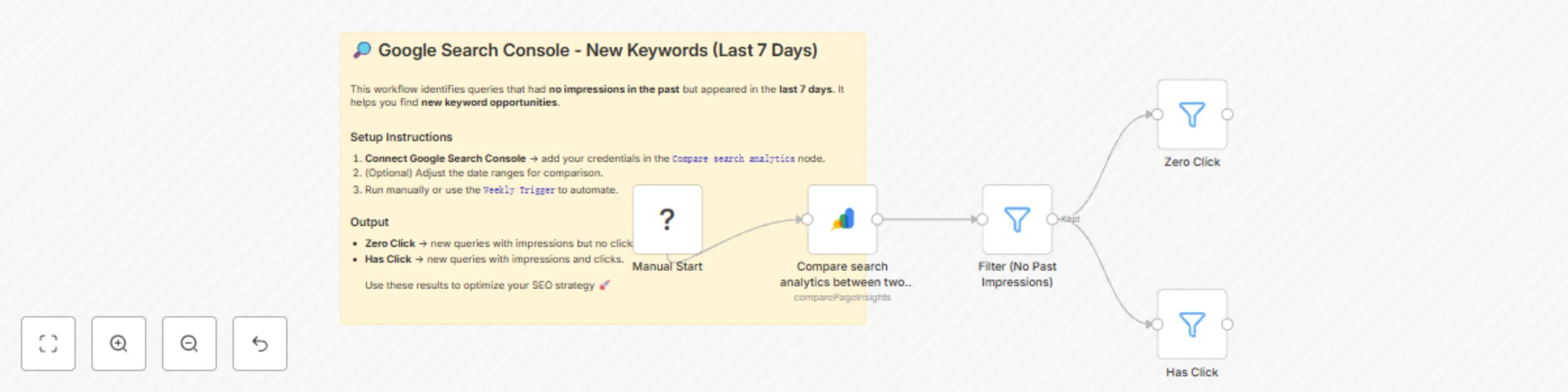
This n8n template demonstrates how to identify new queries in Google Search Console that had no impressions in the past but appeared for the first time in the last 7 days.
It also segments them into two groups: queries with impressions but no clicks yet (Zero Click) and queries that already have clicks (Has Click).

Use cases include:

  • Finding emerging SEO opportunities.
  • Identifying keywords where you already get impressions but need to optimize for clicks.
  • Tracking newly discovered queries week over week.

Good to know

  • This workflow requires a connected Google Search Console account.
  • You can adjust the date ranges in the Compare search analytics node to suit your needs.
  • Works best when scheduled weekly, but in this template we start with manual execution for flexibility.

How it works

  1. Manual Start – Run the workflow manually to fetch fresh data.
  2. Compare Search Analytics – Compares the last 7 days against a custom reference period in Google Search Console.
  3. Filter (No Past Impressions) – Keeps only queries that had zero impressions in the reference period.
  4. Zero Click – Filters queries with impressions but no clicks.
  5. Has Click – Filters queries with impressions and clicks.

The final output is two clean data sets:

  • Zero Click queries: impressions but no clicks → improve meta descriptions, titles, or content relevance.
  • Has Click queries: new queries already generating clicks → consider creating supporting content and optimizing further.

How to use

  • Start with the Manual Start node.
  • Add your Google Search Console credentials in the Compare search analytics node.
  • Optionally, replace the Manual Start with a Schedule Trigger (e.g., weekly) to automate monitoring.
  • Export results or connect them to Slack, Email, or Google Sheets for reporting.

Requirements

  • Google Search Console account (with property access).
  • n8n instance with the Google Search Console integration enabled.

Customising this workflow

  • Adjust the date ranges in the compare node (e.g., last 30 days vs. previous 30 days).
  • Replace the output branches with integrations like Slack, Notion, or Google Sheets to automatically deliver keyword reports.
  • Extend the workflow with additional filters, such as filtering by CTR, country, or device.

1.2 Logical Blocks

This catalog entry is organized from the workflow JSON. The node-level section below shows the executable blocks available for review before importing the template.

2. Block-by-Block Analysis

Block 1 - Manual Start

Type / Role
n8n-nodes-base.start - start
Config choices
Version 1

Block 2 - Compare search analytics between two date ranges

Type / Role
n8n-nodes-google-search-console.googleSearchConsole - googleSearchConsole
Config choices
Version 1

Block 3 - Filter (No Past Impressions)

Type / Role
n8n-nodes-base.filter - filter
Config choices
Version 2.2

Block 4 - Zero Click

Type / Role
n8n-nodes-base.filter - filter
Config choices
Version 2.2

Block 5 - Has Click

Type / Role
n8n-nodes-base.filter - filter
Config choices
Version 2.2

Block 6 - Sticky Note

Type / Role
n8n-nodes-base.stickyNote - stickyNote
Config choices
Version 1

3. Summary Table

Workflow Track new search queries with zero-click analysis in Google Search Console
Complexity intermediate
Nodes 6
Categories Market Research, Multimodal AI
Author Mohammadreza azari
Published 20 Aug 2025

4. Reproducing the Workflow from Scratch

  1. 1. Download the workflow JSON

    Use the JSON export at /data/workflows/7645/7645.json as the source template for this automation.

  2. 2. Import the template into n8n

    Open n8n, import the downloaded JSON, and review each node before activating the workflow.

  3. 3. Configure credentials and variables

    Replace placeholder credentials, API keys, webhook URLs, account IDs, and environment-specific values with your own settings.

  4. 4. Test with sample data

    Run the workflow manually or in a staging workspace, inspect node output, and confirm downstream systems receive the expected data.

  5. 5. Activate and monitor

    Enable the workflow only after testing, then monitor executions, errors, and rate limits during the first production runs.

5. General Notes & Resources

Review imported nodes carefully before activation. This catalog entry is intended to help you inspect the workflow structure, understand required services, and find related templates faster.

Node names, credentials, schedules, webhook paths, and external service limits may need adjustment for your workspace.

Frequently asked questions

What does Track new search queries with zero-click analysis in Google Search Console do?

Google Search Console – Discover New Keywords (Last 7 Days) This n8n template demonstrates how to identify new queries in Google Search Console that had no impressions in the past but appeared for ...

What do I need before importing this workflow?

Review the workflow JSON, configure any required credentials in n8n, and test the automation in a safe workspace before using it in production.

Can I customize this workflow?

Yes. Use the block-by-block analysis and the downloadable JSON to inspect each node, then adjust credentials, prompts, schedules, filters, or destinations for your Market Research, Multimodal AI use case.