Block 1 - On clicking 'execute'
- Type / Role
- n8n-nodes-base.manualTrigger - manualTrigger
- Config choices
- Version 1


 Early Deal
This workflow is provided as-is. Please review and test before using in production.
This workflow uses a number of technologies to track the value of ETFs, stocks and other exchange traded products: Baserow: To keep track of our investments n8n’s Cron node: ...
n8n-nodes-base.manualtrigger, n8n-nodes-base.cron, n8n-nodes-base.baserow, n8n-nodes-base.httprequest, n8n-nodes-base.htmlextract, n8n-nodes-base.function, n8n-nodes-base.set, n8n-nodes-base.sendgrid
This workflow is cataloged by N8N Workflows and links back to its original n8n.io source page by Tom.
Original n8n.io sourceThis workflow uses a number of technologies to track the value of ETFs, stocks and other exchange-traded products:
Thanks to n8n, the steps in this workflow can easily be changed. Not a Sendgrid user? Simply remove the Sendgrid node and add a Gmail node instead. The stock exchange has a REST API? Just throw away the HTML Extract node.
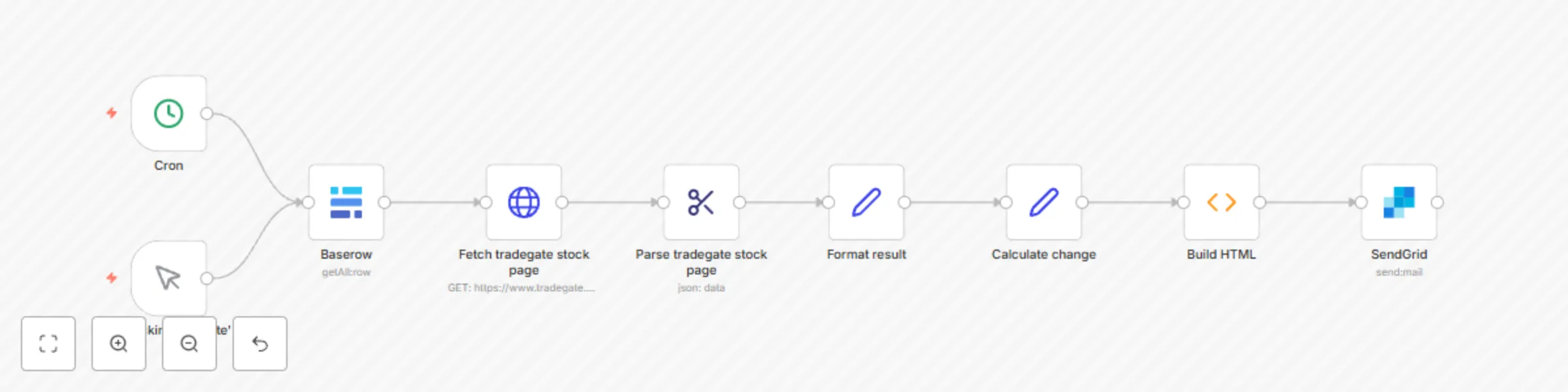
Here’s how it works:
In this scenario, our data source is Baserow. In our table, we’ll track all information needed to identify each investment product:
We have two text type columns (Name and ISIN) as well as two number type columns (Count and Purchase Price).
The Cron node will trigger our workflow to run each work day in the morning hours.
The Baserow node will fetch our investments from the database table shown above.
Using the HTTP Request node we can fetch live data from the stock exchange of our choice based on the ISIN. This example uses Tradegate, which is used by many German fintechs. The basic approach should also work for other exchanges, as long as they provide the required data to the public.
Since our HTTP Request node fetches full websites, we’re using the HTML Extract node to extract the information we’re looking for from each website. If an exchange other than Tradegate is used, the selectors used in this node will most likely need to be updated.
The Set nodes helps with setting the exact columns we’ll use in our table. In this case we’re first formatting the results from our exchange, then calculate the changes based on the purchase price.
Here were using a bit of Javascript magic to build an HTML email. This is where any changes to the email content would have to be made.
Finally we send out the email built in the previous step. This is where you can configure sender and recipients.
The basic email generated by this workflow will look like so:
This catalog entry is organized from the workflow JSON. The node-level section below shows the executable blocks available for review before importing the template.
| Workflow | Track investments using Baserow and n8n |
|---|---|
| Complexity | intermediate |
| Nodes | 9 |
| Categories | Crypto Trading |
| Author | Tom |
| Published | 08 Sept 2022 |
Use the JSON export at /data/workflows/1785/1785.json as the source template for this automation.
Open n8n, import the downloaded JSON, and review each node before activating the workflow.
Replace placeholder credentials, API keys, webhook URLs, account IDs, and environment-specific values with your own settings.
Run the workflow manually or in a staging workspace, inspect node output, and confirm downstream systems receive the expected data.
Enable the workflow only after testing, then monitor executions, errors, and rate limits during the first production runs.
Review imported nodes carefully before activation. This catalog entry is intended to help you inspect the workflow structure, understand required services, and find related templates faster.
Node names, credentials, schedules, webhook paths, and external service limits may need adjustment for your workspace.
This workflow uses a number of technologies to track the value of ETFs, stocks and other exchange traded products: Baserow: To keep track of our investments n8n’s Cron node: ...
Review the workflow JSON, configure any required credentials in n8n, and test the automation in a safe workspace before using it in production.
Yes. Use the block-by-block analysis and the downloadable JSON to inspect each node, then adjust credentials, prompts, schedules, filters, or destinations for your Crypto Trading use case.