T

Tom

22
Workflows

Workflows by Tom

Workflow preview: Transform markdown content into structured Notion blocks
Free intermediate

Transform markdown content into structured Notion blocks

# Markdown to Notion Blocks Converter Transform markdown-formatted text into properly structured Notion page content with this comprehensive workflow. ## Overview This workflow automatically converts markdown text into Notion's block format and inserts it directly into a Notion page. Perfect for content creators, documentation teams, and anyone who needs to migrate markdown content to Notion. ## Features - **Complete Markdown Support**: Handles headers (H1-H4), paragraphs, lists, quotes, code blocks, and horizontal rules - **Rich Text Formatting**: Preserves bold, italic, and link formatting - **Smart Text Processing**: Generates plain text excerpts and maintains original content structure - **Direct Notion Integration**: Automatically inserts converted blocks into your specified Notion page - **Batch Processing**: Efficiently handles large content blocks ## What It Does 1. Takes markdown-formatted text as input 2. Parses and converts it to Notion's block structure 3. Handles complex formatting including: - Headers and subheaders - Bulleted and numbered lists - Code blocks with syntax highlighting - Blockquotes - Bold and italic text - Links - Horizontal dividers 4. Uploads the converted content directly to your Notion page ## Use Cases - **Content Migration**: Move existing markdown documentation to Notion - **Automated Publishing**: Convert blog posts or articles from markdown to Notion - **Documentation Workflows**: Streamline technical documentation processes - **Content Syndication**: Publish the same content across multiple platforms ## Requirements - Notion API credentials - Target Notion page ID - Markdown-formatted source content ## Setup 1. Configure your Notion API credentials 2. Replace the page ID in the HTTP request node with your target Notion page 3. Connect your markdown data source (replace the mock data node) 4. Execute the workflow

T
Tom
Document Extraction
4 Jul 2025
4381
0
Workflow preview: Poll emails using JMAP
Free intermediate

Poll emails using JMAP

n8n does not currently offer a way to retrieve emails from arbritrary providers via a regular node. Unless you're using Gmail or Outlook, you can only use the email trigger to start a workflow when a new email arrives. This currently limits the possible use cases you can cover in your n8n workflows, as you cannot (for example) get an idea of how many unread messages there are in an inbox, or search for specific messages when an event occurs. But fear not, there's a new sheriff in town! The [JMAP standard](https://jmap.io/index.html) allows you to interact with your mailboxes, calendars and contacts through single HTTP requests whenever needed. This n8n workflow demonstrates how to retrieve the total number of unread messages from a JMAP server and also retrieve details for the first 3 messages. It can easily be adapted to search for messages other than unread, or to return details for more than the first 3 messages. # Screenshots ![image.png](fileId:722) ![image.png](fileId:721) # FAQ ## Which n8n version do I need? The workflow was built using n8n 1.20 and should work here out of the box. HTTP requests are also supported on older n8n versions, so the workflow can be backported as an alternative. ## Which credentials do I need? The JMAP standard does not limit the available authentication options. Fastmail (the sponsor of the standard) supports Bearer authentication as well as OAuth2. In n8n you can implement the Fastmail Bearer authentication by creating Header Auth credentials with a name of `Authorization` and a value of `Bearer $apiToken` (replacing `$apiToken` with your actual API token from Fastmail). For other services you'd need to check the respective API documentation for more details on the support authentication methods. ## What even is JMAP? It's an official Internet Engineering Task Force (IETF) standard, sponsored by Fastmail, that will hopefully replace the legacy standards CalDAV, CardDAV, and IMAP soon. The full specs are [available here](https://jmap.io/spec.html). ## How can I use JMAP? If you're a [Fastmail](https://ref.fm/u30544864) customer or if you're hosting your own [Stalwart mail server](https://github.com/stalwartlabs/mail-server) you can use JMAP today. If your email provider doesn't yet support JMAP, you might want to contact them and let them know you're interested in this functionality.

T
Tom
Ticket Management
25 Dec 2023
982
0
Workflow preview: Respond with file download to incoming HTTP request
Free beginner

Respond with file download to incoming HTTP request

This simple workflow demonstrates how to get an end user's browser to download a file. It makes use of the [Content-Disposition](https://developer.mozilla.org/en-US/docs/Web/HTTP/Headers/Content-Disposition) header to set a filename and control the browser behaviour. ![image.png](fileId:709) A use case could be the download of a PDF file at the end of an application process or to export data from a database without replacing the current page content in the browser. With this approach, the current page remains open and the file is simply downloaded instead: ![image.png](fileId:710) The original idea was first present [here](https://community.n8n.io/t/webhook-to-excel-file/11059/24?u=mutedjam) by @dickhoning in the n8n community.

T
Tom
File Management
5 Jun 2023
5985
0
Workflow preview: Merge binary objects on multiple items into a single item
Free intermediate

Merge binary objects on multiple items into a single item

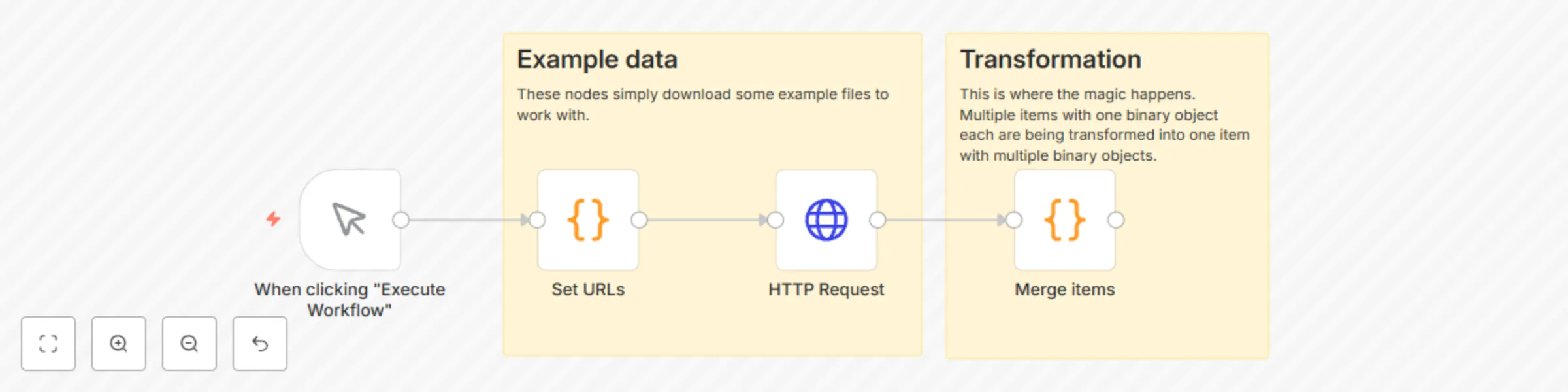
This workflow is the opposite of [this one](https://n8n.io/workflows/1621-split-out-binary-data/). It transforms multiple different items with one binary object named `data` into a single item with multiple binary objects: ![image.png](fileId:706) This can be useful when creating a single .zip archive for example. It uses the updated Code node instead of the older Function node.

T
Tom
File Management
11 May 2023
2470
0
Workflow preview: Count the items returned by a node
Free beginner

Count the items returned by a node

This workflow provides a simple approach to counting the items returned by a node. It uses a Set node with the Execute Once option: ![image.png](fileId:704) The expression uses `$input.all()` (documented [here](https://docs.n8n.io/code-examples/methods-variables-reference/)) to fetch all incoming items at once, and `.length` (documented for example [here](https://developer.mozilla.org/en-US/docs/Web/JavaScript/Reference/Global_Objects/Array/length)) to count them.

T
Tom
Engineering
17 Apr 2023
3745
0
Workflow preview: Merge multiple runs into one
Free intermediate

Merge multiple runs into one

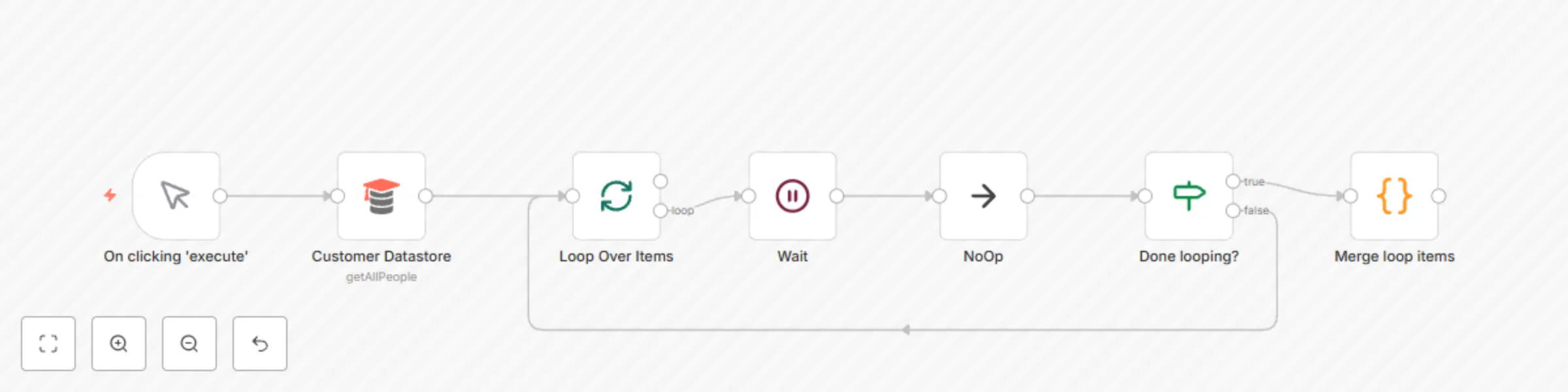
This is a workflow that might come handy after using loops. They usually leave you with items spread across different "runs". The Code node in this example workflow merges them into a single run, so you have a single list of items which is often easier to work with. Simply adjust the node name inside the Code node as needed. The idea is based on [this](https://n8n.io/workflows/1160-merge-data-for-multiple-executions/) older workflow template.

T
Tom
Engineering
19 Oct 2022
10865
0
Workflow preview: Read XML file and store content in Google Sheets
Free intermediate

Read XML file and store content in Google Sheets

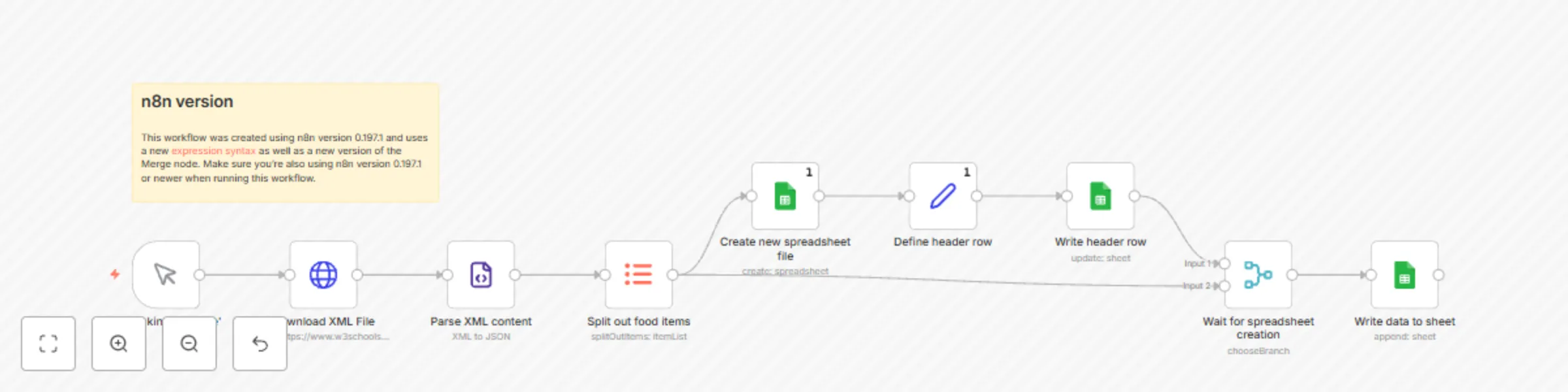
This workflow shows a low code approach to parsing an XML file and storing its contents in a Google Sheets spreadsheet. ![image.png](fileId:681) To run the workflow: * Make sure you are running n8n 0.197 or newer * Have n8n authenticated with Google Sheets How it's done: 1. This workflow first downloads an example file using the [HTTP Request](https://docs.n8n.io/integrations/builtin/core-nodes/n8n-nodes-base.httprequest/) node and reads this file using the [XML](https://docs.n8n.io/integrations/builtin/core-nodes/n8n-nodes-base.xml/) node. ![image.png](fileId:682) 2. It then runs the [Item Lists](https://docs.n8n.io/integrations/builtin/core-nodes/n8n-nodes-base.itemlists/) node to split out the individual `food` items from the example file. 3. It then splits up the workflow into a separate branch creating a new spreadsheet file using the [Google Sheets](https://docs.n8n.io/integrations/builtin/app-nodes/n8n-nodes-base.googlesheets/) node. To read the column names we're using the [Object.keys()](https://developer.mozilla.org/en-US/docs/Web/JavaScript/Reference/Global_Objects/Object/keys) method inside a [Set](https://docs.n8n.io/integrations/builtin/core-nodes/n8n-nodes-base.set/) node. 4. Once the spreadsheet is created (the workflow waits for this using the [Merge](https://docs.n8n.io/integrations/builtin/core-nodes/n8n-nodes-base.merge/) node), the data is appended to the newly created sheet (again using the [Google Sheets](https://docs.n8n.io/integrations/builtin/app-nodes/n8n-nodes-base.googlesheets/) node).

T
Tom
Document Extraction
11 Oct 2022
6392
0
Workflow preview: Rss feed for ARD Audiothek podcasts
Free intermediate

Rss feed for ARD Audiothek podcasts

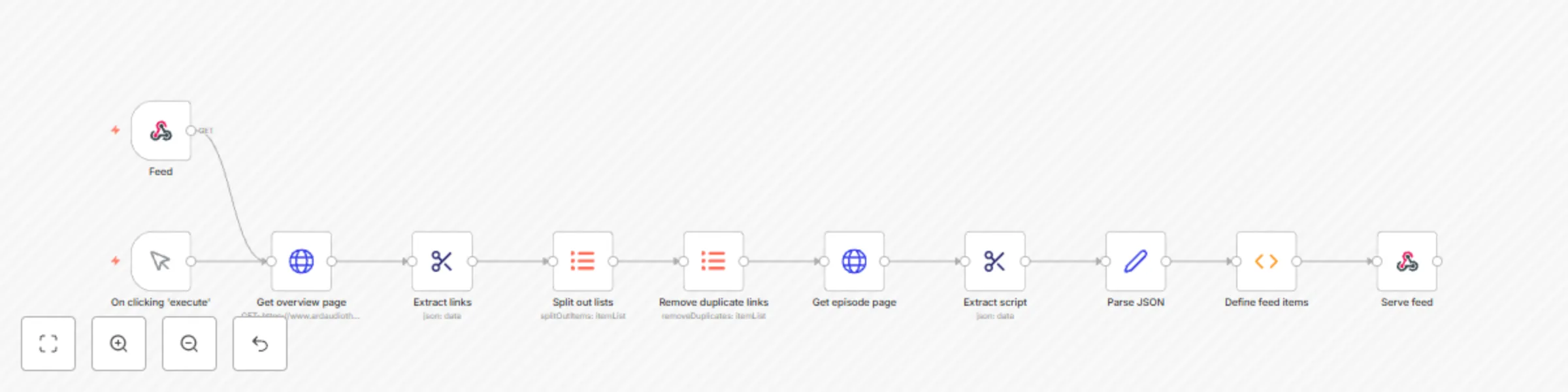
This workflow builds a valid RSS feed (which is an XML feed under the hood) for ARD Audiothek podcasts. This allows you to subscribe to such podcasts using your favourite podcatcher without using the ARD Audiothek app. The example builds a feed for Kalk & Welk, but the workflow can be easily adjusted by providing another podcast URL on the *Get overview page* HTTP Request node. To subscribe to the feed, active your n8n workflow and then use the **Production URL** from the intitial Feed Webhook node in your podcatcher. I've tested the resulting feed using [Pocket Casts](https://pocketcasts.com/)... ![grafik.png](fileId:677) ...and [Miniflux](https://miniflux.app/): ![grafik.png](fileId:678) When using Miniflux, you can add your feed via [this page](https://pocketcasts.com/submit/) to your account. Make sure you select **Private** when doing so to avoid sharing your n8n instance with the world. The resulting feed passes the [W3C Feed Validation Service](https://validator.w3.org/feed/): ![grafik.png](fileId:675) The workflow can also be used as a foundation to free other podcasts from propriertary big media platforms, though not all of them will be as simple to deal with as the ARD Audiothek.

T
Tom
Miscellaneous
25 Sep 2022
1741
0
Workflow preview: Create Salesforce accounts based on Excel file data
Free intermediate

Create Salesforce accounts based on Excel file data

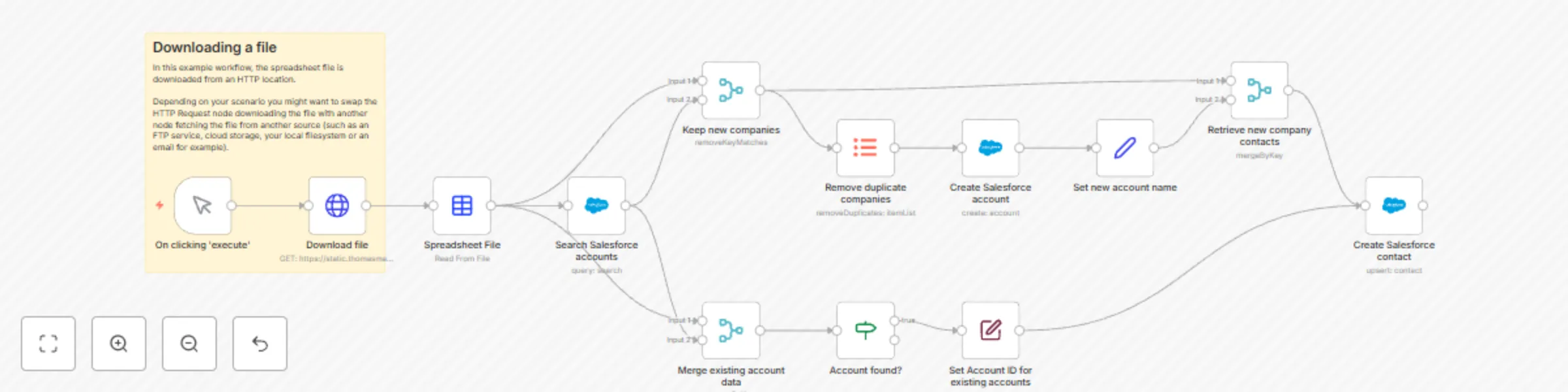
This workflow shows a no code approach to creating Salesforce accounts and contacts based on data coming from an Excel file. For Excel 365 (the online version of Microsoft Excel) check out [this workflow](https://n8n.io/workflows/1793-create-salesforce-accounts-based-on-excel-365-data/) instead. ![image.png](fileId:674) To run the workflow: 1. Make sure your Salesforce account is authenticated with n8n. 2. Have a Microsoft Excel workbook with contacts and their account names ready. The workflow uses [this example file](https://static.thomasmartens.eu/n8n/Excel-File-to-Salesforce.xlsx), but you probably want to use your own data instead. ![image.png](fileId:673) 3. Hit the Execute Workflow button at the bottom of the n8n canvas. Here is how it works: The workflow first searches for existing Salesforce accounts by name. It then branches out depending on whether the account already exists in Salesforce or not. If an account does not exist yet, it will be created. The data is then normalised before both branches converge again. Finally the contacts are created or updated as needed in Salesforce.

T
Tom
CRM
14 Sep 2022
2707
0
Workflow preview: Create Salesforce accounts based on Excel 365 data
Free intermediate

Create Salesforce accounts based on Excel 365 data

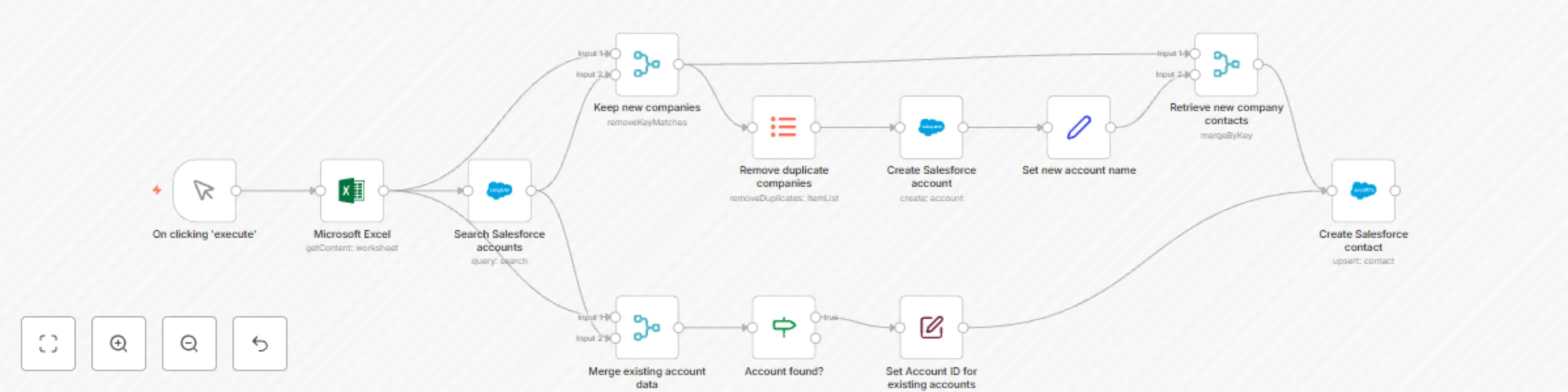
This workflow shows a no code approach to creating Salesforce accounts and contacts based on data coming from Excel 365 (the online version of Microsoft Excel). For a version working with regular Excel files check out [this workflow](https://n8n.io/workflows/1794-create-salesforce-accounts-based-on-excel-file-data/) instead. ![image.png](fileId:672) To run the workflow: 1. Make sure you have both Excel 365 and Salesforce authenticated with n8n. 2. Have a Microsoft Excel workbook with contacts and their account names ready: ![image.png](fileId:670) 3. Select the workbook and sheet in the Microsoft Excel node of the workflow, then configure the range to read data from: ![image.png](fileId:671) 4. Hit the **Execute Workflow** button at the bottom of the n8n canvas: ![image.png](fileId:669) Here is how it works: The workflow first searches for existing Salesforce accounts by name. It then branches out depending on whether the account already exists in Salesforce or not. If an account does not exist yet, it will be created. The data is then normalised before both branches converge again. Finally the contacts are created or updated as needed in Salesforce.

T
Tom
CRM
13 Sep 2022
3232
0
Workflow preview: Create Salesforce accounts based on Google Sheets data
Free intermediate

Create Salesforce accounts based on Google Sheets data

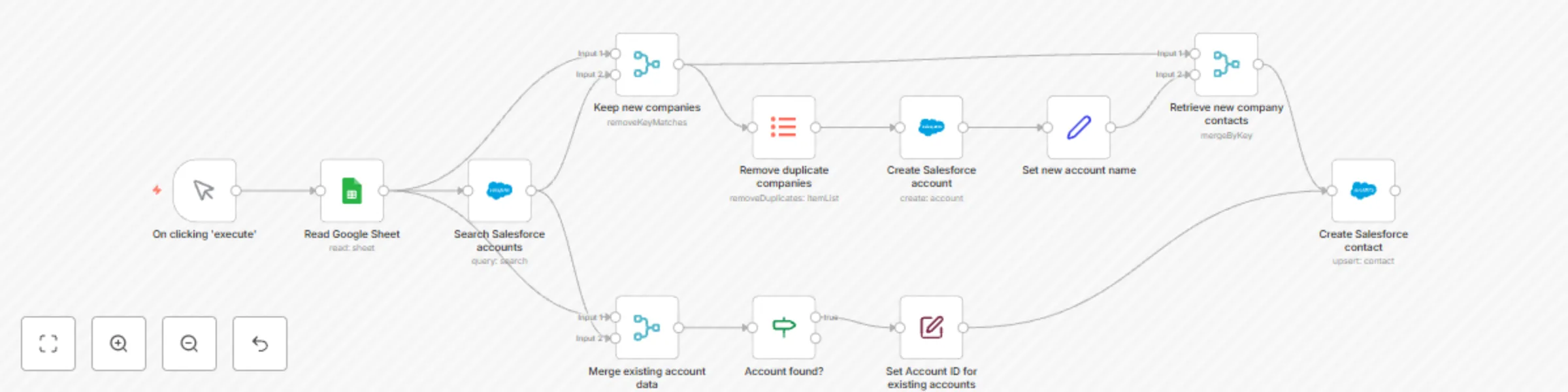
This workflow shows a no code approach to creating Salesforce accounts and contacts based on data coming from Google Sheets. ![image.png](fileId:667) To run the workflow: 1. Make sure you have both Google Sheets and Salesforce authenticated with n8n. 2. Have a Google Sheet with contacts and their account names ready, copy the respective sheet ID from the URL: ![image.png](fileId:666) 3. Add the sheet ID to the Google Sheet node of the workflow: ![image.png](fileId:668) 4. Hit **Execute Workflow** Here is how it works: The workflow first searches for existing Salesforce accounts by name. It then branches out depending on whether the account already exists in Salesforce or not. If an account does not exist yet, it will be created. The data is then normalised before both branches converge again. Finally the contacts are created or updated as needed in Salesforce.

T
Tom
CRM
12 Sep 2022
15562
0
Workflow preview: Track investments using Baserow and n8n
Free intermediate

Track investments using Baserow and n8n

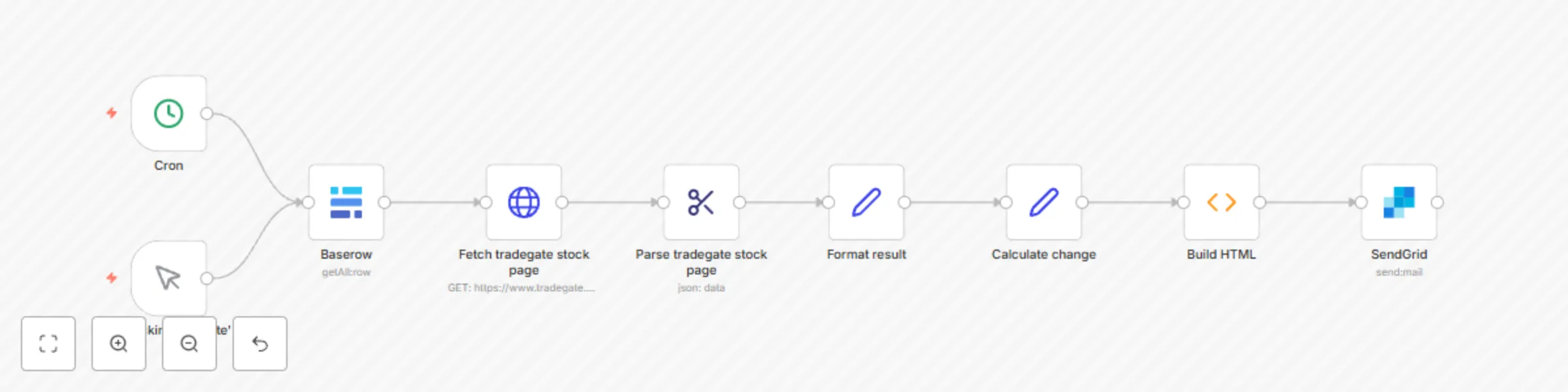
This workflow uses a number of technologies to track the value of ETFs, stocks and other exchange-traded products: - [Baserow](https://baserow.io/): To keep track of our investments - n8n’s Cron node: To trigger the workflow compiling our daily morning briefing - Webscraping: The HTTP Request & HTML Extract nodes to fetch up-to-date prices from the relevant stock exchange and structure this infromation - Javascript: We’ll use the Function node to build a custom HTML body with all the relevant information - [Sendgrid](https://sendgrid.com/): The Email Service Provider in this workflow to send out our email Thanks to n8n, the steps in this workflow can easily be changed. Not a Sendgrid user? Simply remove the Sendgrid node and add a Gmail node instead. The stock exchange has a REST API? Just throw away the HTML Extract node. Here’s how it works: # Data Source In this scenario, our data source is Baserow. In our table, we’ll track all information needed to identify each investment product: ![image.png](fileId:660) We have two text type columns (**Name** and **ISIN**) as well as two number type columns (**Count** and **Purchase Price**). # Workflow ![image.png](fileId:661) ## Nodes ### 1. Cron The Cron node will trigger our workflow to run each work day in the morning hours. ### 2. Baserow The Baserow node will fetch our investments from the database table shown above. ### 3. HTTP Request Using the HTTP Request node we can fetch live data from the stock exchange of our choice based on the ISIN. This example uses Tradegate, which is used by many German fintechs. The basic approach should also work for other exchanges, as long as they provide the required data to the public. ### 4. HTML Extract Since our HTTP Request node fetches full websites, we’re using the HTML Extract node to extract the information we’re looking for from each website. If an exchange other than Tradegate is used, the selectors used in this node will most likely need to be updated. ### 5. + 6. Set The Set nodes helps with setting the exact columns we’ll use in our table. In this case we’re first formatting the results from our exchange, then calculate the changes based on the purchase price. ### 7. Function Here were using a bit of Javascript magic to build an HTML email. This is where any changes to the email content would have to be made. ### 8. Sendgrid Finally we send out the email built in the previous step. This is where you can configure sender and recipients. # Result The basic email generated by this workflow will look like so: ![image.png](fileId:659)

T
Tom
Crypto Trading
8 Sep 2022
6308
0
Workflow preview: Google spreadsheet to HTML - variant with JS function
Free intermediate

Google spreadsheet to HTML - variant with JS function

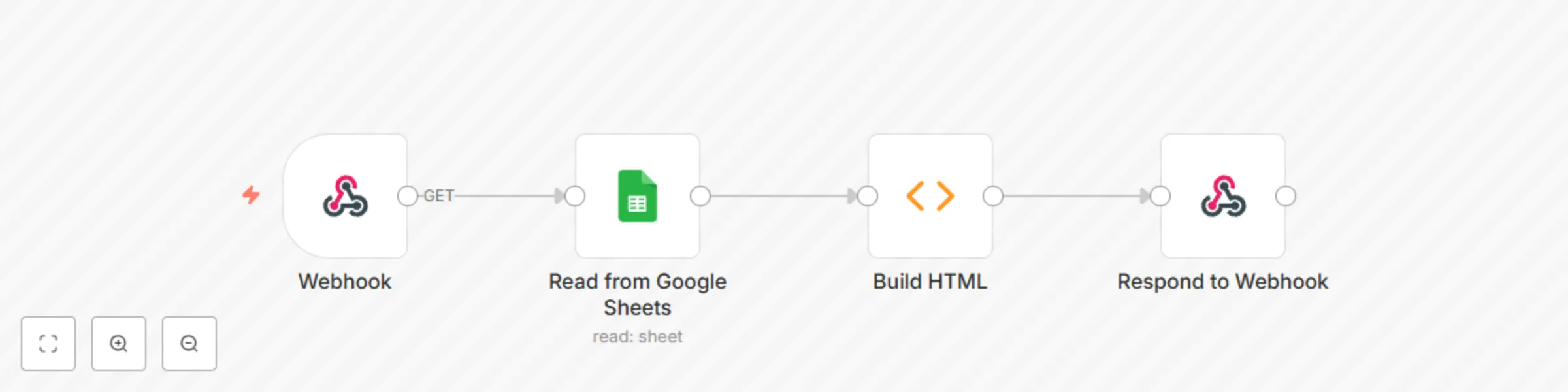
This workflow shows a low code approach to creating a HTML table based on Google Sheets data. It's similar to [this workflow](https://n8n.io/workflows/1756), but allows fully customizing the HTML output. ![image.png](fileId:656) To run the workflow: 1. Make sure you have a Google Sheet with a header row and some data in it. 2. Grab your sheet ID: ![image.png](fileId:657) 3. Add it to the Google Sheets node: ![image.png](fileId:658) 4. Activate the workflow or execute it manually 5. Visit the URL provided by the webhook node in your browser (*production URL* if the workflow is active, *test URL* if the workflow is executed manually)

T
Tom
Document Extraction
25 Jul 2022
2487
0
Workflow preview: Google spreadsheet to HTML - variant with spreadsheet file
Free beginner

Google spreadsheet to HTML - variant with spreadsheet file

This workflow shows a no code approach to creating a HTML table based on Google Sheets data. ![image.png](fileId:653) To run the workflow: 1. Make sure you have a Google Sheet with a header row and some data in it. 2. Grab your sheet ID: ![image.png](fileId:654) 3. Add it to the Google Sheets node: ![image.png](fileId:655) 4. Activate the workflow or execute it manually 5. Visit the URL provided by the webhook node in your browser (*production URL* if the workflow is active, *test URL* if the workflow is executed manually)

T
Tom
Document Extraction
25 Jul 2022
2727
0
Workflow preview: Identify new Google Sheets rows
Free intermediate

Identify new Google Sheets rows

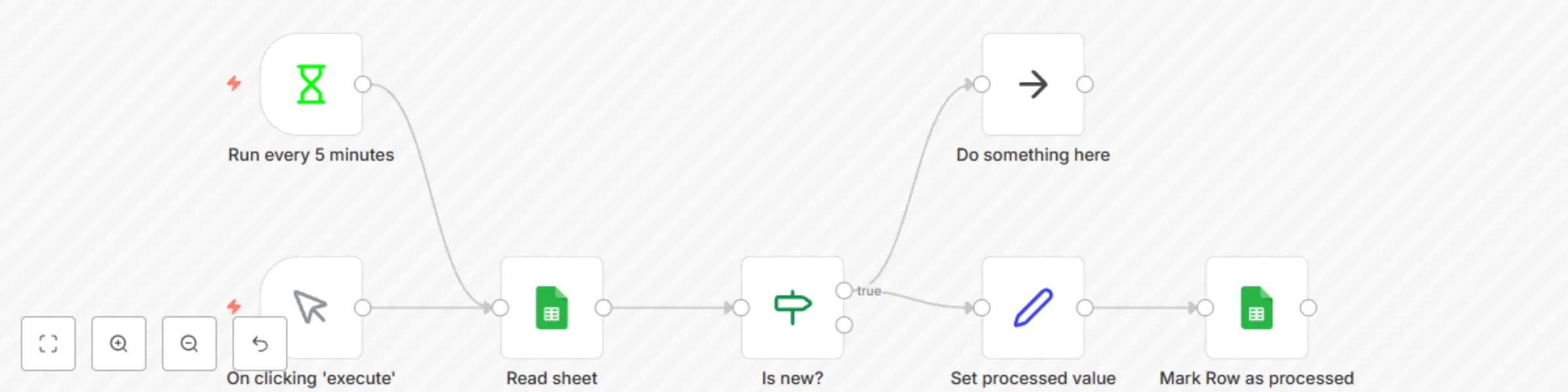
![image.png](fileId:652) This workflow identifies new rows in Google Sheets using a separate column keeping track of already processed rows. For this approach to work, the sheet needs to meet two requirements: - A unique identifier for each row is required - A column used to differentiate new/processed rows is present Our example sheet looks like this: ![image.png](fileId:649) So the row identifier is named `ID`, the new/processed column is called `Processed`. Update the workflow accordingly if your columns have different names. Now if the workflow runs, it discovers all three rows as new. After processing them, it will add a timestamp to the Processed column: ![image.png](fileId:650) The next time the workflow is executed it will skip the existing rows and only process newly added data: ![image.png](fileId:648) ![image.png](fileId:651)

T
Tom
Document Extraction
8 Jul 2022
4683
0
Workflow preview: Split out binary data
Free intermediate

Split out binary data

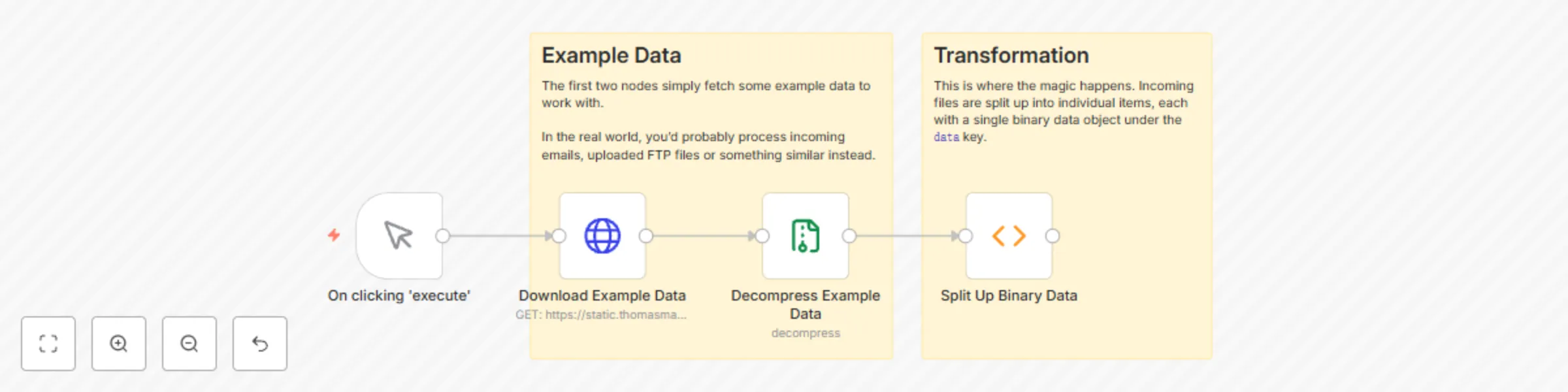
This workflows helps with processing binary data. You'll often have binary objects with keys such as `attachment_0`, `attachment_1`, `attachment_2`, etc. attached to your items, for example when reading an incoming email. This binary data is hard to process because it's not an array you can simply loop through. This workflow solves this problem by providing a Function node that takes all incoming items and all their binary data and then returning a single item for each file with a `data` key containing your binary file. Incoming binary data: ![image.png](fileId:635) Processed binary data: ![image.png](fileId:636)

T
Tom
File Management
5 May 2022
7666
0
Workflow preview: Automate testimonials in Strapi with n8n
Free advanced

Automate testimonials in Strapi with n8n

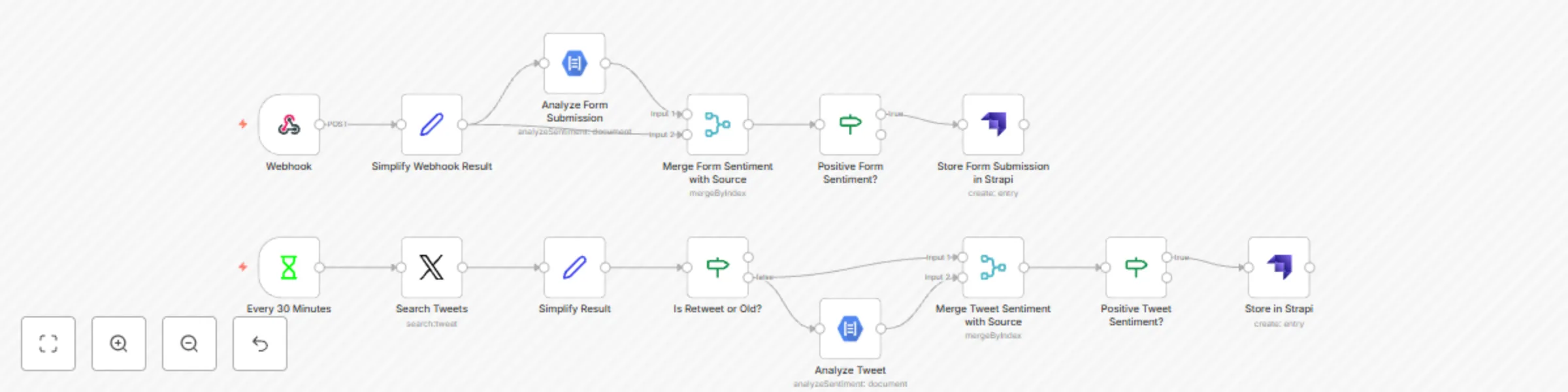
This is the workflow powering the n8n demo shown at StrapiConf 2022. ![image.png](fileId:624) The workflow searches matching Tweets every 30 minutes using the [Interval](https://docs.n8n.io/nodes/n8n-nodes-base.interval/) node and listens to Form submissions using the [Webhook](https://docs.n8n.io/nodes/n8n-nodes-base.webhook/) node. Sentiment analysis is handled by Google using the [Google Cloud Natural Language](https://docs.n8n.io/nodes/n8n-nodes-base.googleCloudNaturalLanguage/) node before the result is stored in Strapi using the [Strapi](https://docs.n8n.io/nodes/n8n-nodes-base.strapi/) node. (These were originally two separate workflows that have been combined into one to simplify sharing.)

T
Tom
Market Research
17 Mar 2022
2271
0
Workflow preview: Handle GDPR data deletion requests with Slack
Free advanced

Handle GDPR data deletion requests with Slack

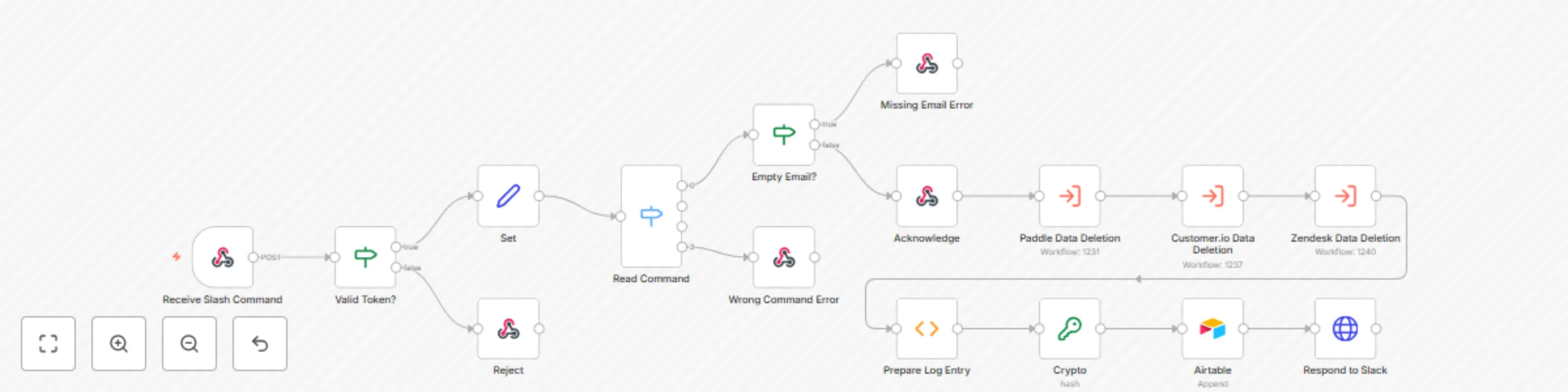
This workflow automatically deletes user data from different apps/services when a specific slash command is issued in Slack. Watch this [talk and demo](https://www.youtube.com/watch?v=jG2aCOF0ICg&t=910s) to learn more about this use case. The demo uses Slack, but [Mattermost is Slack-compatible](https://docs.mattermost.com/developer/integration-faq.html#what-does-slack-compatible-mean), so you can also connect Mattermost in this workflow. ![workflow-screenshot](fileId:617) ## Prerequisites - Accounts and [credentials](https://docs.n8n.io/integrations/credentials/) for the apps/services you want to use. - Some basic knowledge of JavaScript. ## Nodes - [Webhook node](https://docs.n8n.io/integrations/core-nodes/n8n-nodes-base.webhook/) triggers the workflow when a [Slack slash command](https://slack.com/intl/en-gb/help/articles/360001623607-Create-commands-for-Slack-apps) is issued. - [IF nodes](https://docs.n8n.io/integrations/core-nodes/n8n-nodes-base.if/) confirm Slack's verification token and verify that the data has the expected format. - [Set node](https://docs.n8n.io/integrations/core-nodes/n8n-nodes-base.set/) simplifies the payload. - [Switch node](https://docs.n8n.io/nodes/n8n-nodes-base.switch/) chooses the correct path for the operation to perform. - [Respond to Webhook nodes](https://docs.n8n.io/integrations/core-nodes/n8n-nodes-base.respondToWebhook/) send responses back to Slack. - [Execute Workflow nodes](https://docs.n8n.io/integrations/core-nodes/n8n-nodes-base.executeWorkflow/) call sub-workflows tailored to deleting data from each individual service. - [Function node](https://docs.n8n.io/integrations/core-nodes/n8n-nodes-base.function/), [Crypto node](https://docs.n8n.io/integrations/core-nodes/n8n-nodes-base.crypto/), and [Airtable node](https://docs.n8n.io/integrations/nodes/n8n-nodes-base.airtable/) generate and store a log entry containing a hash value. - [HTTP Request node](https://docs.n8n.io/integrations/core-nodes/n8n-nodes-base.httpRequest/) sends the final response back to Slack.

T
Tom
Miscellaneous
17 Feb 2022
2019
0
Workflow preview: Create an RSS feed based on a website's content
Free intermediate

Create an RSS feed based on a website's content

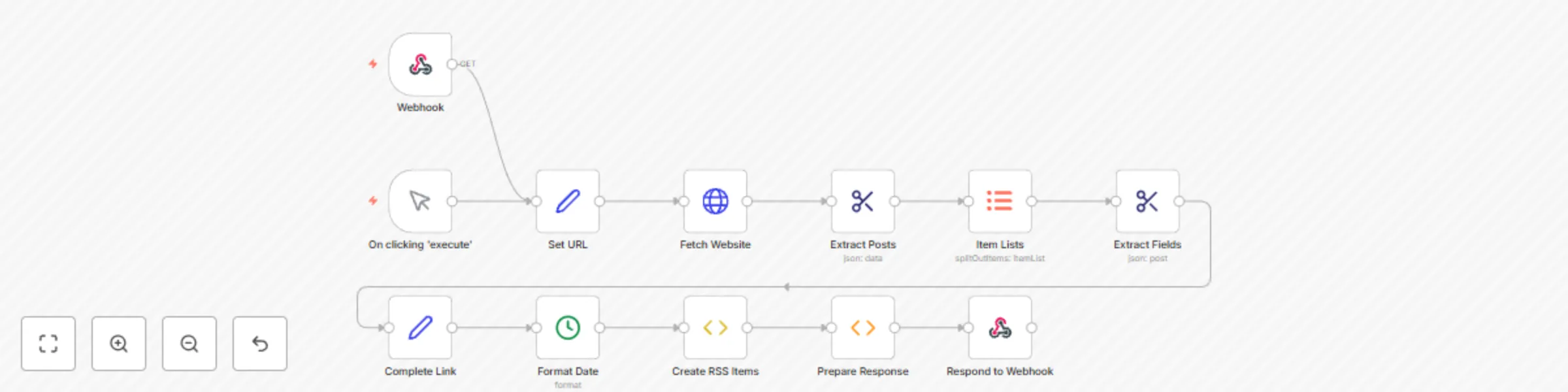
This workflow parses content from a website (for this example, [Baserow's release page](https://baserow.io/blog/category/release)) and creates an RSS feed based on the extracted data. ## Prerequisites - Some familiarity with HTML and CSS selectors ## Nodes - [Webhook node](https://docs.n8n.io/integrations/core-nodes/n8n-nodes-base.webhook/) triggers the workflow when new content (a new Baserow release) is published on a website. - [Set nodes](https://docs.n8n.io/integrations/core-nodes/n8n-nodes-base.set/) set the required URLs and links for the RSS feed. - [HTTP Request node](https://docs.n8n.io/integrations/core-nodes/n8n-nodes-base.httprequest) fetches data from a specified website page. - [HTML Extract nodes](https://docs.n8n.io/integrations/core-nodes/n8n-nodes-base.htmlextract/) extract the posts and their fields (such as date, title, description, and link) from the website. - [Item Lists node](https://docs.n8n.io/integrations/core-nodes/n8n-nodes-base.itemlists/) iterates over each post on the page. - [Date & Time node](https://docs.n8n.io/integrations/core-nodes/n8n-nodes-base.datetime/) converts the date of the post to a different format. - [Function Item node](https://docs.n8n.io/integrations/core-nodes/n8n-nodes-base.functionitem/) creates RSS items for each post. - [Function node](https://docs.n8n.io/integrations/core-nodes/n8n-nodes-base.function/) creates the response code for the RSS feed. - [Respond to Webhook node](https://docs.n8n.io/integrations/core-nodes/n8n-nodes-base.respondtowebhook/) returns the RSS feed in response to the Webhook node. The result of this workflow would look like this: ![image.png](fileId:600)

T
Tom
Document Extraction
30 Jan 2022
42079
0
Workflow preview: Serve a static HTML page when a link is accessed
Free beginner

Serve a static HTML page when a link is accessed

This easy-to-extend workflow automatically serves a static HTML page when a URL is accessed in a browser. ## Prerequisites - Basic knowledge of HTML ## Nodes - [Webhook node](https://docs.n8n.io/nodes/n8n-nodes-base.webhook/) triggers the workflow on an incoming request. - [Respond to Webhook node](https://docs.n8n.io/nodes/n8n-nodes-base.respondToWebhook/) serves the HTML page in response to the webhook.

T
Tom
Engineering
9 Nov 2021
20381
0
Workflow preview: Get email notifications for newly uploaded Google Drive files
Free beginner

Get email notifications for newly uploaded Google Drive files

This workflow sends out email notifications when a new file has been uploaded to Google Drive. ![](https://docs.n8n.io/assets/img/workflow.44f43fab.png) The workflow uses two nodes: - **Google Drive Trigger**: This node will trigger the workflow whenever a new file has been uploaded to a given folder - **Send Email**: This node sends out the email using data from the previous Google Drive Trigger node.

T
Tom
Personal Productivity
25 Oct 2021
2729
0
Workflow preview: Send a file from S3 to AWS Textract
Free beginner

Send a file from S3 to AWS Textract

This workflow shows how to download an image file from S3 and pass it on to Textract for text extraction. ![](https://docs.n8n.io/assets/img/workflow.51d5f2fc.png) The workflow uses two nodes: - **AWS S3**: This node will download a receipt file from S3 - **AWS Textract**: This node connects to Aamazon's Textract service to extract text from the receipt file

T
Tom
Document Extraction
25 Oct 2021
2679
0