Track certification requirements with ScrapeGraphAI, GitLab and Rocket.Chat

Workflow preview

Workflow preview
100%
Track certification requirements with ScrapeGraphAI, GitLab and Rocket.Chat preview
Open on n8n.io

Important notice

This workflow is provided as-is. Please review and test before using in production.

1. Workflow Overview

Certification Requirement Tracker with Rocket.Chat and GitLab ️ COMMUNITY TEMPLATE DISCLAIMER: This is a community contributed template that uses ScrapeGraphAI (a community node). Please ensure yo...

Best for

  • Document Extraction automation workflows
  • AI Summarization automation workflows
  • advanced n8n builders looking for reusable templates

Tools used

n8n-nodes-base.stickynote, n8n-nodes-base.webhook, n8n-nodes-base.code, n8n-nodes-scrapegraphai.scrapegraphai, n8n-nodes-base.gitlab, n8n-nodes-base.merge, n8n-nodes-base.if, n8n-nodes-base.rocketchat

Source and attribution

This workflow is cataloged by N8N Workflows and links back to its original n8n.io source page by vinci-king-01.

Original n8n.io source

1.1 Workflow description

Title
Track certification requirements with ScrapeGraphAI, GitLab and Rocket.Chat
Workflow name
Track certification requirements with ScrapeGraphAI, GitLab and Rocket.Chat

Certification Requirement Tracker with Rocket.Chat and GitLab

⚠️ COMMUNITY TEMPLATE DISCLAIMER: This is a community-contributed template that uses ScrapeGraphAI (a community node). Please ensure you have the ScrapeGraphAI community node installed in your n8n instance before using this template.

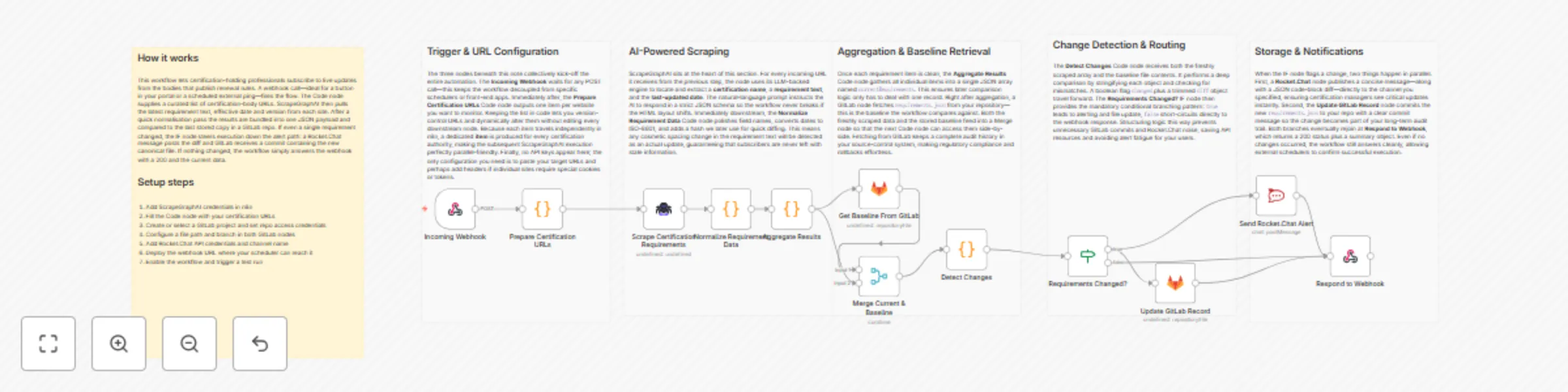
This workflow automatically monitors websites of certification bodies and industry associations, detects changes in certification requirements, commits the updated information to a GitLab repository, and notifies a Rocket.Chat channel. Ideal for professionals and compliance teams who must stay ahead of annual updates and renewal deadlines.

Pre-conditions/Requirements

Prerequisites

  • Running n8n instance (self-hosted or n8n.cloud)
  • ScrapeGraphAI community node installed and active
  • Rocket.Chat workspace (self-hosted or cloud)
  • GitLab account and repository for documentation
  • Publicly reachable URL for incoming webhooks (use n8n tunnel, Ngrok, or a reverse proxy)

Required Credentials

  • ScrapeGraphAI API Key – Enables scraping of certification pages
  • Rocket.Chat Access Token & Server URL – To post update messages
  • GitLab Personal Access Token – With api and write_repository scopes

Specific Setup Requirements

Item Example Value Notes
GitLab Repo gitlab.com/company/cert-tracker Markdown files will be committed here
Rocket.Chat Channel #certification-updates Receives update alerts
Certification Source URLs file /data/sourceList.json in the repository List of URLs to scrape

How it works

This workflow automatically monitors websites of certification bodies and industry associations, detects changes in certification requirements, commits the updated information to a GitLab repository, and notifies a Rocket.Chat channel. Ideal for professionals and compliance teams who must stay ahead of annual updates and renewal deadlines.

Key Steps:

  • Webhook Trigger: Fires on a scheduled HTTP call (e.g., via cron) or manual trigger.
  • Code (Prepare Source List): Reads/constructs a list of certification URLs to scrape.
  • ScrapeGraphAI: Fetches HTML content and extracts requirement sections.
  • Merge: Combines newly scraped data with the last committed snapshot.
  • IF Node: Determines if a change occurred (hash/length comparison).
  • GitLab: Creates a branch, commits updated Markdown/JSON files, and opens an MR (optional).
  • Rocket.Chat: Posts a message summarizing changes and linking to the GitLab diff.
  • Respond to Webhook: Returns a JSON summary to the requester (useful for monitoring or chained automations).

Set up steps

Setup Time: 20-30 minutes

  1. Install Community Node: In n8n UI, go to Settings → Community Nodes and install @n8n/community-node-scrapegraphai.
  2. Create Credentials:
    a. ScrapeGraphAI – paste your API key.
    b. Rocket.Chat – create a personal access token (Personal Access Tokens → New Token) and configure credentials.
    c. GitLab – create PAT with api + write_repository scopes and add to n8n.
  3. Clone the Template: Import this workflow JSON into your n8n instance.
  4. Edit StickyNote: Replace placeholder URLs with actual certification-source URLs or point to a repo file.
  5. Configure GitLab Node: Set your repository, default branch, and commit message template.
  6. Configure Rocket.Chat Node: Select credential, channel, and message template (markdown supported).
  7. Expose Webhook: If self-hosting, enable n8n tunnel or configure reverse proxy to make the webhook public.
  8. Test Run: Trigger the workflow manually; verify GitLab commit/MR and Rocket.Chat notification.
  9. Automate: Schedule an external cron (or n8n Cron node) to POST to the webhook yearly, quarterly, or monthly as needed.

Node Descriptions

Core Workflow Nodes:

  • stickyNote – Human-readable instructions/documentation embedded in the flow.
  • webhook – Entry point; accepts POST /cert-tracker requests.
  • code (Prepare Source List) – Generates an array of URLs; can pull from GitLab or an environment variable.
  • scrapegraphAi – Scrapes each URL and extracts certification requirement sections using CSS/XPath selectors.
  • merge (by key) – Joins new data with previous snapshot for change detection.
  • if (Changes?) – Branches logic based on whether differences exist.
  • gitlab – Creates/updates files and opens merge requests containing new requirements.
  • rocketchat – Sends formatted update to designated channel.
  • respondToWebhook – Returns 200 OK with a JSON summary.

Data Flow:

  1. webhookcodescrapegraphAimergeif
  2. if (true)gitlabrocketchat
  3. if (false)respondToWebhook

Customization Examples

Change Scraping Frequency

// Replace external cron with n8n Cron node
{
  "nodes": [
    {
      "name": "Cron",
      "type": "n8n-nodes-base.cron",
      "parameters": {
        "schedule": {
          "hour": "0",
          "minute": "0",
          "dayOfMonth": "1"
        }
      }
    }
  ]
}

Extend Notification Message

// Rocket.Chat node → Message field
const diffUrl = $json["gitlab_diff_url"];
const count = $json["changes_count"];
return `:bell: **${count} Certification Requirement Update(s)**\n\nView diff: ${diffUrl}`;

Data Output Format

The workflow outputs structured JSON data:

{
  "timestamp": "2024-05-15T12:00:00Z",
  "changesDetected": true,
  "changesCount": 3,
  "gitlab_commit_sha": "a1b2c3d4",
  "gitlab_diff_url": "https://gitlab.com/company/cert-tracker/-/merge_requests/42",
  "notifiedChannel": "#certification-updates"
}

Troubleshooting

Common Issues

  1. ScrapeGraphAI returns empty results – Verify your CSS/XPath selectors and API key quota.
  2. GitLab commit fails (401 Unauthorized) – Ensure PAT has api and write_repository scopes and is not expired.

Performance Tips

  • Limit the number of pages scraped per run to avoid API rate limits.
  • Cache last-scraped HTML in an S3 bucket or database to reduce redundant requests.

Pro Tips:

  • Use GitLab CI to auto-deploy documentation site whenever new certification files are merged.
  • Enable Rocket.Chat threading to keep discussions organized per update.
  • Tag stakeholders in Rocket.Chat messages with @cert-team for instant visibility.

1.2 Logical Blocks

This catalog entry is organized from the workflow JSON. The node-level section below shows the executable blocks available for review before importing the template.

2. Block-by-Block Analysis

Block 1 - Workflow Overview

Type / Role
n8n-nodes-base.stickyNote - stickyNote
Config choices
Version 1

Block 2 - Section – Trigger & Config

Type / Role
n8n-nodes-base.stickyNote - stickyNote
Config choices
Version 1

Block 3 - Section – Scraping

Type / Role
n8n-nodes-base.stickyNote - stickyNote
Config choices
Version 1

Block 4 - Section – Aggregation

Type / Role
n8n-nodes-base.stickyNote - stickyNote
Config choices
Version 1

Block 5 - Section – Decision & Alerting

Type / Role
n8n-nodes-base.stickyNote - stickyNote
Config choices
Version 1

Block 6 - Section – Storage & Notification

Type / Role
n8n-nodes-base.stickyNote - stickyNote
Config choices
Version 1

Block 7 - Incoming Webhook

Type / Role
n8n-nodes-base.webhook - webhook
Config choices
Version 1

Block 8 - Prepare Certification URLs

Type / Role
n8n-nodes-base.code - code
Config choices
Version 2

Block 9 - Scrape Certification Requirements

Type / Role
n8n-nodes-scrapegraphai.scrapegraphAi - scrapegraphAi
Config choices
Version 1

Block 10 - Normalize Requirement Data

Type / Role
n8n-nodes-base.code - code
Config choices
Version 2

Block 11 - Aggregate Results

Type / Role
n8n-nodes-base.code - code
Config choices
Version 2

Block 12 - Get Baseline From GitLab

Type / Role
n8n-nodes-base.gitlab - gitlab
Config choices
Version 1

Block 13 - Merge Current & Baseline

Type / Role
n8n-nodes-base.merge - merge
Config choices
Version 2

Block 14 - Detect Changes

Type / Role
n8n-nodes-base.code - code
Config choices
Version 2

Block 15 - Requirements Changed?

Type / Role
n8n-nodes-base.if - if
Config choices
Version 2

Block 16 - Send Rocket.Chat Alert

Type / Role
n8n-nodes-base.rocketchat - rocketchat
Config choices
Version 1

Block 17 - Update GitLab Record

Type / Role
n8n-nodes-base.gitlab - gitlab
Config choices
Version 1

Block 18 - Respond to Webhook

Type / Role
n8n-nodes-base.respondToWebhook - respondToWebhook
Config choices
Version 1

3. Summary Table

Workflow Track certification requirements with ScrapeGraphAI, GitLab and Rocket.Chat
Complexity advanced
Nodes 18
Categories Document Extraction, AI Summarization
Author vinci-king-01
Published 28 Dec 2025

4. Reproducing the Workflow from Scratch

  1. 1. Download the workflow JSON

    Use the JSON export at /data/workflows/12234/12234.json as the source template for this automation.

  2. 2. Import the template into n8n

    Open n8n, import the downloaded JSON, and review each node before activating the workflow.

  3. 3. Configure credentials and variables

    Replace placeholder credentials, API keys, webhook URLs, account IDs, and environment-specific values with your own settings.

  4. 4. Test with sample data

    Run the workflow manually or in a staging workspace, inspect node output, and confirm downstream systems receive the expected data.

  5. 5. Activate and monitor

    Enable the workflow only after testing, then monitor executions, errors, and rate limits during the first production runs.

5. General Notes & Resources

Review imported nodes carefully before activation. This catalog entry is intended to help you inspect the workflow structure, understand required services, and find related templates faster.

Node names, credentials, schedules, webhook paths, and external service limits may need adjustment for your workspace.

Frequently asked questions

What does Track certification requirements with ScrapeGraphAI, GitLab and Rocket.Chat do?

Certification Requirement Tracker with Rocket.Chat and GitLab ️ COMMUNITY TEMPLATE DISCLAIMER: This is a community contributed template that uses ScrapeGraphAI (a community node). Please ensure yo...

What do I need before importing this workflow?

Review the workflow JSON, configure any required credentials in n8n, and test the automation in a safe workspace before using it in production.

Can I customize this workflow?

Yes. Use the block-by-block analysis and the downloadable JSON to inspect each node, then adjust credentials, prompts, schedules, filters, or destinations for your Document Extraction, AI Summarization use case.