Block 1 - Prepare Contact Data
- Type / Role
- n8n-nodes-base.function - function
- Config choices
- Version 1


 Early Deal
This workflow is provided as-is. Please review and test before using in production.
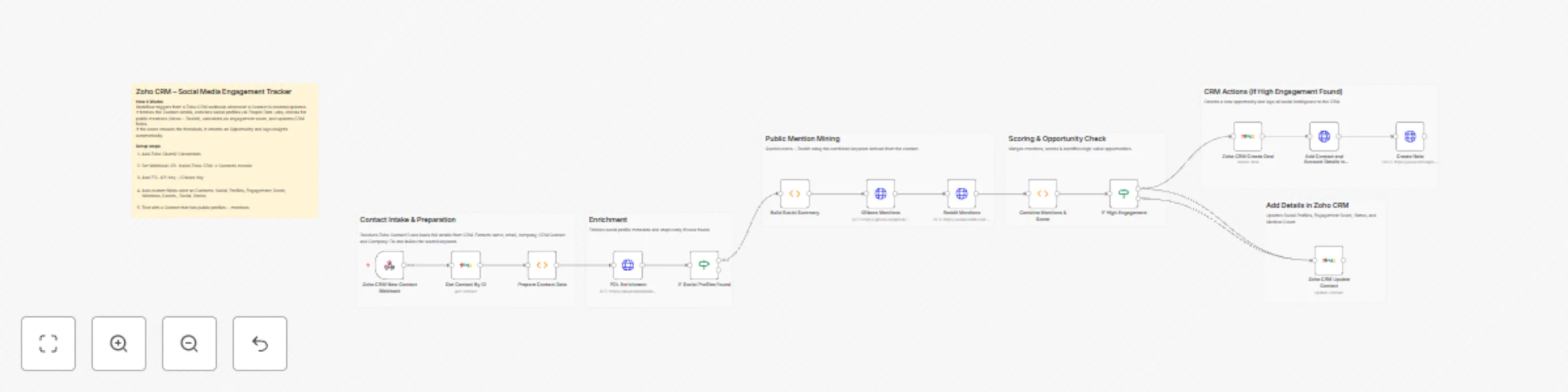
Zoho CRM – Social Media Engagement Tracker This workflow automatically monitors new or updated Contacts in Zoho CRM, enriches them using People Data Labs, checks public visibility across News + Red...
n8n-nodes-base.function, n8n-nodes-base.httprequest, n8n-nodes-base.if, n8n-nodes-base.zohocrm, n8n-nodes-base.stickynote, n8n-nodes-base.webhook
This workflow is cataloged by N8N Workflows and links back to its original n8n.io source page by WeblineIndia.
Original n8n.io sourceThis workflow automatically monitors new or updated Contacts in Zoho CRM, enriches them using People Data Labs, checks public visibility across News + Reddit, calculates an engagement score and updates Zoho CRM fields accordingly. When a Contact shows high online engagement, the workflow automatically opens a Deal and logs a note to help sales teams act quickly.
Social_Profiles,Engagement_Score,Mentions_Counts,Social_StatusThis automation transforms a simple Zoho CRM instance into a proactive intelligence system that detects which contacts are gaining public attention online. When a Contact is created or updated in Zoho CRM, n8n automatically retrieves verified profile data such as LinkedIn, Twitter, Facebook and GitHub using People Data Labs — eliminating manual research and spreadsheet maintenance.
Next, the workflow checks whether the contact is appearing in global News platforms (via GNews) or being discussed on Reddit. It analyzes the volume and context of these public mentions to estimate how relevant, visible or influential the person may be online. Each discovered activity contributes to a calculated Engagement Score.
That score and all enrichment details are written back to Zoho CRM, helping sales and marketing teams instantly identify high-potential contacts. When the score exceeds a defined threshold, the workflow even creates a Deal automatically — meaning your CRM will notify your team of hot prospects before someone else reaches them. This safeguards missed opportunities, speeds outreach and improves your entire pipeline efficiency.
| Tool | Purpose |
|---|---|
| n8n | Workflow automation |
| Zoho CRM | Contact data and CRM updates |
| PDL API Key | Social profiles enrichment |
| GNews API Key | Public news mention search |
| Internet Access | API communication |
Zoho CRM must contain these custom Contact fields:
Social_ProfilesEngagement_ScoreMentions_CountsSocial_Statusx-api-keyapikeyZoho CRM → Developer Space → Webhooks
https://YOUR-N8N-URL/webhook/zoho-crm-new-contactTest by modifying a Contact.
Ensure custom fields exist and allow updates
| Node | Customization Options |
|---|---|
| Engagement Scoring | Adjust weights for likes/comments/news |
| IF High Engagement | Change threshold (default ≥ 200) |
| Deal Creation | Customize Deal name, stage, pipeline |
| Social Profiles | Add more sites: TikTok, Instagram, etc. |
| Notes | Include full mention breakdown |
| Feature | Benefit |
|---|---|
| Slack notifications | Real-time alerts for hot contacts |
| Google Sheets logging | Trend reports across engagements |
| Weekly re-scans | Detect new mentions automatically |
| UTM tracking | Monitor marketing effectiveness |
| AI sentiment scoring | Prioritize positive vs negative mentions |
(And many more real-world CRM automation use cases)
| Issue | Reason | Solution |
|---|---|---|
| No workflow execution | Webhook not triggered | Check Zoho webhook config |
| No social profiles | Contact lacks digital footprint | Test with a known public profile |
| Deal not created | Score below limit | Reduce score threshold |
| HTTP 401 errors | Invalid API credentials | Re-connect Zoho / update keys |
| Reddit search empty | Rate limiting or mismatch | Retry + adjust keyword logic |
This workflow is built by n8n automation developers at WeblineIndia.
We can help you:
This catalog entry is organized from the workflow JSON. The node-level section below shows the executable blocks available for review before importing the template.
| Workflow | Track and score contact engagement with Zoho CRM, PDL, News & Reddit |
|---|---|
| Complexity | advanced |
| Nodes | 21 |
| Categories | CRM, AI Summarization |
| Author | WeblineIndia |
| Published | 11 Dec 2025 |
Use the JSON export at /data/workflows/11700/11700.json as the source template for this automation.
Open n8n, import the downloaded JSON, and review each node before activating the workflow.
Replace placeholder credentials, API keys, webhook URLs, account IDs, and environment-specific values with your own settings.
Run the workflow manually or in a staging workspace, inspect node output, and confirm downstream systems receive the expected data.
Enable the workflow only after testing, then monitor executions, errors, and rate limits during the first production runs.
Review imported nodes carefully before activation. This catalog entry is intended to help you inspect the workflow structure, understand required services, and find related templates faster.
Node names, credentials, schedules, webhook paths, and external service limits may need adjustment for your workspace.
Zoho CRM – Social Media Engagement Tracker This workflow automatically monitors new or updated Contacts in Zoho CRM, enriches them using People Data Labs, checks public visibility across News + Red...
Review the workflow JSON, configure any required credentials in n8n, and test the automation in a safe workspace before using it in production.
Yes. Use the block-by-block analysis and the downloadable JSON to inspect each node, then adjust credentials, prompts, schedules, filters, or destinations for your CRM, AI Summarization use case.