Block 1 - When clicking ‘Test workflow’
- Type / Role
- n8n-nodes-base.manualTrigger - manualTrigger
- Config choices
- Version 1


 Early Deal
This workflow is provided as-is. Please review and test before using in production.
Save Your Tokens from Evil King Browser Image Generated with [ideoGener8r](https://ideogener8r.com?utm so...
n8n-nodes-base.manualtrigger, n8n-nodes-base.n8n, n8n-nodes-base.code, n8n-nodes-base.set, n8n-nodes-base.httprequest, n8n-nodes-base.googlesheets, n8n-nodes-base.stickynote, n8n-nodes-base.executeworkflowtrigger
This workflow is cataloged by N8N Workflows and links back to its original n8n.io source page by RealSimple Solutions.
Original n8n.io sourceThis workflow is ideal for AI engineers, automation specialists, and business analysts who use OpenAI, Anthropic, or other token-based large language models (LLMs) in their n8n workflows and want to track their usage and accuratley estimate associated costs.
Whether you're prototyping workflows or deploying in production, this tool gives you insight into how many tokens you're using and what that translates to in actual dollars.
n8n users running AI-based workflows often struggle to track how many tokens were used per execution and how much those tokens cost. Without visibility into usage, it’s easy to lose track of API spending.
This workflow solves that problem by:
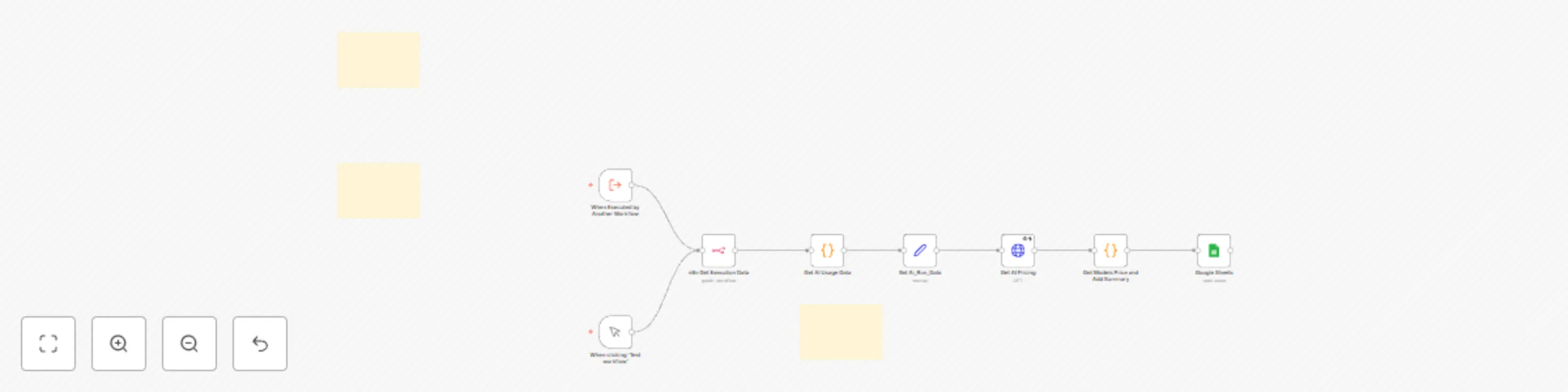
This template allows you to analyze the token usage and cost of any workflow in n8n. It uses an Execute Workflow node to call the Token Estim8r utility, which:
Create Google Sheet: Copy and paste the CSV template below into a .csv file and upload to Google Sheets:
timestamp, Total Tokens, Prompt Tokens, Completion Tokens, Models Used, Tools Used, Total Cost, Json Array
Set up pricing (optional): In the Get AI Pricing node, add your Jina API Auth Header if you want live pricing.
Select the correct Google Sheet: Ensure your workflow is pointing to the imported sheet.
Attach to your target workflow: Add an Execute Workflow node to the end of your target workflow.
Point to this Token Estim8r: Choose this template as the executed workflow and send {{ $execution.id }} as the input.
Run and view results: Trigger the target workflow and see your token usage and cost data populate in the sheet.
> This utility workflow works across all n8n deployment types and uses only built-in nodes.
This catalog entry is organized from the workflow JSON. The node-level section below shows the executable blocks available for review before importing the template.
| Workflow | 🥇 Token Estim8r -sub workflow to track AI model token usage and cost with JinaAI |
|---|---|
| Complexity | intermediate |
| Nodes | 11 |
| Categories | Engineering, AI Summarization |
| Author | RealSimple Solutions |
| Published | 10 Apr 2025 |
Use the JSON export at /data/workflows/3513/3513.json as the source template for this automation.
Open n8n, import the downloaded JSON, and review each node before activating the workflow.
Replace placeholder credentials, API keys, webhook URLs, account IDs, and environment-specific values with your own settings.
Run the workflow manually or in a staging workspace, inspect node output, and confirm downstream systems receive the expected data.
Enable the workflow only after testing, then monitor executions, errors, and rate limits during the first production runs.
Review imported nodes carefully before activation. This catalog entry is intended to help you inspect the workflow structure, understand required services, and find related templates faster.
Node names, credentials, schedules, webhook paths, and external service limits may need adjustment for your workspace.
Save Your Tokens from Evil King Browser Image Generated with [ideoGener8r](https://ideogener8r.com?utm so...
Review the workflow JSON, configure any required credentials in n8n, and test the automation in a safe workspace before using it in production.
Yes. Use the block-by-block analysis and the downloadable JSON to inspect each node, then adjust credentials, prompts, schedules, filters, or destinations for your Engineering, AI Summarization use case.