R

RealSimple Solutions

10
Workflows

Workflows by RealSimple Solutions

Workflow preview: Convert POML to AI-Ready Prompts & Chat Messages with Zero Dependencies
Free intermediate

Convert POML to AI-Ready Prompts & Chat Messages with Zero Dependencies

### _POML → Prompt/Messages (No-Deps)_ ![Poml Logo](https://poml-team.gallerycdn.vsassets.io/extensions/poml-team/poml/0.0.7/1753436631886/Microsoft.VisualStudio.Services.Icons.Default) ## What this does Turns **POML** markup into either a single Markdown **prompt** or chat-style **messages\[]** — using a **zero-dependency** n8n Code node. It supports variable substitution (via `context`), basic components (headings, lists, code, images, tables, line breaks), and optional schema-driven validation using `componentSpec` + `attributeSpec`. ## Credits **Created by** [**_Real Simple Solutions_**](https://realsimple.dev) as an n8n **template friendly POML compiler** (_no dependencies_) for full POML feature parity. ### _View more of our_ [_templates here_](https://joeperes.gumroad.com/) ## Who’s it for Teams who author prompts in **POML** and want a **template-safe** way to turn them into either a single Markdown prompt or **chat-style messages**—without installing external modules. Works on **n8n Cloud and self-hosted**. ## What it does This workflow converts POML into: * **`prompt`** (Markdown) for single-shot models, or * **`messages[]`** (`system|user|assistant`) for chat APIs when `speakerMode` is true. It supports variable substitution via a `context` object (`{{dot.path}}`), lists, headings, code blocks, images (incl. base64 → `data:` URL), tables from JSON (`records`/`columns`), and basic message components. ## How it works * **Set (Specs & Context):** Provide `componentSpec` (allowed attrs per tag), `attributeSpec` (typing/coercion), and optional `context`. * **Code (POML → Prompt/Messages):** A zero-dependency compiler parses the POML and emits `prompt` or `messages[]`. > Add a **yellow Sticky Note** that includes this description and any setup links. Use additional neutral sticky notes to explain each step. ## How to set up 1. Import the template. 2. Open the first **Set** node and paste your `componentSpec`, `attributeSpec`, and `context` (examples included). 3. In the **Code** node, choose: * `speakerMode: true` to get `messages[]`, or `false` for a single `prompt`. * `listStyle`: `dash | star | plus | decimal | latin`. 4. Run → inspect `prompt`/`messages` in the output. ## Requirements * No credentials or community nodes. * Works without external libraries (template-compliant). ## How to customize * Add message tags (`<system-msg>`, `<user-msg>`, `<ai-msg>`) in your POML when using `speakerMode: true`. * Extend `componentSpec`/`attributeSpec` to validate or coerce additional tags/attributes. * Preformat arrays in `context` (e.g., `bulleted`, `csv`) for display, or add a small Set node to build them on the fly. * Rename nodes and keep all user-editable fields grouped in the first Set node. ## Security & best practices * **Never** hardcode API keys in nodes. * Remove any personal IDs before publishing. * Keep your Sticky Note(s) up to date and instructional.

R
RealSimple Solutions
Engineering
20 Aug 2025
147
0
Workflow preview: 🧠 Flowatch 👁️ analyze and diagnose n8n workflow errors via OpenAI and email
Free intermediate

🧠 Flowatch 👁️ analyze and diagnose n8n workflow errors via OpenAI and email

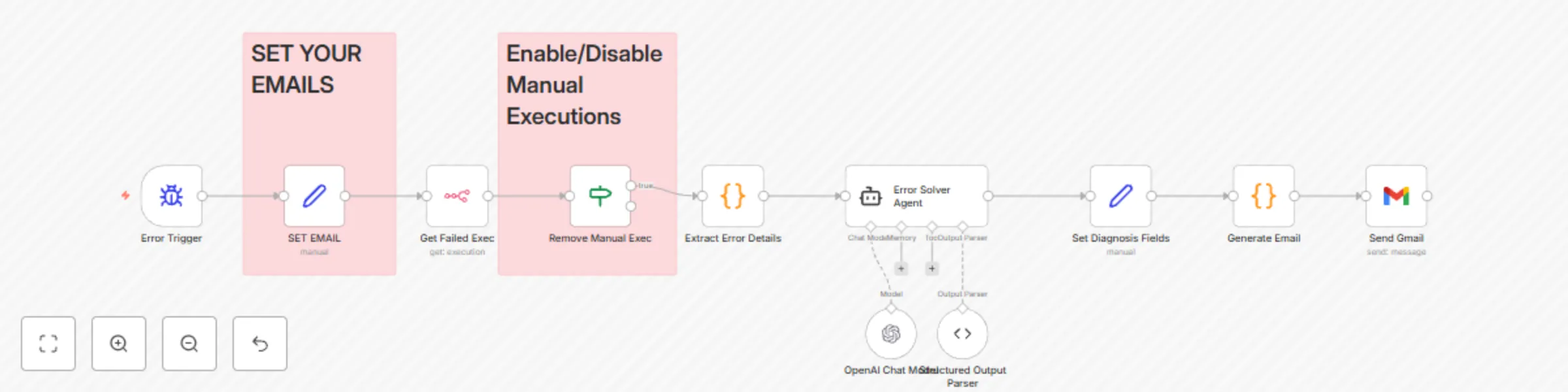
# 🧠 Analyze and Diagnose n8n Workflow Errors Automatically via OpenAI and Email ![FlowatchLogodark.png](fileId:1137) ![FloWatchScreenCap.png](fileId:1138) > ⚠️ **This template is available on ☁️ Cloud & 🖥️ self-hosted n8n instances with the OpenAI node enabled.** --- ## 👤 Who is this for? This workflow is designed for **n8n developers**, **automation engineers**, and **DevOps teams** who want to automatically capture and analyze workflow errors, and receive professional HTML-styled diagnostics directly in their inbox. --- ## 💥 What problem does this solve? Manually troubleshooting failed workflows in n8n can be time-consuming. This template streamlines error detection by: - Capturing workflow failures using the **Error Trigger** node - Diagnosing root causes with the help of **OpenAI** - Sending a fully-formatted, human-readable **HTML error report** via email - Including practical resolutions and next-step suggestions This helps you or your team resolve issues faster and avoid repeated manual debugging. --- ## ⚙️ What this workflow does - ⚡ **Triggers on any n8n workflow error** - 📦 **Extracts relevant error metadata** including node, execution ID, and timestamps - 🧠 **Sends error content to OpenAI** for analysis and recommendations - 💌 **Generates an HTML email report** with inline styles and clear formatting - 📥 **Emails the result to a system administrator or support email** --- ## 🛠️ Setup 1. **Install the OpenAI node** in your self-hosted n8n instance. 2. Add your **OpenAI API Key** securely in credentials. 3. Configure the **SMTP Email node** with your email credentials. 4. Adjust the **Error Trigger** to monitor specific workflows or all workflows. 5. Set your preferred **admin or dev email address** in the final node. --- ## 🔧 How to customize this workflow to your needs - 🧩 Use a [Set node] to define your variables, such as: - Default admin email - Workflow filter (optional) - ✍️ Customize the prompt sent to OpenAI if you want deeper or more specific analysis - 🎨 Modify the email HTML styles to match your brand or internal format - 💾 Add additional logging (e.g., to Airtable, Google Sheets, or Notion) for long-term error tracking --- ## 📌 Sticky Note **Title:** Automated Error Reporter with AI-Powered Diagnosis **Description:** Captures any n8n error, sends it to OpenAI, and emails a beautiful HTML report to the administrator with steps to resolve the issue. Requires OpenAI credentials and SMTP configured.

R
RealSimple Solutions
DevOps
18 Apr 2025
1119
0
Workflow preview: 📊 Token Estim8r UI – visualize token usage analytics dashboard in n8n
Free advanced

📊 Token Estim8r UI – visualize token usage analytics dashboard in n8n

## 📊 Visualize all your AI Token Usage analytics Dashboard using a single n8n Workflow --- ![TokenEstim8rUIGumroadBanner.jpg](fileId:1107) Artwork Generated with **[✨ ideoGener8r](ideoGener8r)** n8n workflow template --- Token Estim8r UI is the premium version of our token tracking solution for n8n users who want real-time insight into AI model usage and exact cost per execution — all in a beautifully designed analytics dashboard. We've done the work with **over 4000 lines of code** for you to simply add a pre-configured **HTTP Request node** to the end of any workflow you want to track, and Token Estim8r UI will handle the rest: collecting data, analyzing token usage, calculating model costs, and **feeding everything into a clean UI with charts, graphs, and summaries**. --- ### 🖼️ What the Dashboard Looks Like ![Token Estim8r Dashboard](https://fillin8n.realsimple.dev/TokenEstim8r-ScreenCap.png) --- ### 🙋‍♂️ Who is this for? This workflow is perfect for: - AI engineers - Automation specialists - Business analysts - Teams using OpenAI, Anthropic, Claude, or any token-based LLM If you’re managing API budgets or optimizing prompt performance, this tool provides immediate visibility into where tokens (and money) are going. --- ### 😌 What problem does this solve? n8n makes it easy to build powerful workflows — but it doesn’t natively track OpenAI token usage or cost. Without that visibility, it’s impossible to: - Know what each automation is costing - Spot inefficiencies in prompt construction - Track cost trends over time **Token Estim8r UI solves that with zero manual logging.** --- ### ⚙️ What this workflow does - Fetches detailed execution logs from n8n - Extracts prompt/completion token usage per model/tool - Optionally retrieves live pricing or use preset pricing as of 4/2025 - Calculates total cost per run - Sends data to a backend for aggregation - Displays a full-featured analytics dashboard with: - Total tokens, cost, and usage trends - Most used models/tools - Workflow-model correlations - Cost breakdowns and comparisons - Workflow usage over time - **Auto-complete workflow search** with filtering by ID or name - **Filter by date or workflow** (single or all workflows) - Built in image server - **Sortable & searchable data table** of filtered results with: - Prompt & completion token breakdown - Cost calculations - Workflow name + direct link to the workflow - Link to exact execution in n8n --- ### 🛠️ How Setup Works 1. Import the Token Estim8r UI workflow into your n8n instance 2. Deploy the included dashboard (React/Next.js app, hosted or self-hosted) 3. Configure Google Sheets or your preferred backend (e.g., Supabase, Airtable) 4. Copy the prebuilt HTTP Request node into the end of any n8n workflow 5. Run your workflow — data is captured, aggregated and stored automatically in Google Sheets 🎉 --- ### 🔄 What Makes This Better than the simple version? The simple version logs to Google Sheets only. This premium UI version adds: - Full analytics dashboard - Cost aggregation across all workflows - Graphs, filters, and model/tool comparisons --- ### 🔧 Customization Ideas - Switch backend to Supabase or Firebase - Add alerts via Slack when costs exceed thresholds - Build weekly token cost summaries - Track model performance across teams - Add filters by user/session/timeframe --- ### 🧠 Why Users Love It "Token Estim8r UI is exactly what I needed to take control of my AI costs inside n8n. It’s plug and play — and the dashboard makes optimization easy." – Beta user, AI Ops Lead ## 😐 If you're serious about building with AI in n8n, Token Estim8r UI gives you the visibility to scale confidently. 🚀

R
RealSimple Solutions
Engineering
13 Apr 2025
301
0
Workflow preview: 🥇 Token Estim8r -sub workflow to track AI model token usage and cost with JinaAI
Free intermediate

🥇 Token Estim8r -sub workflow to track AI model token usage and cost with JinaAI

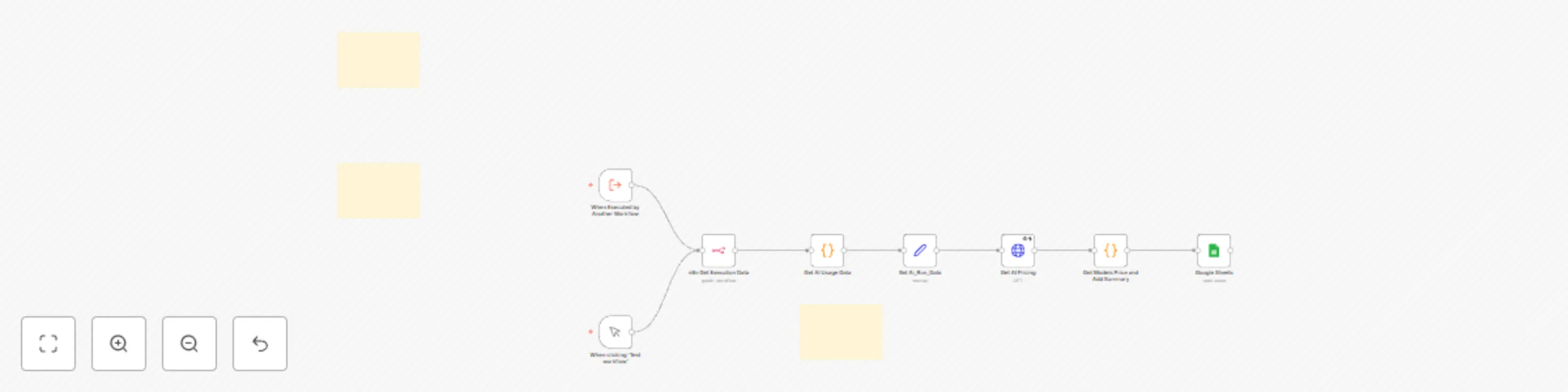
![ToeknsEstim8r](https://fillin8n.realsimple.dev/Evil-King-Browser-Devours-Tokens.jpg) #### _Save Your Tokens from Evil King Browser_ > **Image Generated with [ideoGener8r](https://ideogener8r.com?utm_source=n8n&utm_medium=template&utm_campaign=tokenestim8r)** _n8n workflow template_ --- ## 🔍 Estimate token usage and AI model cost from any workflow in n8n ### 🙋‍♂️ Who is this for? This workflow is ideal for AI engineers, automation specialists, and business analysts who use OpenAI, Anthropic, or other token-based large language models (LLMs) in their n8n workflows and want to track their usage and accuratley estimate associated costs. Whether you're prototyping workflows or deploying in production, this tool gives you insight into how many tokens you're using and what that translates to in actual dollars. ### 😌 What problem is this workflow solving? n8n users running AI-based workflows often struggle to track how many tokens were used per execution and how much those tokens cost. Without visibility into usage, it’s easy to lose track of API spending. This workflow solves that problem by: - Logging token counts and costs to Google Sheets - Supporting prompt and completion token counts - Providing live pricing (optional, via Jina AI API) ### ⚙️ What this workflow does This template allows you to analyze the token usage and cost of **any** workflow in n8n. It uses an `Execute Workflow` node to call the `Token Estim8r` utility, which: - Estimates prompt and completion tokens - Retrieves model pricing (either statically or live via Jina API) - Calculates the total cost - Logs the data to a connected Google Sheet with timestamp and model info ### 🛠️ Setup Instructions 1. **Create Google Sheet**: Copy and paste the CSV template below into a `.csv` file and upload to Google Sheets: ``` timestamp, Total Tokens, Prompt Tokens, Completion Tokens, Models Used, Tools Used, Total Cost, Json Array ``` 2. **Set up pricing (optional)**: In the `Get AI Pricing` node, add your Jina API Auth Header if you want live pricing. 3. **Select the correct Google Sheet**: Ensure your workflow is pointing to the imported sheet. 4. **Attach to your target workflow**: Add an `Execute Workflow` node to the end of your target workflow. 5. **Point to this Token Estim8r**: Choose this template as the executed workflow and send `{{ $execution.id }}` as the input. 6. **Run and view results**: Trigger the target workflow and see your token usage and cost data populate in the sheet. --- ### 🔧 How to customize this workflow to your needs - **Change the logging destination**: Instead of Google Sheets, connect to Airtable, Notion, or a database. - **Support multiple models**: Extend the price-mapping logic to cover your own model providers. - **Add Slack alerts**: Send a notification if a workflow exceeds a token or cost threshold. - **Aggregate costs**: Create a weekly summary workflow that totals cost by workflow or model. --- > This utility workflow works across all n8n deployment types and uses only built-in nodes.

R
RealSimple Solutions
Engineering
11 Apr 2025
1633
0
Workflow preview: 🎨 AI design team - generate and review AI images with Ideogram and OpenAI
Free advanced

🎨 AI design team - generate and review AI images with Ideogram and OpenAI

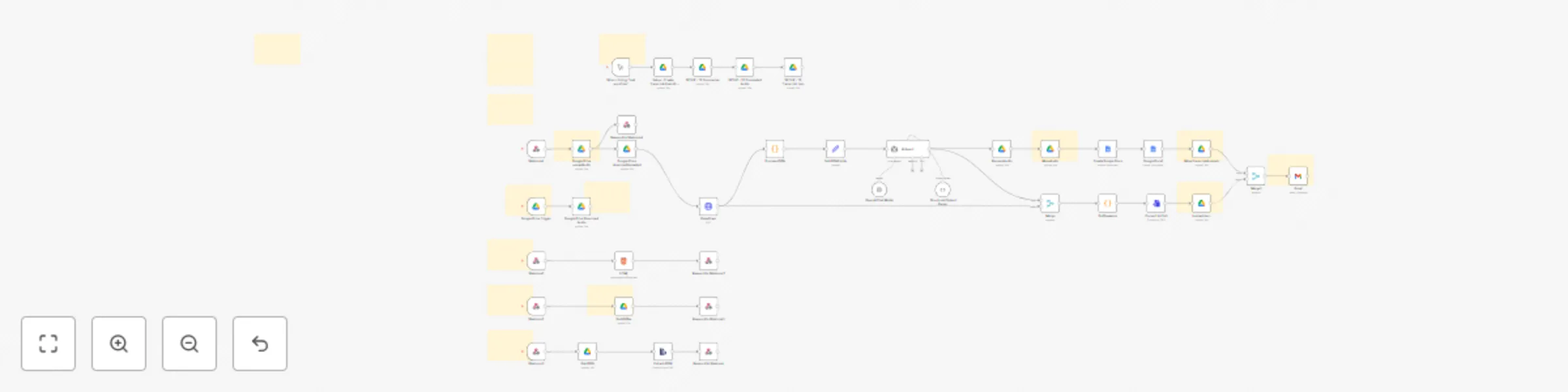
# 🎨 AI Graphic Design Team - Generate and Review AI Images with Ideogram and OpenAI ![image](https://fillin8n.realsimple.dev/ideoGener8r_Team.png) ## Description ### Who is this for? This workflow is perfect for graphic designers, creative agencies, marketing teams, or freelancers who regularly use AI-generated images in their projects. It's specifically beneficial for teams that want to automate the generation, review, and management of AI-created graphics efficiently. ### What problem does this workflow solve? Design teams often face time-consuming manual reviews and inconsistent quality checks for AI-generated images. This workflow addresses these challenges by automating image generation and introducing a systematic, AI-driven vetting process. This ensures only high-quality, relevant images reach your team's assets, saving valuable time and enhancing workflow efficiency. ### What this workflow does - **AI Image Generation:** Integrates Ideogram via HTTP Request to automatically create AI-generated images based on creative briefs. - **Automated Image Review:** Uses OpenAI to automatically evaluate and approve images, ensuring they meet your predefined quality standards. - **Efficient Asset Management:** Automatically creates structured Google Drive folders and compiles key metadata (including creation dates, prompts, and image links) into a CSV file and Google Sheet. - **Immediate Email Notifications:** Delivers a setup confirmation and provides easy access to Google Drive folders and assets via automated email notifications. - **Final Approved Images:** Outputs vetted, ready-to-use images for your creative projects, removing the burden of manual reviews. --- ![image](https://fillin8n.realsimple.dev/n8n_igraphic_design_team_screen_cap.png) ## Setup --- 1. **Initial Email Configuration** - Update your email details in both the "Setup Gmail" node and the "Gmail" notification node. - Run the initial setup workflow to automatically create the Google Drive folders "Graphic_Design_Team" and "Image_Generations," and upload your CSV file (`n8n-Graphic_Design_Team.csv`). 2. **Review Email & Set Up Google Sheets** - Check your inbox for an automated email containing folder IDs and direct links. - Create and set up a Google Sheet by importing the provided CSV data from your email. 3. **Update Workflow Nodes** - Select your newly created Google Sheet in both Google Sheets nodes. - Update your Creative Brief node with the Google Drive folder IDs provided in the email. 4. **Run Workflow for AI Image Generation & Review** - Execute the workflow. Your generated images will be automatically vetted, organized, and ready for creative use. ## How to Customize This Workflow - **Tailor Image Generation Prompts:** Adjust prompts and settings in the Ideogram HTTP Request node to better fit your project's creative requirements. - **Set Quality Standards:** Modify the criteria used by the OpenAI node to reflect your specific standards and preferences for image approval. - **Customize Asset Organization:** Adapt Google Drive folder structures, CSV headers, or Google Sheets integrations to match your team's organizational preferences. ## Dependencies & Requirements - **Nodes Used:** - HTTP Request (Ideogram API integration) - OpenAI (Image review and quality assessment) - Gmail (Automated notifications) - Google Drive (File and asset management) - Google Sheets (Metadata organization) - **Credentials:** Ensure Gmail, Google Drive, Google Sheets, and OpenAI credentials are properly configured in your n8n account. No custom or community nodes are needed. ## Final Outcome Upon completion, your workflow efficiently provides vetted, high-quality AI-generated images, organized in Google Drive and accessible via easy-to-use metadata in Google Sheets, drastically reducing manual intervention and accelerating your creative processes.

R
RealSimple Solutions
Content Creation
8 Apr 2025
11956
0
Workflow preview: 🔊  Browser recording audio transcribing and AI analysis with Deepgram and GPT-4o
Free advanced

🔊 Browser recording audio transcribing and AI analysis with Deepgram and GPT-4o

![Transcript Evalu8r Logo](https://fillin8n.realsimple.dev/Transcript-Evalu8r-Logo-nobg.png) ## **Overview** **Transcript Evalu8r V2** is a robust **browser-based transcript analysis tool** powered by **Deepgram’s speech-to-text API** and built into an **n8n workflow template**. This release introduces full **in-browser audio recording**, **device selection**, and **playback functionality**, allowing users to capture and analyze conversations without leaving their browser. Designed for **researchers, support teams, podcasters, legal professionals, and analysts**, Transcript Evalu8r simplifies how you extract value from voice data using intuitive tools, AI-powered insights, and seamless automation. --- ## ✅ **What’s New in V2** | ![Record in Browser](https://fillin8n.realsimple.dev/transcript-evalu8r-record-in-browser.png) | ![Select Input Device](https://fillin8n.realsimple.dev/transcript-evalu8r-select-input-device.png) | |:--|:--| |### 🔴 Record in Browser <br>Users can now record audio directly in the browser with one click. Record meetings, calls, or voice notes instantly—no external software required. | ### 🎧 Select Audio Input Devices <br>Users can choose from connected input devices (e.g., internal mic, USB mic, headset) before recording, ensuring maximum control and audio quality.| ### ▶️ Listen to Recording in Browser Once a recording is complete, users can immediately **play back the audio** in-browser to review before submitting for transcription—ensuring content is clear and relevant. --- ## **How It Works** 1. **Record or upload** an audio file 2. **Audio recording is uploaded to Google Drive 3. Audio file is sent to Deepgram for transcribing and AI analysis 4. Audio File is moved to completed folder 5. JSON transcript is saved to Google Drive 6. Google Doc of AI analysis, summary, key points, action items, and full transctip is created 7. Use the Web UI to Explore: - **Speaker Names** - **Transcript** - **Key points & tasks** - **Sentiment chart** - **Topic and intent lists with time stamps** 8. **Download or export** transcript and insights 9. **Add Additional automations** or continue workflow (e.g., send to Notion, Slack, Google Sheets, todoist) --- ![Transcript Evalu8r v2](https://fillin8n.realsimple.dev/transcript-evalu8r-screen-cap.jpg) --- ## **Key Features** ### 🔹 **Transcript Processing & Uploads** - Upload or record audio directly in your browser - Track progress of file uploads in real-time - View, select, or download transcripts in **Google Docs, JSON**, and other formats ### 🔹 **Interactive Transcript Viewer** - Full transcript display with **timestamps**, **speaker IDs**, and **auto-scroll** - Clickable word-level navigation for pinpointing dialogue - Real speaker labeling (not just "Speaker 1") ### 🔹 **AI-Powered Analysis** - **Sentiment visualization** over time, per speaker - **Topic and intent extraction** with confidence scores - **Speaker contribution insights**, interruptions, and common word frequency ### 🔹 **Insight Summaries Google Doc** - AI-generated **summary**, **key points**, and **action items** - Speaker-specific task suggestions and idea highlights ### 🔹 **UI Enhancements** - Collapsible sections for focused analysis - Light and dark mode support - Responsive design across desktop, tablet, and mobile --- ## **Use Cases** ✅ Interview & podcast summarization ✅ Customer support QA monitoring ✅ Legal or compliance transcription logging ✅ Market research and trend analysis ✅ Internal meeting follow-up automation --- ## **Requirements** - **n8n instance** (self-hosted or cloud) - **Deepgram API Key** (for audio transcription) - Supported browser with mic permissions enabled --- ## **Why Choose Transcript Evalu8r V2?** 🚀 Instantly record and transcribe within your browser 🧠 Extract sentiment, insights, and intent automatically 📈 Visualize speaker tone and engagement 🎧 Choose audio input for cleaner recordings 🔗 Connect with your favorite tools using n8n’s integrations

R
RealSimple Solutions
Document Extraction
7 Apr 2025
972
0
Workflow preview: ✨ ideoGener8r –  complete Ideogram AI image generator UI with Google integration
Free advanced

✨ ideoGener8r – complete Ideogram AI image generator UI with Google integration

![ideoGener8r logo](https://res.cloudinary.com/dzpjzkooq/image/upload/v1733108590/og-share-facebook-ideogener8r_jmjlwe.jpg) --- # ideoGener8r – Self-Hosted Ideogram AI Interface in n8n 🔥 **[March Sale – n8n Community Members Get ideoGener8r for Just $27!](#) (Reg. $47)** **Use Coupon Code:** `ILoven8n` (Valid until 3/31/2025 for n8n community members) --- ![ideGener8r User Interface](https://static.images.ideogener8r.com/ideogener8r-UI.jpg) **ideoGener8r** is an n8n template that sets up a self-contained, front-end interface for **Ideogram AI** image generation. It offers a complete workflow to generate, upscale, remix, and store images—entirely on your self-hosted n8n instance. --- ## **Key Benefits & Limited-Time Offer** - **Fully Self-Hosted**: Avoid monthly fees and keep your data private. - **All-in-One**: Generate, remix, and upscale images without third-party tools. - **Streamlined Automation**: Integrates directly with Google Sheets & Drive. - **Sale**: **Save $20** – Get ideoGener8r for just **$27** with coupon code `ILoven8n` (valid until **3/31/2025**). --- ## **Requirements & Overview** 1. **Ideogram AI API Key** - Sign up at [Ideogram AI](https://developer.ideogram.ai/ideogram-api/api-setup) and create an API key. 2. **Google Sheets & Drive** - A Google Sheet for storing metadata. - A Google Drive folder for saving generated images. 3. **n8n Auth Credentials** - **Basic Auth** for the login webhook. - **Header Auth** (Bearer token) for the generation/remix webhooks. With ideoGener8r, you can instantly create a private user interface—within n8n—to produce AI images on demand, trigger image generation through webhooks, and automatically log data to Google Sheets. --- ## **Required Google Sheet Columns** Your Google Sheet must contain (at minimum) the following columns for proper logging: Cheeck Setup note in workflow for csv template --- ## **Step-by-Step Setup Instructions** 1. **Import the Template** - Download the JSON file you received upon purchase. - In your n8n instance, go to *Workflows* → *Import*, then upload the JSON file. 2. **Configure Ideogram API** - In n8n, create an HTTP Header Auth credential. - For the “Authorization” header, use `Bearer YOUR_IDEOGRAM_API_KEY`. - Attach this credential to the Ideogram-related nodes (e.g., *IDEOGRAM Image generator*, *ideogram Upscale*). 3. **Google Sheets Setup** - Copy or create a Google Sheet with the columns listed above. - In the template, locate the Google Sheets “Append” nodes. - Select the correct Sheet, tab, and map each column accordingly. 4. **Google Drive Folder** - Create a Drive folder to store images (sharing permissions are up to you). - In the Google Drive nodes, enter the folder ID to save new images there. 5. **Basic Auth for Login** - Open the *Login Webhook-ideoGener8r* node. - Set it to use Basic Auth and create credentials for a username/password. - This will secure the login route (e.g., `/ideogener8r-login`). 6. **Bearer Token for Generation & History** - Open the “Generation Webhook” (e.g., `/ideogen`) and “History Webhook” (e.g., `/ideogener8r-history`). - Set them to Header Auth and use `Authorization: Bearer &lt;YOUR_SECRET_TOKEN&gt;`. - Any requests to these endpoints must include that token in the header. 7. **Publish & Test** - Activate or publish your workflow. - Go to `/ideogener8r-login`, enter your Basic Auth credentials, and test by generating images. - Verify that images appear in your Google Drive folder, and the metadata is logged in the Google Sheet. --- ## **Ideogram API Details** - **Endpoint**: The template uses Ideogram’s `/generate`, `/upscale`, and `/remix` endpoints. - **Headers**: You must provide your API key as a `Bearer` token in the request header. - **Rate Limits**: Check your Ideogram AI account for any usage or rate-limiting policies. --- More info at **[ideoGener8r.com](https://ideoGener8r.com)**

R
RealSimple Solutions
Content Creation
13 Mar 2025
1311
0
Workflow preview: Audio conversation analysis & visualization with DeepGram and GPT-4o
Free advanced

Audio conversation analysis & visualization with DeepGram and GPT-4o

# **Transcript Evalu8r – AI-Powered Transcribing and Transcript Analysis Workflow** ![Transcript Evalu8r Logo](https://fillin8n.realsimple.dev/Transcript-Evalu8r-Logo-nobg.png) ## **Overview** **Transcript Evalu8r** is an **AI-powered transcript analysis workflow** that automates the processing, visualization, and evaluation of transcribed conversations. This **n8n workflow template** is designed to help users quickly **analyze sentiment, extract topics and intents, generate key insights, and enhance transcript navigation**. It is ideal for **customer service teams, legal professionals, researchers, content creators, and businesses** seeking **actionable intelligence** from recorded conversations. --- ## **Key Features** ### 🔹 **Automated Transcript Processing** - **Audio-to-Text Conversion** – Upload an audio file and generate transcripts. - **File Upload Management** – Track file uploads with real-time progress indicators. - **Transcript Selection** – Browse and select previously analyzed transcripts from a dropdown. - **Download Transcripts** – Export transcripts in various formats (**Google Docs and JSON**). - **Error Handling** – Detects and alerts users about upload or processing failures. ### 🔹 **Advanced UI Components** - **Interactive Transcript Viewer** – Displays full transcripts with: - **Timestamps and speaker identification**. - **Clickable words** for easy navigation. - **Auto-scrolling** to highlight the active portion of the transcript. - **Key Points & Action Items Summary** – AI extracts: - **Critical insights from conversations**. - **Actionable follow-ups** detected in the discussion. - **Speaker Labeling** – Dynamically assigns **real speaker names** instead of generic placeholders (e.g., "Speaker 1"). - **Collapsible Sections** – Enables users to **expand/collapse** transcript details, key insights, and analysis sections. ### 🔹 **AI-Powered Conversation Analysis** - **Sentiment Analysis & Visualization** - **Dynamic sentiment graph** tracks emotional shifts. - **Color-coded speaker sentiment tracking**: - 🔵 **Positive** - ⚫ **Neutral** - 🔴 **Negative** - **Time-based sentiment tracking** – Shows sentiment fluctuations across the conversation. - **Topic & Intent Recognition** - **Automated Topic Extraction** – Identifies key themes discussed. - **Hierarchical Topic Organization** – Groups related topics for structured insights. - **Intent Classification** – Recognizes whether statements reflect: - **Questioning** - **Commands** - **Decision-making** - **Information seeking** - **Confidence Scoring** – Displays confidence levels for topic and intent detection. - **Speaker Contribution Metrics** - **Talk-time percentages** per speaker. - **Interruption detection** – Highlights moments where speakers cut each other off. - **Word Frequency Analysis** – Identifies commonly used terms and phrases. ### 🔹 **Seamless Workflow Automation** - **API Integration** – Connects with transcription engines like **OpenAI Whisper, AWS Transcribe, and Deepgram**. - **Webhook Support** – Automates workflows when new transcripts are available. - **Batch Processing** – Handles **multiple transcript analyses** simultaneously. - **Export & Reporting** – Sends insights to Google Sheets, Notion, Airtable, or Slack. --- ## **How It Works** 1. **Upload an audio file** or select a pre-existing transcript. 2. **Transcript Processing**: - Speech-to-text conversion (if required). - AI-driven **sentiment, topic, and intent analysis**. 3. **Visualizations & Insights**: - Review **sentiment charts**, **speaker contributions**, and **key topics**. - Extract **action items** and **critical takeaways**. 4. **Download results** or trigger **automated follow-ups**. --- ## **Use Cases** ✅ **Customer Support Review** – Detect customer concerns and analyze sentiment trends. ✅ **Podcast & Video Content Analysis** – Summarize episodes and extract key themes. ✅ **Sales Call Insights** – Identify common objections and customer pain points. ✅ **Market Research** – Extract trends from focus groups and discussions. ✅ **Legal Compliance Monitoring** – Track policy violations in recorded conversations. --- ## **Setup Instructions** 1. **Import the Transcript Evalu8r workflow** into your **n8n instance**. 2. **Connect DeepGram Speech to Text API**. 3. **Configure workflow parameters** (sentiment thresholds, topic extraction settings). 4. **Run the workflow** to analyze and visualize transcript data. 5. **Review insights and export** as needed. --- ## **Why Use Transcript Evalu8r?** 🚀 **Automate tedious transcript analysis** 💡 **Unlock hidden insights** in conversations 📊 **Visualize conversations** with interactive sentiment tracking ⚡ **Boost efficiency** with AI-powered automation 🔗 **Seamlessly integrate** with your existing workflows --- ## **Requirements** - **n8n instance** (cloud or self-hosted) - **API key for DeegGram API

R
RealSimple Solutions
Document Extraction
12 Mar 2025
935
0
Workflow preview: 🔄 Workflow repos8r: Github version control user interface for n8n workflows
Free advanced

🔄 Workflow repos8r: Github version control user interface for n8n workflows

🔥 **[n8n Members Sale – n8n Community Members Get ideoGener8r for Just $10!](#) (Reg. $15)** **Use Coupon Code:** `FeelinTheFlowgramming` (Valid for n8n community members) ## 💪 How it works Seamlessly track, manage, and version-control your **n8n workflows** with an intuitive Git-style system. Whether you're making updates or creating new workflows, this tool ensures structured commits, detailed change tracking, and seamless GitHub integration—all within a **Matrix-inspired UI**. ## 🎯 **Who is this for?** Perfect for: - **n8n Developers & Automation Engineers** – Maintain workflow history and prevent accidental overwrites. - **Teams Collaborating on Automation** – Track and commit changes with structured version control. - **DevOps & IT Professionals** – Streamline deployment across multiple n8n environments. ## 🚀 **Key Features** ### **Version Control & Workflow Management** - Commit changes when editing existing workflows - Create & commit new workflows from scratch - Detect modifications with **deep node comparison** - Access repo with **direct links** from changes window - Workflow JSON Browser Caching **to avoid large loads on n8n" ## Core Features ### Workflow Management - **Workflow Selection**: Easy selection of n8n workflows and GitHub workflows from dropdown menus - **Smart Caching**: Client-side caching of workflows for faster loading (1-week cache duration) - **Cache Control**: Manual cache clearing via hard refresh (Cmd+Shift+R) - **Matrix-Style UI**: Terminal-inspired interface with glowing effects and animations ### GitHub Integration - **Push to GitHub**: Direct pushing of n8n workflows to GitHub repositories - **Commit Control**: Automated commit message generation with workflow details - **Branch Management**: Automatic branch creation and management - **Pull from GitHub**: Future feature for pulling workflows from GitHub (Coming Soon) ### Workflow Comparison - **Side-by-Side Comparison**: Compare n8n workflows with their GitHub counterparts - **Change Detection**: Automatic detection and highlighting of workflow changes - **Diff Visualization**: Clear visualization of additions, deletions, and modifications - **JSON Validation**: Ensures workflow JSON integrity before operations ### User Experience - **System Notifications**: Matrix-themed toast notifications for important alerts - 30-second duration with manual close option - Context-aware messages (e.g., cache refresh hints) - Glowing effects matching system console aesthetics - **Loading Animations**: Matrix-style loading indicators during operations - **Error Handling**: Clear error messages and recovery suggestions - **Responsive Design**: Adapts to different screen sizes ### Security & Performance - **Local Storage**: Efficient client-side storage for workflow data - **Header Authentication**: Secure API communication with authentication tokens - **Performance Optimization**: Smart caching to reduce server load - **Data Validation**: Input validation and sanitization ## Technical Features ### Code Organization - **Modular Structure**: Well-organized HTML, CSS, and JavaScript - **Component Separation**: Clear separation of concerns - **CSS Variables**: Consistent styling with CSS custom properties - **Event Handling**: Robust event listeners and handlers ### API Integration - **n8n Integration**: Direct communication with n8n workflow API - **GitHub API**: Seamless integration with GitHub repositories - **RESTful Endpoints**: Clean API design for workflow operations - **Error Handling**: Comprehensive error handling and user feedback ### Development Features - **Debug Mode**: Console logging for development - **Code Comments**: Well-documented code sections - **CSS Animations**: Smooth transitions and effects - **Browser Compatibility**: Works across modern browsers ## Future Enhancements - Pull workflows from GitHub repositories - Enhanced diff visualization - Additional GitHub integration features - Extended caching options - More customization options for notifications - Advanced workflow comparison tools ### **GitHub Integration** - Push workflows directly to GitHub - Commit new workflows directly to GitHub - Auto-generate structured commit messages - Pull workflows from GitHub into n8n ### **Change Detection** - Identifies node additions, deletions, and property modifications - Compares connections, settings, and configurations - **Real-time visualization** of detected changes ### **Sleek UI for Effortless Control** - **Matrix-style interface** for a futuristic feel - Clear prompts to prevent accidental overwrites - Interactive workflow commit & sync options ## 🔧 **Setup & Usage** 1. **Generate your n8n API key** 2. **Set up GitHub repository & access tokens** 3. **Create Generic Basic Auth credentials** 4. **Create Generic Header Auth credentials** 5. **Set the workflow variables** 6. **Deploy & start tracking your workflow versions** ## 📚 **Use Cases** 🔹 **Workflow Development** – Ensure clean versioning and commit history. 🔹 **Team Collaboration** – Review and track modifications before deployment. 🔹 **Audit & Compliance** – Maintain an organized change log. ## 🙌 **Built for the n8n Community** Created with ❤️ to bring **reliable version control** to the n8n community.

R
RealSimple Solutions
DevOps
26 Feb 2025
1461
0
Workflow preview: Fetch dynamic prompts from GitHub and auto-populate n8n expressions in prompt
Free advanced

Fetch dynamic prompts from GitHub and auto-populate n8n expressions in prompt

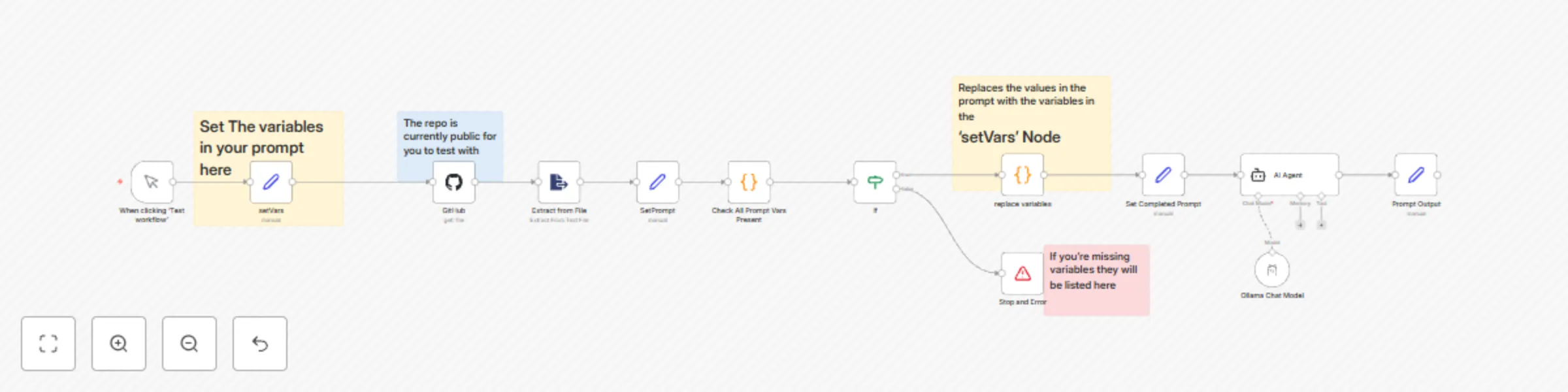
## **Who Is This For?** This workflow is designed for **AI engineers, automation specialists, and content creators** who need a **scalable system** to dynamically manage prompts stored in GitHub. It eliminates manual updates, enforces required variable checks, and ensures that AI interactions always receive **fully processed** prompts. --- ## **🚀 What Problem Does This Solve?** Manually managing AI prompts can be inefficient and error-prone. This workflow: ✅ **Fetches dynamic prompts from GitHub** ✅ **Auto-populates placeholders with values from the `setVars` node** ✅ **Ensures all required variables are present before execution** ✅ **Processes the formatted prompt through an AI agent** --- ## **🛠 How This Workflow Works** This workflow consists of **three key branches**, ensuring smooth prompt retrieval, variable validation, and AI processing. --- ### **1️⃣ Retrieve the Prompt from GitHub (HTTP Request → Extract from File → SetPrompt)** - The workflow starts manually or via an external trigger. - It **fetches a text-based prompt** stored in a GitHub repository. - The **Extract from File Node** retrieves the content from the GitHub file. - The **SetPrompt Node** stores the prompt, making it accessible for processing. 📌 **Note:** The prompt must contain **n8n expression format variables** (e.g., `{{ $json.company }}`) so they can be dynamically replaced. --- ### **2️⃣ Extract & Auto-Populate Variables (Check All Prompt Vars → Replace Variables)** - A **Code Node scans the prompt** for placeholders in the **n8n expression format** (`{{ $json.variableName }}`). - The workflow **compares required variables** against the `setVars` node: - ✅ **If all variables are present**, it proceeds to variable replacement. - ❌ **If any variables are missing**, the workflow stops and returns an error listing them. - The **Replace Variables Node** replaces all placeholders with values from `setVars`. 📌 **Example of a properly formatted GitHub prompt:** ``` Hello {{ $json.company }}, your product {{ $json.features }} launches on {{ $json.launch_date }}. ``` This ensures **seamless replacement when processed in n8n**. --- ### **3️⃣ AI Processing & Output (AI Agent → Prompt Output)** - The **Set Completed Prompt Node** stores the final, processed prompt. - The **AI Agent Node** (Ollama Chat Model) processes the prompt. - The **Prompt Output Node** returns the **fully formatted response**. 📌 **Optional:** Modify this to use OpenAI, Claude, or other AI models. --- ## **⚠️ Error Handling: Missing Variables** If a required variable is missing, the workflow **stops execution** and provides an error message: ``` ⚠️ Missing Required Variables: ["launch_date"] ``` This ensures **no incomplete prompts are sent to AI agents**. --- ## **✅ Example Use Case** ### **📜 GitHub Prompt File (Using n8n Expressions)** ``` Hello {{ $json.company }}, your product {{ $json.features }} launches on {{ $json.launch_date }}. ``` ### **🔹 Variables in `setVars` Node** ```json { "company": "PropTechPro", "features": "AI-powered Property Management", "launch_date": "March 15, 2025" } ``` ### **✅ Successful Output** ``` Hello PropTechPro, your product AI-powered Property Management launches on March 15, 2025. ``` ### **🚨 Error Output (If Missing `launch_date`)** ``` ⚠️ Missing Required Variables: ["launch_date"] ``` --- ## **🔧 Setup Instructions** ### **1️⃣ Connect Your GitHub Repository** - Store your prompt in a **public or private GitHub repo**. - The workflow will fetch the raw file using the **GitHub API**. ### **2️⃣ Configure the SetVars Node** - Define the required variables in the **SetVars Node**. - Make sure the variable names **match those used in the prompt**. ### **3️⃣ Test & Run** - Click **Test Workflow** to execute. - If variables are missing, it will show an error. - If everything is correct, it will output the **fully formatted prompt**. --- ## **⚡ How to Customize This Workflow** 💡 **Need CRM or Database Integration?** - Connect the `setVars` node to an **Airtable, Google Sheets, or HubSpot API** to pull variables dynamically. 💡 **Want to Modify the AI Model?** - Replace the **Ollama Chat Model** with OpenAI, Claude, or a custom LLM endpoint. --- ## **📌 Why Use This Workflow?** ✅ **No Manual Updates Required** – Fetches prompts dynamically from GitHub. ✅ **Prevents Broken Prompts** – Ensures required variables exist before execution. ✅ **Works for Any Use Case** – Handles AI chat prompts, marketing messages, and chatbot scripts. ✅ **Compatible with All n8n Deployments** – Works on **Cloud, Self-Hosted, and Desktop versions**.

R
RealSimple Solutions
Engineering
13 Feb 2025
3553
0