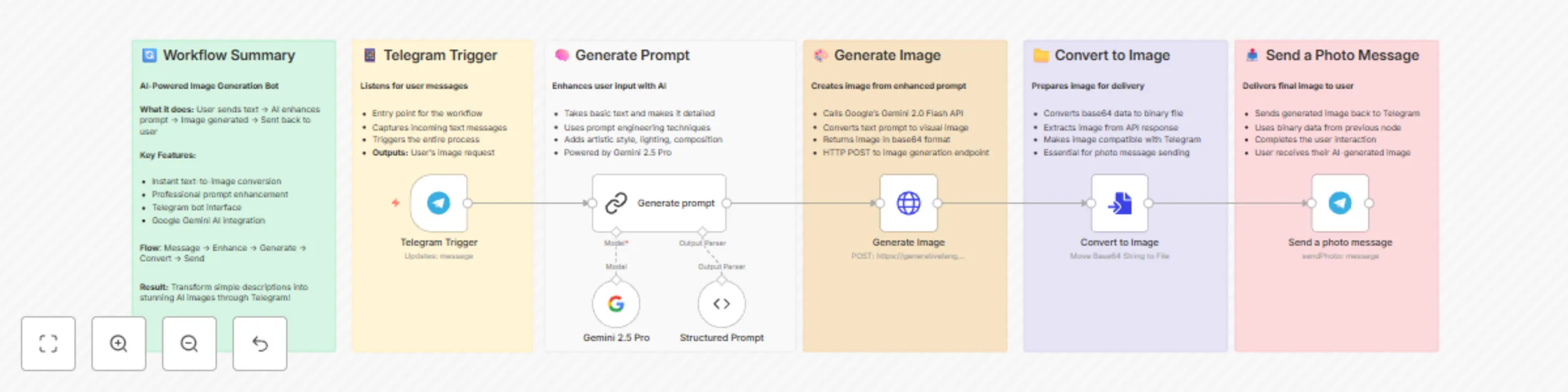
Text-to-image generation with Google Gemini & enhanced prompts via Telegram Bot

Workflow preview

Workflow preview
100%
Text-to-image generation with Google Gemini & enhanced prompts via Telegram Bot preview
Open on n8n.io

Important notice

This workflow is provided as-is. Please review and test before using in production.

1. Workflow Overview

This workflow contains community nodes that are only compatible with the self hosted version of n8n. AI Image Generator Telegram Bot Transform simple text descriptions into stunning AI generated...

Best for

  • Content Creation automation workflows
  • Multimodal AI automation workflows
  • intermediate n8n builders looking for reusable templates

Tools used

n8n-nodes-base.httprequest, n8n-nodes-base.telegram, @n8n/n8n-nodes-langchain.chainllm, @n8n/n8n-nodes-langchain.outputparserstructured, n8n-nodes-base.telegramtrigger, n8n-nodes-base.converttofile, n8n-nodes-base.stickynote, @n8n/n8n-nodes-langchain.lmchatgooglegemini

Source and attribution

This workflow is cataloged by N8N Workflows and links back to its original n8n.io source page by AppStoneLab Technologies LLP.

Original n8n.io source

1.1 Workflow description

Title
Text-to-image generation with Google Gemini & enhanced prompts via Telegram Bot
Workflow name
Text-to-image generation with Google Gemini & enhanced prompts via Telegram Bot

This workflow contains community nodes that are only compatible with the self-hosted version of n8n.

πŸ€– AI Image Generator Telegram Bot

Transform simple text descriptions into stunning AI-generated images through a Telegram bot powered by Google's Gemini 2.0 Flash image. This workflow automatically enhances user prompts with professional prompt engineering techniques and delivers high-quality images directly to your Telegram chat.

🎯 What This Workflow Does

This automation creates an intelligent Telegram bot that:

  • Receives text messages from users describing what image they want
  • Enhances prompts using AI-powered prompt engineering to add artistic details, lighting, composition, and style specifications
  • Generates images using Google's Gemini 2.0 Flash image generation model
  • Delivers results instantly back to the user's Telegram chat

⚑️ Key Features

  • Smart Prompt Enhancement: Automatically transforms basic requests like "a cat on a windowsill" into detailed, professional prompts with lighting, composition, and style details
  • Professional Image Quality: Leverages Google's latest Gemini 2.0 Flash model for high-quality image generation
  • Instant Delivery: Images are generated and sent back to users within seconds
  • User-Friendly: Simple text-to-image conversion through familiar Telegram interface
  • Structured Output: Uses JSON schema to ensure consistent prompt formatting

πŸ› οΈ How It Works

  1. Telegram Trigger: Listens for incoming messages from users
  2. AI Prompt Enhancement: Uses Gemini 2.5 Flash Lite to analyze and expand user requests into detailed prompts
  3. Structured Processing: Formats the enhanced prompt using JSON schema for consistency
  4. Image Generation: Sends the enhanced prompt to Gemini 2.0 Flash image generation API
  5. File Conversion: Converts the generated image data to a file format
  6. Delivery: Sends the generated image back to the user via Telegram

🎭 Use Cases

  • Creative Content Creation: Generate artwork, illustrations, and visual concepts
  • Social Media Content: Create unique images for posts and stories
  • Concept Visualization: Turn ideas into visual representations
  • Educational Materials: Generate images for presentations and learning materials
  • Personal Projects: Create custom artwork for personal use

πŸ“‹ Prerequisites

Before setting up this workflow, you'll need:

Required Accounts & APIs:

  • Telegram Bot Token: Create a bot via @BotFather
  • Google AI Studio Account: Access to Gemini API services

Required Credentials:

  • Telegram Bot API credentials
  • Google Gemini API key with access to:
    • Gemini 2.5 Pro (for prompt enhancement)
    • Gemini 2.0 Flash Preview (for image generation)

πŸš€ Setup Instructions

  1. Import the Workflow: Copy the workflow JSON into your n8n instance
  2. Configure Telegram Bot:
    • Create a new bot using @BotFather
    • Add your bot token to the Telegram credentials in n8n
  3. Set Up Google Gemini API:
  4. Activate the Workflow: Enable the workflow to start receiving messages

πŸ’‘ Customization Options

  • Prompt Templates: Modify the prompt enhancement instructions for different artistic styles
  • Image Parameters: Adjust generation settings for different image formats and qualities
  • Response Formats: Customize how images are delivered (with captions, multiple formats, etc.)

πŸ“Š Example Interaction

User Input: "Generate a beautiful image of a dragon from game of thrones" Enhanced Prompt: "A majestic, formidable dragon, reminiscent of those from Game of Thrones, perched atop a jagged, snow-capped mountain peak. The dragon is depicted with immense, leathery wings unfurled, scales glinting with iridescent blues and deep charcoals under the harsh, cold light. Its eyes glow with an inner, fiery amber. The scene is captured with a dramatic, low-angle wide shot, emphasizing the dragon's sheer scale against a turbulent, stormy sky filled with dark, bruised clouds and streaks of lightning. The atmosphere is oppressive and foreboding, with biting wind and swirling snow creating a sense of raw power and danger. The color palette is dominated by icy blues, stark greys, deep blacks, and the contrasting fiery glow of the dragon's eyes and perhaps a hint of internal fire. Rendered in a hyperrealistic, cinematic digital art style, with exceptional attention to detail on the scales, musculature, and the texture of the rocky environment. Lighting is dramatic and high-contrast, with sharp highlights on the dragon's form and deep, impenetrable shadows. Quality specifications include ultra-high detail, 8K resolution, photorealistic rendering, and an epic, awe-inspiring mood, evoking the grandeur and terror of powerful fantasy creatures." Result:

πŸ”§ Technical Details

  • AI Models: Google Gemini 2.5 Pro (prompt enhancement) + Gemini 2.0 Flash Preview (image generation)
  • Messaging: Telegram Bot API
  • Output Format: High-quality images in standard formats
  • Processing Time: Typically 10-15 seconds per image for Gemini 2.5 Flash and 25-30 seconds Gemini for 2.5 Pro

1.2 Logical Blocks

This catalog entry is organized from the workflow JSON. The node-level section below shows the executable blocks available for review before importing the template.

2. Block-by-Block Analysis

Block 1 - Generate Image

Type / Role
n8n-nodes-base.httpRequest - httpRequest
Config choices
Version 4.2

Block 2 - Send a photo message

Type / Role
n8n-nodes-base.telegram - telegram
Config choices
Version 1.2

Block 3 - Generate prompt

Type / Role
@n8n/n8n-nodes-langchain.chainLlm - chainLlm
Config choices
Version 1.7

Block 4 - Structured Prompt

Type / Role
@n8n/n8n-nodes-langchain.outputParserStructured - outputParserStructured
Config choices
Version 1.3

Block 5 - Telegram Trigger

Type / Role
n8n-nodes-base.telegramTrigger - telegramTrigger
Config choices
Version 1.2

Block 6 - Convert to Image

Type / Role
n8n-nodes-base.convertToFile - convertToFile
Config choices
Version 1.1

Block 7 - Sticky Note

Type / Role
n8n-nodes-base.stickyNote - stickyNote
Config choices
Version 1

Block 8 - Sticky Note1

Type / Role
n8n-nodes-base.stickyNote - stickyNote
Config choices
Version 1

Block 9 - Sticky Note2

Type / Role
n8n-nodes-base.stickyNote - stickyNote
Config choices
Version 1

Block 10 - Sticky Note3

Type / Role
n8n-nodes-base.stickyNote - stickyNote
Config choices
Version 1

Block 11 - Sticky Note4

Type / Role
n8n-nodes-base.stickyNote - stickyNote
Config choices
Version 1

Block 12 - Sticky Note5

Type / Role
n8n-nodes-base.stickyNote - stickyNote
Config choices
Version 1

Block 13 - Gemini 2.5 Pro

Type / Role
@n8n/n8n-nodes-langchain.lmChatGoogleGemini - lmChatGoogleGemini
Config choices
Version 1

3. Summary Table

Workflow Text-to-image generation with Google Gemini & enhanced prompts via Telegram Bot
Complexity intermediate
Nodes 13
Categories Content Creation, Multimodal AI
Author AppStoneLab Technologies LLP
Published 08 Jul 2025

4. Reproducing the Workflow from Scratch

  1. 1. Download the workflow JSON

    Use the JSON export at /data/workflows/5777/5777.json as the source template for this automation.

  2. 2. Import the template into n8n

    Open n8n, import the downloaded JSON, and review each node before activating the workflow.

  3. 3. Configure credentials and variables

    Replace placeholder credentials, API keys, webhook URLs, account IDs, and environment-specific values with your own settings.

  4. 4. Test with sample data

    Run the workflow manually or in a staging workspace, inspect node output, and confirm downstream systems receive the expected data.

  5. 5. Activate and monitor

    Enable the workflow only after testing, then monitor executions, errors, and rate limits during the first production runs.

5. General Notes & Resources

Review imported nodes carefully before activation. This catalog entry is intended to help you inspect the workflow structure, understand required services, and find related templates faster.

Node names, credentials, schedules, webhook paths, and external service limits may need adjustment for your workspace.

Frequently asked questions

What does Text-to-image generation with Google Gemini & enhanced prompts via Telegram Bot do?

This workflow contains community nodes that are only compatible with the self hosted version of n8n. AI Image Generator Telegram Bot Transform simple text descriptions into stunning AI generated...

What do I need before importing this workflow?

Review the workflow JSON, configure any required credentials in n8n, and test the automation in a safe workspace before using it in production.

Can I customize this workflow?

Yes. Use the block-by-block analysis and the downloadable JSON to inspect each node, then adjust credentials, prompts, schedules, filters, or destinations for your Content Creation, Multimodal AI use case.