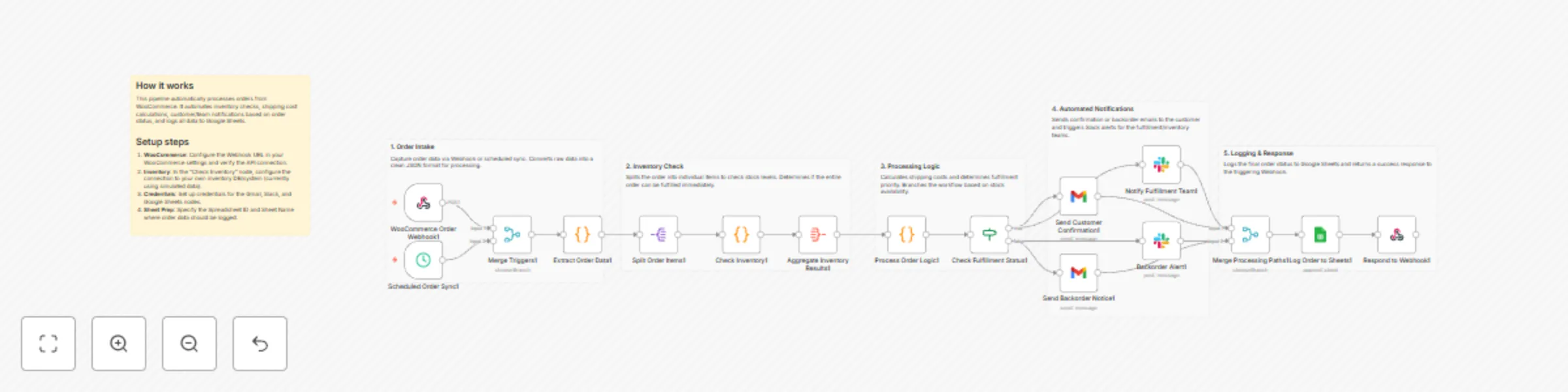
Sync WooCommerce orders and inventory with Google Sheets and Slack

Workflow preview

Workflow preview
100%
Sync WooCommerce orders and inventory with Google Sheets and Slack preview
Open on n8n.io

Important notice

This workflow is provided as-is. Please review and test before using in production.

1. Workflow Overview

Automate order fulfillment and inventory sync from WooCommerce to Google Sheets and Slack This workflow provides a robust, end to end automated pipeline for managing e commerce orders. It bridges t...

Best for

  • CRM automation workflows
  • advanced n8n builders looking for reusable templates

Tools used

n8n-nodes-base.stickynote, n8n-nodes-base.webhook, n8n-nodes-base.scheduletrigger, n8n-nodes-base.merge, n8n-nodes-base.code, n8n-nodes-base.splitout, n8n-nodes-base.aggregate, n8n-nodes-base.if

Source and attribution

This workflow is cataloged by N8N Workflows and links back to its original n8n.io source page by yu-ya.

Original n8n.io source

1.1 Workflow description

Title
Sync WooCommerce orders and inventory with Google Sheets and Slack
Workflow name
Sync WooCommerce orders and inventory with Google Sheets and Slack

Automate order fulfillment and inventory sync from WooCommerce to Google Sheets and Slack

This workflow provides a robust, end-to-end automated pipeline for managing e-commerce orders. It bridges the gap between your storefront and your fulfillment team by handling inventory validation, multi-channel notifications, and centralized data logging.

Who’s it for?

This template is designed for e-commerce business owners and operations managers using WooCommerce who want to eliminate manual order processing. It is ideal for teams that need real-time updates on stock availability and automated communication with both customers and warehouse staff.

How it works

  1. Order Capture: The workflow triggers via a WooCommerce Webhook (real-time) or a Schedule Trigger (hourly sync).
  2. Data Extraction: It parses complex order JSON into a clean, usable format.
  3. Inventory Check: The system iterates through each line item to verify stock levels.
  4. Fulfillment Logic: It determines if an order is "Ready" or "Backordered" and calculates estimated shipping priorities.
  5. Multi-Channel Notification:
    • In-Stock: Sends a confirmation email to the customer and alerts the fulfillment team on Slack.
    • Backordered: Sends a delay notice to the customer and alerts the inventory manager on Slack.
  6. Data Logging: Every order is appended to a Google Sheet for long-term analytics and tracking.

Requirements

  • WooCommerce: REST API access and Webhook setup.
  • Gmail: OAuth2 credentials for sending automated emails.
  • Slack: A Bot Token with permissions to post in #fulfillment and #alerts channels.
  • Google Sheets: A spreadsheet prepared with headers matching the order data.

How to set up

  1. Credentials: Connect your WooCommerce, Gmail, Slack, and Google Sheets accounts in the respective nodes.
  2. WooCommerce Webhook: Copy the Webhook URL from the first node and paste it into your WooCommerce Webhook settings (Topic: Order Created).
  3. Inventory Logic: The "Check Inventory" node currently uses a simulated Code node. Replace this logic with a lookup to your actual inventory database or ERP system.
  4. Google Sheets: Open the "Log Order to Sheets" node and select your specific Spreadsheet ID and Sheet Name.

How to customize

  • Shipping Rates: Modify the "Process Order Logic" node to include your specific carrier rates or integrate a shipping API (like ShipStation).
  • Priority Rules: Adjust the logic to flag "High Value" orders or specific VIP customers for faster processing.
  • Messaging: Customize the Gmail and Slack message templates to match your brand's voice.

1.2 Logical Blocks

This catalog entry is organized from the workflow JSON. The node-level section below shows the executable blocks available for review before importing the template.

2. Block-by-Block Analysis

Block 1 - Main Sticky Note

Type / Role
n8n-nodes-base.stickyNote - stickyNote
Config choices
Version 1

Block 2 - Group Sticky 1

Type / Role
n8n-nodes-base.stickyNote - stickyNote
Config choices
Version 1

Block 3 - Group Sticky 2

Type / Role
n8n-nodes-base.stickyNote - stickyNote
Config choices
Version 1

Block 4 - Group Sticky 3

Type / Role
n8n-nodes-base.stickyNote - stickyNote
Config choices
Version 1

Block 5 - Group Sticky 4

Type / Role
n8n-nodes-base.stickyNote - stickyNote
Config choices
Version 1

Block 6 - Group Sticky 5

Type / Role
n8n-nodes-base.stickyNote - stickyNote
Config choices
Version 1

Block 7 - WooCommerce Order Webhook1

Type / Role
n8n-nodes-base.webhook - webhook
Config choices
Version 2

Block 8 - Scheduled Order Sync1

Type / Role
n8n-nodes-base.scheduleTrigger - scheduleTrigger
Config choices
Version 1.2

Block 9 - Merge Triggers1

Type / Role
n8n-nodes-base.merge - merge
Config choices
Version 3

Block 10 - Extract Order Data1

Type / Role
n8n-nodes-base.code - code
Config choices
Version 2

Block 11 - Split Order Items1

Type / Role
n8n-nodes-base.splitOut - splitOut
Config choices
Version 1

Block 12 - Check Inventory1

Type / Role
n8n-nodes-base.code - code
Config choices
Version 2

Block 13 - Aggregate Inventory Results1

Type / Role
n8n-nodes-base.aggregate - aggregate
Config choices
Version 1

Block 14 - Process Order Logic1

Type / Role
n8n-nodes-base.code - code
Config choices
Version 2

Block 15 - Check Fulfillment Status1

Type / Role
n8n-nodes-base.if - if
Config choices
Version 2

Block 16 - Send Customer Confirmation1

Type / Role
n8n-nodes-base.gmail - gmail
Config choices
Version 2.1

Block 17 - Send Backorder Notice1

Type / Role
n8n-nodes-base.gmail - gmail
Config choices
Version 2.1

Block 18 - Notify Fulfillment Team1

Type / Role
n8n-nodes-base.slack - slack
Config choices
Version 2.2

Block 19 - Backorder Alert1

Type / Role
n8n-nodes-base.slack - slack
Config choices
Version 2.2

Block 20 - Merge Processing Paths1

Type / Role
n8n-nodes-base.merge - merge
Config choices
Version 3

Block 21 - Log Order to Sheets1

Type / Role
n8n-nodes-base.googleSheets - googleSheets
Config choices
Version 4.5

Block 22 - Respond to Webhook1

Type / Role
n8n-nodes-base.respondToWebhook - respondToWebhook
Config choices
Version 1.1

3. Summary Table

Workflow Sync WooCommerce orders and inventory with Google Sheets and Slack
Complexity advanced
Nodes 22
Categories CRM
Author yu-ya
Published 19 Dec 2025

4. Reproducing the Workflow from Scratch

  1. 1. Download the workflow JSON

    Use the JSON export at /data/workflows/11968/11968.json as the source template for this automation.

  2. 2. Import the template into n8n

    Open n8n, import the downloaded JSON, and review each node before activating the workflow.

  3. 3. Configure credentials and variables

    Replace placeholder credentials, API keys, webhook URLs, account IDs, and environment-specific values with your own settings.

  4. 4. Test with sample data

    Run the workflow manually or in a staging workspace, inspect node output, and confirm downstream systems receive the expected data.

  5. 5. Activate and monitor

    Enable the workflow only after testing, then monitor executions, errors, and rate limits during the first production runs.

5. General Notes & Resources

Review imported nodes carefully before activation. This catalog entry is intended to help you inspect the workflow structure, understand required services, and find related templates faster.

Node names, credentials, schedules, webhook paths, and external service limits may need adjustment for your workspace.

Frequently asked questions

What does Sync WooCommerce orders and inventory with Google Sheets and Slack do?

Automate order fulfillment and inventory sync from WooCommerce to Google Sheets and Slack This workflow provides a robust, end to end automated pipeline for managing e commerce orders. It bridges t...

What do I need before importing this workflow?

Review the workflow JSON, configure any required credentials in n8n, and test the automation in a safe workspace before using it in production.

Can I customize this workflow?

Yes. Use the block-by-block analysis and the downloadable JSON to inspect each node, then adjust credentials, prompts, schedules, filters, or destinations for your CRM use case.