Block 1 - Get Notion Pages
- Type / Role
- n8n-nodes-base.notion - notion
- Config choices
- Version 2.2


 Early Deal
This workflow is provided as-is. Please review and test before using in production.
How it works: This template takes approved Notion pages and syncs them to a Webflow CMS collection as draft items. It reads pages marked Status = Ready for publish in a specific Notion database/pro...
n8n-nodes-base.notion, n8n-nodes-base.httprequest, n8n-nodes-base.code, n8n-nodes-base.splitinbatches, n8n-nodes-base.wait, n8n-nodes-base.manualtrigger, n8n-nodes-base.switch
This workflow is cataloged by N8N Workflows and links back to its original n8n.io source page by Snehasish Konger.
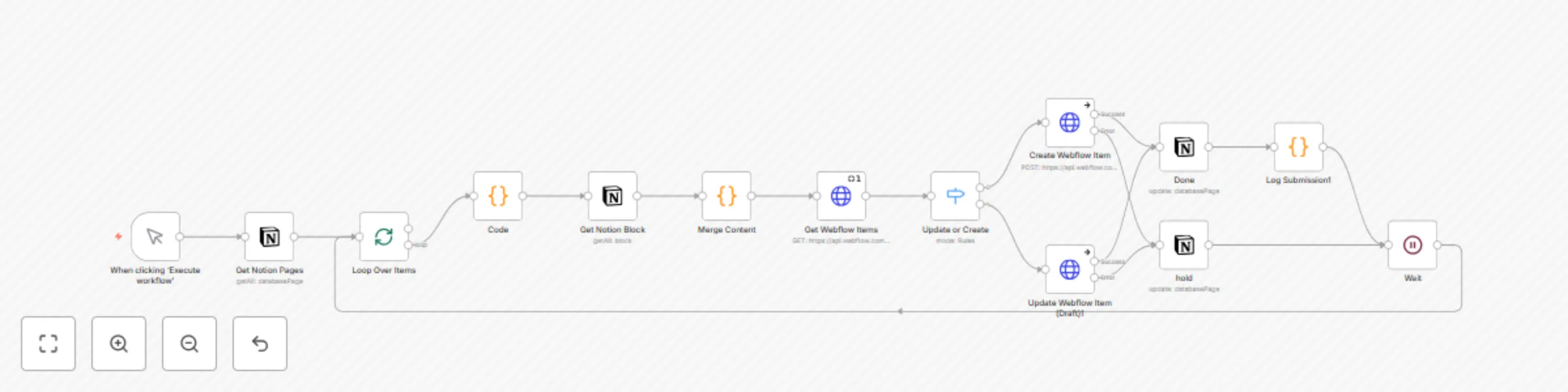
Original n8n.io sourceThis template takes approved Notion pages and syncs them to a Webflow CMS collection as draft items. It reads pages marked Status = Ready for publish in a specific Notion database/project, merges JSON content stored across page blocks into a single object, then either creates a new CMS item or updates the existing one by name. On success it sets the Notion page to 5. Done; on failure it switches the page to On Hold for review.
Manual Trigger You start the run with When clicking ‘Execute workflow’.
Get Notion Pages (Notion → Database: Tech Content Tasks) Pull all pages with Status = Ready for publish scoped to the target Project.
Loop Over Items (Split In Batches) Process one Notion page at a time.
Code (Pass-through) Expose page fields (e.g., name, id, url, sector) for downstream nodes.
Get Notion Block (children) Fetch all blocks under the page id.
Merge Content (Code)
Concatenate code-block fragments, parse them into one mergedContent JSON, and attach the page metadata.
Get Webflow Items (HTTP GET) List items in the target Webflow collection to see if an item with the same name already exists.
Update or Create (Switch)
isDraft: true, mapping all fieldData (e.g., category titles, meta title, excerpt, hero copy/image, benefits, problem pointers, FAQ, ROI).fieldData, leave isDraft: true.Write Back Status (Notion)
Log Submission (Code) Log a compact object with status, notionPageId, webflowItemId, timestamp, and action.
Wait → Loop Short pause, then continue with the next page.
Want hands-free publishing? Add a Cron trigger before step 2 to run on a schedule.
This catalog entry is organized from the workflow JSON. The node-level section below shows the executable blocks available for review before importing the template.
| Workflow | Sync Notion content to Webflow CMS as draft items with status tracking |
|---|---|
| Complexity | intermediate |
| Nodes | 14 |
| Categories | Content Creation, Multimodal AI |
| Author | Snehasish Konger |
| Published | 27 Aug 2025 |
Use the JSON export at /data/workflows/7935/7935.json as the source template for this automation.
Open n8n, import the downloaded JSON, and review each node before activating the workflow.
Replace placeholder credentials, API keys, webhook URLs, account IDs, and environment-specific values with your own settings.
Run the workflow manually or in a staging workspace, inspect node output, and confirm downstream systems receive the expected data.
Enable the workflow only after testing, then monitor executions, errors, and rate limits during the first production runs.
Review imported nodes carefully before activation. This catalog entry is intended to help you inspect the workflow structure, understand required services, and find related templates faster.
Node names, credentials, schedules, webhook paths, and external service limits may need adjustment for your workspace.
How it works: This template takes approved Notion pages and syncs them to a Webflow CMS collection as draft items. It reads pages marked Status = Ready for publish in a specific Notion database/pro...
Review the workflow JSON, configure any required credentials in n8n, and test the automation in a safe workspace before using it in production.
Yes. Use the block-by-block analysis and the downloadable JSON to inspect each node, then adjust credentials, prompts, schedules, filters, or destinations for your Content Creation, Multimodal AI use case.