Block 1 - On form submission
- Type / Role
- n8n-nodes-base.formTrigger - formTrigger
- Config choices
- Version 2.2


 Early Deal
This workflow is provided as-is. Please review and test before using in production.
YouTube Transcript Summarization in Any Language for Social Media This n8n workflow automates the process of: 1. Retrieving YouTube Video Transcripts: It fetches the transcript for any YouTube vide...
n8n-nodes-base.formtrigger, @n8n/n8n-nodes-langchain.lmchatgooglegemini, n8n-nodes-base.googledocs, n8n-nodes-base.set, n8n-nodes-base.code, @n8n/n8n-nodes-langchain.agent, n8n-nodes-base.httprequest, n8n-nodes-base.stickynote
This workflow is cataloged by N8N Workflows and links back to its original n8n.io source page by Sk developer .
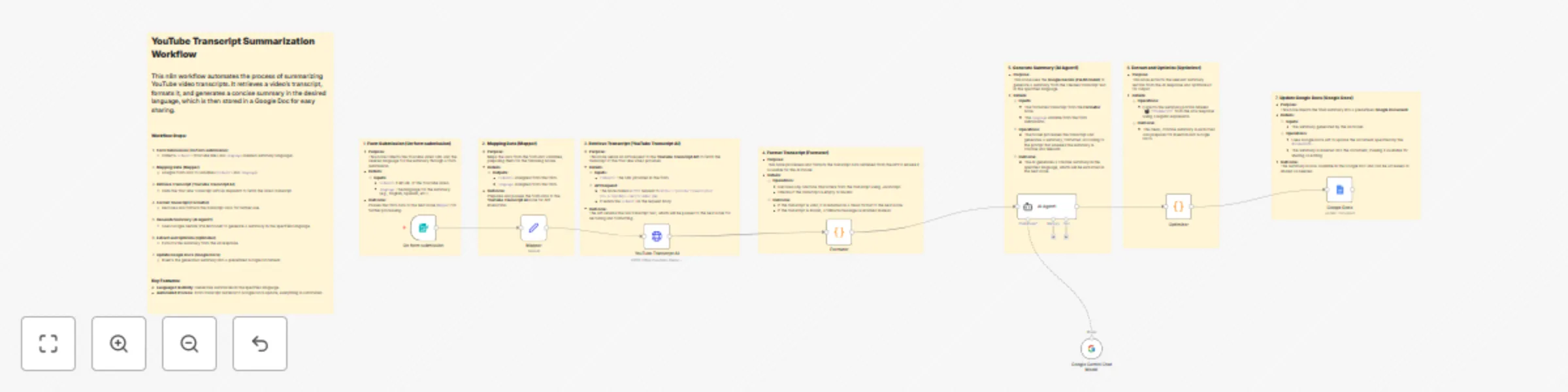
Original n8n.io sourceThis n8n workflow automates the process of:
Retrieving YouTube Video Transcripts:
It fetches the transcript for any YouTube video URL provided using the YouTube Transcript API from RapidAPI.
Generating a Concise Summary in Any Language:
The workflow uses Google Gemini (PaLM) to create a concise summary of the transcript in the language specified by the user (e.g., English, Spanish, etc.).
Storing the Summary in Google Docs:
The generated summary is inserted into a predefined Google Document, making it easy for users to share or edit.
This workflow integrates with YouTube Transcript API via RapidAPI, allowing you to easily fetch video transcripts and summarize them with AI. The entire process is automated and seamless.
Manual Transcript Extraction:
Problem: Manually transcribing and summarizing YouTube videos for social media can be time-consuming and error-prone.
Solution: This workflow fully automates the process, saving hours of manual work using the YouTube Transcript API.
Lack of Language Support in Summaries:
Problem: Many automated tools only summarize content in a single language, limiting their accessibility.
Solution: With language flexibility, the workflow creates summaries in the language of your choice, helping you cater to diverse audiences.
Inconsistent Video Quality & Transcript Accuracy:
Problem: Not all YouTube videos have well-structured or accurate transcripts, leading to incomplete or inaccurate summaries.
Solution: The workflow can process and format even imperfect transcripts, ensuring that the generated summaries are still accurate and useful.
Managing Content Across Platforms:
Problem: Transcripts and summaries often need to be stored in multiple locations for social media posts, which can be cumbersome.
Solution: The workflow integrates with Google Docs to automatically store and manage summaries in one place, making it easier to share and reuse content.
This catalog entry is organized from the workflow JSON. The node-level section below shows the executable blocks available for review before importing the template.
| Workflow | Summarize YouTube transcripts in any language with Google Gemini & Google Docs |
|---|---|
| Complexity | advanced |
| Nodes | 16 |
| Categories | Content Creation, AI Summarization |
| Author | Sk developer |
| Published | 11 Jul 2025 |
Use the JSON export at /data/workflows/5866/5866.json as the source template for this automation.
Open n8n, import the downloaded JSON, and review each node before activating the workflow.
Replace placeholder credentials, API keys, webhook URLs, account IDs, and environment-specific values with your own settings.
Run the workflow manually or in a staging workspace, inspect node output, and confirm downstream systems receive the expected data.
Enable the workflow only after testing, then monitor executions, errors, and rate limits during the first production runs.
Review imported nodes carefully before activation. This catalog entry is intended to help you inspect the workflow structure, understand required services, and find related templates faster.
Node names, credentials, schedules, webhook paths, and external service limits may need adjustment for your workspace.
YouTube Transcript Summarization in Any Language for Social Media This n8n workflow automates the process of: 1. Retrieving YouTube Video Transcripts: It fetches the transcript for any YouTube vide...
Review the workflow JSON, configure any required credentials in n8n, and test the automation in a safe workspace before using it in production.
Yes. Use the block-by-block analysis and the downloadable JSON to inspect each node, then adjust credentials, prompts, schedules, filters, or destinations for your Content Creation, AI Summarization use case.