Summarize Microsoft 365 outage alerts with ChatGPT and send to Slack

Workflow preview

Workflow preview
100%
Summarize Microsoft 365 outage alerts with ChatGPT and send to Slack preview
Open on n8n.io

Important notice

This workflow is provided as-is. Please review and test before using in production.

1. Workflow Overview

Built this for a dedicated Slack outage notifications channel — works well on both desktop and mobile. This is for: IT Administrators & small MSPs looking to streamline M365 alerts from one or mult...

Best for

  • DevOps automation workflows
  • AI Summarization automation workflows
  • intermediate n8n builders looking for reusable templates

Tools used

n8n-nodes-base.microsoftoutlooktrigger, n8n-nodes-base.slack, n8n-nodes-base.microsoftoutlook, @n8n/n8n-nodes-langchain.openai, n8n-nodes-base.code

Source and attribution

This workflow is cataloged by N8N Workflows and links back to its original n8n.io source page by Luke.

Original n8n.io source

1.1 Workflow description

Title
Summarize Microsoft 365 outage alerts with ChatGPT and send to Slack
Workflow name
Summarize Microsoft 365 outage alerts with ChatGPT and send to Slack

Built this for a dedicated Slack outage-notifications channel — works well on both desktop and mobile.

This is for:

  • IT Administrators & small MSPs looking to streamline M365 alerts from one or multiple mailboxes into a single or specific Slack channels
  • IT Admins who prefer ChatOps over management-by-email

What does it do

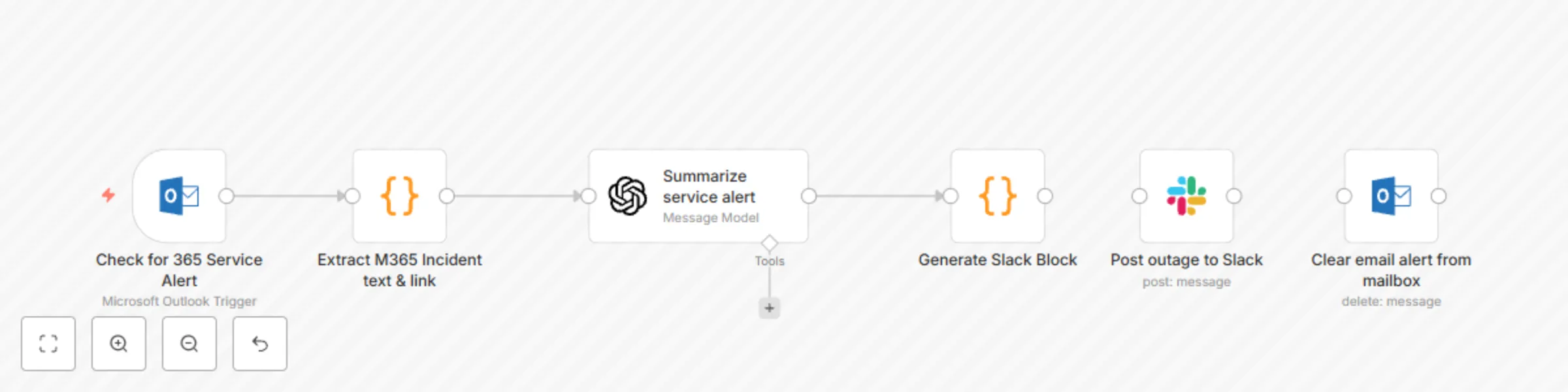
  • Scans for M365 outage alerts emails (every 1 min)
  • Checks if it impacts a specific user region (if the alert calls it out, countries have to be manually set)
  • Summarizes the incident using OpenAI o4-mini (cheap model - or you can swap for local Ollama)
  • Sends a Slack Block to your outage channel with incident link (can be extended)
  • Deletes the original alert email after successful delivery

Credentials

Outlook:
  • Create an Outlook credential (OAuth2.0) to point to the mailbox (regular or shared) where M365 service alerts will be received
Slack:
  • Create a Slack bot credential with access to the slack channel you want updates posted to
OpenAI:
  • Create a OpenAI credential that has access to the GPT-4O-MINI model.
  • Recommend you use projects in OpenAI so that you may set a per-project-budget and not impact other projects.

Review this OpenAI documentation for more info on managing Projects in the API portal. Expect this to consume no more than 1-2 cents per month on average.

Setup

  1. Download & import the workflow
  2. Modify the first Outlook block (Check for 365 Service Alert) to use the Outlook credential
  3. Modify the OpenAI block's system prompt to call out the countries your users reside in ie. "- Assume the organization has users primarily in the U.S. and Australia. If those regions are affected, state: "Your users may have been affected." Otherwise, add: "No impact expected for your user base."" ← swap U.S. & Australia for desired countries
  4. Modify the Slack block (Post outage to Slack) to specify the channel updates will be posted to

Sample Slack Output

Workflow Diagram

1.2 Logical Blocks

This catalog entry is organized from the workflow JSON. The node-level section below shows the executable blocks available for review before importing the template.

2. Block-by-Block Analysis

Block 1 - Check for 365 Service Alert

Type / Role
n8n-nodes-base.microsoftOutlookTrigger - microsoftOutlookTrigger
Config choices
Version 1

Block 2 - Post outage to Slack

Type / Role
n8n-nodes-base.slack - slack
Config choices
Version 2.3

Block 3 - Clear email alert from mailbox

Type / Role
n8n-nodes-base.microsoftOutlook - microsoftOutlook
Config choices
Version 2

Block 4 - Summarize service alert

Type / Role
@n8n/n8n-nodes-langchain.openAi - openAi
Config choices
Version 1.8

Block 5 - Generate Slack Block

Type / Role
n8n-nodes-base.code - code
Config choices
Version 2

Block 6 - Extract M365 Incident text & link

Type / Role
n8n-nodes-base.code - code
Config choices
Version 2

3. Summary Table

Workflow Summarize Microsoft 365 outage alerts with ChatGPT and send to Slack
Complexity intermediate
Nodes 6
Categories DevOps, AI Summarization
Author Luke
Published 29 Mar 2025

4. Reproducing the Workflow from Scratch

  1. 1. Download the workflow JSON

    Use the JSON export at /data/workflows/3353/3353.json as the source template for this automation.

  2. 2. Import the template into n8n

    Open n8n, import the downloaded JSON, and review each node before activating the workflow.

  3. 3. Configure credentials and variables

    Replace placeholder credentials, API keys, webhook URLs, account IDs, and environment-specific values with your own settings.

  4. 4. Test with sample data

    Run the workflow manually or in a staging workspace, inspect node output, and confirm downstream systems receive the expected data.

  5. 5. Activate and monitor

    Enable the workflow only after testing, then monitor executions, errors, and rate limits during the first production runs.

5. General Notes & Resources

Review imported nodes carefully before activation. This catalog entry is intended to help you inspect the workflow structure, understand required services, and find related templates faster.

Node names, credentials, schedules, webhook paths, and external service limits may need adjustment for your workspace.

Frequently asked questions

What does Summarize Microsoft 365 outage alerts with ChatGPT and send to Slack do?

Built this for a dedicated Slack outage notifications channel — works well on both desktop and mobile. This is for: IT Administrators & small MSPs looking to streamline M365 alerts from one or mult...

What do I need before importing this workflow?

Review the workflow JSON, configure any required credentials in n8n, and test the automation in a safe workspace before using it in production.

Can I customize this workflow?

Yes. Use the block-by-block analysis and the downloadable JSON to inspect each node, then adjust credentials, prompts, schedules, filters, or destinations for your DevOps, AI Summarization use case.