Summarize Japanese AI engineering articles from Qiita and note RSS to Slack

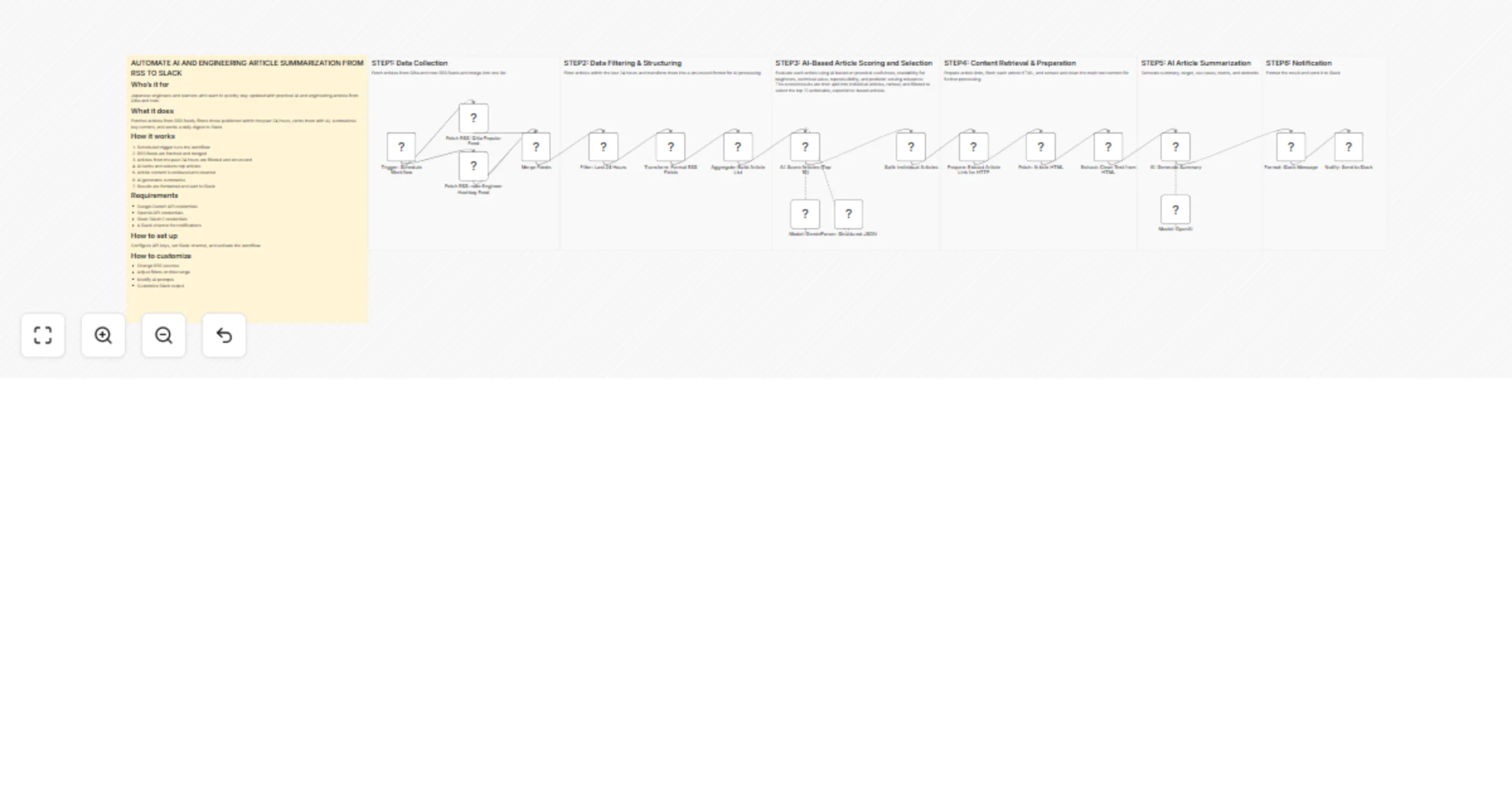
Workflow preview

Workflow preview
100%
Summarize Japanese AI engineering articles from Qiita and note RSS to Slack preview
Open on n8n.io

1. Workflow Overview

Who’s it for This workflow is designed for Japanese speaking individuals who want to efficiently stay up to date with practical, experience based AI and engineering insights shared by developers on...

Best for

  • Market Research automation workflows
  • AI Summarization automation workflows
  • advanced n8n builders looking for reusable templates

Tools used

n8n-nodes-base.scheduletrigger, n8n-nodes-base.rssfeedread, n8n-nodes-base.merge, @n8n/n8n-nodes-langchain.chainllm, @n8n/n8n-nodes-langchain.lmchatgooglegemini, @n8n/n8n-nodes-langchain.outputparserstructured, n8n-nodes-base.httprequest, n8n-nodes-base.code

Source and attribution

This workflow is cataloged by N8N Workflows and links back to its original n8n.io source page by Koyanagi Naoyuki.

Original n8n.io source

1.1 Workflow description

Title
Summarize Japanese AI engineering articles from Qiita and note RSS to Slack
Workflow name
Summarize Japanese AI engineering articles from Qiita and note RSS to Slack

Who’s it for

This workflow is designed for Japanese-speaking individuals who want to efficiently stay up to date with practical, experience-based AI and engineering insights shared by developers on platforms like Qiita and note.

It specifically targets users who prefer real-world knowledge such as implementation examples, troubleshooting solutions, and hands-on AI use cases written in Japanese, rather than generalized global IT news or curated media content.

The workflow is optimized for those who want to quickly consume high-quality Japanese technical content on a daily basis.


What it does

This workflow collects, processes, and summarizes Japanese AI and engineering-related articles published within the last 24 hours from Qiita and note RSS feeds.

It merges multiple RSS sources, filters only recent articles (last 24 hours), and prepares structured data for AI processing.

Then, it uses AI to evaluate and rank the articles, selects the most valuable ones, retrieves each article page, extracts readable content, and generates structured summaries in Japanese, including:

  • Summary
  • Target audience
  • Use cases
  • Merits
  • Demerits

Finally, it formats the results and sends a daily digest to Slack in Japanese.

Users can also customize RSS sources to match their preferred content.


How it works

  1. A scheduled trigger starts the workflow automatically.
  2. RSS feeds from Qiita and note are fetched and merged.
  3. Articles are filtered to only include those published within the last 24 hours.
  4. Articles are normalized into a structured format for AI processing.
  5. Gemini evaluates and ranks articles based on usefulness and selects the top 10.
  6. Article links are prepared and each page is fetched.
  7. HTML is cleaned and converted into readable text.
  8. OpenAI generates structured summaries in Japanese.
  9. The final digest is formatted and posted to Slack in Japanese.

Requirements

  • Google Gemini API credentials
  • OpenAI API credentials
  • Slack OAuth2 credentials
  • A Slack channel for notifications

How to set up

Add your API credentials in n8n, set the Slack destination channel, review and adjust the AI prompts if needed, and activate the workflow.

You can also customize RSS sources depending on your preferred Japanese content (e.g., specific hashtags, niche blogs, or categories).


How to customize the workflow

You can customize this workflow by:

  • Adding or replacing RSS sources (e.g., Japanese niche engineering blogs or communities)
  • Adjusting filtering conditions (e.g., time range beyond 24 hours or keyword-based filtering)
  • Refining AI scoring criteria to better match your interests
  • Modifying summary structure or output format (Japanese-focused customization)
  • Customizing Slack message layout for better readability
  • Changing the output language (default is Japanese)

1.2 Logical Blocks

This catalog entry is organized from the workflow JSON. The node-level section below shows the executable blocks available for review before importing the template.

2. Block-by-Block Analysis

Block 1 - Trigger: Schedule Workflow

Type / Role
n8n-nodes-base.scheduleTrigger - scheduleTrigger
Config choices
Version 1.3

Block 2 - Fetch RSS: Qiita Popular Feed

Type / Role
n8n-nodes-base.rssFeedRead - rssFeedRead
Config choices
Version 1.2

Block 3 - Merge Feeds

Type / Role
n8n-nodes-base.merge - merge
Config choices
Version 3.2

Block 4 - AI: Score Articles (Top 10)

Type / Role
@n8n/n8n-nodes-langchain.chainLlm - chainLlm
Config choices
Version 1.9

Block 5 - Model: Gemini

Type / Role
@n8n/n8n-nodes-langchain.lmChatGoogleGemini - lmChatGoogleGemini
Config choices
Version 1

Block 6 - Parser: Structured JSON

Type / Role
@n8n/n8n-nodes-langchain.outputParserStructured - outputParserStructured
Config choices
Version 1.3

Block 7 - Fetch: Article HTML

Type / Role
n8n-nodes-base.httpRequest - httpRequest
Config choices
Version 4.4

Block 8 - Format: Slack Message

Type / Role
n8n-nodes-base.code - code
Config choices
Version 2

Block 9 - Notify: Send to Slack

Type / Role
n8n-nodes-base.slack - slack
Config choices
Version 2.4

Block 10 - AI: Generate Summary

Type / Role
@n8n/n8n-nodes-langchain.agent - agent
Config choices
Version 3.1

Block 11 - Model: OpenAI

Type / Role
@n8n/n8n-nodes-langchain.lmChatOpenAi - lmChatOpenAi
Config choices
Version 1.3

Block 12 - Filter: Last 24 Hours

Type / Role
n8n-nodes-base.code - code
Config choices
Version 2

Block 13 - Aggregate: Build Article List

Type / Role
n8n-nodes-base.aggregate - aggregate
Config choices
Version 1

Block 14 - Split: Individual Articles

Type / Role
n8n-nodes-base.splitOut - splitOut
Config choices
Version 1

Block 15 - STEP1

Type / Role
n8n-nodes-base.stickyNote - stickyNote
Config choices
Version 1

Block 16 - STEP2

Type / Role
n8n-nodes-base.stickyNote - stickyNote
Config choices
Version 1

Block 17 - STEP3

Type / Role
n8n-nodes-base.stickyNote - stickyNote
Config choices
Version 1

Block 18 - STEP4

Type / Role
n8n-nodes-base.stickyNote - stickyNote
Config choices
Version 1

Block 19 - STEP5

Type / Role
n8n-nodes-base.stickyNote - stickyNote
Config choices
Version 1

Block 20 - STEP6

Type / Role
n8n-nodes-base.stickyNote - stickyNote
Config choices
Version 1

Block 21 - WORKFLOW OVERVIEW

Type / Role
n8n-nodes-base.stickyNote - stickyNote
Config choices
Version 1

Block 22 - Prepare: Extract Article Link for HTTP

Type / Role
n8n-nodes-base.set - set
Config choices
Version 3.4

Block 23 - Fetch RSS: note Engineer Hashtag Feed

Type / Role
n8n-nodes-base.rssFeedRead - rssFeedRead
Config choices
Version 1.2

Block 24 - Transform: Format RSS Fields

Type / Role
n8n-nodes-base.set - set
Config choices
Version 3.4

Showing the first 24 of 25 workflow blocks. Download the JSON for the full node graph.

3. Summary Table

Workflow Summarize Japanese AI engineering articles from Qiita and note RSS to Slack
Complexity advanced
Nodes 25
Categories Market Research, AI Summarization
Author Koyanagi Naoyuki
Published 10 Apr 2026

4. Reproducing the Workflow from Scratch

  1. 1. Download the workflow JSON

    Use the JSON export at /data/workflows/14980/14980.json as the source template for this automation.

  2. 2. Import the template into n8n

    Open n8n, import the downloaded JSON, and review each node before activating the workflow.

  3. 3. Configure credentials and variables

    Replace placeholder credentials, API keys, webhook URLs, account IDs, and environment-specific values with your own settings.

  4. 4. Test with sample data

    Run the workflow manually or in a staging workspace, inspect node output, and confirm downstream systems receive the expected data.

  5. 5. Activate and monitor

    Enable the workflow only after testing, then monitor executions, errors, and rate limits during the first production runs.

5. General Notes & Resources

Review imported nodes carefully before activation. This catalog entry is intended to help you inspect the workflow structure, understand required services, and find related templates faster.

Node names, credentials, schedules, webhook paths, and external service limits may need adjustment for your workspace.

Frequently asked questions

What does Summarize Japanese AI engineering articles from Qiita and note RSS to Slack do?

Who’s it for This workflow is designed for Japanese speaking individuals who want to efficiently stay up to date with practical, experience based AI and engineering insights shared by developers on...

What do I need before importing this workflow?

Review the workflow JSON, configure any required credentials in n8n, and test the automation in a safe workspace before using it in production.

Can I customize this workflow?

Yes. Use the block-by-block analysis and the downloadable JSON to inspect each node, then adjust credentials, prompts, schedules, filters, or destinations for your Market Research, AI Summarization use case.