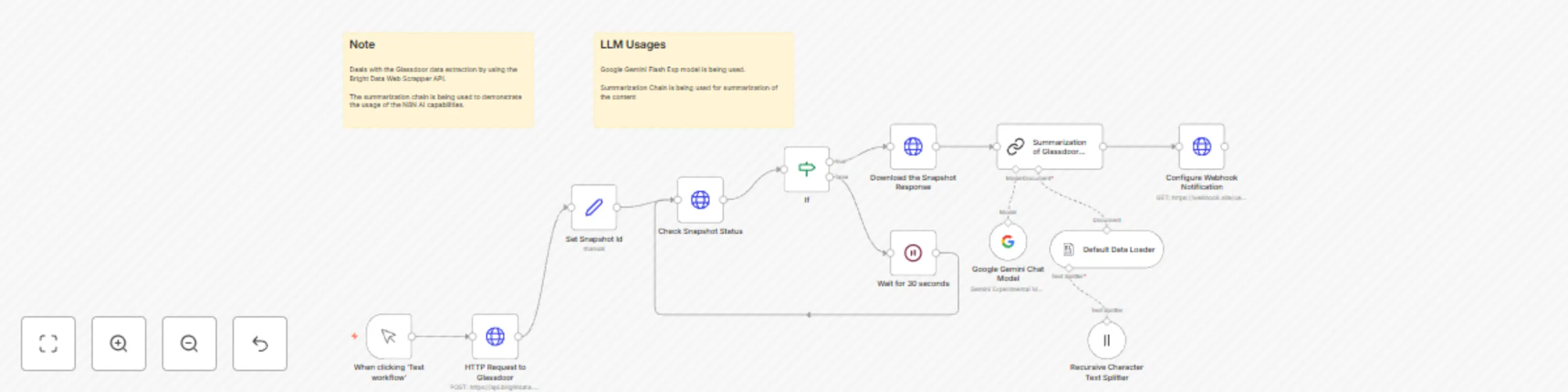
Summarize Glassdoor company info with Google Gemini and Bright Data web scraper

Workflow preview

Workflow preview
100%
Summarize Glassdoor company info with Google Gemini and Bright Data web scraper preview
Open on n8n.io

Important notice

This workflow is provided as-is. Please review and test before using in production.

1. Workflow Overview

Who is this for? This workflow is designed for HR professionals, employer branding teams, talent acquisition strategists, market researchers, and business intelligence analysts who want to monitor,...

Best for

  • Market Research automation workflows
  • AI Summarization automation workflows
  • intermediate n8n builders looking for reusable templates

Tools used

n8n-nodes-base.manualtrigger, @n8n/n8n-nodes-langchain.lmchatgooglegemini, @n8n/n8n-nodes-langchain.documentdefaultdataloader, @n8n/n8n-nodes-langchain.textsplitterrecursivecharactertextsplitter, n8n-nodes-base.if, n8n-nodes-base.set, n8n-nodes-base.stickynote, n8n-nodes-base.httprequest

Source and attribution

This workflow is cataloged by N8N Workflows and links back to its original n8n.io source page by Ranjan Dailata.

Original n8n.io source

1.1 Workflow description

Title
Summarize Glassdoor company info with Google Gemini and Bright Data web scraper
Workflow name
Summarize Glassdoor company info with Google Gemini and Bright Data web scraper

Who is this for?

This workflow is designed for HR professionals, employer branding teams, talent acquisition strategists, market researchers, and business intelligence analysts who want to monitor, understand, and act upon employee sentiment and company perception on Glassdoor.

It's ideal for organizations that value real-time feedback, are tracking employer brand perception, or need summarized insights for leadership reporting without sifting through thousands of raw reviews.

What problem is this workflow solving?

Manually reviewing and analyzing Glassdoor reviews is tedious, subjective, and not scalable especially for larger companies or those with many subsidiaries. This workflow:

  • Automates review collection by making a Glassdoor company request via the Bright Data Web Scrapper API.
  • Uses Google Gemini to summarize the content.
  • Sends an actionable summary to HR dashboards, leadership teams, or alert systems via the Webhook notification.

What this workflow does

  • Makes an HTTP Request to Glassdoor via the Bright Data Web Scrapper API.
  • Polls the BrightData Glassdoor for the completion of the request.
  • Downloads the Glassdoor response when a new snapshot is ready.
  • Sends the prompt to Google Gemini for summarization.
  • Delivers the summarized insights (strengths, weaknesses, sentiment, patterns) to a configured webhook or dashboard endpoint.

Setup

  • Sign up at Bright Data.
  • Navigate to Proxies & Scraping and create a new Web Unlocker zone by selecting Web Unlocker API under Scraping Solutions.
  • In n8n, configure the Header Auth account under Credentials (Generic Auth Type: Header Authentication). The Value field should be set with the Bearer XXXXXXXXXXXXXX. The XXXXXXXXXXXXXX should be replaced by the Web Unlocker Token.
  • A Google Gemini API key (or access through Vertex AI or proxy).
  • A webhook or endpoint to receive the summary (e.g., Slack, Notion, or custom HR dashboard).

How to customize this workflow to your needs

  1. Change Summary Focus by updating the Summarization of Glassdoor Response node Summarization methods and prompts to extract specific insights:
  • Cultural feedback
  • Leadership issues
  • Compensation comments
  • Exit motivation
  1. Update the HTTP Request to Glassdoor node with a specific Glassdoor Company information that you are looking for.
  2. Format the output to produce a customized summary to Markdown or HTML for rich delivery.
  3. Integrate with HR Systems
  • BambooHR, Workday, SAP SuccessFactors via API.
  • Google Sheets or Airtable

1.2 Logical Blocks

This catalog entry is organized from the workflow JSON. The node-level section below shows the executable blocks available for review before importing the template.

2. Block-by-Block Analysis

Block 1 - When clicking ‘Test workflow’

Type / Role
n8n-nodes-base.manualTrigger - manualTrigger
Config choices
Version 1

Block 2 - Google Gemini Chat Model

Type / Role
@n8n/n8n-nodes-langchain.lmChatGoogleGemini - lmChatGoogleGemini
Config choices
Version 1

Block 3 - Default Data Loader

Type / Role
@n8n/n8n-nodes-langchain.documentDefaultDataLoader - documentDefaultDataLoader
Config choices
Version 1

Block 4 - Recursive Character Text Splitter

Type / Role
@n8n/n8n-nodes-langchain.textSplitterRecursiveCharacterTextSplitter - textSplitterRecursiveCharacterTextSplitter
Config choices
Version 1

Block 5 - If

Type / Role
n8n-nodes-base.if - if
Config choices
Version 2.2

Block 6 - Set Snapshot Id

Type / Role
n8n-nodes-base.set - set
Config choices
Version 3.4

Block 7 - Sticky Note

Type / Role
n8n-nodes-base.stickyNote - stickyNote
Config choices
Version 1

Block 8 - Sticky Note1

Type / Role
n8n-nodes-base.stickyNote - stickyNote
Config choices
Version 1

Block 9 - Check Snapshot Status

Type / Role
n8n-nodes-base.httpRequest - httpRequest
Config choices
Version 4.2

Block 10 - Download the Snapshot Response

Type / Role
n8n-nodes-base.httpRequest - httpRequest
Config choices
Version 4.2

Block 11 - Wait for 30 seconds

Type / Role
n8n-nodes-base.wait - wait
Config choices
Version 1.1

Block 12 - Summarization of Glassdoor Response

Type / Role
@n8n/n8n-nodes-langchain.chainSummarization - chainSummarization
Config choices
Version 2

Block 13 - Configure Webhook Notification

Type / Role
n8n-nodes-base.httpRequest - httpRequest
Config choices
Version 4.2

Block 14 - HTTP Request to Glassdoor

Type / Role
n8n-nodes-base.httpRequest - httpRequest
Config choices
Version 4.2

3. Summary Table

Workflow Summarize Glassdoor company info with Google Gemini and Bright Data web scraper
Complexity intermediate
Nodes 14
Categories Market Research, AI Summarization
Author Ranjan Dailata
Published 13 Apr 2025

4. Reproducing the Workflow from Scratch

  1. 1. Download the workflow JSON

    Use the JSON export at /data/workflows/3532/3532.json as the source template for this automation.

  2. 2. Import the template into n8n

    Open n8n, import the downloaded JSON, and review each node before activating the workflow.

  3. 3. Configure credentials and variables

    Replace placeholder credentials, API keys, webhook URLs, account IDs, and environment-specific values with your own settings.

  4. 4. Test with sample data

    Run the workflow manually or in a staging workspace, inspect node output, and confirm downstream systems receive the expected data.

  5. 5. Activate and monitor

    Enable the workflow only after testing, then monitor executions, errors, and rate limits during the first production runs.

5. General Notes & Resources

Review imported nodes carefully before activation. This catalog entry is intended to help you inspect the workflow structure, understand required services, and find related templates faster.

Node names, credentials, schedules, webhook paths, and external service limits may need adjustment for your workspace.

Frequently asked questions

What does Summarize Glassdoor company info with Google Gemini and Bright Data web scraper do?

Who is this for? This workflow is designed for HR professionals, employer branding teams, talent acquisition strategists, market researchers, and business intelligence analysts who want to monitor,...

What do I need before importing this workflow?

Review the workflow JSON, configure any required credentials in n8n, and test the automation in a safe workspace before using it in production.

Can I customize this workflow?

Yes. Use the block-by-block analysis and the downloadable JSON to inspect each node, then adjust credentials, prompts, schedules, filters, or destinations for your Market Research, AI Summarization use case.