Submit iOS meeting notes to Obsidian using local AI transcription

Workflow preview

Workflow preview
100%
Submit iOS meeting notes to Obsidian using local AI transcription preview
Open on n8n.io

Important notice

This workflow is provided as-is. Please review and test before using in production.

1. Workflow Overview

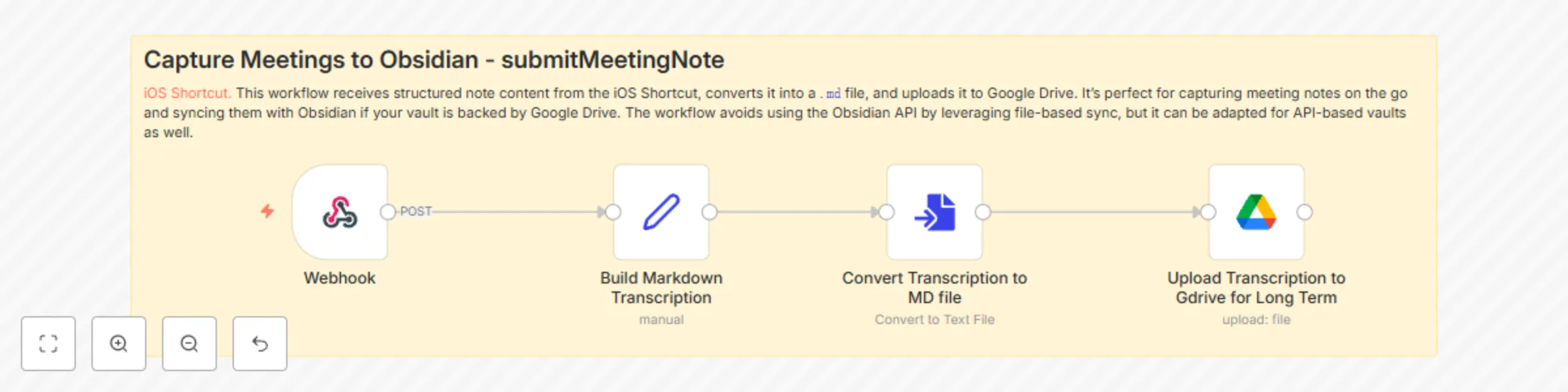
This workflow enables seamless, privacy first capture of meeting notes from your iPhone. It pairs with an iOS Shortcut that leve...

Best for

  • Personal Productivity automation workflows
  • intermediate n8n builders looking for reusable templates

Tools used

n8n-nodes-base.webhook, n8n-nodes-base.stickynote, n8n-nodes-base.set, n8n-nodes-base.converttofile, n8n-nodes-base.googledrive

Source and attribution

This workflow is cataloged by N8N Workflows and links back to its original n8n.io source page by Angel Menendez.

Original n8n.io source

1.1 Workflow description

Title
Submit iOS meeting notes to Obsidian using local AI transcription
Workflow name
Submit iOS meeting notes to Obsidian using local AI transcription

This workflow enables seamless, privacy-first capture of meeting notes from your iPhone. It pairs with an iOS Shortcut that leverages Apple’s on-device transcription from the Voice Memos app and optionally passes the output to ChatGPT or a local AI model for summarization.

Who it's for

  • Anyone who wants fast, secure note capture on iOS
  • Professionals (e.g., lawyers, therapists) who require on-device processing for privacy
  • Obsidian users who want to sync mobile notes via Google Drive

What it does

  1. You record a voice memo in the iOS Voice Memos app.
  2. The Shortcut transcribes it locally (no API or cloud involved).
  3. Optionally, a summarization step is done via ChatGPT or a replaceable local model.
  4. The data is sent to an n8n webhook, where it’s converted into a .md file.
  5. The Markdown file is uploaded to a Google Drive folder synced with your Obsidian vault.

Key Benefits

  • 🧠 Keeps your meeting notes private — no cloud APIs required
  • 🗃️ Easily searchable in Obsidian as structured Markdown files
  • 🛠️ Fully local if you swap out ChatGPT for a local model (can be less stable)

Limitations

  • Transcriptions longer than ~1 hour may fail or produce unstable results.
  • Some setup required to replace ChatGPT with a local model in the Shortcut.

Setup

  • Install and configure the iOS Shortcut
  • Replace the ChatGPT step in the Shortcut if you need full local-only processing
  • Point the webhook in the Shortcut to your n8n instance
  • Make sure your Obsidian vault is synced with the Google Drive folder used in the workflow
  • Update any of the prompts in the iOS shortcut to ensure its personalized.

> ⚡ Pro Tip: Use a Set node early on to clearly define the filename, title, and text so it's easier to modify this for other note types (e.g., journals, therapy sessions, etc.)

1.2 Logical Blocks

This catalog entry is organized from the workflow JSON. The node-level section below shows the executable blocks available for review before importing the template.

2. Block-by-Block Analysis

Block 1 - Webhook

Type / Role
n8n-nodes-base.webhook - webhook
Config choices
Version 2

Block 2 - Sticky Note

Type / Role
n8n-nodes-base.stickyNote - stickyNote
Config choices
Version 1

Block 3 - Build Markdown Transcription

Type / Role
n8n-nodes-base.set - set
Config choices
Version 3.4

Block 4 - Convert Transcription to MD file

Type / Role
n8n-nodes-base.convertToFile - convertToFile
Config choices
Version 1.1

Block 5 - Upload Transcription to Gdrive for Long Term

Type / Role
n8n-nodes-base.googleDrive - googleDrive
Config choices
Version 3

3. Summary Table

Workflow Submit iOS meeting notes to Obsidian using local AI transcription
Complexity intermediate
Nodes 5
Categories Personal Productivity
Author Angel Menendez
Published 03 Nov 2025

4. Reproducing the Workflow from Scratch

  1. 1. Download the workflow JSON

    Use the JSON export at /data/workflows/10482/10482.json as the source template for this automation.

  2. 2. Import the template into n8n

    Open n8n, import the downloaded JSON, and review each node before activating the workflow.

  3. 3. Configure credentials and variables

    Replace placeholder credentials, API keys, webhook URLs, account IDs, and environment-specific values with your own settings.

  4. 4. Test with sample data

    Run the workflow manually or in a staging workspace, inspect node output, and confirm downstream systems receive the expected data.

  5. 5. Activate and monitor

    Enable the workflow only after testing, then monitor executions, errors, and rate limits during the first production runs.

5. General Notes & Resources

Review imported nodes carefully before activation. This catalog entry is intended to help you inspect the workflow structure, understand required services, and find related templates faster.

Node names, credentials, schedules, webhook paths, and external service limits may need adjustment for your workspace.

Frequently asked questions

What does Submit iOS meeting notes to Obsidian using local AI transcription do?

This workflow enables seamless, privacy first capture of meeting notes from your iPhone. It pairs with an iOS Shortcut that leve...

What do I need before importing this workflow?

Review the workflow JSON, configure any required credentials in n8n, and test the automation in a safe workspace before using it in production.

Can I customize this workflow?

Yes. Use the block-by-block analysis and the downloadable JSON to inspect each node, then adjust credentials, prompts, schedules, filters, or destinations for your Personal Productivity use case.