Student absence alerts via email & WhatsApp with attendance tracking
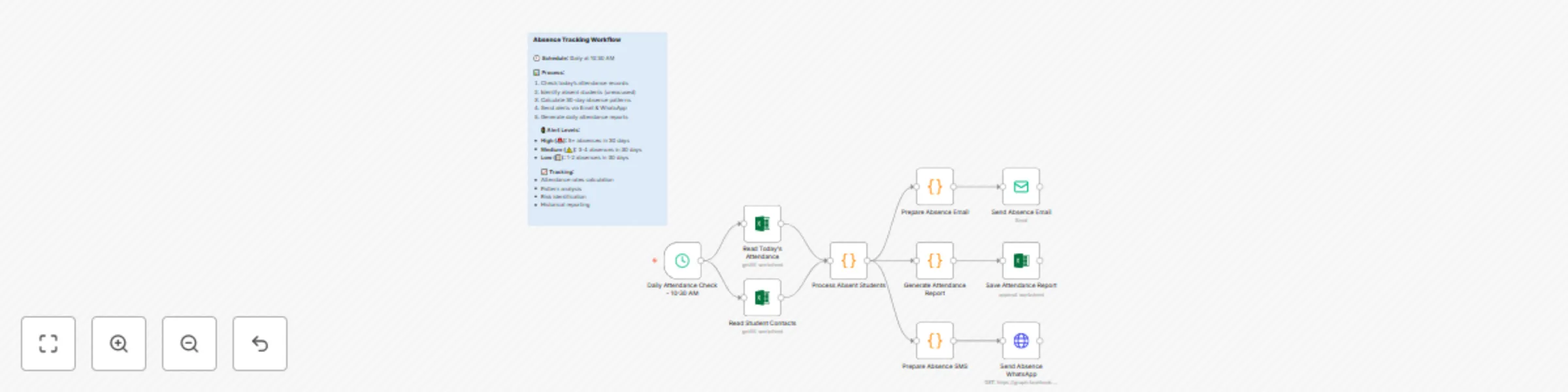
Workflow preview


 Early Deal
DISCOUNT 20%

Important notice
This workflow is provided as-is. Please review and test before using in production.
Overview
📘 Student Absence Alerts & Attendance Tracking Automation
Automatically alerts parents about student absences and tracks 30-day attendance patterns to identify risks and trends.
🔧 Main Components
Daily Attendance Check – 10:30 AM Triggers the workflow every day at 10:30 AM.
Read Today’s Attendance Retrieves current-day attendance records from the source Excel or database.
Read Student Contacts Reads contact details (email, phone) of students for alert delivery.
Process Absent Students Identifies students who are absent and unexcused for the day.
Prepare Absence Email Generates customized email content for absent students.
Send Absence Email Sends an absence alert email to the student’s parent/guardian.
Prepare Absence SMS Formats WhatsApp-friendly message for alerts.
Send Absence WhatsApp Sends the WhatsApp message using API (e.g., Facebook Graph).
Generate Attendance Report Prepares a daily attendance summary with absence level classifications.
Save Attendance Report Appends the generated report to a historical attendance sheet.
⚠️ Alert Logic
Based on the past 30-day absence pattern, the system classifies students into:
| Level | Absences in 30 Days | Status |
|---|---|---|
| 🔴 High | 5+ | Critical Alert |
| 🟡 Medium | 3–4 | Warning |
| 🟢 Low | 1–2 | Low Risk |
📊 Tracking Features
- 🔢 Attendance Rate Calculation – Tracks each student's attendance percentage
- 🔍 Pattern Analysis – Detects recurring absenteeism trends
- 🚨 Risk Identification – Flags high-risk students for early intervention
- 📈 Historical Reporting – Maintains daily logs for future reference
✅ Essential Prerequisites
- Excel sheet or database with daily attendance logs
- Excel sheet or database with student contact details
- SMTP credentials for sending emails
- WhatsApp API integration (e.g., Facebook Graph or Twilio)
- Storage access for saving attendance reports
📁 Required Excel File Structures
Attendance Sheet (daily_attendance.xlsx)
| Student ID | Date | Status |
|---|---|---|
| ST101 | 2025-08-06 | Absent |
Contacts Sheet (student_contacts.xlsx)
| Student ID | Name | Phone | |
|---|---|---|---|
| ST101 | Aryan Shah | [email protected] | +919123456789 |
🧾 Expected Input Format Example
{
  "studentId": "ST101",
  "name": "Aryan Shah",
  "email": "[email protected]",
  "phone": "+919123456789",
  "status": "Absent",
  "date": "2025-08-06"
}
🚀 Key Features
- ⏰ Scheduled Daily Execution – Automated tracking at 10:30 AM
- ✉️ Multi-Channel Notifications – Email + WhatsApp alerts to parents
- 📊 Absence Pattern Monitoring – 30-day trend analysis
- 🧠 Risk-Based Alerts – Smart classification into alert levels
- 🗂️ Daily Reports – Easy to audit attendance summary logs
⚙️ Quick Setup Guide
- Import Workflow JSON into n8n.
- Configure schedule trigger at 10:30 AM.
- Set Excel file paths in "Read Today’s Attendance" and "Read Student Contacts".
- Customize absence thresholds in the “Process Absent Students” node.
- Add SMTP details for the “Send Absence Email” node.
- Integrate WhatsApp API in the “Send Absence WhatsApp” node.
- Test with mock data and review reports.
- Activate the workflow.
🔧 Parameters to Configure
| Parameter | Description |
|---|---|
attendance_file_path |
Path to today's attendance records |
contacts_file_path |
Path to student contacts sheet |
smtp_user |
Email username for SMTP server |
smtp_password |
Password for SMTP server |
whatsapp_api_url |
Endpoint for sending WhatsApp messages |
alert_thresholds |
Absence count thresholds for alerts |