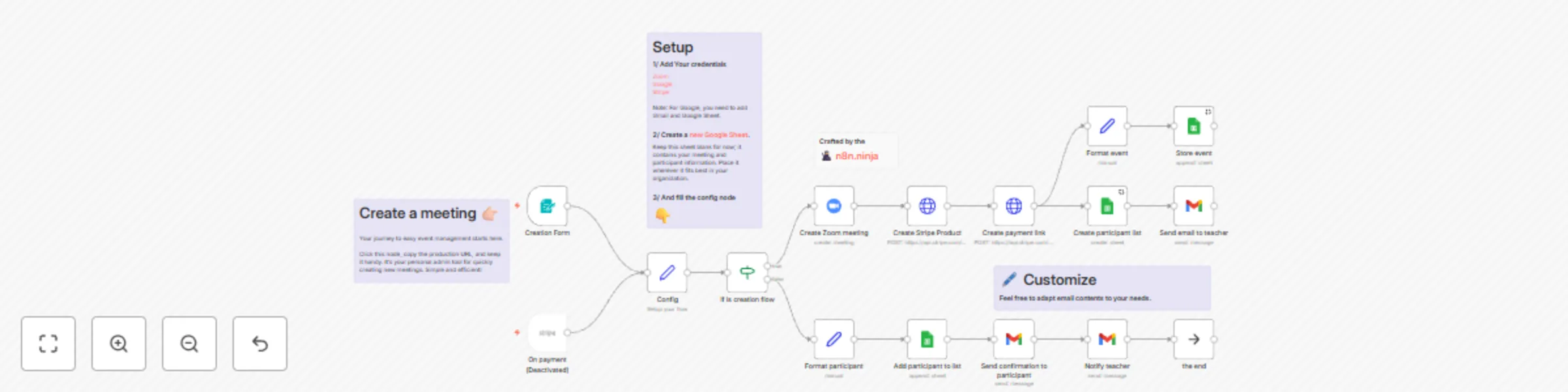
Streamline your Zoom meetings with secure, automated Stripe payments

Workflow preview

Workflow preview
100%
Streamline your Zoom meetings with secure, automated Stripe payments preview
Open on n8n.io

Important notice

This workflow is provided as-is. Please review and test before using in production.

1. Workflow Overview

Do you want to master AI automation, so you can save time and build cool stuff? I’ve created a welcoming Skool community for non technical yet resourceful learners. 🏻 [Join the AI Atelier](ht...

Best for

  • Miscellaneous automation workflows
  • advanced n8n builders looking for reusable templates

Tools used

n8n-nodes-base.zoom, n8n-nodes-base.httprequest, n8n-nodes-base.set, n8n-nodes-base.gmail, n8n-nodes-base.googlesheets, n8n-nodes-base.formtrigger, n8n-nodes-base.stripetrigger, n8n-nodes-base.stickynote

Source and attribution

This workflow is cataloged by N8N Workflows and links back to its original n8n.io source page by Emmanuel Bernard - n8n Expert Lausanne.

Original n8n.io source

1.1 Workflow description

Title
Streamline your Zoom meetings with secure, automated Stripe payments
Workflow name
Streamline your Zoom meetings with secure, automated Stripe payments

🎉 Do you want to master AI automation, so you can save time and build cool stuff?

I’ve created a welcoming Skool community for non-technical yet resourceful learners.

👉🏻 Join the AI Atelier 👈🏻


Unlock streamlined Zoom Meeting organization and exclusive access management with this n8n workflow. Designed for educators, event organizers, and businesses, this tool automates your event logistics, so you can focus on delivering valuable content.

Features

  • Zoom Meetings Creation: Instantly generate new Zoom meetings with the n8n built-in form.
  • Collect Payments Using Stripe: Effortlessly monetize your events with secure, automatically created Stripe payment pages for each meeting.
  • Exclusive Gated Access: Ensure your content remains exclusive by sending Zoom meeting passwords only to verified subscribers who have completed their payment through Stripe.
  • Participants Email Notifications: Automate the distribution of Zoom meeting details post-payment, eliminating the need for manual email management and ensuring participants are promptly informed.
  • Instant and Easy Participants Overview: Manage and track your event registrations with ease. All related data is stored in a Google Sheets document that you own. You're notified via email with each new subscription, simplifying participant management.

Set Up Steps

  • Connect your Zoom, Stripe, Gmail and Google Sheet credentials.
  • Create an empty Google Sheet in your Google Drive.
  • Fill the config node (Sheet URL, email and currency).
  • Edit email text.

This n8n workflow template is designed to minimize setup time and maximize efficiency, allowing you to focus on delivering value to your subscribers. With just a few clicks, you can automate the entire process of organizing and monetizing your Zoom meetings.

Created by the n8ninja.

1.2 Logical Blocks

This catalog entry is organized from the workflow JSON. The node-level section below shows the executable blocks available for review before importing the template.

2. Block-by-Block Analysis

Block 1 - Create Zoom meeting

Type / Role
n8n-nodes-base.zoom - zoom
Config choices
Version 1

Block 2 - Create Stripe Product

Type / Role
n8n-nodes-base.httpRequest - httpRequest
Config choices
Version 4.1

Block 3 - Config

Type / Role
n8n-nodes-base.set - set
Config choices
Version 3.3

Block 4 - Send email to teacher

Type / Role
n8n-nodes-base.gmail - gmail
Config choices
Version 2.1

Block 5 - Create participant list

Type / Role
n8n-nodes-base.googleSheets - googleSheets
Config choices
Version 4.3

Block 6 - Add participant to list

Type / Role
n8n-nodes-base.googleSheets - googleSheets
Config choices
Version 4.3

Block 7 - Send confirmation to participant

Type / Role
n8n-nodes-base.gmail - gmail
Config choices
Version 2.1

Block 8 - Notify teacher

Type / Role
n8n-nodes-base.gmail - gmail
Config choices
Version 2.1

Block 9 - Create payment link

Type / Role
n8n-nodes-base.httpRequest - httpRequest
Config choices
Version 4.1

Block 10 - Format participant

Type / Role
n8n-nodes-base.set - set
Config choices
Version 3.3

Block 11 - Format event

Type / Role
n8n-nodes-base.set - set
Config choices
Version 3.3

Block 12 - Store event

Type / Role
n8n-nodes-base.googleSheets - googleSheets
Config choices
Version 4.3

Block 13 - Creation Form

Type / Role
n8n-nodes-base.formTrigger - formTrigger
Config choices
Version 2

Block 14 - On payment

Type / Role
n8n-nodes-base.stripeTrigger - stripeTrigger
Config choices
Version 1

Block 15 - Sticky Note1

Type / Role
n8n-nodes-base.stickyNote - stickyNote
Config choices
Version 1

Block 16 - Sticky Note2

Type / Role
n8n-nodes-base.stickyNote - stickyNote
Config choices
Version 1

Block 17 - Sticky Note3

Type / Role
n8n-nodes-base.stickyNote - stickyNote
Config choices
Version 1

Block 18 - if is creation flow

Type / Role
n8n-nodes-base.if - if
Config choices
Version 2

Block 19 - Sticky Note

Type / Role
n8n-nodes-base.stickyNote - stickyNote
Config choices
Version 1

Block 20 - the end

Type / Role
n8n-nodes-base.noOp - noOp
Config choices
Version 1

3. Summary Table

Workflow Streamline your Zoom meetings with secure, automated Stripe payments
Complexity advanced
Nodes 20
Categories Miscellaneous
Author Emmanuel Bernard - n8n Expert Lausanne
Published 25 Mar 2024

4. Reproducing the Workflow from Scratch

  1. 1. Download the workflow JSON

    Use the JSON export at /data/workflows/2192/2192.json as the source template for this automation.

  2. 2. Import the template into n8n

    Open n8n, import the downloaded JSON, and review each node before activating the workflow.

  3. 3. Configure credentials and variables

    Replace placeholder credentials, API keys, webhook URLs, account IDs, and environment-specific values with your own settings.

  4. 4. Test with sample data

    Run the workflow manually or in a staging workspace, inspect node output, and confirm downstream systems receive the expected data.

  5. 5. Activate and monitor

    Enable the workflow only after testing, then monitor executions, errors, and rate limits during the first production runs.

5. General Notes & Resources

Review imported nodes carefully before activation. This catalog entry is intended to help you inspect the workflow structure, understand required services, and find related templates faster.

Node names, credentials, schedules, webhook paths, and external service limits may need adjustment for your workspace.

Frequently asked questions

What does Streamline your Zoom meetings with secure, automated Stripe payments do?

Do you want to master AI automation, so you can save time and build cool stuff? I’ve created a welcoming Skool community for non technical yet resourceful learners. 🏻 [Join the AI Atelier](ht...

What do I need before importing this workflow?

Review the workflow JSON, configure any required credentials in n8n, and test the automation in a safe workspace before using it in production.

Can I customize this workflow?

Yes. Use the block-by-block analysis and the downloadable JSON to inspect each node, then adjust credentials, prompts, schedules, filters, or destinations for your Miscellaneous use case.