Social media content generator and publisher | X, Linkedin

Workflow preview

Workflow preview
100%
Social media content generator and publisher | X, Linkedin preview
Open on n8n.io

Important notice

This workflow is provided as-is. Please review and test before using in production.

1. Workflow Overview

Generate and Publish AI Content to LinkedIn and X (Twitter) with n8n Overview This n8n workflow automates the generation and publishing of AI powered social media content across LinkedIn and X (for...

Best for

  • Social Media automation workflows
  • Multimodal AI automation workflows
  • intermediate n8n builders looking for reusable templates

Tools used

@n8n/n8n-nodes-langchain.lmchatgooglegemini, n8n-nodes-base.formtrigger, @n8n/n8n-nodes-langchain.agent, @n8n/n8n-nodes-langchain.outputparserstructured, n8n-nodes-base.twitter, n8n-nodes-base.linkedin, n8n-nodes-base.merge, n8n-nodes-base.form

Source and attribution

This workflow is cataloged by N8N Workflows and links back to its original n8n.io source page by ömer.

Original n8n.io source

1.1 Workflow description

Title
Social media content generator and publisher | X, Linkedin
Workflow name
Social media content generator and publisher | X, Linkedin

Generate and Publish AI Content to LinkedIn and X (Twitter) with n8n

Overview

This n8n workflow automates the generation and publishing of AI-powered social media content across LinkedIn and X (formerly Twitter). By leveraging AI, this workflow helps social media managers, marketers, and content creators streamline their posting process.

Who is this for?

  • Social media managers
  • Content creators
  • Digital marketers
  • Businesses looking to automate content generation

Features

  • AI-powered content creation tailored for LinkedIn and X (Twitter)
  • Automated publishing to both platforms
  • Structured output parsing to ensure consistency
  • OAuth2 authentication for secure posting
  • Merge and confirmation steps to track successful postings

Setup Instructions

Prerequisites

Before using this workflow, ensure you have:

  • An n8n instance set up
  • API credentials for:
    • Google Gemini AI (for content generation)
    • X Developer Account with OAuth2 authentication
    • LinkedIn Developer Account with OAuth2 authentication
  • A form submission service integrated with n8n

Workflow Breakdown

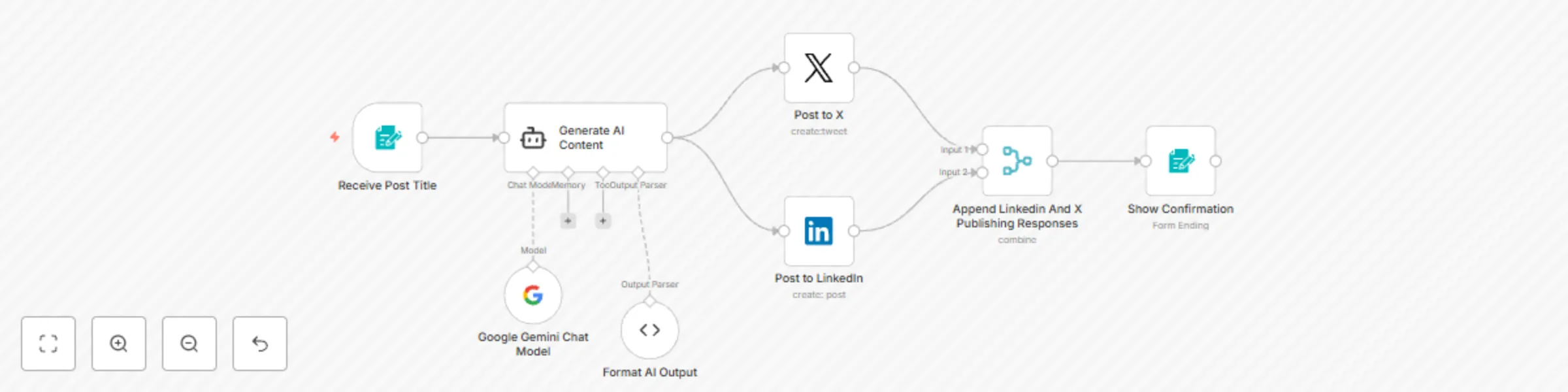
1. Trigger: Form Submission

  • A user submits a form containing the post title.
  • The form is secured with Basic Authentication.
  • The submitted title is passed to the AI Agent.

2. AI Content Generation

  • The Google Gemini Chat Model processes the title and generates:
    • LinkedIn post content
    • Twitter (X) post content
    • Hashtags
    • Call-to-action (LinkedIn)
    • Character limit check (Twitter)

3. Parsing AI Output

  • A structured output parser converts the AI-generated content into a JSON format.
  • Ensures correct formatting for LinkedIn and Twitter (X).

4. Publishing to Social Media

X (Twitter) Posting
  • Extracts the Twitter post from the AI output.
  • Publishes it via an OAuth2-authenticated X (Twitter) account.
LinkedIn Posting
  • Extracts the LinkedIn post from the AI output.
  • Publishes it via an OAuth2-authenticated LinkedIn account.

5. Merging Post Results

  • Merges the response data from both LinkedIn and Twitter after publishing.

6. Confirmation Step

  • Displays a final confirmation form once the posts are successfully published.

Benefits

  • Save time by automating content creation and publishing.
  • Ensure consistency across platforms with structured AI-generated posts.
  • Secure authentication using OAuth2 for LinkedIn and Twitter.
  • Increase engagement with AI-optimized hashtags and CTAs.

This workflow enables seamless social media automation, helping professionals post engaging AI-powered content effortlessly. 🚀


1.2 Logical Blocks

This catalog entry is organized from the workflow JSON. The node-level section below shows the executable blocks available for review before importing the template.

2. Block-by-Block Analysis

Block 1 - Google Gemini Chat Model

Type / Role
@n8n/n8n-nodes-langchain.lmChatGoogleGemini - lmChatGoogleGemini
Config choices
Version 1

Block 2 - Receive Post Title

Type / Role
n8n-nodes-base.formTrigger - formTrigger
Config choices
Version 2.2

Block 3 - Generate AI Content

Type / Role
@n8n/n8n-nodes-langchain.agent - agent
Config choices
Version 1.7

Block 4 - Format AI Output

Type / Role
@n8n/n8n-nodes-langchain.outputParserStructured - outputParserStructured
Config choices
Version 1.2

Block 5 - Post to X

Type / Role
n8n-nodes-base.twitter - twitter
Config choices
Version 2

Block 6 - Post to LinkedIn

Type / Role
n8n-nodes-base.linkedIn - linkedIn
Config choices
Version 1

Block 7 - Append Linkedin And X Publishing Responses

Type / Role
n8n-nodes-base.merge - merge
Config choices
Version 3

Block 8 - Show Confirmation

Type / Role
n8n-nodes-base.form - form
Config choices
Version 1

3. Summary Table

Workflow Social media content generator and publisher | X, Linkedin
Complexity intermediate
Nodes 8
Categories Social Media, Multimodal AI
Author ömer
Published 04 Mar 2025

4. Reproducing the Workflow from Scratch

  1. 1. Download the workflow JSON

    Use the JSON export at /data/workflows/3082/3082.json as the source template for this automation.

  2. 2. Import the template into n8n

    Open n8n, import the downloaded JSON, and review each node before activating the workflow.

  3. 3. Configure credentials and variables

    Replace placeholder credentials, API keys, webhook URLs, account IDs, and environment-specific values with your own settings.

  4. 4. Test with sample data

    Run the workflow manually or in a staging workspace, inspect node output, and confirm downstream systems receive the expected data.

  5. 5. Activate and monitor

    Enable the workflow only after testing, then monitor executions, errors, and rate limits during the first production runs.

5. General Notes & Resources

Review imported nodes carefully before activation. This catalog entry is intended to help you inspect the workflow structure, understand required services, and find related templates faster.

Node names, credentials, schedules, webhook paths, and external service limits may need adjustment for your workspace.

Frequently asked questions

What does Social media content generator and publisher | X, Linkedin do?

Generate and Publish AI Content to LinkedIn and X (Twitter) with n8n Overview This n8n workflow automates the generation and publishing of AI powered social media content across LinkedIn and X (for...

What do I need before importing this workflow?

Review the workflow JSON, configure any required credentials in n8n, and test the automation in a safe workspace before using it in production.

Can I customize this workflow?

Yes. Use the block-by-block analysis and the downloadable JSON to inspect each node, then adjust credentials, prompts, schedules, filters, or destinations for your Social Media, Multimodal AI use case.