Block 1 - Sticky Note
- Type / Role
- n8n-nodes-base.stickyNote - stickyNote
- Config choices
- Version 1


 Early Deal
This workflow is provided as-is. Please review and test before using in production.
This is a response chatbot in public channels through slash commands. I explain more in detail through the YouTube video, but it's only available in K...
n8n-nodes-base.stickynote, n8n-nodes-base.webhook, n8n-nodes-base.switch, @n8n/n8n-nodes-langchain.chainllm, @n8n/n8n-nodes-langchain.lmchatopenai, n8n-nodes-base.slack
This workflow is cataloged by N8N Workflows and links back to its original n8n.io source page by InfoGrab.
Original n8n.io sourceThis is a response chatbot in public channels through slash commands. I explain more in detail through the YouTube video, but it's only available in Korean.
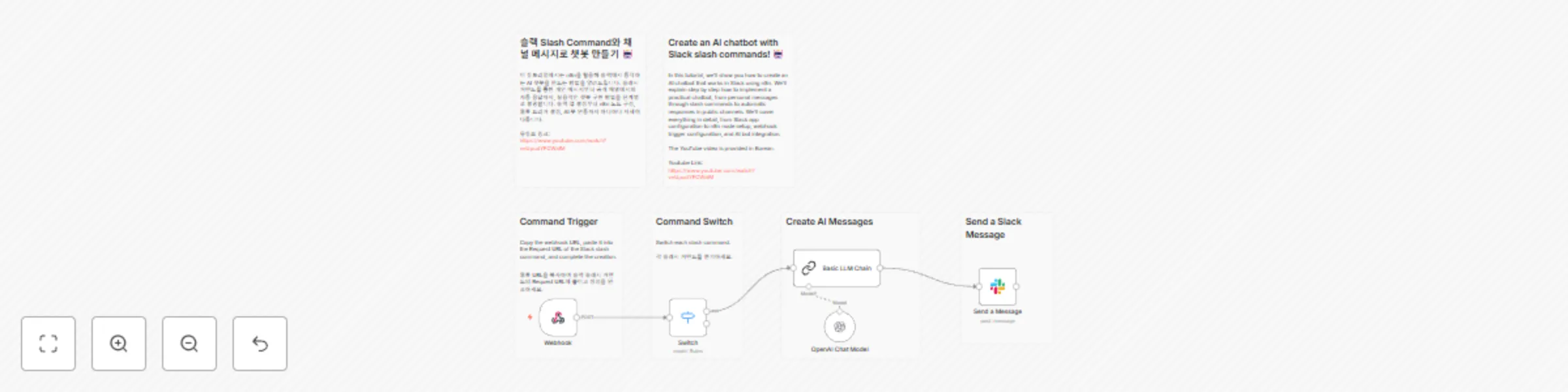
When you request the created slash command in Slack, the request comes to the webhook. Then, the Switch Node branches appropriately according to each slash command request. Here, a slash command called /ask is connected to the chatbot, and the chatbot generates answers to the questions asked. The final node responds to the channel.
chat:write permission in Slack OAuth&Permissions>Scopes.슬래시 커맨드를 통한 공개 채널에서의 응답 챗봇 입니다. 유튜브 영상에 더 자세하게 설명 드립니다.
슬랙에 생성한 슬래시 커맨드를 슬랙에서 요청하면 웹훅에 요청이 들어옵니다. 이후 Switch Node에서 각 슬래시 커맨드의 요청에 따라 알맞게 분기합니다. 여기에서는 /ask라는 슬래시 커맨드가 챗봇으로 연결되어 있고, 챗봇에서 질문한 내용의 답변을 생성합니다. 마지막 노드에서 채널로 응답을 합니다.
chat:write 권한을 추가하세요.This catalog entry is organized from the workflow JSON. The node-level section below shows the executable blocks available for review before importing the template.
| Workflow | Slack slash commands AI chat bot |
|---|---|
| Complexity | intermediate |
| Nodes | 11 |
| Categories | Internal Wiki, AI Chatbot |
| Author | InfoGrab |
| Published | 14 Feb 2025 |
Use the JSON export at /data/workflows/2905/2905.json as the source template for this automation.
Open n8n, import the downloaded JSON, and review each node before activating the workflow.
Replace placeholder credentials, API keys, webhook URLs, account IDs, and environment-specific values with your own settings.
Run the workflow manually or in a staging workspace, inspect node output, and confirm downstream systems receive the expected data.
Enable the workflow only after testing, then monitor executions, errors, and rate limits during the first production runs.
Review imported nodes carefully before activation. This catalog entry is intended to help you inspect the workflow structure, understand required services, and find related templates faster.
Node names, credentials, schedules, webhook paths, and external service limits may need adjustment for your workspace.
This is a response chatbot in public channels through slash commands. I explain more in detail through the YouTube video, but it's only available in K...
Review the workflow JSON, configure any required credentials in n8n, and test the automation in a safe workspace before using it in production.
Yes. Use the block-by-block analysis and the downloadable JSON to inspect each node, then adjust credentials, prompts, schedules, filters, or destinations for your Internal Wiki, AI Chatbot use case.