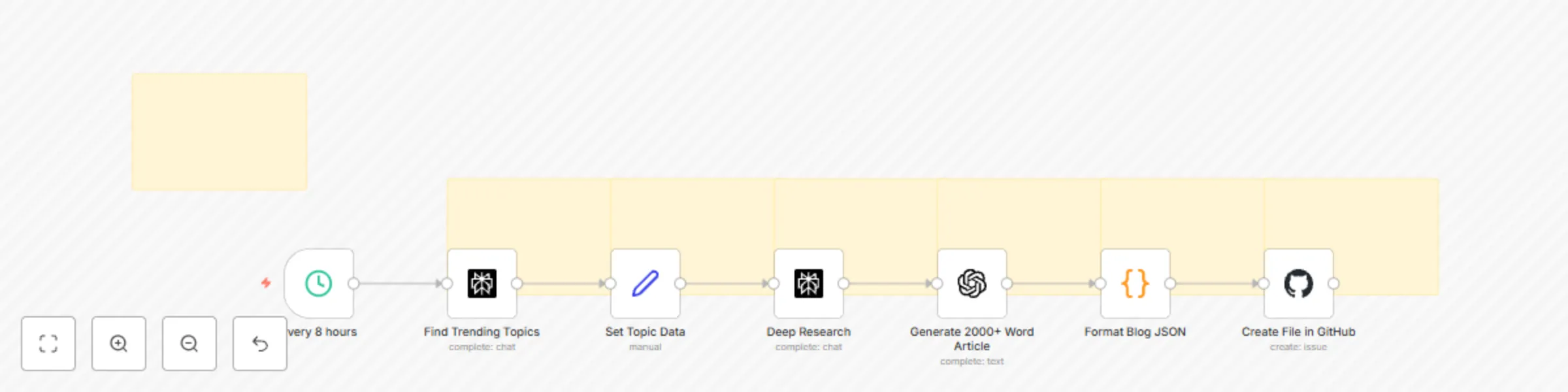
SEO writer: Content generator (2500 keywords) with Perplexity & auto publish

Workflow preview

Workflow preview
100%
SEO writer: Content generator (2500 keywords) with Perplexity & auto publish preview
Open on n8n.io

Important notice

This workflow is provided as-is. Please review and test before using in production.

1. Workflow Overview

TLDR Automatically generate and publish 2000+ word SEO optimized blog posts to GitHub every 8 hours Complete with trending topic research, AI content generation, and automatic JSON formatting fo...

Best for

  • Content Creation automation workflows
  • Multimodal AI automation workflows
  • intermediate n8n builders looking for reusable templates

Tools used

n8n-nodes-base.set, n8n-nodes-base.perplexity, n8n-nodes-base.code, n8n-nodes-base.github, n8n-nodes-base.scheduletrigger, n8n-nodes-base.openai, n8n-nodes-base.stickynote

Source and attribution

This workflow is cataloged by N8N Workflows and links back to its original n8n.io source page by Reddit Dev .

Original n8n.io source

1.1 Workflow description

Title
SEO writer: Content generator (2500 keywords) with Perplexity & auto publish
Workflow name
SEO writer: Content generator (2500 keywords) with Perplexity & auto publish

πŸ”₯ TLDR

Automatically generate and publish 2000+ word SEO-optimized blog posts to GitHub every 8 hours - Complete with trending topic research, AI content generation, and automatic JSON formatting for your blog platform. Instant SEO traffic upcoming!


πŸ“Œ Who's it for

Content creators, marketers, and developers who want to:

  • Maintain a consistent blog publishing schedule without manual effort
  • Generate high-quality, SEO-optimized content automatically
  • Keep up with trending topics in their industry
  • Build content libraries for their websites or applications

πŸš€ What it does

This workflow is a complete content generation pipeline that runs automatically every 8 hours:

  1. Discovers trending topics using Perplexity Sonar to find what's hot in your chosen categories
  2. Conducts deep research with real statistics, expert opinions, and current data
  3. Generates comprehensive content - 2000-2500 word articles using GPT-5 mini
  4. Formats for web - Converts to JSON with proper metadata (slug, keywords, reading time)
  5. Publishes automatically to your GitHub repository as blog-ready JSON files

✨ Key Features

SEO Optimization

  • Keyword-rich content with targeted keywords naturally integrated
  • Proper heading structure (H1, H2, H3) for search engine crawling
  • Meta descriptions automatically generated from content
  • Reading time calculation for better user engagement metrics
  • URL-friendly slugs with timestamps for uniqueness

Content Quality

  • 2000+ words minimum ensuring comprehensive coverage
  • Research-backed with current statistics and expert opinions
  • Structured format with clear sections: Introduction, Analysis, Applications, Challenges, Future Outlook
  • Markdown formatting for easy rendering on any platform

πŸ› οΈ How to set up

Requirements

  • n8n instance (self-hosted or cloud)
  • Perplexity API account
  • OpenAI API account (GPT-5 mini access)
  • GitHub repository for storing blog content

Setup Steps

  1. Import the workflow into your n8n instance
  2. Configure credentials: - Add your Perplexity API key - Add your OpenAI API key - Connect your GitHub account via OAuth2
  3. Customize the GitHub node: - Set your repository owner and name - Adjust the file path if needed (default: public/blog-data/)
  4. Adjust the schedule (optional): - Default runs every 8 hours - Modify the Schedule Trigger node for your preferred frequency
  5. Test the workflow with manual execution before enabling automatic scheduling

🎨 How to customize

Topic Categories

Edit the "Find trending topics" node to focus on your niche:

  • Technology & AI
  • Social Media & Marketing
  • Business & Finance
  • Health & Wellness
  • Education & Career

Content Length

Adjust word count requirements in the "Format Blog JSON" node validation

Output Format

Modify the JSON structure in "Format Blog JSON" to match your blog platform's requirements

Publishing Destination

Change the GitHub repository path or integrate with other platforms like WordPress, Contentful, or Strapi

πŸ“Š Workflow Benefits

  • Consistency: Never miss a publishing deadline
  • Scale: Generate multiple articles daily without manual effort
  • Quality: Research-backed content with real data and sources
  • SEO-Ready: Optimized structure and metadata for search engines
  • Cost-Effective: Uses efficient AI models for sustainable content generation

1.2 Logical Blocks

This catalog entry is organized from the workflow JSON. The node-level section below shows the executable blocks available for review before importing the template.

2. Block-by-Block Analysis

Block 1 - Set Topic Data

Type / Role
n8n-nodes-base.set - set
Config choices
Version 3.4

Block 2 - Deep Research

Type / Role
n8n-nodes-base.perplexity - perplexity
Config choices
Version 1

Block 3 - Format Blog JSON

Type / Role
n8n-nodes-base.code - code
Config choices
Version 2

Block 4 - Create File in GitHub

Type / Role
n8n-nodes-base.github - github
Config choices
Version 1

Block 5 - Every 8 hours

Type / Role
n8n-nodes-base.scheduleTrigger - scheduleTrigger
Config choices
Version 1.2

Block 6 - Find Trending Topics

Type / Role
n8n-nodes-base.perplexity - perplexity
Config choices
Version 1

Block 7 - Generate 2000+ Word Article

Type / Role
n8n-nodes-base.openAi - openAi
Config choices
Version 1.1

Block 8 - Sticky Note

Type / Role
n8n-nodes-base.stickyNote - stickyNote
Config choices
Version 1

Block 9 - Sticky Note 2

Type / Role
n8n-nodes-base.stickyNote - stickyNote
Config choices
Version 1

Block 10 - Sticky Note 3

Type / Role
n8n-nodes-base.stickyNote - stickyNote
Config choices
Version 1

Block 11 - Sticky Note 4

Type / Role
n8n-nodes-base.stickyNote - stickyNote
Config choices
Version 1

Block 12 - Sticky Note 5

Type / Role
n8n-nodes-base.stickyNote - stickyNote
Config choices
Version 1

Block 13 - Sticky Note 6

Type / Role
n8n-nodes-base.stickyNote - stickyNote
Config choices
Version 1

Block 14 - Sticky Note 7

Type / Role
n8n-nodes-base.stickyNote - stickyNote
Config choices
Version 1

3. Summary Table

Workflow SEO writer: Content generator (2500 keywords) with Perplexity & auto publish
Complexity intermediate
Nodes 14
Categories Content Creation, Multimodal AI
Author Reddit Dev
Published 12 Aug 2025

4. Reproducing the Workflow from Scratch

  1. 1. Download the workflow JSON

    Use the JSON export at /data/workflows/7279/7279.json as the source template for this automation.

  2. 2. Import the template into n8n

    Open n8n, import the downloaded JSON, and review each node before activating the workflow.

  3. 3. Configure credentials and variables

    Replace placeholder credentials, API keys, webhook URLs, account IDs, and environment-specific values with your own settings.

  4. 4. Test with sample data

    Run the workflow manually or in a staging workspace, inspect node output, and confirm downstream systems receive the expected data.

  5. 5. Activate and monitor

    Enable the workflow only after testing, then monitor executions, errors, and rate limits during the first production runs.

5. General Notes & Resources

Review imported nodes carefully before activation. This catalog entry is intended to help you inspect the workflow structure, understand required services, and find related templates faster.

Node names, credentials, schedules, webhook paths, and external service limits may need adjustment for your workspace.

Frequently asked questions

What does SEO writer: Content generator (2500 keywords) with Perplexity & auto publish do?

TLDR Automatically generate and publish 2000+ word SEO optimized blog posts to GitHub every 8 hours Complete with trending topic research, AI content generation, and automatic JSON formatting fo...

What do I need before importing this workflow?

Review the workflow JSON, configure any required credentials in n8n, and test the automation in a safe workspace before using it in production.

Can I customize this workflow?

Yes. Use the block-by-block analysis and the downloadable JSON to inspect each node, then adjust credentials, prompts, schedules, filters, or destinations for your Content Creation, Multimodal AI use case.