R

Reddit Dev

4
Workflows

Workflows by Reddit Dev
Workflow preview: SEO writer: Content generator (2500 keywords) with Perplexity & auto publish
Free intermediate

SEO writer: Content generator (2500 keywords) with Perplexity & auto publish

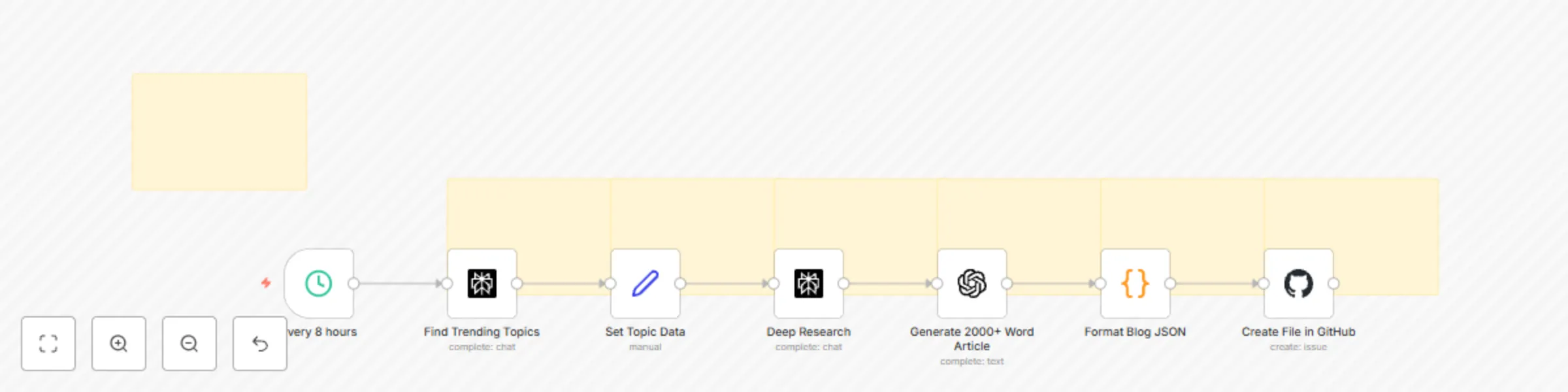
🔥 TLDR Automatically generate and publish 2000+ word SEO-optimized blog posts to GitHub every 8 hours - Complete with trending topic research, AI content generation, and automatic JSON formatting for your blog platform. Instant SEO traffic upcoming! --- 📌 Who's it for Content creators, marketers, and developers who want to: - Maintain a consistent blog publishing schedule without manual effort - Generate high-quality, SEO-optimized content automatically - Keep up with trending topics in their industry - Build content libraries for their websites or applications 🚀 What it does This workflow is a complete content generation pipeline that runs automatically every 8 hours: 1. Discovers trending topics using Perplexity Sonar to find what's hot in your chosen categories 2. Conducts deep research with real statistics, expert opinions, and current data 3. Generates comprehensive content - 2000-2500 word articles using GPT-5 mini 4. Formats for web - Converts to JSON with proper metadata (slug, keywords, reading time) 5. Publishes automatically to your GitHub repository as blog-ready JSON files ✨ Key Features SEO Optimization - Keyword-rich content with targeted keywords naturally integrated - Proper heading structure (H1, H2, H3) for search engine crawling - Meta descriptions automatically generated from content - Reading time calculation for better user engagement metrics - URL-friendly slugs with timestamps for uniqueness Content Quality - 2000+ words minimum ensuring comprehensive coverage - Research-backed with current statistics and expert opinions - Structured format with clear sections: Introduction, Analysis, Applications, Challenges, Future Outlook - Markdown formatting for easy rendering on any platform 🛠️ How to set up Requirements - n8n instance (self-hosted or cloud) - Perplexity API account - OpenAI API account (GPT-5 mini access) - GitHub repository for storing blog content Setup Steps 1. Import the workflow into your n8n instance 2. Configure credentials: - Add your Perplexity API key - Add your OpenAI API key - Connect your GitHub account via OAuth2 3. Customize the GitHub node: - Set your repository owner and name - Adjust the file path if needed (default: public/blog-data/) 4. Adjust the schedule (optional): - Default runs every 8 hours - Modify the Schedule Trigger node for your preferred frequency 5. Test the workflow with manual execution before enabling automatic scheduling 🎨 How to customize Topic Categories Edit the "Find trending topics" node to focus on your niche: - Technology & AI - Social Media & Marketing - Business & Finance - Health & Wellness - Education & Career Content Length Adjust word count requirements in the "Format Blog JSON" node validation Output Format Modify the JSON structure in "Format Blog JSON" to match your blog platform's requirements Publishing Destination Change the GitHub repository path or integrate with other platforms like WordPress, Contentful, or Strapi 📊 Workflow Benefits - Consistency: Never miss a publishing deadline - Scale: Generate multiple articles daily without manual effort - Quality: Research-backed content with real data and sources - SEO-Ready: Optimized structure and metadata for search engines - Cost-Effective: Uses efficient AI models for sustainable content generation

R
Reddit Dev
Content Creation
12 Aug 2025
480
0
Workflow preview: Viral video generator: HeyGen to TikTok & Instagram auto-post + any content
Free advanced

Viral video generator: HeyGen to TikTok & Instagram auto-post + any content

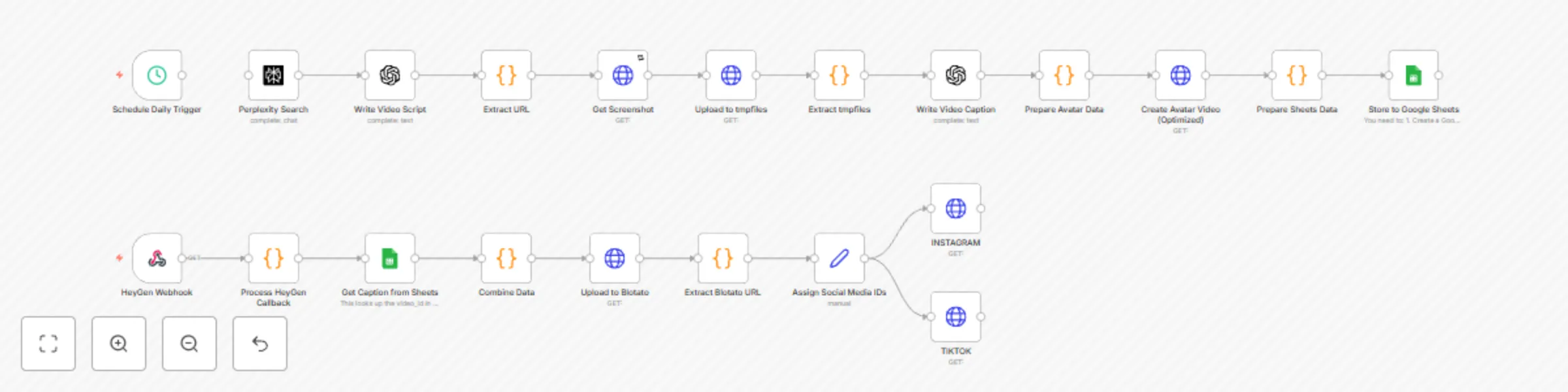
# HeyGen AI Video Generation with Social Media Publishing ## Description This workflow automates the entire process of creating AI-generated videos from trending news content and publishing them to social media platforms (Instagram and TikTok). It runs daily at 6 AM, finds viral-worthy news, generates scripts, creates AI avatar videos using HeyGen, and automatically publishes to multiple social platforms. ## How it works ### Content Discovery & Script Generation 1. **Schedule Trigger**: Runs daily at 6 AM or any time you choose. 2. **Perplexity Search**: Finds trending news articles that would make good viral content 3. **Write Video Script**: Uses GPT-4.1 to create a 30-second video script with hook, main content, and CTA 4. **Extract URL**: Parses the article URL and script data for further processing ### Video Creation Pipeline 5. **Get Screenshot**: Uses ScreenshotOne API to create an animated scrolling video of the news article 6. **Upload to Cloudinary**: Temporarily stores the background video 7. **Write Video Caption**: Generates an engaging social media caption (150-200 characters) 8. **Prepare Avatar Data**: Combines all data needed for HeyGen video generation 9. **Create Avatar Video**: Sends request to HeyGen API to generate AI avatar video with: - Talking photo avatar - Text-to-speech voice - Background video from the news article - 720x1280 dimensions (vertical format) ### Data Management 10. **Prepare Sheets Data**: Formats video metadata 11. **Store to Google Sheets**: Saves video_id, caption, timestamp, and status for tracking ### Webhook Processing (Asynchronous) 12. **HeyGen Webhook**: Receives callback when video generation is complete 13. **Process HeyGen Callback**: Extracts video URLs and status from webhook 14. **Get Caption from Sheets**: Retrieves the associated caption using video_id 15. **Combine Data**: Merges video data with caption ### Social Media Publishing 16. **Upload to Blotato**: Uploads the completed video to Blotato media service 17. **Extract Blotato URL**: Gets the media URL for social posting 18. **Assign Social Media IDs**: Sets the account IDs for each platform 19. **INSTAGRAM**: Posts video to Instagram with caption 20. **TIKTOK**: Posts video to TikTok with caption and appropriate settings ## Setup ### Prerequisites 1. **API Keys Required**: - Perplexity API (for news search) - OpenAI API (for script and caption generation) - ScreenshotOne API (for article screenshots) - HeyGen API (for AI video generation) - Cloudinary account (for temporary video storage) - Blotato API (for social media posting) - Google Sheets API (for data tracking) 2. **HeyGen Setup**: - Create a talking photo avatar and get the `talking_photo_id` - Select a voice and get the `voice_id` - Set up a webhook endpoint in n8n for callbacks 3. **Google Sheets Setup**: - Create a new Google Sheet - Add headers: `video_id`, `caption`, `timestamp`, `status` - Get the sheet ID from the URL 4. **Social Media Setup**: - Connect Instagram and TikTok accounts to Blotato - Get the account IDs for each platform ### Configuration Steps 1. **Replace all placeholder values**: - `YOUR_TALKING_PHOTO_ID` - HeyGen avatar ID - `YOUR_VOICE_ID` - HeyGen voice ID - `YOUR_WEBHOOK_URL` - Your n8n webhook URL - `YOUR_GOOGLE_SHEET_ID` - Google Sheets document ID - `YOUR_INSTAGRAM_ACCOUNT_ID` - Blotato Instagram account ID - `YOUR_TIKTOK_ACCOUNT_ID` - Blotato TikTok account ID - `YOUR_CLOUD_NAME` - Cloudinary cloud name - `YOUR_UPLOAD_PRESET` - Cloudinary upload preset 2. **Add credentials in n8n**: - Perplexity API credentials - OpenAI API credentials - HeyGen API credentials (create custom API credentials with X-Api-Key) - Blotato API credentials - Google Sheets OAuth2 - ScreenshotOne API credentials 3. **Configure the webhook**: - Copy the webhook URL from the "HeyGen Webhook" node - Use this URL in the "Create Avatar Video" node's callback_url ## Notes - The workflow uses a two-part asynchronous process: initial video creation and webhook-based completion - Videos are optimized for vertical format (720x1280) for mobile social media - The Google Sheet acts as a database to link video IDs with captions - All sensitive content (URLs, API keys) should be replaced with your own values - Consider content moderation and copyright when selecting news sources - Monitor API usage and costs, especially for HeyGen video generation ## Customization Options - **Content Sources**: Modify the Perplexity search query to target specific news sources or topics - **Video Style**: Adjust avatar position, scale, and background video settings - **Voice Settings**: Change voice_id, speed, and pitch for different narration styles - **Publishing Schedule**: Modify the Schedule Trigger for different times or frequencies - **Social Platforms**: Add more platforms by duplicating the Blotato posting nodes

R
Reddit Dev
Content Creation
17 Jul 2025
938
0
Workflow preview: Viral video creator: Fal.ai AI videos → TikTok, YouTube & Instagram automation
Free advanced

Viral video creator: Fal.ai AI videos → TikTok, YouTube & Instagram automation

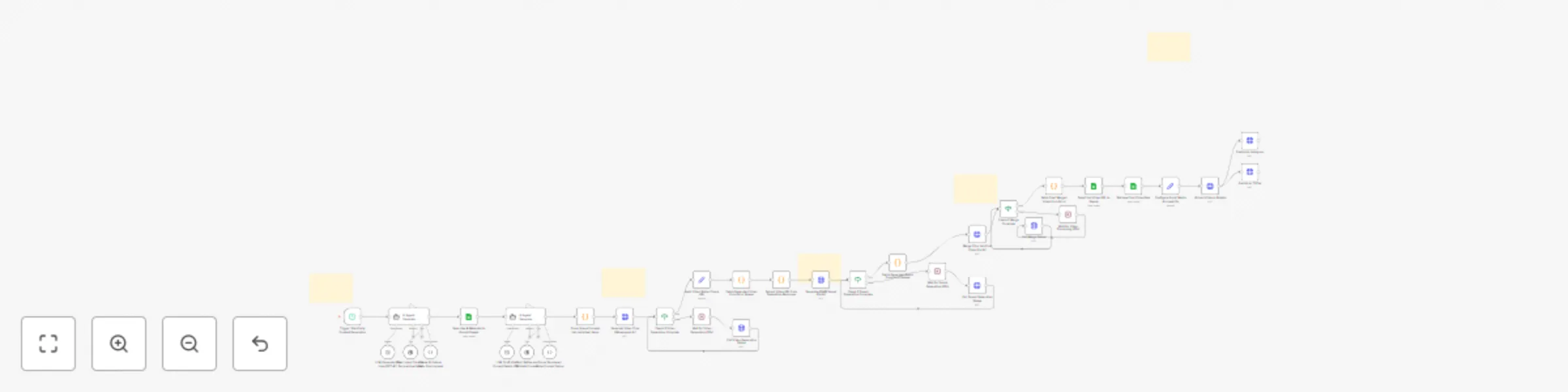
## 🎬 The AI Viral Video Factory: From Concept to Content in Minutes This n8n workflow is a fully automated pipeline that takes a creative concept and transforms it into a polished, platform-ready short-form video. It ideates, generates video and audio using AI, merges them, and publishes the final content to your social media accounts! ## ✨ Core Features - **Automated Ideation**: Leverages GPT-4 to generate unique, trend-aware ASMR video concepts, complete with captions and hashtags. - **AI-Powered Visuals**: Uses Fal.ai to transform text prompts into multiple cinematic video scenes. - **Custom Soundscapes**: Generates matching ASMR audio tracks to enhance the sensory experience. - **End-to-End Automation**: The entire process, from idea generation to social media publishing, runs automatically on a schedule. - **Content Management**: Logs all ideas and final video URLs into Google Sheets for easy tracking and management. ## 🛠️ Setup and Configuration Guide Follow these detailed steps to get the workflow running. You'll need accounts for n8n, OpenAI, Google, Fal.ai, and Blotato. ### Prerequisites - n8n instance (self-hosted or cloud) - OpenAI account with API access - Google account with Sheets access - Fal.ai account with API access - Blotato account for social media publishing - Connected Instagram and TikTok accounts in Blotato ### Step 1: Google Sheets Template Setup This workflow requires two separate sheets in a single Google Spreadsheet. 1. **Create a new Google Spreadsheet** - Go to [Google Sheets](https://sheets.google.com) and create a new spreadsheet - Name it something memorable (e.g., "AI Video Factory Data") - Note the Spreadsheet ID from its URL: ``` https://docs.google.com/spreadsheets/d/SPREADSHEET_ID_IS_HERE/edit#gid=0 ``` - You'll need this ID later for the workflow configuration 2. **Sheet 1: Idea Logging** This sheet stores the initial ideas generated by the AI. - Create a sheet and name it exactly: `Ideas` - Set up the following columns in this exact order (case-sensitive): | Column A | Column B | Column C | Column D | Column E | |----------|----------|----------|----------|----------| | Caption | Idea | Environment | Sound | Status | - Do not add any additional columns or headers 3. **Sheet 2: Final Output Logging** This sheet stores the links to the final, published videos. - Create a second sheet in the same spreadsheet - Name it exactly: `Published` - Set up the following columns in this exact order (case-sensitive): | Column A | Column B | Column C | Column D | |----------|----------|----------|----------| | final_output | thumbnail_url | status | created_date | - Do not add any additional columns or headers ### Step 2: API Key and Credentials Configuration You need to obtain and configure credentials for each service used in the workflow. #### OpenAI Configuration 1. **Get your API Key**: - Go to [platform.openai.com](https://platform.openai.com) - Navigate to API Keys section - Create a new API key and copy it 2. **Add to n8n**: - In n8n, go to **Credentials** > **New** - Search for "OpenAI" and select it - Paste your API key - Name the credential (e.g., "OpenAI account") - Save the credential 3. **Update the workflow**: - In the nodes `LLM: Generate Raw Idea (GPT-4.1)` and `LLM: Draft Video Prompt Details (GPT-4.1)` - Select the OpenAI credential you just created #### Google Sheets Configuration 1. **Set up OAuth2**: - In n8n, go to **Credentials** > **New** - Search for "Google Sheets" and select **Google Sheets OAuth2 API** - Follow the OAuth setup instructions to connect your Google account - Name the credential (e.g., "Google Sheets account") 2. **Update the workflow**: - In all Google Sheets nodes: - `Save Idea & Metadata to Google Sheets` - `Save Final Video URL to Sheets` - `Retrieve Final Video Data` - Select your Google Sheets credential - Enter your Spreadsheet ID in the **Document ID** field - Ensure the sheet names match exactly ("Ideas" and "Published") #### Fal.ai Configuration 1. **Get your API Key**: - Sign up at [fal.ai](https://fal.ai) - Go to your dashboard and get your API Key - The key format is: `key xxxxxxxxxxxxxxxxxxxxxxxxxxxxxxxxxx` 2. **Update the workflow**: - No separate n8n credential needed - Find these HTTP Request nodes and update the Authorization header: - `Generate Video Clips (Wavespeed AI)` - `Generate ASMR Sound (Fal AI)` - `Merge Clips into Final Video (Fal AI)` - `Poll Video Generation Status` - `Poll Sound Generation Status` - `Poll Merge Status` - In each node's Header Parameters, replace `{{YOUR_FAL_AI_KEY}}` with your actual key - The value should be: `key YOUR_ACTUAL_FAL_AI_KEY` #### Blotato Configuration 1. **Get your API Key**: - Sign up at [blotato.com](https://blotato.com) - Get your API key from the dashboard - Connect your Instagram and TikTok accounts - Note down the Account IDs for each platform 2. **Update the workflow**: - In these nodes: - `Upload Video to Blotato` - `Publish to Instagram` - `Publish to TikTok` - Replace `{{YOUR_BLOTATO_API_KEY}}` with your actual API key in the Header Parameters 3. **Set Social Media IDs**: - In the `Assign Social Media IDs` node - Replace `{{YOUR_INSTAGRAM_ACCOUNT_ID}}` with your Instagram account ID from Blotato - Replace `{{YOUR_TIKTOK_ACCOUNT_ID}}` with your TikTok account ID from Blotato ### Step 3: Workflow Activation 1. **Test the workflow**: - Use the manual trigger to test before scheduling - Monitor each node's execution - Check Google Sheets for proper data logging 2. **Schedule automation**: - The workflow is set to run daily - Adjust the schedule in the `Trigger: Start Daily Content Generation` node as needed ## ⚙️ Workflow Breakdown ### Ideation & Storage The workflow triggers on schedule. An AI Agent generates a unique ASMR video concept and saves the Idea, Caption, Environment, and Sound details into your first Google Sheet. ### Scene Prompting A second AI Agent takes the approved idea from the sheet and creates three detailed, cinematic scene prompts designed for text-to-video AI. ### Video & Audio Generation The workflow makes parallel API calls to Fal.ai: - Generates a video clip for each of the three scenes - Generates a single, corresponding ASMR audio track - Continuously polls Fal.ai until assets are ready ### Merging & Finalizing Once all assets are generated, it sends a request to Fal.ai's FFMPEG API to stitch the video clips and audio track into one final video. ### Logging & Publishing The final video URL is saved to your second Google Sheet. The workflow then uploads this video to Blotato and publishes it to your specified Instagram and TikTok accounts. ## 🎨 Customization Guide ### Content Type Customization To adapt this workflow for different content types: 1. **Modify the AI prompts**: - In `AI Agent: Generate Creative Video Idea`, update the prompt to match your content style - Adjust the systemMessage to reflect your brand voice and content guidelines 2. **Change video parameters**: - In `Generate Video Clips (Wavespeed AI)`, modify: - `duration`: Video length (default: 10 seconds) - `aspect_ratio`: Change from "9:16" to "16:9" for horizontal videos 3. **Adjust audio generation**: - In `Generate ASMR Sound (Fal AI)`, update the prompt for different audio styles - Modify `cfg_strength` (1-10) for more/less adherence to prompt ### Platform-Specific Adjustments 1. **Instagram-specific**: - Maximum video duration: 90 seconds for Reels - Optimal hashtag count: 5-10 2. **TikTok-specific**: - Maximum video duration: 10 minutes - Optimal hashtag count: 3-5 - In `Publish to TikTok` node, adjust privacy settings as needed ### Scheduling Options Modify the `Trigger: Start Daily Content Generation` node: - Change from daily to hourly, weekly, or specific times - Add multiple triggers for different time zones - Use cron expressions for complex schedules ### Error Handling Add error handling nodes: - Connect error outputs to notification systems - Log failed attempts to a separate Google Sheet - Implement retry logic for API failures ## 🎯 Perfect For - **Content Creators** looking to scale their output with minimal effort - **Digital Marketers** seeking a consistent stream of engaging, trend-based content - **Brands** wanting to build a strong presence on short-form video platforms - **Automation Enthusiasts** building content-driven businesses ## 🚀 Getting Started 1. Import the workflow into your n8n instance 2. Follow the setup guide above step-by-step 3. Test with manual execution first 4. Monitor the first few automated runs 5. Adjust prompts and parameters based on results ## 📧 Support For questions or issues with this template: - Email: [email protected] - n8n Community Forum: [community.n8n.io](https://community.n8n.io) ## 🔧 Technical Stack - **Workflow Engine**: n8n - **AI Models**: GPT-4, Fal.ai (Wavespeed & MMAudio-v2) - **Data Storage**: Google Sheets - **Publishing**: Blotato API - **Output**: Platform-optimized 9:16 videos with synchronized ASMR audio ---

R
Reddit Dev
Content Creation
12 Jul 2025
651
0
Workflow preview: Reddit bot automation: AI auto-reply & post monitor with GPT-4 + Google Sheets
Free advanced

Reddit bot automation: AI auto-reply & post monitor with GPT-4 + Google Sheets

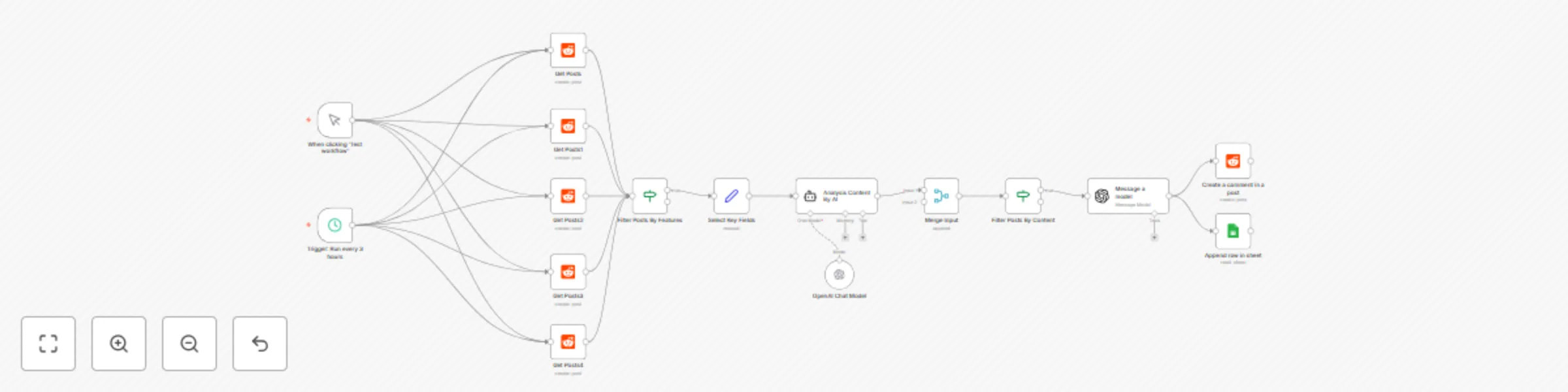
🚀 Built an AI-Powered Reddit Engagement (Reddit auto comment to relevant posts based on your whish. A workflow That Actually Helps People and helps you to promote your product and service. Just spent hours fine-tuning an n8n automation that genuinely adds value to Reddit conversations and to your service, app, business or message that you want to promote. Here's what it does: The Challenge: Finding relevant discussions where my service, app, business or message could actually help someone - without being spammy or salesy. The Solution: An intelligent workflow that: - 🔍 Monitors multiple subreddits for photo editing discussions - 🧠 Uses GPT-4.1 to analyze comments (not just posts!) for genuine need - 🎯 Filters out bots, moderators, and irrelevant content - ✍️ Crafts helpful, conversational responses that provide value first - 📊 Tracks everything in Google Sheets for transparency Key Features: - Runs every 3 hours automatically - Analyzes comment context, not just keywords - Only engages when the service, app, business or message is genuinely relevant - Focuses on helping, mentions the app naturally if appropriate - Respects Reddit culture and community guidelines Why This Matters: Instead of blind self-promotion, this creates genuine interactions. When someone asks "Anyone know a good service, app, business to do XYZ?", they get a helpful response from someone who's actually built a solution. Tech Stack: n8n, OpenAI GPT-4, Reddit API, Google Sheets The best part? It forces me to only engage where I can add real value. No spam, just helpful participation in communities I care about. What automation challenges are you working on? Happy to share learnings! Questions or feedback?: [email protected]

R
Reddit Dev
Social Media
12 Jul 2025
864
0