Block 1 - Weekly Trigger
- Type / Role
- n8n-nodes-base.scheduleTrigger - scheduleTrigger
- Config choices
- Version 1


 Early Deal
This workflow is provided as-is. Please review and test before using in production.
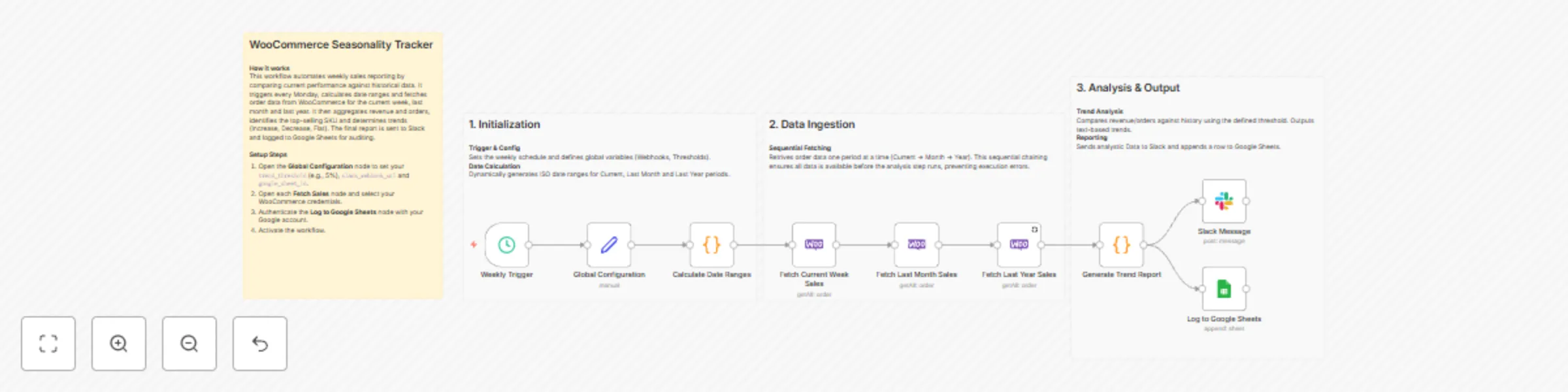
WooCommerce Seasonal Sales Planning & Monitor → SET Pattern Compare → Slack This workflow automatically aggregates sales data, calculates performance trends (Revenue & Orders) against previous mont...
n8n-nodes-base.scheduletrigger, n8n-nodes-base.set, n8n-nodes-base.code, n8n-nodes-base.woocommerce, n8n-nodes-base.googlesheets, n8n-nodes-base.stickynote, n8n-nodes-base.slack
This workflow is cataloged by N8N Workflows and links back to its original n8n.io source page by WeblineIndia.
Original n8n.io sourceThis workflow automatically aggregates sales data, calculates performance trends (Revenue & Orders) against previous months and years, identifies the top-selling SKU and sends a strictly formatted, professional summary report to Slack.
This workflow runs on a schedule (e.g., daily or weekly) to generate a snapshot of your business performance. It fetches sales data from your database or e-commerce platform, calculates growth percentages (vs. Month, vs. Year), formats the data into a clean JSON structure and sends a structured report to Slack without unnecessary clutter or emojis.
You receive:
Ideal for management teams needing a quick, data-driven pulse check on store performance without manually running reports.
current, vsMonth and vsYear metrics (or use the calculation nodes provided).This workflow automates the generation of your business trend report:
This ensures your team focuses on the numbers that matter, with zero manual effort.
This workflow is ideal for:
To run this workflow, you need:
revenue.current, orders.vsYear).{{ $json["revenue"]["current"] }}{{ $json["orders"]["vsMonth"]["percent"] }}Modify the Set/Calculation nodes:
You can modify the JSON in the Slack node to:
*bold*)Replace the generic database node with:
You can extend this workflow to:
Delivers key metrics to the team channel 15 minutes before the daily meeting.
Quickly identifies if a new marketing campaign is driving order volume.
Highlights the "Top SKU" so the warehouse team knows what is moving fast.
Provides leadership with a noise-free, "just the numbers" view of the business.
| Issue | Possible Cause | Solution |
|---|---|---|
| "N/A" in Trend | No historical data found | Ensure database has data for previous month/year |
| Slack formatting broken | Invalid JSON syntax | Check quotes and brackets in Slack node |
| Wrong Top SKU | Sorting logic incorrect | Verify the "Sort" node is ordering by Count DESC |
| Authentication Error | Slack token expired | Re-connect Slack credentials in n8n |
| Workflow not running | Schedule disabled | Toggle "Active" switch to ON |
If you need help customizing or extending this workflow — integrating specific ERPs, creating complex visual dashboards or scaling your data reporting, feel free to contact our n8n workflow development experts at WeblineIndia. We are happy to assist you with advanced automation solutions.
This catalog entry is organized from the workflow JSON. The node-level section below shows the executable blocks available for review before importing the template.
| Workflow | Send seasonal WooCommerce sales trend reports to Slack and Google Sheets |
|---|---|
| Complexity | intermediate |
| Nodes | 13 |
| Categories | CRM, AI Summarization |
| Author | WeblineIndia |
| Published | 01 Jan 2026 |
Use the JSON export at /data/workflows/12371/12371.json as the source template for this automation.
Open n8n, import the downloaded JSON, and review each node before activating the workflow.
Replace placeholder credentials, API keys, webhook URLs, account IDs, and environment-specific values with your own settings.
Run the workflow manually or in a staging workspace, inspect node output, and confirm downstream systems receive the expected data.
Enable the workflow only after testing, then monitor executions, errors, and rate limits during the first production runs.
Review imported nodes carefully before activation. This catalog entry is intended to help you inspect the workflow structure, understand required services, and find related templates faster.
Node names, credentials, schedules, webhook paths, and external service limits may need adjustment for your workspace.
WooCommerce Seasonal Sales Planning & Monitor → SET Pattern Compare → Slack This workflow automatically aggregates sales data, calculates performance trends (Revenue & Orders) against previous mont...
Review the workflow JSON, configure any required credentials in n8n, and test the automation in a safe workspace before using it in production.
Yes. Use the block-by-block analysis and the downloadable JSON to inspect each node, then adjust credentials, prompts, schedules, filters, or destinations for your CRM, AI Summarization use case.