Block 1 - JS - Validate JSON from LLM
- Type / Role
- n8n-nodes-base.code - code
- Config choices
- Version 2


 Early Deal
This workflow is provided as-is. Please review and test before using in production.
This workflow automates weather forecast delivery by collecting city names, fetching 5 day forecasts from OpenWeatherMap, and generating professionally formatted HTML emails using GPT 4. The AI cre...
n8n-nodes-base.code, n8n-nodes-base.gmail, n8n-nodes-base.openweathermap, n8n-nodes-base.set, n8n-nodes-base.merge, n8n-nodes-base.httprequest, n8n-nodes-base.formtrigger, @n8n/n8n-nodes-langchain.openai
This workflow is cataloged by N8N Workflows and links back to its original n8n.io source page by Sridevi Edupuganti.
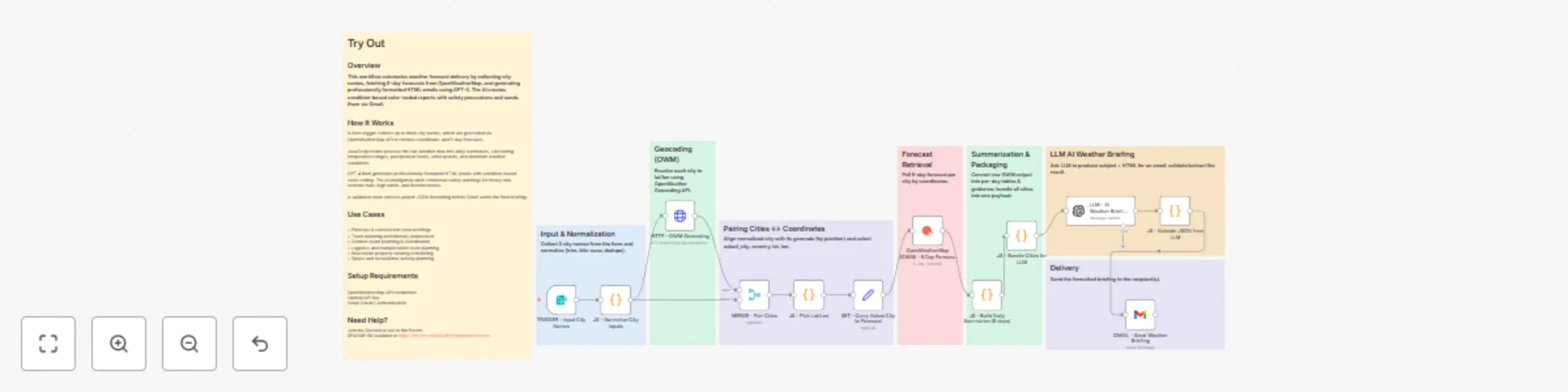
Original n8n.io sourceThis workflow automates weather forecast delivery by collecting city names, fetching 5-day forecasts from OpenWeatherMap, and generating professionally formatted HTML emails using GPT-4. The AI creates condition-based color-coded reports with safety precautions and sends them via Gmail.
A form trigger collects up to three city names, which are geocoded via OpenWeatherMap API to retrieve coordinates and 5-day forecasts.
JavaScript nodes process the raw weather data into daily summaries, calculating temperature ranges, precipitation levels, wind speeds, and dominant weather conditions.
GPT-4 then generates professionally formatted HTML emails with condition-based color coding: The AI intelligently adds contextual safety warnings for heavy rain, extreme heat, high winds, and thunderstorms.
A validation node ensures proper JSON formatting before Gmail sends the final briefing.
• Field ops & construction crew briefings • Travel planning and itinerary preparation • Outdoor event planning & coordination • Logistics and transportation route planning • Real estate property viewing scheduling • Sports and recreational activity planning
Join the Discord or ask in the Forum! README file available at https://tinyurl.com/MulticityWeatherForecast
This catalog entry is organized from the workflow JSON. The node-level section below shows the executable blocks available for review before importing the template.
| Workflow | Send multi-city weather forecasts with AI-enhanced formatting from OpenWeatherMap to Gmail |
|---|---|
| Complexity | advanced |
| Nodes | 20 |
| Categories | Personal Productivity, Multimodal AI |
| Author | Sridevi Edupuganti |
| Published | 19 Oct 2025 |
Use the JSON export at /data/workflows/9909/9909.json as the source template for this automation.
Open n8n, import the downloaded JSON, and review each node before activating the workflow.
Replace placeholder credentials, API keys, webhook URLs, account IDs, and environment-specific values with your own settings.
Run the workflow manually or in a staging workspace, inspect node output, and confirm downstream systems receive the expected data.
Enable the workflow only after testing, then monitor executions, errors, and rate limits during the first production runs.
Review imported nodes carefully before activation. This catalog entry is intended to help you inspect the workflow structure, understand required services, and find related templates faster.
Node names, credentials, schedules, webhook paths, and external service limits may need adjustment for your workspace.
This workflow automates weather forecast delivery by collecting city names, fetching 5 day forecasts from OpenWeatherMap, and generating professionally formatted HTML emails using GPT 4. The AI cre...
Review the workflow JSON, configure any required credentials in n8n, and test the automation in a safe workspace before using it in production.
Yes. Use the block-by-block analysis and the downloadable JSON to inspect each node, then adjust credentials, prompts, schedules, filters, or destinations for your Personal Productivity, Multimodal AI use case.