Send daily real estate construction updates via Gmail & WhatsApp with Google Sheets

Workflow preview

Workflow preview
100%
Send daily real estate construction updates via Gmail & WhatsApp with Google Sheets preview
Open on n8n.io

Important notice

This workflow is provided as-is. Please review and test before using in production.

1. Workflow Overview

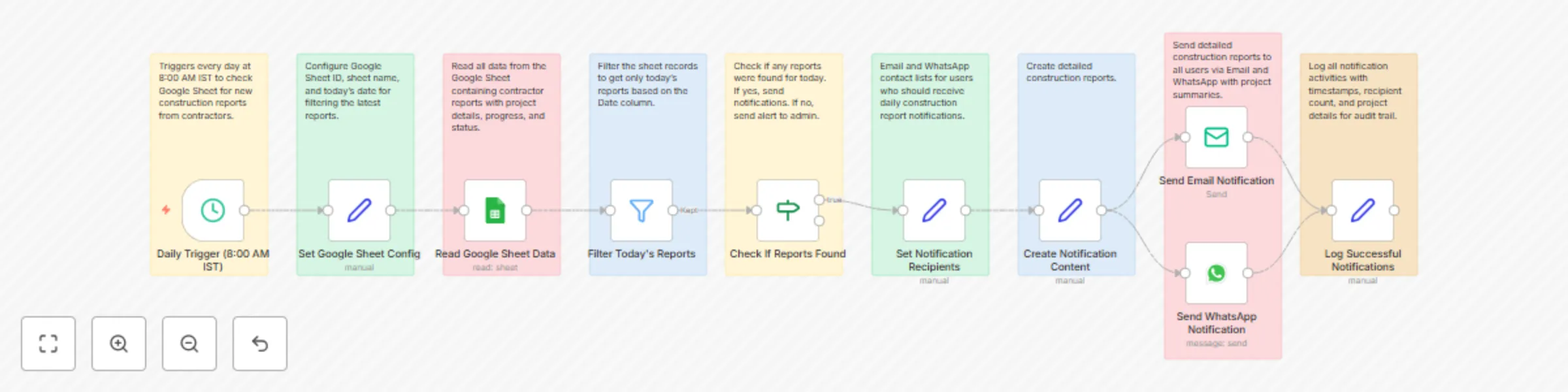
This n8n template demonstrates how to create an automated construction progress notification system for real estate companies. The workflow triggers daily at 8:00 AM IST to check a Google Sheet for...

Best for

  • Project Management automation workflows
  • advanced n8n builders looking for reusable templates

Tools used

n8n-nodes-base.scheduletrigger, n8n-nodes-base.set, n8n-nodes-base.googlesheets, n8n-nodes-base.filter, n8n-nodes-base.if, n8n-nodes-base.whatsapp, n8n-nodes-base.emailsend, n8n-nodes-base.stickynote

Source and attribution

This workflow is cataloged by N8N Workflows and links back to its original n8n.io source page by Oneclick AI Squad.

Original n8n.io source

1.1 Workflow description

Title
Send daily real estate construction updates via Gmail & WhatsApp with Google Sheets
Workflow name
Send daily real estate construction updates via Gmail & WhatsApp with Google Sheets

This n8n template demonstrates how to create an automated construction progress notification system for real estate companies. The workflow triggers daily at 8:00 AM IST to check a Google Sheet for contractor construction reports, automatically processes the data, and sends comprehensive project updates to buyers via email and WhatsApp. Perfect for real estate developers wanting to maintain transparent communication with buyers and ensure timely project status updates.

Good to know

  • Daily automated monitoring ensures no construction updates are missed
  • Multi-channel communication (Email + WhatsApp) reaches buyers through their preferred method
  • Smart filtering system only processes today's reports for relevant updates
  • Comprehensive logging tracks all notification activities for audit purposes
  • Built-in alert system notifies administrators when contractors fail to submit reports
  • Handles multiple projects and contractors simultaneously without data conflicts

How it works

Daily Monitoring Workflow

  • System triggers automatically every day at 8:00 AM IST to check for new construction reports
  • Google Sheet configuration is set with Sheet ID, sheet name, and today's date for filtering
  • All construction data is read from the designated Google Sheet containing contractor submissions
  • Advanced filtering isolates only today's reports based on the Date column for processing

Report Processing Workflow

  • System checks if any construction reports were submitted for the current date
  • If reports are found: Detailed notifications are prepared and sent to all registered buyers
  • If no reports are found: Alert notifications are sent to administrators about missing submissions
  • All project data is compiled into comprehensive summaries with progress percentages and status updates

Notification Distribution Workflow

  • Email notifications contain detailed construction summaries with all project information
  • WhatsApp messages provide concise updates with key progress indicators and status
  • Messages are personalized with project names, completion percentages, and contractor details
  • Multiple recipients receive notifications simultaneously through both communication channels

Activity Logging Workflow

  • All notification activities are logged with precise timestamps and recipient information
  • Success logs record project count, recipient numbers, and delivery confirmation
  • Warning logs capture instances when no reports are found for administrative follow-up
  • Complete audit trail maintains compliance and tracking for project management

Google Sheet Structure

Construction Reports Sheet

  • Date - Report submission date (DD/MM/YYYY format)
  • Project_Name - Name of the construction project
  • Contractor_Name - Name of the responsible contractor
  • Location - Project location or site address
  • Progress_Percentage - Current completion percentage (0-100%)
  • Status - Current project status (On Track, Delayed, Completed, etc.)
  • Work_Description - Detailed description of today's construction activities
  • Issues - Any problems or challenges encountered (optional)
  • Budget_Status - Financial status update (On Budget, Over Budget, Under Budget)
  • Next_Milestone - Upcoming project milestone or target date

How to use

  • Import the workflow into your n8n instance and configure Google Sheets integration
  • Set up your Google Sheet with the required column structure for construction reports
  • Configure email SMTP settings for professional construction update delivery
  • Set up WhatsApp Business API for instant mobile notifications to buyers
  • Add buyer email addresses and WhatsApp numbers to the notification recipient lists
  • Contractors submit daily reports to the Google Sheet before 8:00 AM for same-day processing
  • System automatically processes and distributes updates to all registered buyers
  • Monitor logs for delivery confirmation and missing report alerts

Requirements

  • Google Sheets account for construction report data storage and management
  • Email service integration (Gmail, SMTP, or corporate email system)
  • WhatsApp Business API account for mobile messaging capabilities
  • n8n instance with Google Sheets, Email, and WhatsApp connectors properly configured
  • Valid credentials for all integrated services (Google OAuth, SMTP, WhatsApp API)

Customising this workflow

  • Construction update automation can be adapted for different project types and development scales
  • Try popular use-cases such as weekly progress summaries, milestone notifications, or emergency construction alerts
  • The workflow can be extended to include photo attachments from construction sites, weather impact assessments, and safety compliance reporting
  • Integration possibilities include CRM systems for buyer management, project management tools for contractor coordination, and financial systems for budget tracking
  • Notification scheduling can be adjusted for different time zones, multiple daily updates, or project-specific timing requirements
  • Advanced features can include buyer feedback collection, contractor performance ratings, and automated delay notifications with mitigation plans

1.2 Logical Blocks

This catalog entry is organized from the workflow JSON. The node-level section below shows the executable blocks available for review before importing the template.

2. Block-by-Block Analysis

Block 1 - Daily Trigger (8:00 AM IST)

Type / Role
n8n-nodes-base.scheduleTrigger - scheduleTrigger
Config choices
Version 1.2

Block 2 - Set Google Sheet Config

Type / Role
n8n-nodes-base.set - set
Config choices
Version 3.4

Block 3 - Read Google Sheet Data

Type / Role
n8n-nodes-base.googleSheets - googleSheets
Config choices
Version 4.4

Block 4 - Filter Today's Reports

Type / Role
n8n-nodes-base.filter - filter
Config choices
Version 2

Block 5 - Check If Reports Found

Type / Role
n8n-nodes-base.if - if
Config choices
Version 2

Block 6 - Set Notification Recipients

Type / Role
n8n-nodes-base.set - set
Config choices
Version 3.4

Block 7 - Create Notification Content

Type / Role
n8n-nodes-base.set - set
Config choices
Version 3.4

Block 8 - Send WhatsApp Notification

Type / Role
n8n-nodes-base.whatsApp - whatsApp
Config choices
Version 1

Block 9 - Send Email Notification

Type / Role
n8n-nodes-base.emailSend - emailSend
Config choices
Version 2.1

Block 10 - Log Successful Notifications

Type / Role
n8n-nodes-base.set - set
Config choices
Version 3.4

Block 11 - Sticky Note - Trigger

Type / Role
n8n-nodes-base.stickyNote - stickyNote
Config choices
Version 1

Block 12 - Sticky Note - Config

Type / Role
n8n-nodes-base.stickyNote - stickyNote
Config choices
Version 1

Block 13 - Sticky Note - Read Sheet

Type / Role
n8n-nodes-base.stickyNote - stickyNote
Config choices
Version 1

Block 14 - Sticky Note - Filter

Type / Role
n8n-nodes-base.stickyNote - stickyNote
Config choices
Version 1

Block 15 - Sticky Note - Check Reports

Type / Role
n8n-nodes-base.stickyNote - stickyNote
Config choices
Version 1

Block 16 - Sticky Note - Contacts

Type / Role
n8n-nodes-base.stickyNote - stickyNote
Config choices
Version 1

Block 17 - Sticky Note - Send Notifications

Type / Role
n8n-nodes-base.stickyNote - stickyNote
Config choices
Version 1

Block 18 - Sticky Note - Logging

Type / Role
n8n-nodes-base.stickyNote - stickyNote
Config choices
Version 1

Block 19 - Sticky Note - Send Notifications1

Type / Role
n8n-nodes-base.stickyNote - stickyNote
Config choices
Version 1

3. Summary Table

Workflow Send daily real estate construction updates via Gmail & WhatsApp with Google Sheets
Complexity advanced
Nodes 19
Categories Project Management
Author Oneclick AI Squad
Published 30 Jul 2025

4. Reproducing the Workflow from Scratch

  1. 1. Download the workflow JSON

    Use the JSON export at /data/workflows/6694/6694.json as the source template for this automation.

  2. 2. Import the template into n8n

    Open n8n, import the downloaded JSON, and review each node before activating the workflow.

  3. 3. Configure credentials and variables

    Replace placeholder credentials, API keys, webhook URLs, account IDs, and environment-specific values with your own settings.

  4. 4. Test with sample data

    Run the workflow manually or in a staging workspace, inspect node output, and confirm downstream systems receive the expected data.

  5. 5. Activate and monitor

    Enable the workflow only after testing, then monitor executions, errors, and rate limits during the first production runs.

5. General Notes & Resources

Review imported nodes carefully before activation. This catalog entry is intended to help you inspect the workflow structure, understand required services, and find related templates faster.

Node names, credentials, schedules, webhook paths, and external service limits may need adjustment for your workspace.

Frequently asked questions

What does Send daily real estate construction updates via Gmail & WhatsApp with Google Sheets do?

This n8n template demonstrates how to create an automated construction progress notification system for real estate companies. The workflow triggers daily at 8:00 AM IST to check a Google Sheet for...

What do I need before importing this workflow?

Review the workflow JSON, configure any required credentials in n8n, and test the automation in a safe workspace before using it in production.

Can I customize this workflow?

Yes. Use the block-by-block analysis and the downloadable JSON to inspect each node, then adjust credentials, prompts, schedules, filters, or destinations for your Project Management use case.