Send automated discount vouchers to high-value Magento 2 customers with Gmail

Workflow preview

Workflow preview
100%
Send automated discount vouchers to high-value Magento 2 customers with Gmail preview
Open on n8n.io

Important notice

This workflow is provided as-is. Please review and test before using in production.

1. Workflow Overview

This workflow analyses completed orders from the past 3 months to identify high value customers, generates unique voucher codes for each, and sends them a professionally designed promotional email....

Best for

  • Social Media automation workflows
  • intermediate n8n builders looking for reusable templates

Tools used

n8n-nodes-base.cron, n8n-nodes-base.httprequest, n8n-nodes-base.code, n8n-nodes-base.if, n8n-nodes-base.stickynote, n8n-nodes-base.gmail

Source and attribution

This workflow is cataloged by N8N Workflows and links back to its original n8n.io source page by Kanaka Kishore Kandregula.

Original n8n.io source

1.1 Workflow description

Title
Send automated discount vouchers to high-value Magento 2 customers with Gmail
Workflow name
Send automated discount vouchers to high-value Magento 2 customers with Gmail

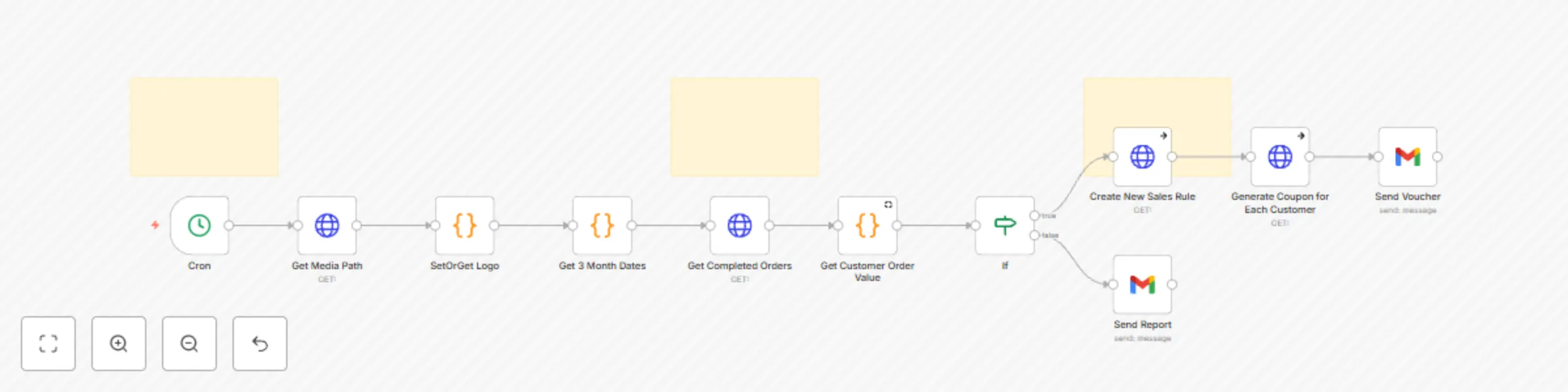
This workflow analyses completed orders from the past 3 months to identify high-value customers, generates unique voucher codes for each, and sends them a professionally designed promotional email.

This n8n template helps Magento 2 merchants automatically send customised, beautifully branded coupon emails to high-value customers.

The workflow connects to Magento 2’s REST API to retrieve your store logo and secure base URL. It either generates a coupon code and then crafts a visually appealing HTML email with dynamic customer details and branding.

You can integrate this flow as part of loyalty campaigns or customer milestone automations. All styling is mobile-responsive and minimal to reduce the chance of spam filtering while still delivering a modern user experience.

πŸ” What It Does:
  1. Authenticates and connects to your Magento 2 store.
  2. Fetches store logo and base media URL using API calls.
  3. Processes High valued customers.
  4. Generates coupons for each customers
  5. Dynamically injects customer name and unique coupon code.
  6. Sends a fully branded and styled HTML email.

βš™οΈ Technical Highlights:

  1. Uses rest/all/V1/store/storeConfigs to retrieve logo and configuration data.
  2. HTML email styled with CSS media queries for prefers-color-scheme.
  3. Gradient background with fallbacks and proper semantic structure.
  4. Works with Gmail, Apple Mail, Outlook (Mac), and others.
  5. Uses n8n expressions to handle personalization logic without external scripts.
βœ… Ideal For:
  • Magento 2 store owners.
  • Digital marketers targeting loyal or VIP customers.
  • CRM/email marketing automation professionals.
  • Agencies building Magento-based growth funnels.
πŸ“ˆ Why This Matters in the Current Market:
  • Modern customers expect personalized, premium communication β€” and inbox competition is tougher than ever.
  • This workflow enables eCommerce merchants to deliver clean, brand-consistent emails using automation β€” all without plugins or frontend code changes.
πŸ”§ Modules Used:
  • HTTP Request – Fetch Magento logo and config via REST API.
  • Set – Store customer name and coupon values.
  • Email or SMTP – Sends the composed HTML email.
  • DateTime – To handle expiration display (optional).
  • HTML Template – Responsive MJML-like styling with fallback-safe design.
πŸ’Ό Use Cases:
  • Loyalty program campaigns
  • Seasonal or holiday discount blasts
  • Surprise reward drops for top spenders
  • Post-purchase thank-you automation
  • Reactivation flows for high-valuee users
πŸ”’ Credentials Required:
  • Magento 2 Admin API Token
  • (Optional) SMTP credentials or Email node configuration
πŸ“‚ Category

E-commerce β†’ Magento 2 (Adobe Commerce)

πŸ’¬ Need Help? πŸ’‘ Having trouble setting it up or want to customize this workflow further? Feel free to reach out β€” I’m happy to help with setup, customization, or Magento 2 API integration issues.

Contact: Author

πŸ‘€ Author

Kanaka Kishore Kandregula Certified Magento 2 Developer https://gravatar.com/kmyprojects https://www.linkedin.com/in/kanakakishore

1.2 Logical Blocks

This catalog entry is organized from the workflow JSON. The node-level section below shows the executable blocks available for review before importing the template.

2. Block-by-Block Analysis

Block 1 - Cron

Type / Role
n8n-nodes-base.cron - cron
Config choices
Version 1

Block 2 - Get Completed Orders

Type / Role
n8n-nodes-base.httpRequest - httpRequest
Config choices
Version 2

Block 3 - Create New Sales Rule

Type / Role
n8n-nodes-base.httpRequest - httpRequest
Config choices
Version 4.2

Block 4 - Generate Coupon for Each Customer

Type / Role
n8n-nodes-base.httpRequest - httpRequest
Config choices
Version 4.2

Block 5 - Get Customer Order Value

Type / Role
n8n-nodes-base.code - code
Config choices
Version 2

Block 6 - Get 3 Month Dates

Type / Role
n8n-nodes-base.code - code
Config choices
Version 2

Block 7 - If

Type / Role
n8n-nodes-base.if - if
Config choices
Version 2.2

Block 8 - Get Media Path

Type / Role
n8n-nodes-base.httpRequest - httpRequest
Config choices
Version 4.2

Block 9 - SetOrGet Logo

Type / Role
n8n-nodes-base.code - code
Config choices
Version 2

Block 10 - Sticky Note

Type / Role
n8n-nodes-base.stickyNote - stickyNote
Config choices
Version 1

Block 11 - Sticky Note1

Type / Role
n8n-nodes-base.stickyNote - stickyNote
Config choices
Version 1

Block 12 - Sticky Note2

Type / Role
n8n-nodes-base.stickyNote - stickyNote
Config choices
Version 1

Block 13 - Send Voucher

Type / Role
n8n-nodes-base.gmail - gmail
Config choices
Version 2.1

Block 14 - Send Report

Type / Role
n8n-nodes-base.gmail - gmail
Config choices
Version 2.1

3. Summary Table

Workflow Send automated discount vouchers to high-value Magento 2 customers with Gmail
Complexity intermediate
Nodes 14
Categories Social Media
Author Kanaka Kishore Kandregula
Published 04 Aug 2025

4. Reproducing the Workflow from Scratch

  1. 1. Download the workflow JSON

    Use the JSON export at /data/workflows/6982/6982.json as the source template for this automation.

  2. 2. Import the template into n8n

    Open n8n, import the downloaded JSON, and review each node before activating the workflow.

  3. 3. Configure credentials and variables

    Replace placeholder credentials, API keys, webhook URLs, account IDs, and environment-specific values with your own settings.

  4. 4. Test with sample data

    Run the workflow manually or in a staging workspace, inspect node output, and confirm downstream systems receive the expected data.

  5. 5. Activate and monitor

    Enable the workflow only after testing, then monitor executions, errors, and rate limits during the first production runs.

5. General Notes & Resources

Review imported nodes carefully before activation. This catalog entry is intended to help you inspect the workflow structure, understand required services, and find related templates faster.

Node names, credentials, schedules, webhook paths, and external service limits may need adjustment for your workspace.

Frequently asked questions

What does Send automated discount vouchers to high-value Magento 2 customers with Gmail do?

This workflow analyses completed orders from the past 3 months to identify high value customers, generates unique voucher codes for each, and sends them a professionally designed promotional email....

What do I need before importing this workflow?

Review the workflow JSON, configure any required credentials in n8n, and test the automation in a safe workspace before using it in production.

Can I customize this workflow?

Yes. Use the block-by-block analysis and the downloadable JSON to inspect each node, then adjust credentials, prompts, schedules, filters, or destinations for your Social Media use case.