Selective forex factory calendar import & cleanup for Google Calendar

Workflow preview

Workflow preview
100%
Selective forex factory calendar import & cleanup for Google Calendar preview
Open on n8n.io

Important notice

This workflow is provided as-is. Please review and test before using in production.

1. Workflow Overview

Import Forex Factory Calendar To Google Calendar Purpose of this n8n Template 1. Import Forex Factory Calendar events into Google Calendar. 2. Delete past Forex Factory Calendar events from Google ...

Best for

  • Crypto Trading automation workflows
  • intermediate n8n builders looking for reusable templates

Tools used

n8n-nodes-base.httprequest, n8n-nodes-base.extractfromfile, n8n-nodes-base.splitout, n8n-nodes-base.googlecalendar, n8n-nodes-base.switch, n8n-nodes-base.scheduletrigger, n8n-nodes-base.if, n8n-nodes-base.noop

Source and attribution

This workflow is cataloged by N8N Workflows and links back to its original n8n.io source page by Harry Gunadi Permana.

Original n8n.io source

1.1 Workflow description

Title
Selective forex factory calendar import & cleanup for Google Calendar
Workflow name
Selective forex factory calendar import & cleanup for Google Calendar

Import Forex Factory Calendar To Google Calendar

Purpose of this n8n Template

  1. Import Forex Factory Calendar events into Google Calendar.
  2. Delete past Forex Factory Calendar events from Google Calendar.

Use Cases:

  • Get reminders for important economic data releases — especially High Impact news.
  • Use as a trigger for opening trading positions.

How It Works (Adding Next Week’s Events to Google Calendar)

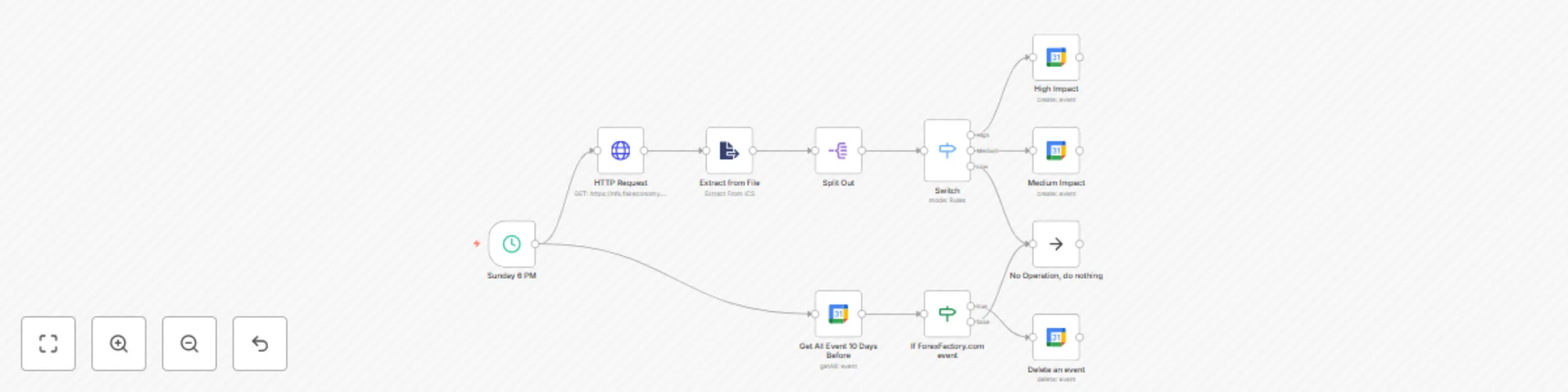
  • Every Sunday, the workflow fetches the next week’s events (.ics file) using the HTTP node.
  • The file is parsed with the Extract From File node.
  • Events are split using the Split Out node so each event is processed separately.
  • Events are classified into three categories — High, Medium, and Low Impact — using the Switch node.
  • High Impact news is added to Google Calendar with a popup reminder set 30 minutes before release.
  • Medium Impact news is added to Google Calendar without a reminder.
  • Low Impact news is ignored.

How It Works (Deleting Past Events from Google Calendar)

  • The workflow retrieves events from the past 10 days using the Google Calendar node.
  • If an event is related to Forex Factory, it will be deleted.
  • If it is not related, it will be left untouched.

How to Use

  • Enter your credentials for all Google Calendar nodes.

Requirements

  • A valid Google Calendar credential.

Need Help?

Join the Discord or ask in the Forum!

Thank you!

1.2 Logical Blocks

This catalog entry is organized from the workflow JSON. The node-level section below shows the executable blocks available for review before importing the template.

2. Block-by-Block Analysis

Block 1 - HTTP Request

Type / Role
n8n-nodes-base.httpRequest - httpRequest
Config choices
Version 4.2

Block 2 - Extract from File

Type / Role
n8n-nodes-base.extractFromFile - extractFromFile
Config choices
Version 1

Block 3 - Split Out

Type / Role
n8n-nodes-base.splitOut - splitOut
Config choices
Version 1

Block 4 - High Impact

Type / Role
n8n-nodes-base.googleCalendar - googleCalendar
Config choices
Version 1.3

Block 5 - Switch

Type / Role
n8n-nodes-base.switch - switch
Config choices
Version 3.2

Block 6 - Medium Impact

Type / Role
n8n-nodes-base.googleCalendar - googleCalendar
Config choices
Version 1.3

Block 7 - Sunday 6 PM

Type / Role
n8n-nodes-base.scheduleTrigger - scheduleTrigger
Config choices
Version 1.2

Block 8 - If ForexFactory.com event

Type / Role
n8n-nodes-base.if - if
Config choices
Version 2.2

Block 9 - No Operation, do nothing

Type / Role
n8n-nodes-base.noOp - noOp
Config choices
Version 1

Block 10 - Delete an event

Type / Role
n8n-nodes-base.googleCalendar - googleCalendar
Config choices
Version 1.3

Block 11 - Get All Event 10 Days Before

Type / Role
n8n-nodes-base.googleCalendar - googleCalendar
Config choices
Version 1.3

3. Summary Table

Workflow Selective forex factory calendar import & cleanup for Google Calendar
Complexity intermediate
Nodes 11
Categories Crypto Trading
Author Harry Gunadi Permana
Published 06 Sept 2025

4. Reproducing the Workflow from Scratch

  1. 1. Download the workflow JSON

    Use the JSON export at /data/workflows/8327/8327.json as the source template for this automation.

  2. 2. Import the template into n8n

    Open n8n, import the downloaded JSON, and review each node before activating the workflow.

  3. 3. Configure credentials and variables

    Replace placeholder credentials, API keys, webhook URLs, account IDs, and environment-specific values with your own settings.

  4. 4. Test with sample data

    Run the workflow manually or in a staging workspace, inspect node output, and confirm downstream systems receive the expected data.

  5. 5. Activate and monitor

    Enable the workflow only after testing, then monitor executions, errors, and rate limits during the first production runs.

5. General Notes & Resources

Review imported nodes carefully before activation. This catalog entry is intended to help you inspect the workflow structure, understand required services, and find related templates faster.

Node names, credentials, schedules, webhook paths, and external service limits may need adjustment for your workspace.

Frequently asked questions

What does Selective forex factory calendar import & cleanup for Google Calendar do?

Import Forex Factory Calendar To Google Calendar Purpose of this n8n Template 1. Import Forex Factory Calendar events into Google Calendar. 2. Delete past Forex Factory Calendar events from Google ...

What do I need before importing this workflow?

Review the workflow JSON, configure any required credentials in n8n, and test the automation in a safe workspace before using it in production.

Can I customize this workflow?

Yes. Use the block-by-block analysis and the downloadable JSON to inspect each node, then adjust credentials, prompts, schedules, filters, or destinations for your Crypto Trading use case.