Harry Gunadi Permana
Workflows by Harry Gunadi Permana
Track and analyze Forex news trading results with MyFxBook and Google Sheets
## Forex News Trading Result Data ### This n8n template simulates the results if we take every trade based on the previous workflow: https://n8n.io/workflows/8340-automated-forex-news-alert-system-with-forex-factory-and-telegram/ ### Use Cases 1. Analyze which news events have a higher probability of generating profit. 2. Decide on Take Profit and Stop Loss levels for specific currency pairs or news events. ### Currency Pairs EURUSD, GBPUSD, AUDUSD, NZDUSD, USDJPY, USDCHF, USDCAD, XAUUSD ### Limitations 1. We use High, Low, and Live Prices from MyFxBook. These values may differ depending on the broker. 2. Spread widening and slippage will vary across brokers. 3. Price gaps may occur over weekends. 4. Profit/Loss also depends on when the trade is closed. ### How It Works * Each day, the workflow checks if the Sheets have empty High and Low Price values. * It queries MyFxBook for updated High and Low Prices for Date+1 (the next trading day after opening a buy/sell position) using the HTTP Request node. * The response from the HTTP Request is parsed. * If new High and Low data are available, the workflow retrieves the date. * It scrapes the new High and Low Price data and calculates the multiplier for the respective currency pair. * Example: USDJPY prices have 3 decimals, so the multiplier is 1000. * Sheets are updated with High, Low, Points Up, and Points Down. * The workflow checks if the buy/sell position results in profit or loss. * Example: if we have a EURUSD Buy position and Points Up > 0, then there is a possibility of profit. * Points Up can be negative if the new High Price remains below the Buy position entry price. * If we have a Buy position and Points Up ≤ 0, then there is a possibility of a loss. ### How to Use * Enter all required credentials. * Create or download a Google Sheets file (example): https://docs.google.com/spreadsheets/d/1OhrbUQEc_lGegk5pRWWKz5nrnMbTZGT0lxK9aJqqId4/edit?usp=drive_link * Run the workflow. ### Requirements * Enable the Google Drive API in Google Cloud Console. * Provide Google Sheets credentials. ### Need Help? Join the [Discord](https://discord.gg/n8n) or ask in the [Forum](https://community.n8n.io/)! Thank you!
Track Forex Factory news releases with MyFxBook, Telegram & Google Sheets
## Get Forex Factory News Release to Telegram, Google Sheets. Record News Data and Live Price from MyFxBook for Affected Currency Pairs. ### This n8n template demonstrates how to capture Actual Data Releases as quickly as possible for trading decisions. ### Use cases: 1. Get notified if the actual data release is positive or negative for the relevant currency. 2. Use the Telegram chat message about the news release as a trigger to open a trading position in MetaTrader 4. 3. Record news data and live price to google sheets for analysis. ### Currency Pairs EURUSD, GBPUSD, AUDUSD, NZDUSD, USDJPY, USDCHF, USDCAD, XAUUSD ### How it works * A news release event acts as the trigger. * Only news with a numerical Forecast value will be processed. Events that cannot be measured numerically (e.g., speeches) are ignored. * Extract news details: currency, impact level (high/medium), release date, and news link. * Wait 10 seconds to ensure the Actual value is available on the news page. * Scrape the Actual value from the news link using Airtop. * If the Actual value is not available, wait another 5 seconds and retry scraping. * Extract both Actual and Forecast values from the scraped content. * Remove non-numeric characters (%, K, M, B, T) and convert values to numbers. * Determine the effect: If the Actual value is lower than the Forecast value (and lower is better), send it to the True branch. Otherwise, send it to the False branch. * Record news data and live price from MyFxBook to Google Sheets. ### How to use * Enter all required credentials. * Create or Download Google Sheets file like this in your Google Drive: https://docs.google.com/spreadsheets/d/1OhrbUQEc_lGegk5pRWWKz5nrnMbTZGT0lxK9aJqqId4/edit?usp=drive_link * Run the workflow. ### Requirements * Google Calendar credentials * Airtop API key * Telegram Chat ID * Telegram Bot API token * Enable Google Drive API in Google Cloud Console * Google Sheets credentials ### Need Help? Join the [Discord](https://discord.gg/n8n) or ask in the [Forum](https://community.n8n.io/)! Thank you! ### Update Sept 26, 2025: * Add new edit node
Automated forex news alert system with Forex Factory and Telegram
## Get Forex Factory News Release to Telegram ### This n8n template demonstrates how to capture Actual Data Releases as quickly as possible for trading decisions. ### Use cases: 1. Get notified if the actual data release is positive or negative for the relevant currency. 2. Use the Telegram chat message about the news release as a trigger to open a trading position in MetaTrader 4. ### How it works * A news release event acts as the trigger. * Only news with a numerical Forecast value will be processed. Events that cannot be measured numerically (e.g., speeches) are ignored. * Extract news details: currency, impact level (high/medium), release date, and news link. * Wait 10 seconds to ensure the Actual value is available on the news page. * Scrape the Actual value from the news link using Airtop. * If the Actual value is not available, wait another 5 seconds and retry scraping. * Extract both Actual and Forecast values from the scraped content. * Remove non-numeric characters (%, K, M, B, T) and convert values to numbers. * Determine the effect: If the Actual value is lower than the Forecast value (and lower is better), send it to the True branch. Otherwise, send it to the False branch. ### How to use * Enter all required credentials. * Run the workflow. ### Requirements * Google Calendar credentials * Airtop API key * Telegram Chat ID * Telegram Bot API token ### Need Help? Join the [Discord](https://discord.gg/n8n) or ask in the [Forum](https://community.n8n.io/)! Thank you! ### Update Sept 26, 2025: * Add new edit node
Selective forex factory calendar import & cleanup for Google Calendar
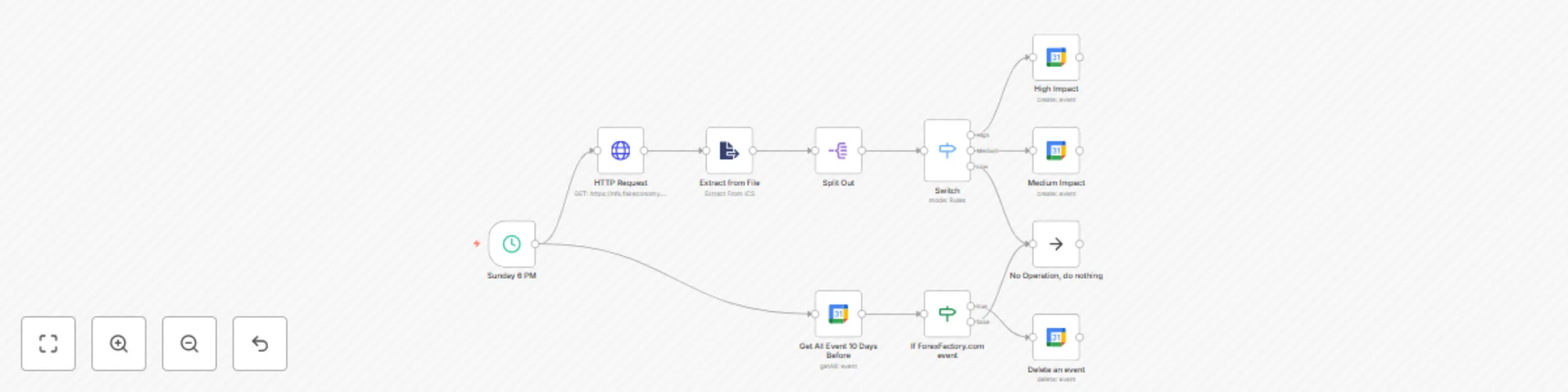
## Import Forex Factory Calendar To Google Calendar ### Purpose of this n8n Template 1. Import Forex Factory Calendar events into Google Calendar. 2. Delete past Forex Factory Calendar events from Google Calendar. ### Use Cases: * Get reminders for important economic data releases — especially High Impact news. * Use as a trigger for opening trading positions. ### How It Works (Adding Next Week’s Events to Google Calendar) * Every Sunday, the workflow fetches the next week’s events (.ics file) using the HTTP node. * The file is parsed with the Extract From File node. * Events are split using the Split Out node so each event is processed separately. * Events are classified into three categories — High, Medium, and Low Impact — using the Switch node. * High Impact news is added to Google Calendar with a popup reminder set 30 minutes before release. * Medium Impact news is added to Google Calendar without a reminder. * Low Impact news is ignored. ### How It Works (Deleting Past Events from Google Calendar) * The workflow retrieves events from the past 10 days using the Google Calendar node. * If an event is related to Forex Factory, it will be deleted. * If it is not related, it will be left untouched. ### How to Use * Enter your credentials for all Google Calendar nodes. ### Requirements * A valid Google Calendar credential. ### Need Help? Join the [Discord](https://discord.gg/n8n) or ask in the [Forum](https://community.n8n.io/)! Thank you!