Segment WooCommerce customers for targeted marketing with RFM analysis

Workflow preview

Workflow preview
100%
Segment WooCommerce customers for targeted marketing with RFM analysis preview
Open on n8n.io

Important notice

This workflow is provided as-is. Please review and test before using in production.

1. Workflow Overview

This workflow is designed for eCommerce store owners and marketing teams who use WooCommerce. It helps segment customers based on their purchasing behavior using the RFM (Recency, Frequency, Moneta...

Best for

  • Market Research automation workflows
  • intermediate n8n builders looking for reusable templates

Tools used

n8n-nodes-base.start, n8n-nodes-base.scheduletrigger, n8n-nodes-base.woocommerce, n8n-nodes-base.code, n8n-nodes-base.html, n8n-nodes-base.stickynote

Source and attribution

This workflow is cataloged by N8N Workflows and links back to its original n8n.io source page by Mohammadreza azari.

Original n8n.io source

1.1 Workflow description

Title
Segment WooCommerce customers for targeted marketing with RFM analysis
Workflow name
Segment WooCommerce customers for targeted marketing with RFM analysis

Overview

This workflow is designed for eCommerce store owners and marketing teams who use WooCommerce. It helps segment customers based on their purchasing behavior using the RFM (Recency, Frequency, Monetary) model. By identifying high-value customers, new buyers, and at-risk segments, you can tailor your marketing strategies and improve customer retention.

How It Works

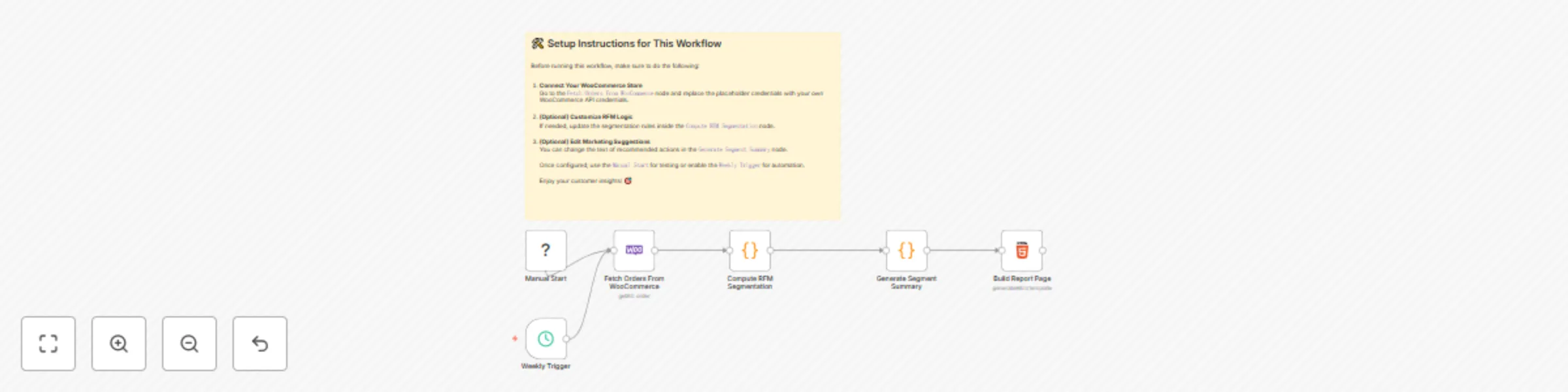
  1. Trigger: The workflow can be started manually or on a scheduled basis (e.g., weekly).
  2. Retrieve Orders: It fetches completed orders from your WooCommerce store from the past year.
  3. RFM Analysis: It groups orders by customer and calculates their RFM scores.
  4. Customer Segmentation: Based on RFM scores, customers are categorized into marketing segments (e.g., Champions, At Risk, Lost).
  5. Summary Report: Generates a styled HTML report with a table summarizing customer segments and suggested marketing actions.

Setup Instructions

  1. Connect WooCommerce:

    • Go to the WooCommerce node.
    • Add or select your WooCommerce API credentials. You need the Base URL, Consumer Key, and Consumer Secret.
    • Ensure API access is enabled in your WooCommerce settings.
  2. Customize Segmentation (Optional):

    • In the "Calculate RFM Scores" code node, you can adjust the logic that assigns segment labels based on score combinations.
    • You can also update the marketing suggestions in the second "Code" node.
  3. Run the Workflow:

    • Use the "Manual Start" node for testing.
    • Enable the "Weekly Trigger" node to automate execution.
  4. View Report:

    • The final HTML node outputs a complete styled report.
    • You can send this via email or integrate it with other services.

Requirements

  • WooCommerce store with API access enabled.
  • Valid API credentials (Base URL, Consumer Key, Consumer Secret).
  • n8n instance with access to the internet.

1.2 Logical Blocks

This catalog entry is organized from the workflow JSON. The node-level section below shows the executable blocks available for review before importing the template.

2. Block-by-Block Analysis

Block 1 - Manual Start

Type / Role
n8n-nodes-base.start - start
Config choices
Version 1

Block 2 - Weekly Trigger

Type / Role
n8n-nodes-base.scheduleTrigger - scheduleTrigger
Config choices
Version 1.1

Block 3 - Fetch Orders From WooCommerce

Type / Role
n8n-nodes-base.wooCommerce - wooCommerce
Config choices
Version 1

Block 4 - Compute RFM Segmentation

Type / Role
n8n-nodes-base.code - code
Config choices
Version 2

Block 5 - Generate Segment Summary

Type / Role
n8n-nodes-base.code - code
Config choices
Version 2

Block 6 - Build Report Page

Type / Role
n8n-nodes-base.html - html
Config choices
Version 1.2

Block 7 - Sticky Note

Type / Role
n8n-nodes-base.stickyNote - stickyNote
Config choices
Version 1

3. Summary Table

Workflow Segment WooCommerce customers for targeted marketing with RFM analysis
Complexity intermediate
Nodes 7
Categories Market Research
Author Mohammadreza azari
Published 11 Jun 2025

4. Reproducing the Workflow from Scratch

  1. 1. Download the workflow JSON

    Use the JSON export at /data/workflows/4880/4880.json as the source template for this automation.

  2. 2. Import the template into n8n

    Open n8n, import the downloaded JSON, and review each node before activating the workflow.

  3. 3. Configure credentials and variables

    Replace placeholder credentials, API keys, webhook URLs, account IDs, and environment-specific values with your own settings.

  4. 4. Test with sample data

    Run the workflow manually or in a staging workspace, inspect node output, and confirm downstream systems receive the expected data.

  5. 5. Activate and monitor

    Enable the workflow only after testing, then monitor executions, errors, and rate limits during the first production runs.

5. General Notes & Resources

Review imported nodes carefully before activation. This catalog entry is intended to help you inspect the workflow structure, understand required services, and find related templates faster.

Node names, credentials, schedules, webhook paths, and external service limits may need adjustment for your workspace.

Frequently asked questions

What does Segment WooCommerce customers for targeted marketing with RFM analysis do?

This workflow is designed for eCommerce store owners and marketing teams who use WooCommerce. It helps segment customers based on their purchasing behavior using the RFM (Recency, Frequency, Moneta...

What do I need before importing this workflow?

Review the workflow JSON, configure any required credentials in n8n, and test the automation in a safe workspace before using it in production.

Can I customize this workflow?

Yes. Use the block-by-block analysis and the downloadable JSON to inspect each node, then adjust credentials, prompts, schedules, filters, or destinations for your Market Research use case.