Search & summarize web data with Perplexity, Gemini AI & Bright Data to webhooks

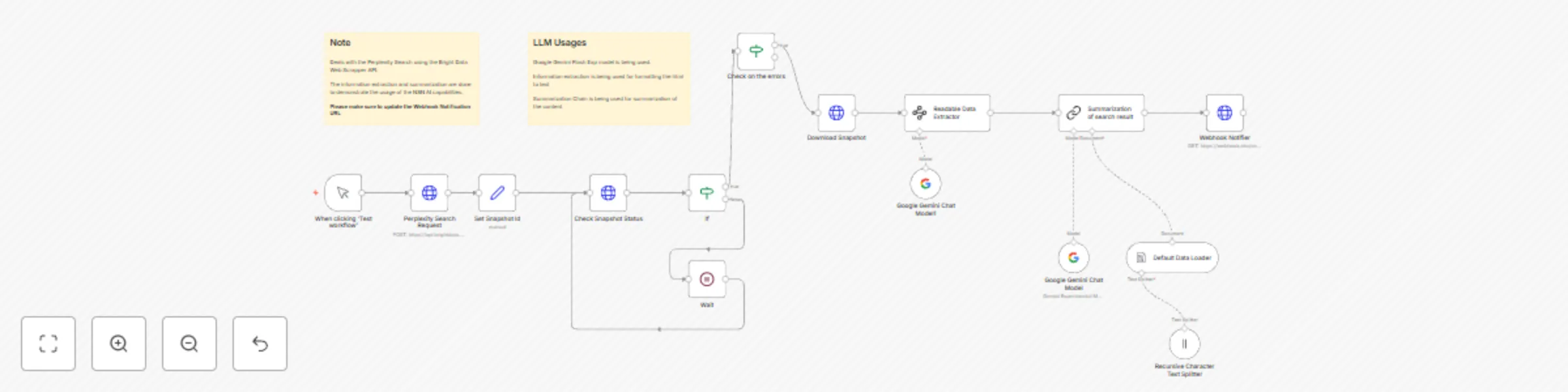
Workflow preview

Workflow preview
100%
Search & summarize web data with Perplexity, Gemini AI & Bright Data to webhooks preview
Open on n8n.io

Important notice

This workflow is provided as-is. Please review and test before using in production.

1. Workflow Overview

Who this is for? This workflow is designed for professionals and teams who need real time, structured insights from Perplexity Search results without manual effort. What problem is this workflow so...

Best for

  • Market Research automation workflows
  • AI Summarization automation workflows
  • advanced n8n builders looking for reusable templates

Tools used

n8n-nodes-base.manualtrigger, @n8n/n8n-nodes-langchain.lmchatgooglegemini, @n8n/n8n-nodes-langchain.documentdefaultdataloader, @n8n/n8n-nodes-langchain.textsplitterrecursivecharactertextsplitter, n8n-nodes-base.if, n8n-nodes-base.set, n8n-nodes-base.httprequest, n8n-nodes-base.wait

Source and attribution

This workflow is cataloged by N8N Workflows and links back to its original n8n.io source page by Ranjan Dailata.

Original n8n.io source

1.1 Workflow description

Title
Search & summarize web data with Perplexity, Gemini AI & Bright Data to webhooks
Workflow name
Search & summarize web data with Perplexity, Gemini AI & Bright Data to webhooks

Who this is for?

This workflow is designed for professionals and teams who need real-time, structured insights from Perplexity Search results without manual effort.

What problem is this workflow solving?

This n8n workflow solves the problem of automating Perplexity Search result extraction, cleanup, summarization, and AI-enhanced formatting for downstream use like sending the results to a webhook or another system.

What this workflow does

  1. Automates Perplexity Search via Bright Data
  • Uses Bright Data’s proxy-based SERP API to run a Google Search query programmatically.
  • Makes the process repeatable and scriptable with different search terms and regions/zones.
  1. Cleans and Extracts Useful Content
  • The Readable Data Extractor uses LLM-based cleaning to remove HTML/CSS/JS from the response and extract pure text data.
  • Converts messy, unstructured web content into structured, machine-readable format.
  1. Summarizes Search Results Through the Gemini Flash + Summarization Chain, it generates a concise summary of the search results. Ideal for users who don’t have time to read full pages of search results.

  2. Formats Data Using AI Agent The AI Agent acts like a virtual assistant that: - Understands search results

  • Formats them in a readable, JSON-compatible form
  • Prepares them for webhook delivery
  1. Delivers Results to Webhook Sends the final summary + structured search result to a webhook (could be your app, a Slack bot, Google Sheets, or CRM).

Setup

  • Sign up at Bright Data.
  • Navigate to Proxies & Scraping and create a new Web Unlocker zone by selecting Web Unlocker API under Scraping Solutions.
  • In n8n, configure the Header Auth account under Credentials (Generic Auth Type: Header Authentication). The Value field should be set with the Bearer XXXXXXXXXXXXXX. The XXXXXXXXXXXXXX should be replaced by the Web Unlocker Token.
  • In n8n, configure the Google Gemini(PaLM) Api account with the Google Gemini API key (or access through Vertex AI or proxy).
  • Update the Perplexity Search Request node with the prompt you wish to perform the search.
  • Update the Webhook HTTP Request node with the Webhook endpoint of your choice.

How to customize this workflow to your needs

1. Change the Perplexity Search Input

Default: It searches a fixed query or dataset.

Customize:

  • Accept input from a Google Sheet, Airtable, or a form.
  • Auto-trigger searches based on keywords or schedules.

2. Customize Summarization Style (LLM Output)

Default: General summary using Google Gemini or OpenAI.

Customize:

  • Add tone: formal, casual, technical, executive-summary, etc.

  • Focus on specific sections: pricing, competitors, FAQs, etc.

  • Translate the summaries into multiple languages.

  • Add bullet points, pros/cons, or insight tags.

3.Choose Where the Results Go

Options:

  • Email, Slack, Notion, Airtable, Google Docs, or a dashboard.

  • Auto-create content drafts for WordPress or newsletters.

  • Feed into CRM notes or attach to Salesforce leads.

1.2 Logical Blocks

This catalog entry is organized from the workflow JSON. The node-level section below shows the executable blocks available for review before importing the template.

2. Block-by-Block Analysis

Block 1 - When clicking ‘Test workflow’

Type / Role
n8n-nodes-base.manualTrigger - manualTrigger
Config choices
Version 1

Block 2 - Google Gemini Chat Model

Type / Role
@n8n/n8n-nodes-langchain.lmChatGoogleGemini - lmChatGoogleGemini
Config choices
Version 1

Block 3 - Default Data Loader

Type / Role
@n8n/n8n-nodes-langchain.documentDefaultDataLoader - documentDefaultDataLoader
Config choices
Version 1

Block 4 - Recursive Character Text Splitter

Type / Role
@n8n/n8n-nodes-langchain.textSplitterRecursiveCharacterTextSplitter - textSplitterRecursiveCharacterTextSplitter
Config choices
Version 1

Block 5 - If

Type / Role
n8n-nodes-base.if - if
Config choices
Version 2.2

Block 6 - Set Snapshot Id

Type / Role
n8n-nodes-base.set - set
Config choices
Version 3.4

Block 7 - Download Snapshot

Type / Role
n8n-nodes-base.httpRequest - httpRequest
Config choices
Version 4.2

Block 8 - Google Gemini Chat Model1

Type / Role
@n8n/n8n-nodes-langchain.lmChatGoogleGemini - lmChatGoogleGemini
Config choices
Version 1

Block 9 - Wait

Type / Role
n8n-nodes-base.wait - wait
Config choices
Version 1.1

Block 10 - Check on the errors

Type / Role
n8n-nodes-base.if - if
Config choices
Version 2.2

Block 11 - Sticky Note

Type / Role
n8n-nodes-base.stickyNote - stickyNote
Config choices
Version 1

Block 12 - Webhook Notifier

Type / Role
n8n-nodes-base.httpRequest - httpRequest
Config choices
Version 4.2

Block 13 - Sticky Note1

Type / Role
n8n-nodes-base.stickyNote - stickyNote
Config choices
Version 1

Block 14 - Perplexity Search Request

Type / Role
n8n-nodes-base.httpRequest - httpRequest
Config choices
Version 4.2

Block 15 - Check Snapshot Status

Type / Role
n8n-nodes-base.httpRequest - httpRequest
Config choices
Version 4.2

Block 16 - Readable Data Extractor

Type / Role
@n8n/n8n-nodes-langchain.informationExtractor - informationExtractor
Config choices
Version 1

Block 17 - Summarization of search result

Type / Role
@n8n/n8n-nodes-langchain.chainSummarization - chainSummarization
Config choices
Version 2

3. Summary Table

Workflow Search & summarize web data with Perplexity, Gemini AI & Bright Data to webhooks
Complexity advanced
Nodes 17
Categories Market Research, AI Summarization
Author Ranjan Dailata
Published 13 Apr 2025

4. Reproducing the Workflow from Scratch

  1. 1. Download the workflow JSON

    Use the JSON export at /data/workflows/3534/3534.json as the source template for this automation.

  2. 2. Import the template into n8n

    Open n8n, import the downloaded JSON, and review each node before activating the workflow.

  3. 3. Configure credentials and variables

    Replace placeholder credentials, API keys, webhook URLs, account IDs, and environment-specific values with your own settings.

  4. 4. Test with sample data

    Run the workflow manually or in a staging workspace, inspect node output, and confirm downstream systems receive the expected data.

  5. 5. Activate and monitor

    Enable the workflow only after testing, then monitor executions, errors, and rate limits during the first production runs.

5. General Notes & Resources

Review imported nodes carefully before activation. This catalog entry is intended to help you inspect the workflow structure, understand required services, and find related templates faster.

Node names, credentials, schedules, webhook paths, and external service limits may need adjustment for your workspace.

Frequently asked questions

What does Search & summarize web data with Perplexity, Gemini AI & Bright Data to webhooks do?

Who this is for? This workflow is designed for professionals and teams who need real time, structured insights from Perplexity Search results without manual effort. What problem is this workflow so...

What do I need before importing this workflow?

Review the workflow JSON, configure any required credentials in n8n, and test the automation in a safe workspace before using it in production.

Can I customize this workflow?

Yes. Use the block-by-block analysis and the downloadable JSON to inspect each node, then adjust credentials, prompts, schedules, filters, or destinations for your Market Research, AI Summarization use case.