Block 1 - Start
- Type / Role
- n8n-nodes-base.manualTrigger - manualTrigger
- Config choices
- Version 1


 Early Deal
This workflow is provided as-is. Please review and test before using in production.
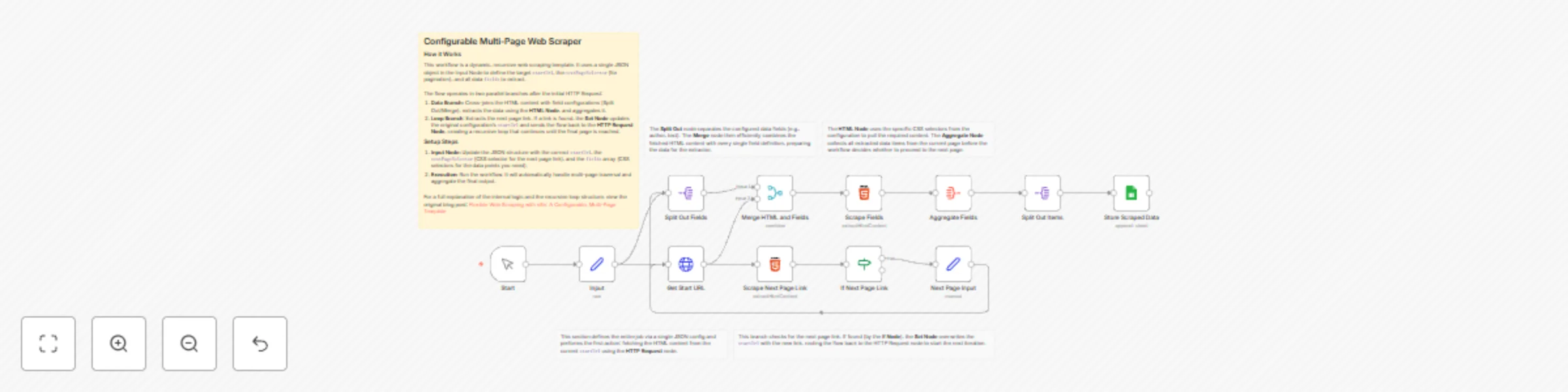
Configurable Multi Page Web Scraper Introduction This n8n workflow provides a robust and highly reusable solution for scraping data from paginated websites. Instead of building a complex series of ...
n8n-nodes-base.manualtrigger, n8n-nodes-base.set, n8n-nodes-base.httprequest, n8n-nodes-base.splitout, n8n-nodes-base.merge, n8n-nodes-base.html, n8n-nodes-base.if, n8n-nodes-base.aggregate
This workflow is cataloged by N8N Workflows and links back to its original n8n.io source page by Viktor Klepikovskyi.
Original n8n.io sourceThis n8n workflow provides a robust and highly reusable solution for scraping data from paginated websites. Instead of building a complex series of nodes for every new site, you only need to update a simple JSON configuration in the initial Input Node, making your scraping tasks faster and more standardized.
The core purpose of this template is to automate the extraction of structured data (e.g., product details, quotes, articles) from websites with multiple pages. It is designed to be fully recursive: it follows the "next page" link until no link is found, aggregates the results from all pages, and cleanly structures the final output into a single list of items.
startUrl: The URL of the first page to begin scraping.nextPageSelector: The CSS selector for the "Next" or "Continue" link element that leads to the next page. This is crucial for the pagination loop.fields: An array of objects defining the data to extract on each page. For each field, specify the name (the output key), the selector (the CSS selector pointing to the data), and the value (the HTML attribute to pull, usually text or href).For a detailed breakdown of the internal logic, including how the loop is constructed using the Set, If, and HTTP Request nodes, please refer to the original blog post: Flexible Web Scraping with n8n: A Configurable, Multi-Page Template
This catalog entry is organized from the workflow JSON. The node-level section below shows the executable blocks available for review before importing the template.
| Workflow | Scrape multi-page websites recursively with Google Sheets storage |
|---|---|
| Complexity | advanced |
| Nodes | 17 |
| Categories | Document Extraction |
| Author | Viktor Klepikovskyi |
| Published | 25 Oct 2025 |
Use the JSON export at /data/workflows/10173/10173.json as the source template for this automation.
Open n8n, import the downloaded JSON, and review each node before activating the workflow.
Replace placeholder credentials, API keys, webhook URLs, account IDs, and environment-specific values with your own settings.
Run the workflow manually or in a staging workspace, inspect node output, and confirm downstream systems receive the expected data.
Enable the workflow only after testing, then monitor executions, errors, and rate limits during the first production runs.
Review imported nodes carefully before activation. This catalog entry is intended to help you inspect the workflow structure, understand required services, and find related templates faster.
Node names, credentials, schedules, webhook paths, and external service limits may need adjustment for your workspace.
Configurable Multi Page Web Scraper Introduction This n8n workflow provides a robust and highly reusable solution for scraping data from paginated websites. Instead of building a complex series of ...
Review the workflow JSON, configure any required credentials in n8n, and test the automation in a safe workspace before using it in production.
Yes. Use the block-by-block analysis and the downloadable JSON to inspect each node, then adjust credentials, prompts, schedules, filters, or destinations for your Document Extraction use case.