Block 1 - When clicking ‘Execute workflow’
- Type / Role
- n8n-nodes-base.manualTrigger - manualTrigger
- Config choices
- Version 1


 Early Deal
This workflow is provided as-is. Please review and test before using in production.
Description: Make your SDK documentation localization ready before translation with this n8n automation template. The workflow pulls FAQ content from Notion, evaluates each entry using Azure OpenAI...
n8n-nodes-base.manualtrigger, n8n-nodes-base.stickynote, n8n-nodes-base.notion, @n8n/n8n-nodes-langchain.agent, @n8n/n8n-nodes-langchain.lmchatazureopenai, n8n-nodes-base.code, n8n-nodes-base.googlesheets, n8n-nodes-base.if
This workflow is cataloged by N8N Workflows and links back to its original n8n.io source page by Rahul Joshi.
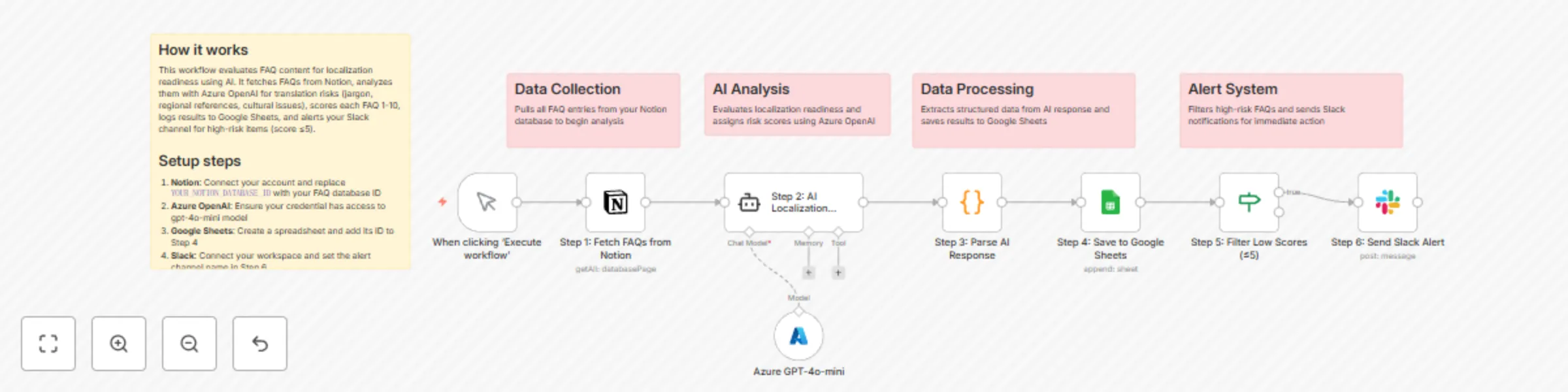
Original n8n.io sourceMake your SDK documentation localization-ready before translation with this n8n automation template. The workflow pulls FAQ content from Notion, evaluates each entry using Azure OpenAI GPT-4o-mini, and scores its localization readiness based on jargon density, cultural context, and translation risk. It logs results into Google Sheets and notifies your team on Slack if an FAQ scores poorly (≤5). Perfect for developer documentation teams, localization managers, and globalization leads who want to identify high-risk content early and ensure smooth translation for multi-language SDKs.
⚙️ Step 1: Fetch FAQs from Notion Retrieves all FAQ entries from your Notion database, including question, answer, and unique ID fields for tracking.
🤖 Step 2: AI Localization Review (GPT-4o-mini) Uses Azure OpenAI GPT-4o-mini to evaluate each FAQ for localization challenges such as:
🧩 Step 3: Parse AI Response Converts the raw AI output into structured JSON (score, issues, priority, recommendations) for clean logging and filtering.
📊 Step 4: Log Results to Google Sheets Appends one row per FAQ, storing fields like Question, Score, Priority, and Recommendations — creating a long-term localization quality tracker.
🚦 Step 5: Filter High-Risk Content (Score ≤5) Flags FAQs with low localization readiness for further review, ensuring that potential translation blockers are addressed first.
📢 Step 6: Send Slack Alerts Sends a Slack message with summary details for all high-risk FAQs — including their score and key issues — keeping localization teams informed in real time.
🧠 Key Features 🌍 AI-powered localization scoring for SDK FAQs 🤖 Azure OpenAI GPT-4o-mini integration 📊 Google Sheets-based performance logging 📢 Slack notifications for at-risk FAQs ⚙️ Automated Notion-to-AI-to-Sheets pipeline 💼 Use Cases 🧾 Audit SDK documentation before translation 🌐 Prioritize localization tasks based on content risk 🧠 Identify FAQs that need rewriting for non-native audiences 📢 Keep global documentation teams aligned on translation readiness
✅ Detect localization blockers early in your SDK documentation ✅ Automate readiness scoring across hundreds of FAQs ✅ Reduce translation rework and cultural misinterpretation ✅ Ensure a globally inclusive developer experience
This catalog entry is organized from the workflow JSON. The node-level section below shows the executable blocks available for review before importing the template.
| Workflow | Score SDK documentation localization readiness with Azure GPT-4o-mini and Slack alerts |
|---|---|
| Complexity | intermediate |
| Nodes | 13 |
| Categories | Document Extraction, AI Summarization |
| Author | Rahul Joshi |
| Published | 06 Nov 2025 |
Use the JSON export at /data/workflows/10550/10550.json as the source template for this automation.
Open n8n, import the downloaded JSON, and review each node before activating the workflow.
Replace placeholder credentials, API keys, webhook URLs, account IDs, and environment-specific values with your own settings.
Run the workflow manually or in a staging workspace, inspect node output, and confirm downstream systems receive the expected data.
Enable the workflow only after testing, then monitor executions, errors, and rate limits during the first production runs.
Review imported nodes carefully before activation. This catalog entry is intended to help you inspect the workflow structure, understand required services, and find related templates faster.
Node names, credentials, schedules, webhook paths, and external service limits may need adjustment for your workspace.
Description: Make your SDK documentation localization ready before translation with this n8n automation template. The workflow pulls FAQ content from Notion, evaluates each entry using Azure OpenAI...
Review the workflow JSON, configure any required credentials in n8n, and test the automation in a safe workspace before using it in production.
Yes. Use the block-by-block analysis and the downloadable JSON to inspect each node, then adjust credentials, prompts, schedules, filters, or destinations for your Document Extraction, AI Summarization use case.