Run bulk RAG queries from CSV with Lookio

Workflow preview

Workflow preview
100%
Run bulk RAG queries from CSV with Lookio preview
Open on n8n.io

Important notice

This workflow is provided as-is. Please review and test before using in production.

1. Workflow Overview

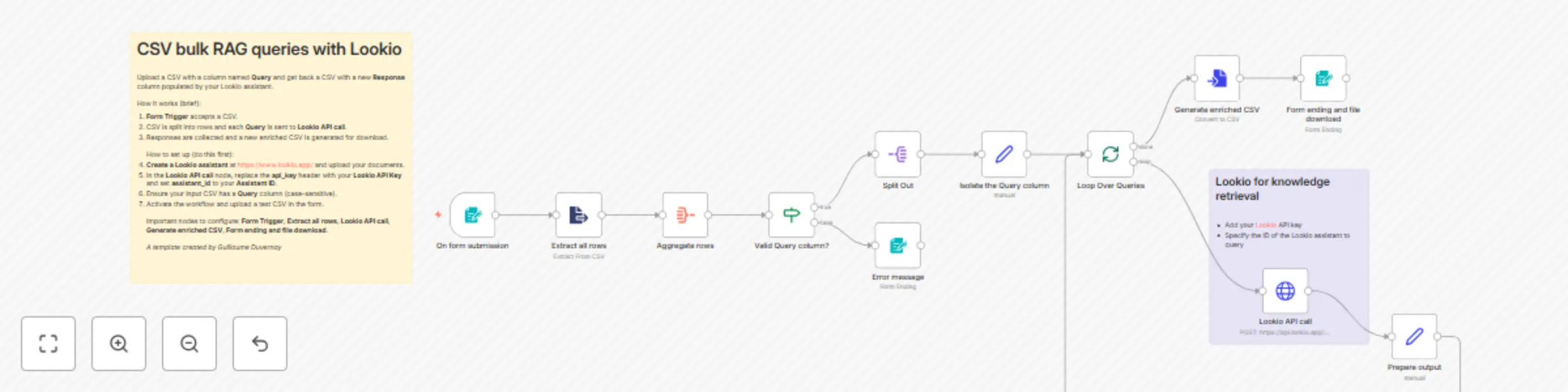
This template processes a CSV of questions and returns an enriched CSV with RAG based answers produced by your Lookio assistant. Upload a CSV that contains a column named Query , and the workflow w...

Best for

  • Document Extraction automation workflows
  • AI RAG automation workflows
  • intermediate n8n builders looking for reusable templates

Tools used

n8n-nodes-base.formtrigger, n8n-nodes-base.if, n8n-nodes-base.form, n8n-nodes-base.set, n8n-nodes-base.httprequest, n8n-nodes-base.converttofile, n8n-nodes-base.splitinbatches, n8n-nodes-base.splitout

Source and attribution

This workflow is cataloged by N8N Workflows and links back to its original n8n.io source page by Guillaume Duvernay.

Original n8n.io source

1.1 Workflow description

Title
Run bulk RAG queries from CSV with Lookio
Workflow name
Run bulk RAG queries from CSV with Lookio

This template processes a CSV of questions and returns an enriched CSV with RAG-based answers produced by your Lookio assistant.

Upload a CSV that contains a column named Query, and the workflow will loop through every row, call the Lookio API, and append a Response column containing the assistant's answer.

It's ideal for batch tasks like drafting RFP responses, pre-filling support replies, generating knowledge-checked summaries, or validating large lists of product/customer questions against your internal documentation.

Who is this for?

  • Knowledge managers & technical writers: Produce draft answers to large question sets using your company docs.
  • Sales & proposal teams: Auto-generate RFP answer drafts informed by internal docs.
  • Support & operations teams: Bulk-enrich FAQs or support ticket templates with authoritative responses.
  • Automation builders: Integrate Lookio-powered retrieval into bulk data pipelines.

What it does / What problem does this solve?

  • Automates bulk queries: Eliminates the manual process of running many individual lookups.
  • Ensures answers are grounded: Responses come from your uploaded documents via Lookio, reducing hallucinations.
  • Produces ready-to-use output: Delivers an enriched CSV with a new Response column for downstream use.
  • Simple UX: Users only need to upload a CSV with a Query column and download the resulting file.

How it works

  1. Form submission: User uploads a CSV via the Form Trigger.
  2. Extract & validate: Extract all rows reads the CSV and Aggregate rows checks for a Query column.
  3. Per-row loop: Split Out and Loop Over Queries iterate rows; Isolate the Query column normalizes data.
  4. Call Lookio: Lookio API call posts each query to your assistant and returns the answer.
  5. Build output: Prepare output appends Response values and Generate enriched CSV creates the downloadable file delivered by Form ending and file download.

Why use Lookio for high quality RAG?

While building a native RAG pipeline in n8n offers granular control, achieving consistently high-quality and reliable results requires significant effort in data processing, chunking strategy, and retrieval logic optimization. Lookio is designed to address these challenges by providing a managed RAG service accessible via a simple API.

It handles the entire backend pipeline—from processing various document formats to employing advanced retrieval techniques—allowing you to integrate a production-ready knowledge source into your workflows. This approach lets you focus on building your automation in n8n, rather than managing the complexities of a RAG infrastructure.

How to set up

  1. Create a Lookio assistant: Sign up at https://www.lookio.app/, upload documents, and create an assistant.
  2. Get credentials: Copy your Lookio API Key and Assistant ID.
  3. Configure the workflow nodes:
    • In the Lookio API call HTTP Request node, replace the api_key header value with your Lookio API Key and update assistant_id with your Assistant ID (replace placeholders like <your-lookio-api-key> and <your-assistant-id>).
    • Ensure the Form Trigger is enabled and accepts a .csv file.
  4. CSV format: Ensure the input CSV has a column named Query (case-sensitive as configured).
  5. Activate the workflow: Run a test upload and download the enriched CSV.

Requirements

  • An n8n instance with the ability to host Forms and run workflows
  • A Lookio account (API Key) and an Assistant ID

How to take it further

  • Add rate limiting / retries: Insert error handling and delay nodes to respect API limits for large batches.
  • Improve the speed: You could drastically reduce the processing time by parallelizing the queries instead of doing them one after the other in the loop. For that, you could use HTTP request nodes that would trigger your sort of sub-workflow.
  • Store results: Add an Airtable or Google Sheets node to archive questions and responses for audit and reuse.
  • Post-process answers: Add an LLM node to summarize or standardize responses, or to add confidence flags.
  • Trigger variations: Replace the Form Trigger with a Google Drive or Airtable trigger to process CSVs automatically from a folder or table.

1.2 Logical Blocks

This catalog entry is organized from the workflow JSON. The node-level section below shows the executable blocks available for review before importing the template.

2. Block-by-Block Analysis

Block 1 - On form submission

Type / Role
n8n-nodes-base.formTrigger - formTrigger
Config choices
Version 2.3

Block 2 - Valid Query column?

Type / Role
n8n-nodes-base.if - if
Config choices
Version 2.2

Block 3 - Error message

Type / Role
n8n-nodes-base.form - form
Config choices
Version 2.3

Block 4 - Isolate the Query column

Type / Role
n8n-nodes-base.set - set
Config choices
Version 3.4

Block 5 - Lookio API call

Type / Role
n8n-nodes-base.httpRequest - httpRequest
Config choices
Version 4.2

Block 6 - Prepare output

Type / Role
n8n-nodes-base.set - set
Config choices
Version 3.4

Block 7 - Generate enriched CSV

Type / Role
n8n-nodes-base.convertToFile - convertToFile
Config choices
Version 1.1

Block 8 - Form ending and file download

Type / Role
n8n-nodes-base.form - form
Config choices
Version 2.3

Block 9 - Loop Over Queries

Type / Role
n8n-nodes-base.splitInBatches - splitInBatches
Config choices
Version 3

Block 10 - Split Out

Type / Role
n8n-nodes-base.splitOut - splitOut
Config choices
Version 1

Block 11 - Aggregate rows

Type / Role
n8n-nodes-base.aggregate - aggregate
Config choices
Version 1

Block 12 - Extract all rows

Type / Role
n8n-nodes-base.extractFromFile - extractFromFile
Config choices
Version 1

Block 13 - Sticky Note

Type / Role
n8n-nodes-base.stickyNote - stickyNote
Config choices
Version 1

Block 14 - Sticky Note1

Type / Role
n8n-nodes-base.stickyNote - stickyNote
Config choices
Version 1

3. Summary Table

Workflow Run bulk RAG queries from CSV with Lookio
Complexity intermediate
Nodes 14
Categories Document Extraction, AI RAG
Author Guillaume Duvernay
Published 19 Oct 2025

4. Reproducing the Workflow from Scratch

  1. 1. Download the workflow JSON

    Use the JSON export at /data/workflows/9908/9908.json as the source template for this automation.

  2. 2. Import the template into n8n

    Open n8n, import the downloaded JSON, and review each node before activating the workflow.

  3. 3. Configure credentials and variables

    Replace placeholder credentials, API keys, webhook URLs, account IDs, and environment-specific values with your own settings.

  4. 4. Test with sample data

    Run the workflow manually or in a staging workspace, inspect node output, and confirm downstream systems receive the expected data.

  5. 5. Activate and monitor

    Enable the workflow only after testing, then monitor executions, errors, and rate limits during the first production runs.

5. General Notes & Resources

Review imported nodes carefully before activation. This catalog entry is intended to help you inspect the workflow structure, understand required services, and find related templates faster.

Node names, credentials, schedules, webhook paths, and external service limits may need adjustment for your workspace.

Frequently asked questions

What does Run bulk RAG queries from CSV with Lookio do?

This template processes a CSV of questions and returns an enriched CSV with RAG based answers produced by your Lookio assistant. Upload a CSV that contains a column named Query , and the workflow w...

What do I need before importing this workflow?

Review the workflow JSON, configure any required credentials in n8n, and test the automation in a safe workspace before using it in production.

Can I customize this workflow?

Yes. Use the block-by-block analysis and the downloadable JSON to inspect each node, then adjust credentials, prompts, schedules, filters, or destinations for your Document Extraction, AI RAG use case.