Route and analyze customer feedback with Qwen3-VL, Tally, PostgreSQL

Workflow preview

Workflow preview
100%
Route and analyze customer feedback with Qwen3-VL, Tally, PostgreSQL preview
Open on n8n.io

1. Workflow Overview

Self Hosted This workflow provides a complete end to end system for capturing, analyzing, and routing customer feedback. By combining local multimodal AI processing with structured data storage, it...

Best for

  • Ticket Management automation workflows
  • AI Summarization automation workflows
  • advanced n8n builders looking for reusable templates

Tools used

n8n-nodes-tallyforms.tallytrigger, n8n-nodes-base.set, @n8n/n8n-nodes-langchain.chainllm, n8n-nodes-base.if, n8n-nodes-base.httprequest, @n8n/n8n-nodes-langchain.lmchatopenai, n8n-nodes-base.discord, @n8n/n8n-nodes-langchain.outputparserstructured

Source and attribution

This workflow is cataloged by N8N Workflows and links back to its original n8n.io source page by Neloy Barman.

Original n8n.io source

1.1 Workflow description

Title
Route and analyze customer feedback with Qwen3-VL, Tally, PostgreSQL
Workflow name
Route and analyze customer feedback with Qwen3-VL, Tally, PostgreSQL

Self-Hosted

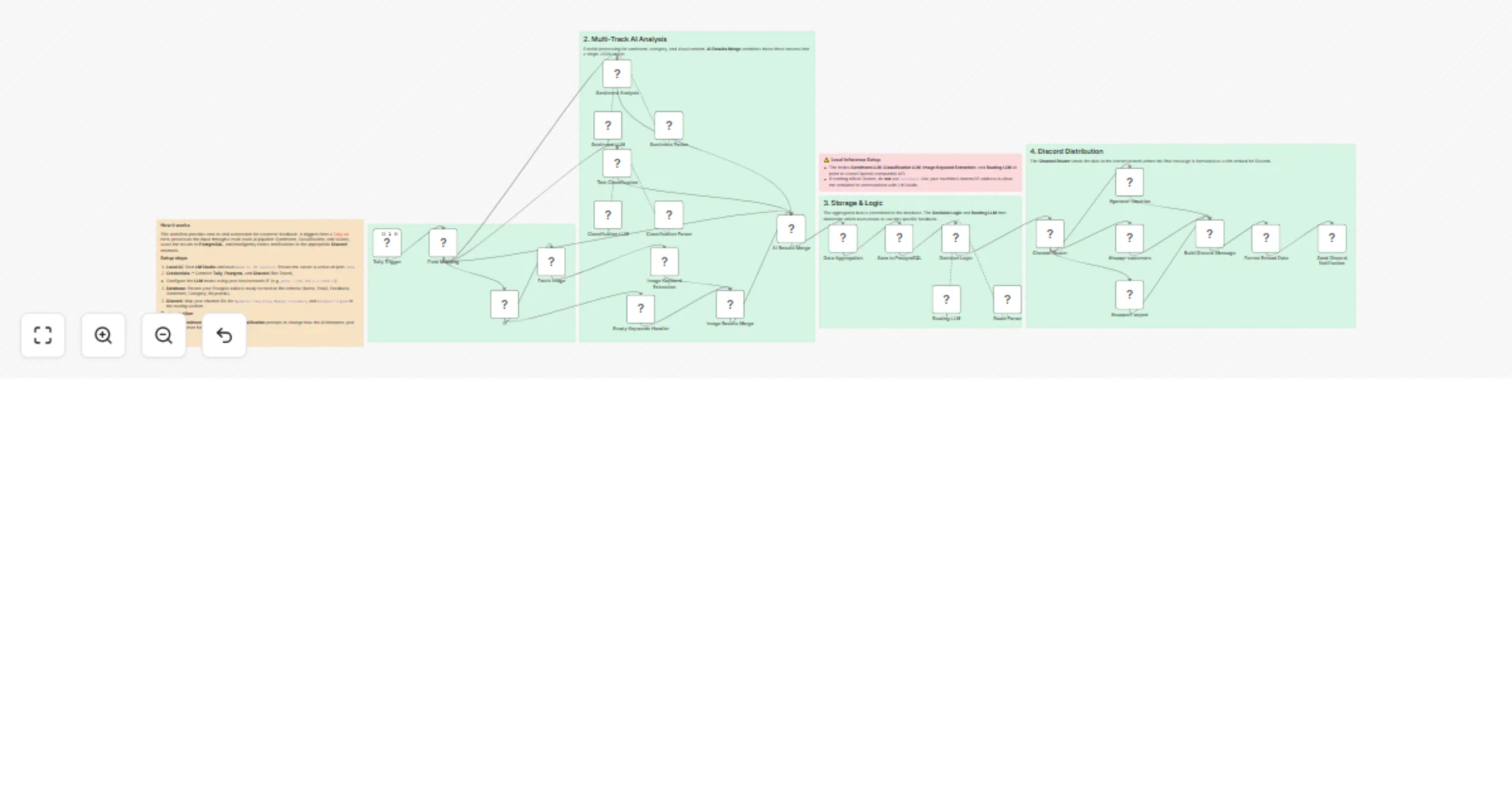
This workflow provides a complete end-to-end system for capturing, analyzing, and routing customer feedback. By combining local multimodal AI processing with structured data storage, it allows teams to respond to customer needs in real-time without compromising data privacy.

Who is this for?

This is designed for Customer Success Managers, Product Teams, and Community Leads who need to automate the triage of high-volume feedback. It is particularly useful for organizations that handle sensitive customer data and prefer local AI processing over cloud-based API calls.

🛠️ Tech Stack

  • Tally.so: For front-end feedback collection.
  • LM Studio: To host the local AI models (Qwen3-VL).
  • PostgreSQL: For persistent data storage and reporting.
  • Discord: For real-time team notifications.

✨ How it works

  1. Form Submission: The workflow triggers when a new submission is received from Tally.so.
  2. Multimodal Analysis: The OpenAI node (pointing to LM Studio) processes the input using the Qwen3-VL model across three specific layers:
  • Sentiment Analysis: Evaluates the text to determine if the customer is Positive, Negative, or Neutral.
  • Zero-Shot Classification: Categorizes the feedback into pre-defined labels based on instructions in the prompt.
  • Vision Processing: Analyzes any attached images to extract descriptive keywords or identify UI elements mentioned in the feedback.
  1. Data Storage: The PostgreSQL node logs the user's details, the original message, and all AI-generated insights.
  2. AI-Driven Routing: The same Qwen3-VL model makes the routing decision by evaluating the classification results and determining the appropriate path for the data to follow.
  3. Discord Notification: The Discord node sends a formatted message to the corresponding channel, ensuring the support team sees urgent issues while the marketing team sees positive testimonials.

📋 Requirements

  • LM Studio running a local server on port 1234.
  • Qwen3-VL-4B (GGUF) model loaded in LM Studio.
  • PostgreSQL instance with a table configured for feedback data.
  • Discord Bot Token and specific Channel IDs.

🚀 How to set up

  1. Prepare your Local AI:
  • Open LM Studio and download the Qwen3-VL-4B model.
  • Start the Local Server on port 1234 and ensure CORS is enabled.
  • Disable the Require Authentication setting in the Local Server tab.
  1. Configure PostgreSQL:
  • Ensure your database is running. Create a table named customer_feedback with columns for name, email_address, feedback_message, image_url, sentiment, category, and img_keywords.
  1. Import the Workflow:
  • Import the JSON file into your n8n instance.
  1. Link Services:
  • Update the Webhook node with your Tally.so URL.
  • In the Discord nodes, paste the relevant Channel IDs for your #support, #feedback, and #general channels.
  1. Test and Activate:
  • Toggle the workflow to Active.
  • Send a test submission through your Tally form and verify the data appears in PostgreSQL and Discord.

🔑 Credential Setup

To run this workflow, you must configure the following credentials in n8n:

  • OpenAI API (Local):
  • Create a new OpenAI API credential.
  • API Key: Enter any placeholder text (e.g., lm-studio).
  • Base URL: Set this to your machine's local IP address (e.g., http://192.168.1.10:1234/v1) to ensure n8n can connect to the local AI server, especially if running within a Docker container.
  • PostgreSQL:
  • Create a new PostgreSQL credential.
  • Enter your database Host, Database Name, User, and Password. If using the provided Docker setup, the host is usually db.
  • Discord Bot:
  • Create a new Discord Bot API credential.
  • Paste your Bot Token obtained from the Discord Developer Portal.
  • Tally:
  • Create a new Tally API credential.
  • Enter your API Key, which you can find in your Tally.so account settings.

⚙️ How to customize

  • Refine AI Logic: Update the System Message in the AI node to change classification categories or sentiment sensitivity.
  • Switch to Cloud AI: If you prefer not to use a local model, you can swap the local LM Studio connection for any 3rd party API, such as OpenAI (GPT-4o), Anthropic (Claude), or Google Gemini, by updating the node credentials and Base URL.
  • Expand Destinations: Add more Discord nodes or integrate Slack to notify different departments based on the AI's routing decision.
  • Custom Triggers: Replace the Tally webhook with a Typeform, Google Forms, or a custom Webhook trigger if your collection stack differs.

1.2 Logical Blocks

This catalog entry is organized from the workflow JSON. The node-level section below shows the executable blocks available for review before importing the template.

2. Block-by-Block Analysis

Block 1 - Tally Trigger

Type / Role
n8n-nodes-tallyforms.tallyTrigger - tallyTrigger
Config choices
Version 1

Block 2 - Field Mapping

Type / Role
n8n-nodes-base.set - set
Config choices
Version 3.4

Block 3 - Sentiment Analysis

Type / Role
@n8n/n8n-nodes-langchain.chainLlm - chainLlm
Config choices
Version 1.7

Block 4 - If

Type / Role
n8n-nodes-base.if - if
Config choices
Version 2.2

Block 5 - Fetch Image

Type / Role
n8n-nodes-base.httpRequest - httpRequest
Config choices
Version 4.3

Block 6 - Routing LLM

Type / Role
@n8n/n8n-nodes-langchain.lmChatOpenAi - lmChatOpenAi
Config choices
Version 1.3

Block 7 - #general-inquiries

Type / Role
n8n-nodes-base.set - set
Config choices
Version 3.4

Block 8 - #happy-customers

Type / Role
n8n-nodes-base.set - set
Config choices
Version 3.4

Block 9 - Decision Logic

Type / Role
@n8n/n8n-nodes-langchain.chainLlm - chainLlm
Config choices
Version 1.7

Block 10 - Send Discord Notification

Type / Role
n8n-nodes-base.discord - discord
Config choices
Version 2

Block 11 - Sentiment LLM

Type / Role
@n8n/n8n-nodes-langchain.lmChatOpenAi - lmChatOpenAi
Config choices
Version 1.3

Block 12 - Sentiment Parser

Type / Role
@n8n/n8n-nodes-langchain.outputParserStructured - outputParserStructured
Config choices
Version 1.3

Block 13 - Text Classification

Type / Role
@n8n/n8n-nodes-langchain.chainLlm - chainLlm
Config choices
Version 1.7

Block 14 - Classification LLM

Type / Role
@n8n/n8n-nodes-langchain.lmChatOpenAi - lmChatOpenAi
Config choices
Version 1.3

Block 15 - Classification Parser

Type / Role
@n8n/n8n-nodes-langchain.outputParserStructured - outputParserStructured
Config choices
Version 1.3

Block 16 - Image Keyword Extraction

Type / Role
n8n-nodes-base.code - code
Config choices
Version 2

Block 17 - Empty Keywords Handler

Type / Role
n8n-nodes-base.set - set
Config choices
Version 3.4

Block 18 - Image Results Merge

Type / Role
n8n-nodes-base.merge - merge
Config choices
Version 3.2

Block 19 - AI Results Merge

Type / Role
n8n-nodes-base.merge - merge
Config choices
Version 3.2

Block 20 - Data Aggregation

Type / Role
n8n-nodes-base.aggregate - aggregate
Config choices
Version 1

Block 21 - Save to PostgreSQL

Type / Role
n8n-nodes-base.postgres - postgres
Config choices
Version 2.6

Block 22 - Route Parser

Type / Role
@n8n/n8n-nodes-langchain.outputParserStructured - outputParserStructured
Config choices
Version 1.3

Block 23 - Channel Router

Type / Role
n8n-nodes-base.switch - switch
Config choices
Version 3.3

Block 24 - #support-urgent

Type / Role
n8n-nodes-base.set - set
Config choices
Version 3.4

Showing the first 24 of 32 workflow blocks. Download the JSON for the full node graph.

3. Summary Table

Workflow Route and analyze customer feedback with Qwen3-VL, Tally, PostgreSQL
Complexity advanced
Nodes 32
Categories Ticket Management, AI Summarization
Author Neloy Barman
Published 11 Feb 2026

4. Reproducing the Workflow from Scratch

  1. 1. Download the workflow JSON

    Use the JSON export at /data/workflows/13314/13314.json as the source template for this automation.

  2. 2. Import the template into n8n

    Open n8n, import the downloaded JSON, and review each node before activating the workflow.

  3. 3. Configure credentials and variables

    Replace placeholder credentials, API keys, webhook URLs, account IDs, and environment-specific values with your own settings.

  4. 4. Test with sample data

    Run the workflow manually or in a staging workspace, inspect node output, and confirm downstream systems receive the expected data.

  5. 5. Activate and monitor

    Enable the workflow only after testing, then monitor executions, errors, and rate limits during the first production runs.

5. General Notes & Resources

Review imported nodes carefully before activation. This catalog entry is intended to help you inspect the workflow structure, understand required services, and find related templates faster.

Node names, credentials, schedules, webhook paths, and external service limits may need adjustment for your workspace.

Frequently asked questions

What does Route and analyze customer feedback with Qwen3-VL, Tally, PostgreSQL do?

Self Hosted This workflow provides a complete end to end system for capturing, analyzing, and routing customer feedback. By combining local multimodal AI processing with structured data storage, it...

What do I need before importing this workflow?

Review the workflow JSON, configure any required credentials in n8n, and test the automation in a safe workspace before using it in production.

Can I customize this workflow?

Yes. Use the block-by-block analysis and the downloadable JSON to inspect each node, then adjust credentials, prompts, schedules, filters, or destinations for your Ticket Management, AI Summarization use case.