Route AI queries cost‐efficiently with GPT‐4o‐mini, GPT‐4o and confidence scoring

Workflow preview

Workflow preview
100%
Route AI queries cost‐efficiently with GPT‐4o‐mini, GPT‐4o and confidence scoring preview
Open on n8n.io

1. Workflow Overview

This workflow implements a cost optimized AI routing system using n8n. It intelligently decides whether a request should be handled by a low cost model or escalated to a higher quality model based ...

Best for

  • Engineering automation workflows
  • AI Summarization automation workflows
  • advanced n8n builders looking for reusable templates

Tools used

n8n-nodes-base.webhook, n8n-nodes-base.set, n8n-nodes-base.if, n8n-nodes-base.code, @n8n/n8n-nodes-langchain.agent, @n8n/n8n-nodes-langchain.outputparserstructured, @n8n/n8n-nodes-langchain.lmchatopenai, n8n-nodes-base.stickynote

Source and attribution

This workflow is cataloged by N8N Workflows and links back to its original n8n.io source page by ResilNext.

Original n8n.io source

1.1 Workflow description

Title
Route AI queries cost‐efficiently with GPT‐4o‐mini, GPT‐4o and confidence scoring
Workflow name
Route AI queries cost‐efficiently with GPT‐4o‐mini, GPT‐4o and confidence scoring

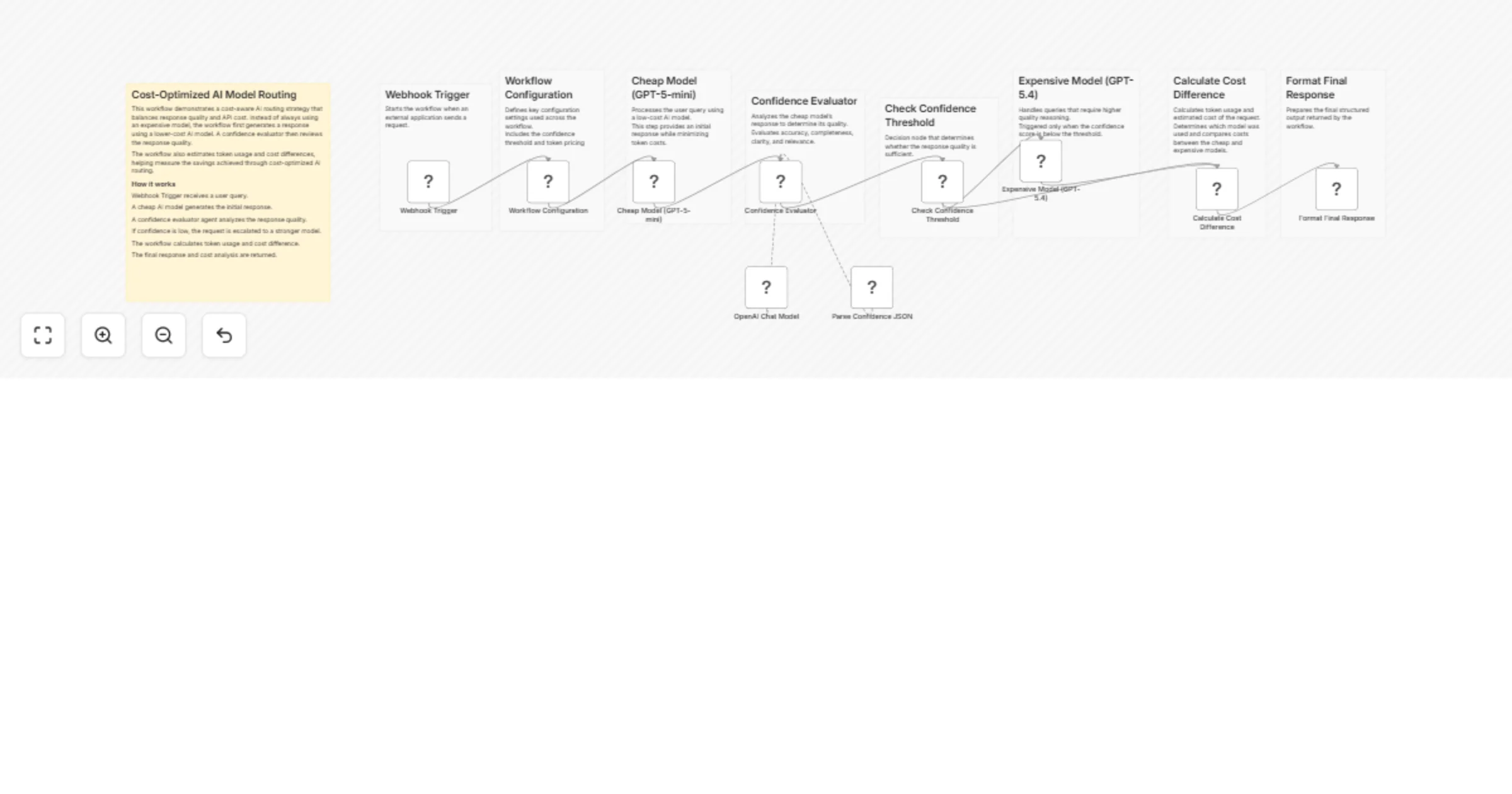
This workflow implements a cost-optimized AI routing system using n8n. It intelligently decides whether a request should be handled by a low-cost model or escalated to a higher-quality model based on response confidence.

The goal is to minimize LLM usage costs while maintaining high answer quality.

A query is first processed by a cheaper model. The response is then evaluated by a confidence-scoring AI agent. If the response quality is insufficient, the workflow automatically escalates the request to a more capable model.

This approach is useful for building scalable AI systems where most queries can be answered cheaply, while complex queries still receive high-quality responses.


How It Works

  1. Webhook Trigger
  • Receives a user query from an external application.
  1. Workflow Configuration
  • Defines parameters such as:
  • confidence threshold
  • cheap model cost
  • expensive model cost
  1. Cheap Model Response
  • The query is first processed using GPT-4o-mini to minimize cost.
  1. Confidence Evaluation
  • An AI agent analyzes the response quality.
  • It evaluates accuracy, completeness, clarity, and relevance.
  1. Structured Output Parsing
  • The evaluator returns structured data including:
  • confidence score
  • explanation
  • escalation recommendation.
  1. Decision Logic
  • If the confidence score is below the configured threshold, the workflow escalates the request.
  1. Expensive Model Escalation
  • The query is reprocessed using GPT-4o for a higher-quality answer.
  1. Cost Calculation
  • Token usage is analyzed to estimate:
  • total cost
  • cost difference between models.
  1. Final Response Formatting
  • The workflow returns:
  • AI response
  • model used
  • confidence score
  • escalation status
  • estimated cost.

Setup Instructions

  1. Create an OpenAI credential in n8n.

  2. Configure the following nodes:

  • Cheap Model (GPT-4o-mini)
  • Expensive Model (GPT-4o)
  • OpenAI Chat Model used by the confidence evaluator agent.
  1. Adjust configuration values in the Workflow Configuration node:
  • confidenceThreshold
  • cheapModelCostPer1kTokens
  • expensiveModelCostPer1kTokens
  1. Deploy the workflow and send requests to the Webhook URL.

Example webhook payload:

{
 "query": "Explain how photosynthesis works."
}

1.2 Logical Blocks

This catalog entry is organized from the workflow JSON. The node-level section below shows the executable blocks available for review before importing the template.

2. Block-by-Block Analysis

Block 1 - Webhook Trigger

Type / Role
n8n-nodes-base.webhook - webhook
Config choices
Version 2.1

Block 2 - Workflow Configuration

Type / Role
n8n-nodes-base.set - set
Config choices
Version 3.4

Block 3 - Check Confidence Threshold

Type / Role
n8n-nodes-base.if - if
Config choices
Version 2.3

Block 4 - Calculate Cost Difference

Type / Role
n8n-nodes-base.code - code
Config choices
Version 2

Block 5 - Format Final Response

Type / Role
n8n-nodes-base.set - set
Config choices
Version 3.4

Block 6 - Confidence Evaluator

Type / Role
@n8n/n8n-nodes-langchain.agent - agent
Config choices
Version 3

Block 7 - Parse Confidence JSON

Type / Role
@n8n/n8n-nodes-langchain.outputParserStructured - outputParserStructured
Config choices
Version 1.3

Block 8 - OpenAI Chat Model

Type / Role
@n8n/n8n-nodes-langchain.lmChatOpenAi - lmChatOpenAi
Config choices
Version 1.3

Block 9 - Sticky Note

Type / Role
n8n-nodes-base.stickyNote - stickyNote
Config choices
Version 1

Block 10 - Sticky Note1

Type / Role
n8n-nodes-base.stickyNote - stickyNote
Config choices
Version 1

Block 11 - Sticky Note3

Type / Role
n8n-nodes-base.stickyNote - stickyNote
Config choices
Version 1

Block 12 - Sticky Note4

Type / Role
n8n-nodes-base.stickyNote - stickyNote
Config choices
Version 1

Block 13 - Sticky Note5

Type / Role
n8n-nodes-base.stickyNote - stickyNote
Config choices
Version 1

Block 14 - Sticky Note6

Type / Role
n8n-nodes-base.stickyNote - stickyNote
Config choices
Version 1

Block 15 - Sticky Note8

Type / Role
n8n-nodes-base.stickyNote - stickyNote
Config choices
Version 1

Block 16 - Sticky Note9

Type / Role
n8n-nodes-base.stickyNote - stickyNote
Config choices
Version 1

Block 17 - Sticky Note10

Type / Role
n8n-nodes-base.stickyNote - stickyNote
Config choices
Version 1

Block 18 - Cheap Model (GPT-5-mini)

Type / Role
@n8n/n8n-nodes-langchain.openAi - openAi
Config choices
Version 2.1

Block 19 - Expensive Model (GPT-5.4)

Type / Role
@n8n/n8n-nodes-langchain.openAi - openAi
Config choices
Version 2.1

3. Summary Table

Workflow Route AI queries cost‐efficiently with GPT‐4o‐mini, GPT‐4o and confidence scoring
Complexity advanced
Nodes 19
Categories Engineering, AI Summarization
Author ResilNext
Published 09 Mar 2026

4. Reproducing the Workflow from Scratch

  1. 1. Download the workflow JSON

    Use the JSON export at /data/workflows/13966/13966.json as the source template for this automation.

  2. 2. Import the template into n8n

    Open n8n, import the downloaded JSON, and review each node before activating the workflow.

  3. 3. Configure credentials and variables

    Replace placeholder credentials, API keys, webhook URLs, account IDs, and environment-specific values with your own settings.

  4. 4. Test with sample data

    Run the workflow manually or in a staging workspace, inspect node output, and confirm downstream systems receive the expected data.

  5. 5. Activate and monitor

    Enable the workflow only after testing, then monitor executions, errors, and rate limits during the first production runs.

5. General Notes & Resources

Review imported nodes carefully before activation. This catalog entry is intended to help you inspect the workflow structure, understand required services, and find related templates faster.

Node names, credentials, schedules, webhook paths, and external service limits may need adjustment for your workspace.

Frequently asked questions

What does Route AI queries cost‐efficiently with GPT‐4o‐mini, GPT‐4o and confidence scoring do?

This workflow implements a cost optimized AI routing system using n8n. It intelligently decides whether a request should be handled by a low cost model or escalated to a higher quality model based ...

What do I need before importing this workflow?

Review the workflow JSON, configure any required credentials in n8n, and test the automation in a safe workspace before using it in production.

Can I customize this workflow?

Yes. Use the block-by-block analysis and the downloadable JSON to inspect each node, then adjust credentials, prompts, schedules, filters, or destinations for your Engineering, AI Summarization use case.