Review GitHub pull requests and label them using OpenAI GPT-4o-mini and Slack

Workflow preview

Workflow preview
100%
Review GitHub pull requests and label them using OpenAI GPT-4o-mini and Slack preview
Open on n8n.io

Important notice

This workflow is provided as-is. Please review and test before using in production.

1. Workflow Overview

Automate GitHub pull request reviews and labeling using OpenAI This workflow automates the first line of code review for your development team. By leveraging OpenAI, it analyzes pull request diffs,...

Best for

  • AI Summarization automation workflows
  • advanced n8n builders looking for reusable templates

Tools used

n8n-nodes-base.stickynote, n8n-nodes-base.webhook, n8n-nodes-base.filter, n8n-nodes-base.code, n8n-nodes-base.github, n8n-nodes-base.httprequest, n8n-nodes-base.merge, @n8n/n8n-nodes-langchain.lmchatopenai

Source and attribution

This workflow is cataloged by N8N Workflows and links back to its original n8n.io source page by yu-ya.

Original n8n.io source

1.1 Workflow description

Title
Review GitHub pull requests and label them using OpenAI GPT-4o-mini and Slack
Workflow name
Review GitHub pull requests and label them using OpenAI GPT-4o-mini and Slack

Automate GitHub pull request reviews and labeling using OpenAI

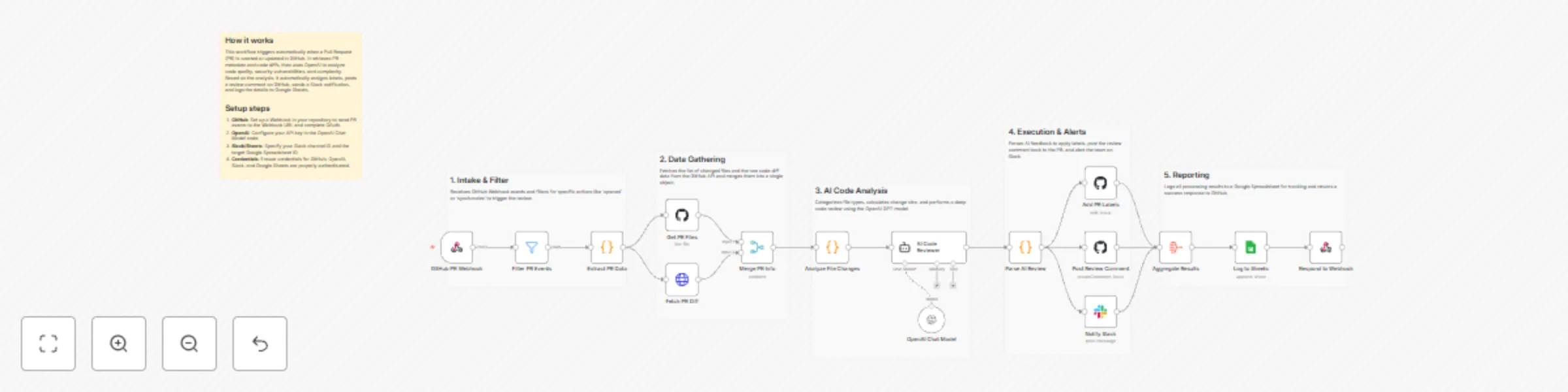
This workflow automates the first line of code review for your development team. By leveraging OpenAI, it analyzes pull request diffs, assigns descriptive labels based on change size and category, posts summary comments back to GitHub, and keeps your team informed via Slack.

Who’s it for?

  • DevOps Engineers looking to standardize PR triage.
  • Team Leads who want to provide instant feedback to developers.
  • Open Source Maintainers managing high volumes of contributions.
  • Development Teams aiming to reduce manual overhead in code reviews.

How it works / What it does

  1. Trigger: The workflow starts via a GitHub PR Webhook when a pull request is opened or synchronized.
  2. Data Gathering: It extracts PR metadata and uses the GitHub Node and HTTP Request Node to fetch a list of changed files and the raw code diff.
  3. Analysis: A Code Node categorizes the changes (e.g., size labels like size/S or size/L).
  4. AI Review: The AI Agent (powered by OpenAI) analyzes the code diff to generate a quality score, summary, and specific strengths/concerns.
  5. Action:
    • The GitHub Node updates the PR with relevant labels.
    • An automated review comment is posted to the PR discussion.
    • A summary is sent to a Slack channel.
  6. Reporting: All review data is logged into Google Sheets for long-term tracking and analytics.

Requirements

  • GitHub Account: OAuth credentials with repository access.
  • OpenAI API Key: For the Chat Model (recommends GPT-4o-mini or higher).
  • Slack Workspace: A bot token to post to the #code-reviews channel.
  • Google Sheets: A spreadsheet with headers matching the PR metadata.

How to set up

  1. GitHub Webhook: Configure your GitHub repository to send "Pull request" events to the Webhook URL provided by this workflow.
  2. Credentials: Authenticate your GitHub, OpenAI, Slack, and Google Sheets accounts in their respective nodes.
  3. Google Sheets: Select your target Spreadsheet and Sheet name in the "Log to Sheets" node.
  4. Slack: Ensure the Slack bot is invited to the channel specified in the "Notify Slack" node.

How to customize

  • AI Prompt: Modify the "System Message" in the AI Code Reviewer node to reflect your team's specific coding standards or preferred review tone.
  • Labeling Logic: Edit the "Analyze File Changes" node to add custom labels based on file paths (e.g., frontend, documentation).
  • Review Logic: Add an If Node after the AI analysis to only auto-approve PRs with a quality score higher than 90.

1.2 Logical Blocks

This catalog entry is organized from the workflow JSON. The node-level section below shows the executable blocks available for review before importing the template.

2. Block-by-Block Analysis

Block 1 - Main Overview

Type / Role
n8n-nodes-base.stickyNote - stickyNote
Config choices
Version 1

Block 2 - Intake Group

Type / Role
n8n-nodes-base.stickyNote - stickyNote
Config choices
Version 1

Block 3 - Data Group

Type / Role
n8n-nodes-base.stickyNote - stickyNote
Config choices
Version 1

Block 4 - AI Group

Type / Role
n8n-nodes-base.stickyNote - stickyNote
Config choices
Version 1

Block 5 - Action Group

Type / Role
n8n-nodes-base.stickyNote - stickyNote
Config choices
Version 1

Block 6 - Report Group

Type / Role
n8n-nodes-base.stickyNote - stickyNote
Config choices
Version 1

Block 7 - GitHub PR Webhook

Type / Role
n8n-nodes-base.webhook - webhook
Config choices
Version 2

Block 8 - Filter PR Events

Type / Role
n8n-nodes-base.filter - filter
Config choices
Version 2.2

Block 9 - Extract PR Data

Type / Role
n8n-nodes-base.code - code
Config choices
Version 2

Block 10 - Get PR Files

Type / Role
n8n-nodes-base.github - github
Config choices
Version 1

Block 11 - Fetch PR Diff

Type / Role
n8n-nodes-base.httpRequest - httpRequest
Config choices
Version 4.2

Block 12 - Merge PR Info

Type / Role
n8n-nodes-base.merge - merge
Config choices
Version 3

Block 13 - Analyze File Changes

Type / Role
n8n-nodes-base.code - code
Config choices
Version 2

Block 14 - OpenAI Chat Model

Type / Role
@n8n/n8n-nodes-langchain.lmChatOpenAi - lmChatOpenAi
Config choices
Version 1.2

Block 15 - AI Code Reviewer

Type / Role
@n8n/n8n-nodes-langchain.agent - agent
Config choices
Version 1.7

Block 16 - Parse AI Review

Type / Role
n8n-nodes-base.code - code
Config choices
Version 2

Block 17 - Add PR Labels

Type / Role
n8n-nodes-base.github - github
Config choices
Version 1

Block 18 - Post Review Comment

Type / Role
n8n-nodes-base.github - github
Config choices
Version 1

Block 19 - Notify Slack

Type / Role
n8n-nodes-base.slack - slack
Config choices
Version 2.2

Block 20 - Aggregate Results

Type / Role
n8n-nodes-base.aggregate - aggregate
Config choices
Version 1

Block 21 - Log to Sheets

Type / Role
n8n-nodes-base.googleSheets - googleSheets
Config choices
Version 4.5

Block 22 - Respond to Webhook

Type / Role
n8n-nodes-base.respondToWebhook - respondToWebhook
Config choices
Version 1.1

3. Summary Table

Workflow Review GitHub pull requests and label them using OpenAI GPT-4o-mini and Slack
Complexity advanced
Nodes 22
Categories AI Summarization
Author yu-ya
Published 19 Dec 2025

4. Reproducing the Workflow from Scratch

  1. 1. Download the workflow JSON

    Use the JSON export at /data/workflows/11967/11967.json as the source template for this automation.

  2. 2. Import the template into n8n

    Open n8n, import the downloaded JSON, and review each node before activating the workflow.

  3. 3. Configure credentials and variables

    Replace placeholder credentials, API keys, webhook URLs, account IDs, and environment-specific values with your own settings.

  4. 4. Test with sample data

    Run the workflow manually or in a staging workspace, inspect node output, and confirm downstream systems receive the expected data.

  5. 5. Activate and monitor

    Enable the workflow only after testing, then monitor executions, errors, and rate limits during the first production runs.

5. General Notes & Resources

Review imported nodes carefully before activation. This catalog entry is intended to help you inspect the workflow structure, understand required services, and find related templates faster.

Node names, credentials, schedules, webhook paths, and external service limits may need adjustment for your workspace.

Frequently asked questions

What does Review GitHub pull requests and label them using OpenAI GPT-4o-mini and Slack do?

Automate GitHub pull request reviews and labeling using OpenAI This workflow automates the first line of code review for your development team. By leveraging OpenAI, it analyzes pull request diffs,...

What do I need before importing this workflow?

Review the workflow JSON, configure any required credentials in n8n, and test the automation in a safe workspace before using it in production.

Can I customize this workflow?

Yes. Use the block-by-block analysis and the downloadable JSON to inspect each node, then adjust credentials, prompts, schedules, filters, or destinations for your AI Summarization use case.