Block 1 - Research Overview
- Type / Role
- n8n-nodes-base.stickyNote - stickyNote
- Config choices
- Version 1


 Early Deal
This workflow is provided as-is. Please review and test before using in production.
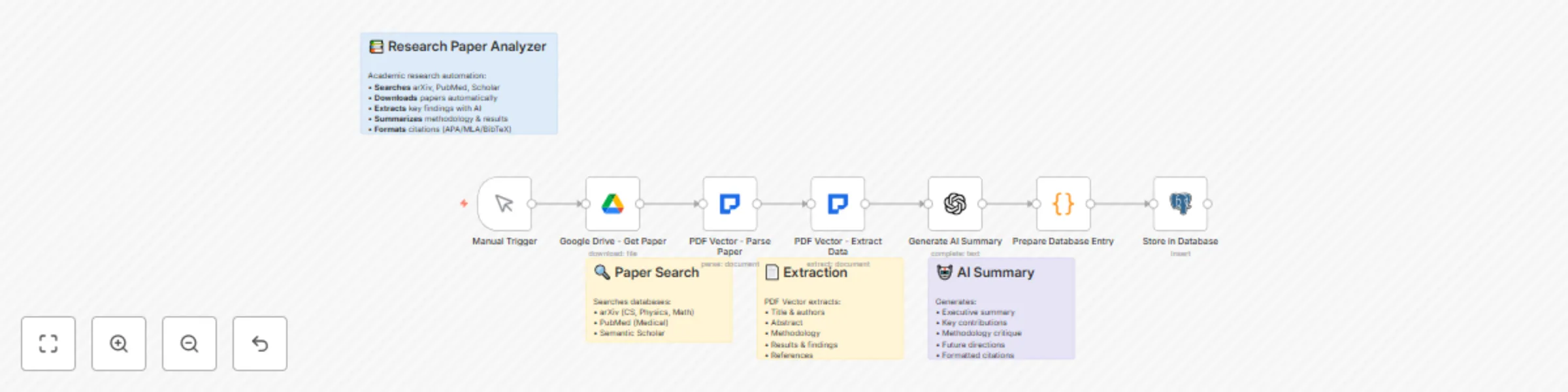
Researchers and academic institutions need efficient ways to process and analyze large volumes of research papers and academic documents, including scanned PDFs and image based materials (JPG, PNG)...
n8n-nodes-base.stickynote, n8n-nodes-base.manualtrigger, n8n-nodes-base.googledrive, n8n-nodes-pdfvector.pdfvector, n8n-nodes-base.openai, n8n-nodes-base.code, n8n-nodes-base.postgres
This workflow is cataloged by N8N Workflows and links back to its original n8n.io source page by PDF Vector.
Original n8n.io sourceResearchers and academic institutions need efficient ways to process and analyze large volumes of research papers and academic documents, including scanned PDFs and image-based materials (JPG, PNG). Manual review of academic literature is time-consuming and makes it difficult to identify trends, track citations, and synthesize findings across multiple papers. This workflow automates the extraction and analysis of research papers and scanned documents using OCR technology, creating a searchable knowledge base of academic insights from both digital and image-based sources.
Research institutions, university libraries, R&D departments, academic researchers, literature review teams, and organizations tracking scientific developments in their field.
Literature reviews require reading hundreds of papers to identify relevant findings and methodologies. This template automates the extraction of key information from research papers, including methodologies, findings, and citations. It builds a searchable database that helps researchers quickly find relevant studies and identify research gaps.
Setup Instructions:
Key Features:
Customization Options:
Implementation Details: The workflow uses PDF Vector's academic features to understand research paper structure and extract meaningful insights. It processes papers from various sources, identifies key contributions, and creates structured summaries. The system tracks citations to measure impact and identifies emerging research trends by analyzing multiple papers in a field.
Note: This workflow uses the PDF Vector community node. Make sure to install it from the n8n community nodes collection before using this template.
This catalog entry is organized from the workflow JSON. The node-level section below shows the executable blocks available for review before importing the template.
| Workflow | Research paper analysis system with PDF vector, OCR, GPT-4, and Google Drive |
|---|---|
| Complexity | intermediate |
| Nodes | 11 |
| Categories | Document Extraction, AI RAG |
| Author | PDF Vector |
| Published | 12 Sept 2025 |
Use the JSON export at /data/workflows/8499/8499.json as the source template for this automation.
Open n8n, import the downloaded JSON, and review each node before activating the workflow.
Replace placeholder credentials, API keys, webhook URLs, account IDs, and environment-specific values with your own settings.
Run the workflow manually or in a staging workspace, inspect node output, and confirm downstream systems receive the expected data.
Enable the workflow only after testing, then monitor executions, errors, and rate limits during the first production runs.
Review imported nodes carefully before activation. This catalog entry is intended to help you inspect the workflow structure, understand required services, and find related templates faster.
Node names, credentials, schedules, webhook paths, and external service limits may need adjustment for your workspace.
Researchers and academic institutions need efficient ways to process and analyze large volumes of research papers and academic documents, including scanned PDFs and image based materials (JPG, PNG)...
Review the workflow JSON, configure any required credentials in n8n, and test the automation in a safe workspace before using it in production.
Yes. Use the block-by-block analysis and the downloadable JSON to inspect each node, then adjust credentials, prompts, schedules, filters, or destinations for your Document Extraction, AI RAG use case.