Block 1 - Sticky: Overview & Setup
- Type / Role
- n8n-nodes-base.stickyNote - stickyNote
- Config choices
- Version 1


 Early Deal
This workflow is provided as-is. Please review and test before using in production.
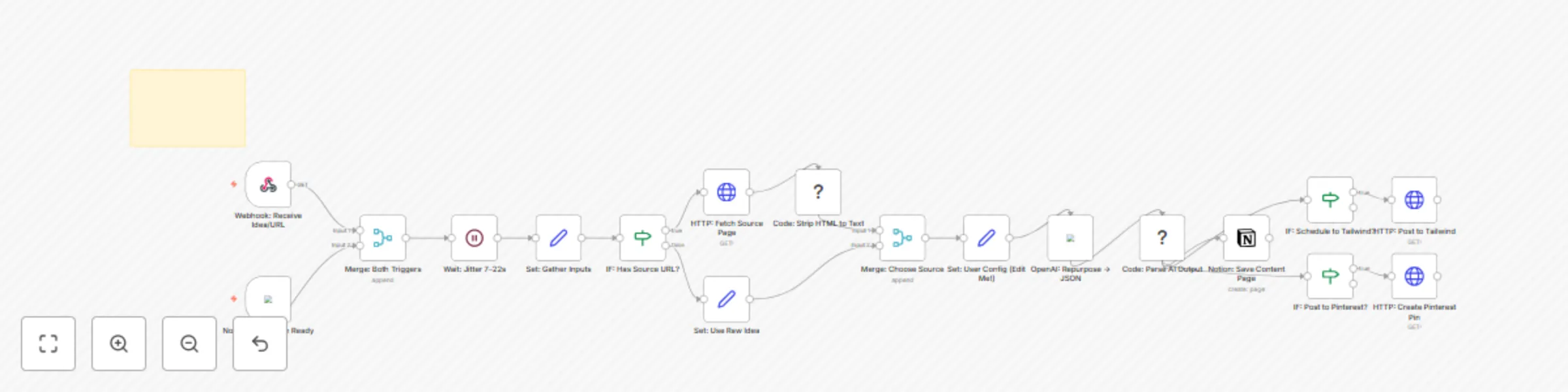
n8n Template Submission – “7 Day Content Bloom” by Shelly Ann Davy, The Workflow Muse What it does Drop one article URL or brain dump idea into this workflow and watch it blossom into a week ...
n8n-nodes-base.stickynote, n8n-nodes-base.webhook, n8n-nodes-base.notiontrigger, n8n-nodes-base.merge, n8n-nodes-base.wait, n8n-nodes-base.set, n8n-nodes-base.if, n8n-nodes-base.httprequest
This workflow is cataloged by N8N Workflows and links back to its original n8n.io source page by Shelly-Ann Davy.
Original n8n.io source📦 n8n Template Submission – “7-Day Content Bloom”
by Shelly-Ann Davy, The Workflow Muse
Drop one article URL or brain-dump idea into this workflow and watch it blossom into a week of graceful, feminine content for Instagram, X/Twitter, Pinterest, and your Sunday-email love-note.
AI writes every caption, tweet, pin title, FAQ, and CTA in my signature warm-neuroscience tone—then tucks everything into a clean Notion page for your final approval.
Optional one-click scheduling to Tailwind & Pinterest keeps your feed blooming while you sip tea.
Creators, moms, and gentle-growth entrepreneurs who crave consistent visibility without hustle energy.
gpt-4o crafts platform-specific copy in strict JSON. | Asset | Where to find | Notes |
|---|---|---|
| Notion database | Duplicate template | pastel palette included |
| OpenAI key | n8n → Credentials → OpenAI | no keys hard-coded |
| Tailwind & Pinterest tokens | Optional; HTTP Header Auth credentials | only if you want autopilot |
Send this to your webhook URL:
{
  "source_url": "https://yourblog.com/neuroscience-productivity",
  "idea_text": ""
}
…or flip any Notion row to Ready to Repurpose and watch the magic.
Data stays in your Notion, Tailwind, and Pinterest accounts.
OpenAI charges only for the tokens you use (~$0.04 per run on average).
Elegant, feminine, neuroscience-backed, and always ending with a gentle CTA to your free Sunday-reset Notion template.
Ready to let your next big idea bloom across the internet—stress-free?
Activate the workflow, and let the Muse do the rest. 🌷
This catalog entry is organized from the workflow JSON. The node-level section below shows the executable blocks available for review before importing the template.
| Workflow | Repurpose one idea into a week of social content with Notion and GPT-4o |
|---|---|
| Complexity | advanced |
| Nodes | 22 |
| Categories | Content Creation, Multimodal AI |
| Author | Shelly-Ann Davy |
| Published | 22 Aug 2025 |
Use the JSON export at /data/workflows/7751/7751.json as the source template for this automation.
Open n8n, import the downloaded JSON, and review each node before activating the workflow.
Replace placeholder credentials, API keys, webhook URLs, account IDs, and environment-specific values with your own settings.
Run the workflow manually or in a staging workspace, inspect node output, and confirm downstream systems receive the expected data.
Enable the workflow only after testing, then monitor executions, errors, and rate limits during the first production runs.
Review imported nodes carefully before activation. This catalog entry is intended to help you inspect the workflow structure, understand required services, and find related templates faster.
Node names, credentials, schedules, webhook paths, and external service limits may need adjustment for your workspace.
n8n Template Submission – “7 Day Content Bloom” by Shelly Ann Davy, The Workflow Muse What it does Drop one article URL or brain dump idea into this workflow and watch it blossom into a week ...
Review the workflow JSON, configure any required credentials in n8n, and test the automation in a safe workspace before using it in production.
Yes. Use the block-by-block analysis and the downloadable JSON to inspect each node, then adjust credentials, prompts, schedules, filters, or destinations for your Content Creation, Multimodal AI use case.