Block 1 - Sticky Note
- Type / Role
- n8n-nodes-base.stickyNote - stickyNote
- Config choices
- Version 1


 Early Deal
This workflow is provided as-is. Please review and test before using in production.
Transform blog posts, YouTube videos, or any text into LinkedIn posts, Twitter threads, email newsletters, and more with GPT 5.1 Who is this for? Content creators who want to maximize reach from ev...
n8n-nodes-base.stickynote, n8n-nodes-base.formtrigger, n8n-nodes-base.if, n8n-nodes-base.httprequest, n8n-nodes-base.code, @n8n/n8n-nodes-langchain.openai, n8n-nodes-base.googledocs, n8n-nodes-base.set
This workflow is cataloged by N8N Workflows and links back to its original n8n.io source page by AK Pasnoor.
Original n8n.io sourceTransform blog posts, YouTube videos, or any text into LinkedIn posts, Twitter threads, email newsletters, and more with GPT-5.1
Creating platform-specific content is time-consuming. A single blog post could become LinkedIn posts, Twitter threads, email newsletters, and video scripts-but manually adapting content for each platform takes hours.
This workflow automates the entire process. Drop in a URL or paste your content, and get 7+ ready-to-use content pieces in under 2 minutes.
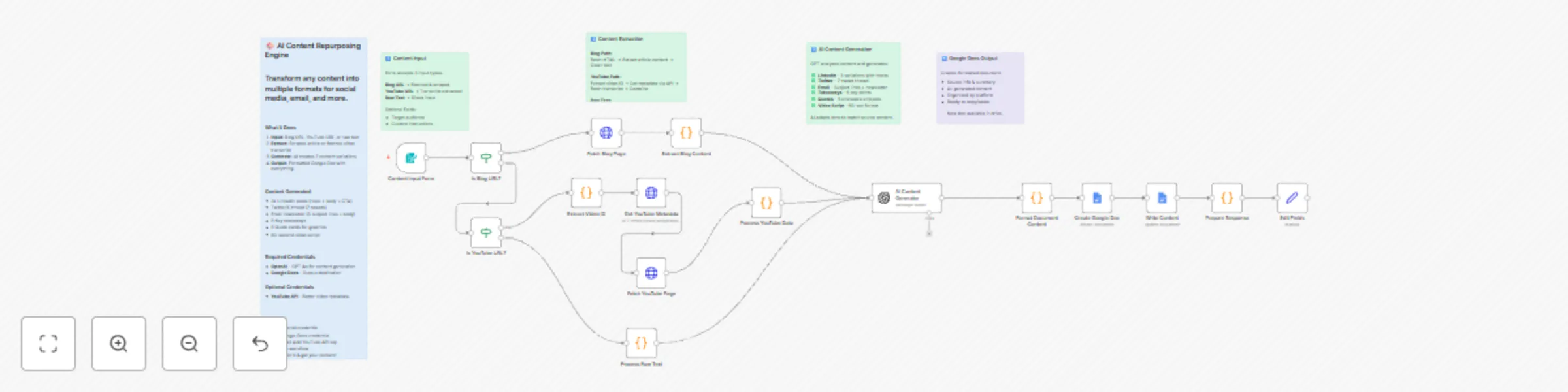
Step 1: Content Input
Step 2: Smart Extraction
Step 3: AI Content Generation GPT-4.1/5.1 analyzes your content and generates platform-optimized variations:
| Output | What You Get |
|---|---|
| LinkedIn Posts | 3 variations (story-driven, list format, contrarian angle) |
| Twitter/X Thread | 7-tweet thread + alternative hook for A/B testing |
| Email Newsletter | 3 subject lines + preview text + full body |
| Key Takeaways | 5 actionable bullet points |
| Quote Cards | 5 shareable quotes ready for graphics |
| Video Script | 60-second script (hook → problem → solution → CTA) |
Step 4: Google Docs Output
LinkedIn Posts (3 variations):
Twitter/X Thread (7 tweets):
Email Newsletter:
Key Takeaways:
Quote Cards:
Video Script:
1. OpenAI API
2. Google Docs
3. YouTube OAuth2 (use same clientId and secret as above)
Modify the AI prompt:
Change output destination:
Add more platforms:
Input:
https://example.com/10-tips-for-startup-foundersOutput (in ~90 seconds):
| Service | Cost |
|---|---|
| OpenAI (GPT-5.1) | ~$0.01-0.03 per generation |
| YouTube API | Free (10,000 queries/day) |
| Google Docs API | Free |
Total per use: ~$0.02-0.04
Questions or need customization? Contact Agentical AI
This catalog entry is organized from the workflow JSON. The node-level section below shows the executable blocks available for review before importing the template.
| Workflow | Repurpose blog & YouTube content to social media with GPT-5.1 and Google Docs |
|---|---|
| Complexity | advanced |
| Nodes | 21 |
| Categories | Content Creation, Multimodal AI |
| Author | AK Pasnoor |
| Published | 08 Dec 2025 |
Use the JSON export at /data/workflows/11599/11599.json as the source template for this automation.
Open n8n, import the downloaded JSON, and review each node before activating the workflow.
Replace placeholder credentials, API keys, webhook URLs, account IDs, and environment-specific values with your own settings.
Run the workflow manually or in a staging workspace, inspect node output, and confirm downstream systems receive the expected data.
Enable the workflow only after testing, then monitor executions, errors, and rate limits during the first production runs.
Review imported nodes carefully before activation. This catalog entry is intended to help you inspect the workflow structure, understand required services, and find related templates faster.
Node names, credentials, schedules, webhook paths, and external service limits may need adjustment for your workspace.
Transform blog posts, YouTube videos, or any text into LinkedIn posts, Twitter threads, email newsletters, and more with GPT 5.1 Who is this for? Content creators who want to maximize reach from ev...
Review the workflow JSON, configure any required credentials in n8n, and test the automation in a safe workspace before using it in production.
Yes. Use the block-by-block analysis and the downloadable JSON to inspect each node, then adjust credentials, prompts, schedules, filters, or destinations for your Content Creation, Multimodal AI use case.