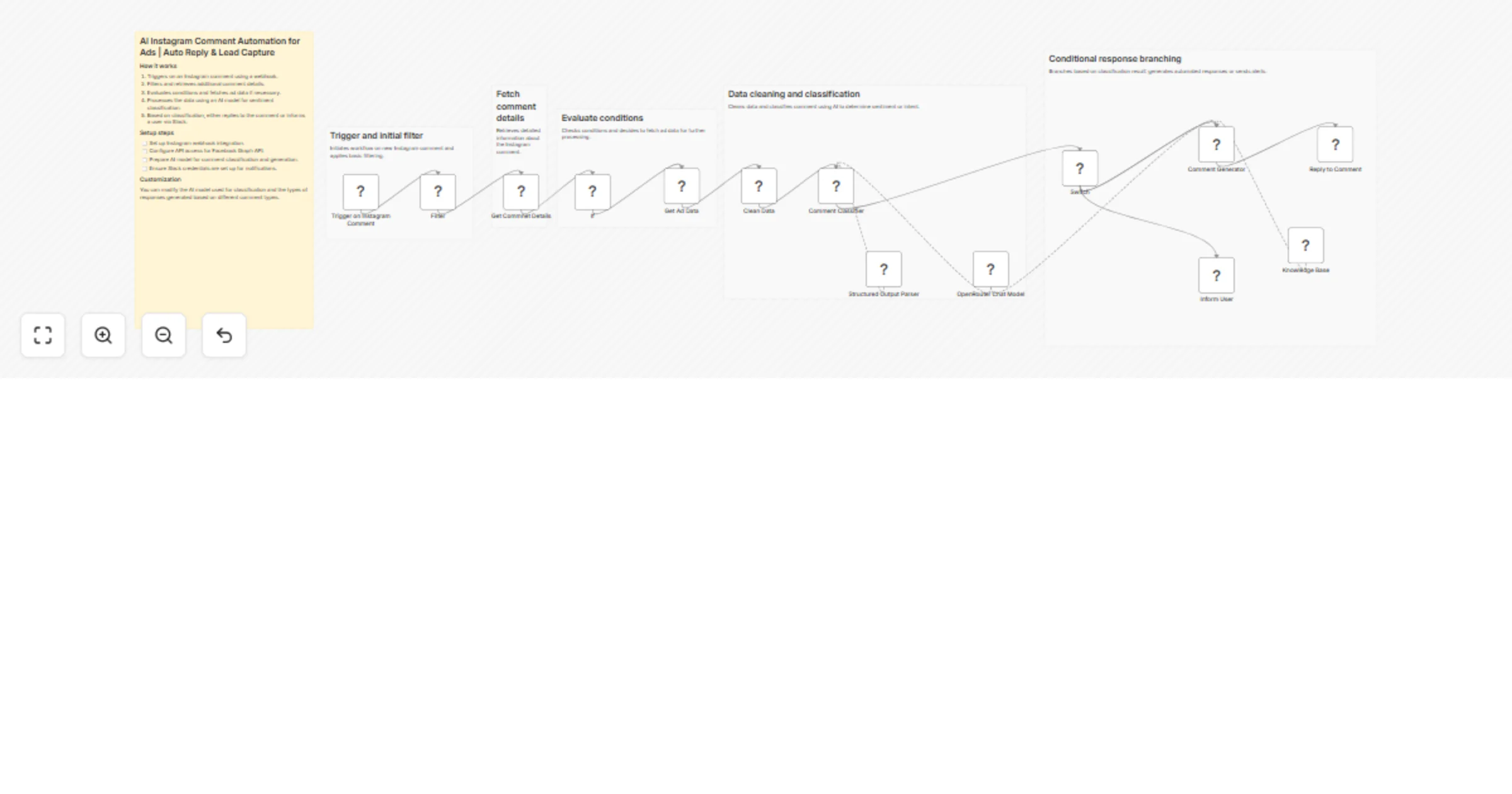
Reply to Instagram ad comments with GPT-4o, Google Docs, and Slack

Workflow preview

Workflow preview
100%
Reply to Instagram ad comments with GPT-4o, Google Docs, and Slack preview
Open on n8n.io

1. Workflow Overview

Never miss a lead from your Instagram ads again. This workflow automatically monitors every comment on your Instagram ad posts in real time, classifies the comment using AI, and takes the right act...

Best for

  • Social Media automation workflows
  • AI RAG automation workflows
  • advanced n8n builders looking for reusable templates

Tools used

n8n-nodes-base.filter, n8n-nodes-base.webhook, n8n-nodes-base.if, n8n-nodes-base.set, @n8n/n8n-nodes-langchain.agent, @n8n/n8n-nodes-langchain.outputparserstructured, @n8n/n8n-nodes-langchain.lmchatopenrouter, n8n-nodes-base.httprequest

Source and attribution

This workflow is cataloged by N8N Workflows and links back to its original n8n.io source page by Salman Mehboob.

Original n8n.io source

1.1 Workflow description

Title
Reply to Instagram ad comments with GPT-4o, Google Docs, and Slack
Workflow name
Reply to Instagram ad comments with GPT-4o, Google Docs, and Slack

Never miss a lead from your Instagram ads again. This workflow automatically monitors every comment on your Instagram ad posts in real time, classifies the comment using AI, and takes the right action instantly — whether that is replying with accurate information from your knowledge base, thanking a happy customer, or alerting your team about a negative review that needs human attention.

Built for agencies, service businesses, and ecommerce brands running Instagram ad campaigns who are losing potential clients because comments go unanswered for hours — or worse, never get a reply at all.


The Problem This Solves

When you run Instagram ads, your comment section becomes your most active sales channel. Potential customers ask about pricing, timelines, and services directly in the comments. Happy customers leave reviews. Unhappy ones post complaints. Competitors spam your section with their own links.

Managing all of this manually is impossible at scale:

  • Comments come in at 2am when your team is offline
  • A single active ad can receive hundreds of comments per day
  • Slow replies mean lost leads — potential clients move on to competitors who respond faster
  • Inconsistent replies from different team members destroy brand voice
  • Negative comments that go unanswered damage ad performance and brand reputation
  • Spam comments clutter your section and reduce trust from real prospects

This workflow solves every one of these problems automatically.


How It Works

Step 1 — Real-Time Instagram Webhook Trigger

The workflow fires the instant someone comments on your Instagram ad post. No polling. No delays. The comment is received within seconds via the Meta Graph API webhook, giving you a response time advantage that manual management can never match.

Step 2 — Smart Filter

Before any processing happens, the workflow checks three things:

  • The comment field is confirmed as a real comment (not a like or post update)
  • The comment is not from your own account (prevents reply loops)
  • The post is an ad post (media_product_type = AD)

This ensures only relevant, genuine comments from real users trigger the workflow.

Step 3 — Fetch Full Comment Details

The workflow calls the Instagram Graph API to retrieve the full comment data including the commenter username, exact comment text, and comment ID needed for replying.

Step 4 — Fetch Ad Post Content

The workflow fetches the caption and details of the ad post the comment was left on. This is critical context for the AI — it needs to understand what is being advertised before it can classify or answer the comment accurately.

Step 5 — Clean and Normalize Data

All extracted data is normalized into clean variables: post text, post permalink, comment text, comment ID, and commenter username. This makes all downstream nodes simple and reliable.

Step 6 — AI Comment Classifier

An AI agent powered by OpenRouter (GPT-4o) reads both the post caption and the comment together and classifies the comment into one of four categories:

  • QUERY — The person is asking about the service, price, timeline, or process
  • POSITIVE_REVIEW — The person is expressing satisfaction or giving a compliment
  • NEGATIVE_REVIEW — The person is complaining, expressing frustration, or calling the service fake
  • SPAM — The comment is irrelevant, promotional, or from a bot

The classifier also returns a confidence level: HIGH, MEDIUM, or LOW. This structured output is enforced via a JSON output parser ensuring 100% reliable downstream routing.

Step 7 — Switch Node Routes to the Right Branch

Based on the classification the workflow splits into four paths:

QUERY Branch: The AI reply agent searches your Google Docs knowledge base for the answer. If found it writes a clear, helpful, human-sounding public reply that answers the question and ends with a soft call to action. If the answer is not in the knowledge base it redirects the user to your DM or WhatsApp without making up information. The reply is posted directly to Instagram via the Graph API.

POSITIVE_REVIEW Branch: The AI reply agent writes a warm, genuine thank-you reply without consulting the knowledge base. It keeps it short, sounds human, and subtly encourages others to try the service. The reply is posted directly to Instagram via the Graph API.

NEGATIVE_REVIEW Branch: No auto reply is posted. Instead a detailed Slack alert is sent immediately to your team with the commenter username, the full comment text, and a prompt to handle it manually. Negative comments require human judgment and empathy — this workflow keeps humans in control of the most sensitive interactions.

SPAM Branch: No action taken. The comment is ignored completely. No reply, no alert, no wasted API calls.


What Makes This Workflow Unique

Most Instagram comment automation tools either reply to everything with the same canned message, or require expensive third-party subscriptions like ManyChat or Spur. This workflow does something none of them do:

  • Two-context AI classification — the classifier reads both the post content AND the comment together, not just the comment in isolation. This produces dramatically more accurate classifications, especially for short or ambiguous comments
  • Knowledge base powered replies — answers come from your actual business document, not hallucinated AI responses. When information is not available the AI redirects to your team rather than guessing
  • Confidence-based routing — the classifier flags low confidence cases so you can add human review for uncertain classifications
  • Negative review human handoff — negative comments are never auto-replied to. Your team gets instant Slack alerts with full context to handle reputation-sensitive situations personally
  • Free to run — uses your own OpenRouter API key and Meta Graph API. No third-party subscription required

Requirements

  • Instagram Business Account connected to a Facebook Page
  • Meta Developer App with webhooks configured for Instagram comments
  • System User token from Meta Business Portfolio with instagram_basic and pages_read_engagement permissions
  • n8n instance (self-hosted or cloud) with the webhook URL registered in Meta Developer Dashboard
  • OpenRouter API key (supports GPT-4o, Gemini, Claude, and 200+ other models)
  • Google Docs OAuth2 credentials with a knowledge base document prepared
  • Slack API credentials with a channel configured for negative review alerts
  • ngrok or a public HTTPS URL if running n8n locally

Setup Steps

  1. Create your Meta Developer App and configure Instagram webhooks pointing to your n8n webhook URL
  2. Subscribe your Instagram Business Account to the app using the Facebook Page subscribed_apps endpoint
  3. Generate a System User token in Meta Business Portfolio with the required permissions
  4. Create your knowledge base as a Google Doc with your services, prices, FAQs and contact information
  5. Add your OpenRouter API key to n8n credentials
  6. Connect your Google Docs OAuth2 account and update the document ID in the Knowledge Base tool node
  7. Connect your Slack account and update the channel or user ID in the Inform User node
  8. Update the filter condition with your Instagram username to prevent reply loops
  9. Activate the workflow and test by commenting on one of your Instagram ad posts

Customization Options

  • Change the AI model — swap GPT-4o for any OpenRouter model including Claude, Gemini Flash, or Mistral to control cost
  • Extend the knowledge base — add product FAQs, testimonials, pricing tables, or process explanations to improve answer quality
  • Add Instagram DM — extend the QUERY branch to also send a private DM with your WhatsApp link or service proposal alongside the public reply
  • Add Telegram alerts — replace or complement Slack with Telegram notifications for negative reviews
  • Extend to Facebook — the classifier and reply logic works identically for Facebook page comments. Add a second webhook trigger for Facebook and merge both into the same classification flow
  • Add confidence gating — route LOW confidence classifications to a Slack approval queue before posting any reply
  • Localization — the system prompt handles Urdu, English, and mixed language automatically. Extend to any other language by adding examples to the classifier prompt

Use Cases

  • SEO and digital marketing agencies managing multiple client Instagram accounts and ad campaigns
  • Service businesses running Instagram ads for consulting, coaching, legal, medical, or educational services
  • Ecommerce brands receiving high volumes of product questions on sponsored posts
  • Real estate agencies handling inquiries on property listing ads
  • Any business that spends money on Instagram ads and cannot afford to let leads go cold in the comment section

Nodes Used

  • Webhook — Instagram comment trigger
  • Filter — comment validation and ad post check
  • HTTP Request — Instagram Graph API for comment details and ad post content
  • IF — comment text existence check
  • Set — data normalization
  • AI Agent (LangChain) — comment classifier with structured output
  • AI Agent (LangChain) — comment reply generator
  • Structured Output Parser — enforces JSON classification output
  • OpenRouter Chat Model — powers both AI agents
  • Google Docs Tool — knowledge base retrieval
  • Switch — routes to correct branch based on classification
  • HTTP Request — posts reply to Instagram via Graph API
  • Slack — sends negative review alert to team

Built with Meta Graph API v25.0 and OpenRouter. Tested on Instagram Business accounts connected via Facebook Business Portfolio System Users.

📩 Support & Contact

1.2 Logical Blocks

This catalog entry is organized from the workflow JSON. The node-level section below shows the executable blocks available for review before importing the template.

2. Block-by-Block Analysis

Block 1 - Filter

Type / Role
n8n-nodes-base.filter - filter
Config choices
Version 2.3

Block 2 - Trigger on Instagram Comment

Type / Role
n8n-nodes-base.webhook - webhook
Config choices
Version 2.1

Block 3 - If

Type / Role
n8n-nodes-base.if - if
Config choices
Version 2.3

Block 4 - Clean Data

Type / Role
n8n-nodes-base.set - set
Config choices
Version 3.4

Block 5 - Comment Classifier

Type / Role
@n8n/n8n-nodes-langchain.agent - agent
Config choices
Version 3.1

Block 6 - Structured Output Parser

Type / Role
@n8n/n8n-nodes-langchain.outputParserStructured - outputParserStructured
Config choices
Version 1.3

Block 7 - OpenRouter Chat Model

Type / Role
@n8n/n8n-nodes-langchain.lmChatOpenRouter - lmChatOpenRouter
Config choices
Version 1

Block 8 - Get Ad Data

Type / Role
n8n-nodes-base.httpRequest - httpRequest
Config choices
Version 4.3

Block 9 - Switch

Type / Role
n8n-nodes-base.switch - switch
Config choices
Version 3.4

Block 10 - Knowledge Base

Type / Role
n8n-nodes-base.googleDocsTool - googleDocsTool
Config choices
Version 2

Block 11 - Comment Generator

Type / Role
@n8n/n8n-nodes-langchain.agent - agent
Config choices
Version 3.1

Block 12 - Reply to Comment

Type / Role
n8n-nodes-base.httpRequest - httpRequest
Config choices
Version 4.3

Block 13 - Inform User

Type / Role
n8n-nodes-base.slack - slack
Config choices
Version 2.4

Block 14 - Get Commnet Details

Type / Role
n8n-nodes-base.httpRequest - httpRequest
Config choices
Version 4.3

Block 15 - Sticky Note

Type / Role
n8n-nodes-base.stickyNote - stickyNote
Config choices
Version 1

Block 16 - Sticky Note1

Type / Role
n8n-nodes-base.stickyNote - stickyNote
Config choices
Version 1

Block 17 - Sticky Note2

Type / Role
n8n-nodes-base.stickyNote - stickyNote
Config choices
Version 1

Block 18 - Sticky Note3

Type / Role
n8n-nodes-base.stickyNote - stickyNote
Config choices
Version 1

Block 19 - Sticky Note4

Type / Role
n8n-nodes-base.stickyNote - stickyNote
Config choices
Version 1

Block 20 - Sticky Note5

Type / Role
n8n-nodes-base.stickyNote - stickyNote
Config choices
Version 1

3. Summary Table

Workflow Reply to Instagram ad comments with GPT-4o, Google Docs, and Slack
Complexity advanced
Nodes 20
Categories Social Media, AI RAG
Author Salman Mehboob
Published 08 Apr 2026

4. Reproducing the Workflow from Scratch

  1. 1. Download the workflow JSON

    Use the JSON export at /data/workflows/14893/14893.json as the source template for this automation.

  2. 2. Import the template into n8n

    Open n8n, import the downloaded JSON, and review each node before activating the workflow.

  3. 3. Configure credentials and variables

    Replace placeholder credentials, API keys, webhook URLs, account IDs, and environment-specific values with your own settings.

  4. 4. Test with sample data

    Run the workflow manually or in a staging workspace, inspect node output, and confirm downstream systems receive the expected data.

  5. 5. Activate and monitor

    Enable the workflow only after testing, then monitor executions, errors, and rate limits during the first production runs.

5. General Notes & Resources

Review imported nodes carefully before activation. This catalog entry is intended to help you inspect the workflow structure, understand required services, and find related templates faster.

Node names, credentials, schedules, webhook paths, and external service limits may need adjustment for your workspace.

Frequently asked questions

What does Reply to Instagram ad comments with GPT-4o, Google Docs, and Slack do?

Never miss a lead from your Instagram ads again. This workflow automatically monitors every comment on your Instagram ad posts in real time, classifies the comment using AI, and takes the right act...

What do I need before importing this workflow?

Review the workflow JSON, configure any required credentials in n8n, and test the automation in a safe workspace before using it in production.

Can I customize this workflow?

Yes. Use the block-by-block analysis and the downloadable JSON to inspect each node, then adjust credentials, prompts, schedules, filters, or destinations for your Social Media, AI RAG use case.