Reduce LLM Costs with Semantic Caching using Redis Vector Store and HuggingFace

Workflow preview

Workflow preview
100%
Reduce LLM Costs with Semantic Caching using Redis Vector Store and HuggingFace preview
Open on n8n.io

Important notice

This workflow is provided as-is. Please review and test before using in production.

1. Workflow Overview

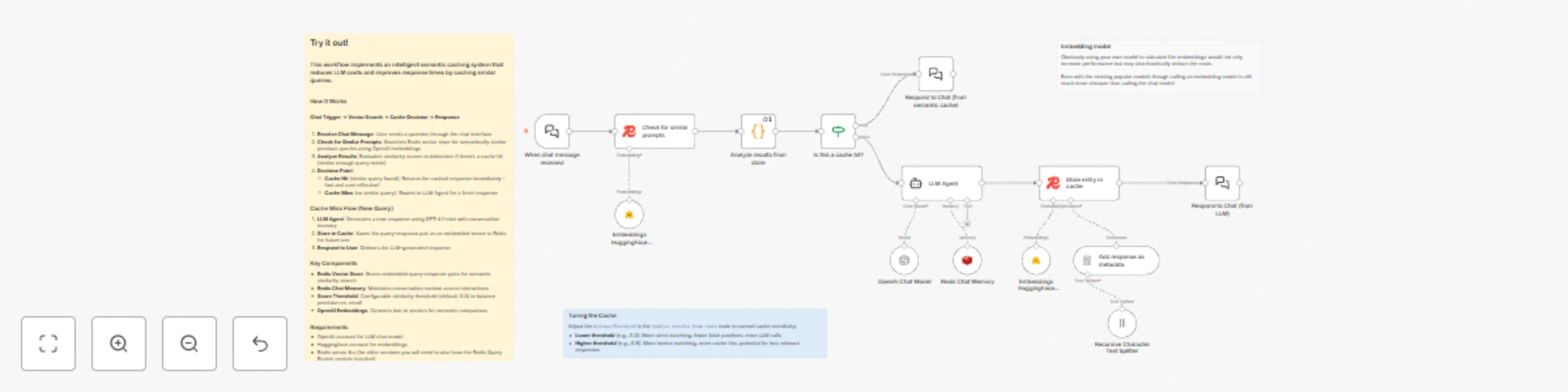
Stop Paying for the Same Answer Twice Your LLM is answering the same questions over and over. "What's the weather?" "How's the weather today?" "Tell me about the weather." Same answer, three API ca...

Best for

  • Engineering automation workflows
  • AI Chatbot automation workflows
  • advanced n8n builders looking for reusable templates

Tools used

n8n-nodes-base.stickynote, @n8n/n8n-nodes-langchain.lmchatopenai, @n8n/n8n-nodes-langchain.memoryredischat, @n8n/n8n-nodes-langchain.chattrigger, n8n-nodes-base.code, @n8n/n8n-nodes-langchain.vectorstoreredis, @n8n/n8n-nodes-langchain.chat, @n8n/n8n-nodes-langchain.agent

Source and attribution

This workflow is cataloged by N8N Workflows and links back to its original n8n.io source page by Tihomir Mateev.

Original n8n.io source

1.1 Workflow description

Title
Reduce LLM Costs with Semantic Caching using Redis Vector Store and HuggingFace
Workflow name
Reduce LLM Costs with Semantic Caching using Redis Vector Store and HuggingFace

Stop Paying for the Same Answer Twice

Your LLM is answering the same questions over and over. "What's the weather?" "How's the weather today?" "Tell me about the weather." Same answer, three API calls, triple the cost. This workflow fixes that.

What Does It Do?

Semantic caching with superpowers. When someone asks a question, it checks if you've answered something similar before. Not exact matches—semantic similarity. If it finds a match, boom, instant cached response. No LLM call, no cost, no waiting.

First time: "What's your refund policy?" → Calls LLM, caches answer
Next time: "How do refunds work?" → Instant cached response (it knows these are the same!)
Result: Faster responses + way lower API bills

The Flow

  1. Question comes in through the chat interface
  2. Vector search checks Redis for semantically similar past questions
  3. Smart decision: Cache hit? Return instantly. Cache miss? Ask the LLM.
  4. New answers get cached automatically for next time
  5. Conversation memory keeps context across the whole chat

It's like having a really smart memo pad that understands meaning, not just exact words.

Quick Start

You'll need:

  • OpenAI API key (for the chat model)
  • huggingface API key (for embeddings)
  • Redis 8.x (for vector magic)

Get it running:

  1. Drop in your credentials
  2. Hit the chat interface
  3. Watch your API costs drop as the cache fills up

That's it. No complex setup, no configuration hell.

Tune It Your Way

The distanceThreshold in the "Analyze results from store" node is your control knob:

  • Lower (0.2): Strict matching, fewer false positives, more LLM calls
  • Higher (0.5): Loose matching, more cache hits, occasional weird matches
  • Default (0.3): Sweet spot for most use cases

Play with it. Find what works for your questions.

Hack It Up

Some ideas to get you started:

  • Add TTL: Make cached answers expire after a day/week/month
  • Category filters: Different caches for different topics
  • Confidence scores: Show users when they got a cached vs fresh answer
  • Analytics dashboard: Track cache hit rates and cost savings
  • Multi-language: Cache works across languages (embeddings are multilingual!)
  • Custom embeddings: Swap OpenAI for local models or other providers

Real Talk 💡

When it shines:

  • Customer support (same questions, different words)
  • Documentation chatbots (limited knowledge base)
  • FAQ systems (obvious use case)
  • Internal tools (repetitive queries)

When to skip it:

  • Real-time data queries (stock prices, weather, etc.)
  • Highly personalized responses
  • Questions that need fresh context every time

Pro tip: Start with a higher threshold (0.4-0.5) and tighten it as you see what gets cached. Better to cache too much at first than miss obvious matches.

Built with n8n, Redis, Huggingface and OpenAI. Open source, self-hosted, completely under your control.

1.2 Logical Blocks

This catalog entry is organized from the workflow JSON. The node-level section below shows the executable blocks available for review before importing the template.

2. Block-by-Block Analysis

Block 1 - Sticky Note

Type / Role
n8n-nodes-base.stickyNote - stickyNote
Config choices
Version 1

Block 2 - Sticky Note2

Type / Role
n8n-nodes-base.stickyNote - stickyNote
Config choices
Version 1

Block 3 - OpenAI Chat Model

Type / Role
@n8n/n8n-nodes-langchain.lmChatOpenAi - lmChatOpenAi
Config choices
Version 1.2

Block 4 - Redis Chat Memory

Type / Role
@n8n/n8n-nodes-langchain.memoryRedisChat - memoryRedisChat
Config choices
Version 1.5

Block 5 - When chat message received

Type / Role
@n8n/n8n-nodes-langchain.chatTrigger - chatTrigger
Config choices
Version 1.4

Block 6 - Analyze results from store

Type / Role
n8n-nodes-base.code - code
Config choices
Version 2

Block 7 - Check for similar prompts

Type / Role
@n8n/n8n-nodes-langchain.vectorStoreRedis - vectorStoreRedis
Config choices
Version 1.3

Block 8 - Respond to Chat (from semantic cache)

Type / Role
@n8n/n8n-nodes-langchain.chat - chat
Config choices
Version 1

Block 9 - Respond to Chat (from LLM)

Type / Role
@n8n/n8n-nodes-langchain.chat - chat
Config choices
Version 1

Block 10 - LLM Agent

Type / Role
@n8n/n8n-nodes-langchain.agent - agent
Config choices
Version 1.8

Block 11 - Store entry in cache

Type / Role
@n8n/n8n-nodes-langchain.vectorStoreRedis - vectorStoreRedis
Config choices
Version 1.3

Block 12 - Add response as metadata

Type / Role
@n8n/n8n-nodes-langchain.documentDefaultDataLoader - documentDefaultDataLoader
Config choices
Version 1

Block 13 - Recursive Character Text Splitter

Type / Role
@n8n/n8n-nodes-langchain.textSplitterRecursiveCharacterTextSplitter - textSplitterRecursiveCharacterTextSplitter
Config choices
Version 1

Block 14 - Sticky Note3

Type / Role
n8n-nodes-base.stickyNote - stickyNote
Config choices
Version 1

Block 15 - Is this a cache hit?

Type / Role
n8n-nodes-base.if - if
Config choices
Version 2.2

Block 16 - Embeddings HuggingFace Inference

Type / Role
@n8n/n8n-nodes-langchain.embeddingsHuggingFaceInference - embeddingsHuggingFaceInference
Config choices
Version 1

Block 17 - Embeddings HuggingFace Inference1

Type / Role
@n8n/n8n-nodes-langchain.embeddingsHuggingFaceInference - embeddingsHuggingFaceInference
Config choices
Version 1

3. Summary Table

Workflow Reduce LLM Costs with Semantic Caching using Redis Vector Store and HuggingFace
Complexity advanced
Nodes 17
Categories Engineering, AI Chatbot
Author Tihomir Mateev
Published 16 Nov 2025

4. Reproducing the Workflow from Scratch

  1. 1. Download the workflow JSON

    Use the JSON export at /data/workflows/10887/10887.json as the source template for this automation.

  2. 2. Import the template into n8n

    Open n8n, import the downloaded JSON, and review each node before activating the workflow.

  3. 3. Configure credentials and variables

    Replace placeholder credentials, API keys, webhook URLs, account IDs, and environment-specific values with your own settings.

  4. 4. Test with sample data

    Run the workflow manually or in a staging workspace, inspect node output, and confirm downstream systems receive the expected data.

  5. 5. Activate and monitor

    Enable the workflow only after testing, then monitor executions, errors, and rate limits during the first production runs.

5. General Notes & Resources

Review imported nodes carefully before activation. This catalog entry is intended to help you inspect the workflow structure, understand required services, and find related templates faster.

Node names, credentials, schedules, webhook paths, and external service limits may need adjustment for your workspace.

Frequently asked questions

What does Reduce LLM Costs with Semantic Caching using Redis Vector Store and HuggingFace do?

Stop Paying for the Same Answer Twice Your LLM is answering the same questions over and over. "What's the weather?" "How's the weather today?" "Tell me about the weather." Same answer, three API ca...

What do I need before importing this workflow?

Review the workflow JSON, configure any required credentials in n8n, and test the automation in a safe workspace before using it in production.

Can I customize this workflow?

Yes. Use the block-by-block analysis and the downloadable JSON to inspect each node, then adjust credentials, prompts, schedules, filters, or destinations for your Engineering, AI Chatbot use case.