T

Tihomir Mateev

2
Workflows

Workflows by Tihomir Mateev
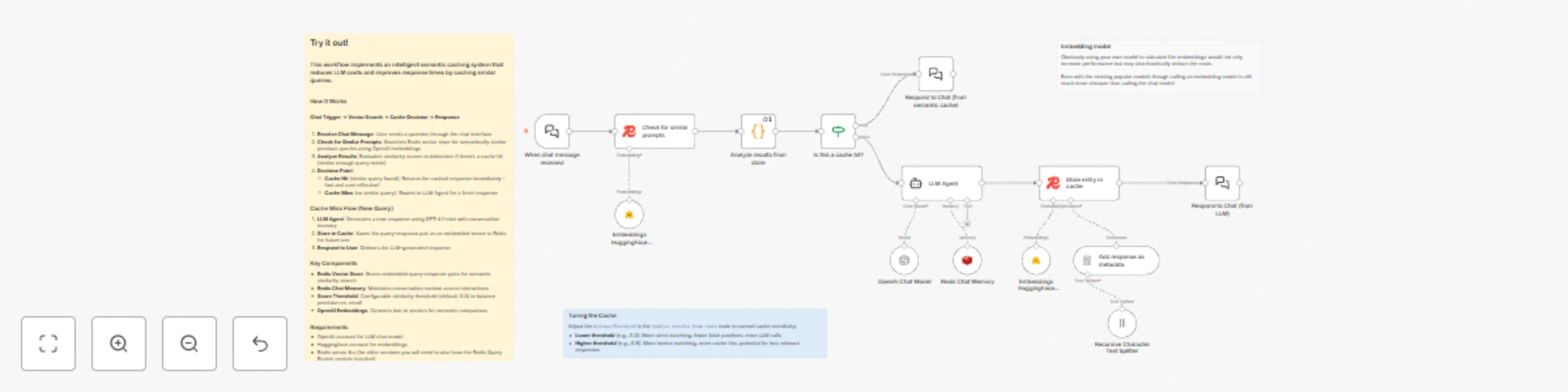
Workflow preview: Reduce LLM Costs with Semantic Caching using Redis Vector Store and HuggingFace
Free advanced

Reduce LLM Costs with Semantic Caching using Redis Vector Store and HuggingFace

# Stop Paying for the Same Answer Twice Your LLM is answering the same questions over and over. "What's the weather?" "How's the weather today?" "Tell me about the weather." Same answer, three API calls, triple the cost. This workflow fixes that. ## What Does It Do? Semantic caching with superpowers. When someone asks a question, it checks if you've answered something *similar* before. Not exact matches—*semantic* similarity. If it finds a match, boom, instant cached response. No LLM call, no cost, no waiting. **First time:** "What's your refund policy?" → Calls LLM, caches answer **Next time:** "How do refunds work?" → Instant cached response (it knows these are the same!) **Result:** Faster responses + way lower API bills ## The Flow 1. **Question comes in** through the chat interface 2. **Vector search** checks Redis for semantically similar past questions 3. **Smart decision**: Cache hit? Return instantly. Cache miss? Ask the LLM. 4. **New answers get cached** automatically for next time 5. **Conversation memory** keeps context across the whole chat It's like having a really smart memo pad that understands meaning, not just exact words. ## Quick Start **You'll need:** - OpenAI API key (for the chat model) - huggingface API key (for embeddings) - Redis 8.x (for vector magic) **Get it running:** 1. Drop in your credentials 2. Hit the chat interface 3. Watch your API costs drop as the cache fills up That's it. No complex setup, no configuration hell. ## Tune It Your Way The `distanceThreshold` in the "Analyze results from store" node is your control knob: - **Lower (0.2)**: Strict matching, fewer false positives, more LLM calls - **Higher (0.5)**: Loose matching, more cache hits, occasional weird matches - **Default (0.3)**: Sweet spot for most use cases Play with it. Find what works for your questions. ## Hack It Up Some ideas to get you started: - **Add TTL**: Make cached answers expire after a day/week/month - **Category filters**: Different caches for different topics - **Confidence scores**: Show users when they got a cached vs fresh answer - **Analytics dashboard**: Track cache hit rates and cost savings - **Multi-language**: Cache works across languages (embeddings are multilingual!) - **Custom embeddings**: Swap OpenAI for local models or other providers ## Real Talk 💡 **When it shines:** - Customer support (same questions, different words) - Documentation chatbots (limited knowledge base) - FAQ systems (obvious use case) - Internal tools (repetitive queries) **When to skip it:** - Real-time data queries (stock prices, weather, etc.) - Highly personalized responses - Questions that need fresh context every time **Pro tip:** Start with a higher threshold (0.4-0.5) and tighten it as you see what gets cached. Better to cache too much at first than miss obvious matches. Built with n8n, Redis, Huggingface and OpenAI. Open source, self-hosted, completely under your control.

T
Tihomir Mateev
Engineering
16 Nov 2025
1229
0

Workflow preview: Chat with GitHub issues using OpenAI and Redis vector search
Free advanced

Chat with GitHub issues using OpenAI and Redis vector search

# Chat with Your GitHub Issues Using AI 🤖 Ever wanted to just *ask* your repository what's going on instead of scrolling through endless issue lists? This workflow lets you do exactly that. ## What Does It Do? Turn any GitHub repo into a conversational knowledge base. Ask questions in plain English, get smart answers powered by AI and vector search. * **"Show me recent authentication bugs"** → AI finds and explains them * **"What issues are blocking the release?"** → Instant context-aware answers * **"Are there any similar problems to #247?"** → Semantic search finds connections you'd miss ## The Magic ✨ 1. **Slurp up issues** from your GitHub repo (with all the metadata goodness) 2. **Vectorize everything** using OpenAI embeddings and store in Redis 3. **Chat naturally** with an AI agent that searches your issue database 4. **Get smart answers** with full conversation memory ## Quick Start **You'll need:** - OpenAI API key (for the AI brain) - Redis 8.x (for vector search magic) - GitHub repo URL (optional: API token for speed) **Get it running:** 1. Drop in your credentials 2. Point it at your repo (edit the `owner` and `repository` params) 3. Run the ingestion flow once to populate the database 4. Start chatting! ## Tinker Away 🔧 This is your playground. Here are some ideas: - **Swap the data source**: Jira tickets? Linear issues? Notion docs? Go wild. - **Change the AI model**: Try different GPT models or even local LLMs - **Add custom filters**: Filter by labels, assignees, or whatever matters to you - **Tune the search**: Adjust how many results come back, tweak relevance scores - **Make it public**: Share the chat interface with your team or users - **Auto-update**: Hook it up to webhooks for real-time issue indexing Built with n8n, Redis, and OpenAI. No vendor lock-in, fully hackable, 100% yours to customize.

T
Tihomir Mateev
Internal Wiki
14 Nov 2025
163
0