Rank Math bulk title & description optimizer for WordPress

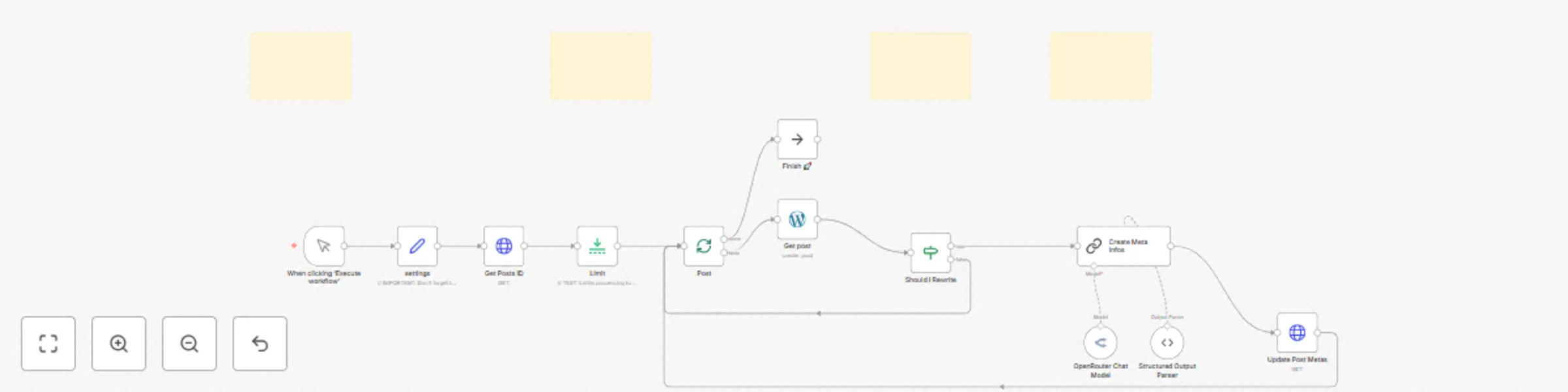
Workflow preview

Workflow preview
100%
Rank Math bulk title & description optimizer for WordPress preview
Open on n8n.io

Important notice

This workflow is provided as-is. Please review and test before using in production.

1. Workflow Overview

Bulk WordPress SEO Meta Optimizer with Rank Math & AI This n8n workflow, along with its companion WordPress plugin ( ), automates the bulk optimization of your WordPress posts' Rank Math SEO titles...

Best for

  • Content Creation automation workflows
  • Multimodal AI automation workflows
  • advanced n8n builders looking for reusable templates

Tools used

n8n-nodes-base.manualtrigger, n8n-nodes-base.set, @n8n/n8n-nodes-langchain.lmchatopenrouter, @n8n/n8n-nodes-langchain.outputparserstructured, n8n-nodes-base.httprequest, n8n-nodes-base.splitinbatches, @n8n/n8n-nodes-langchain.chainllm, n8n-nodes-base.noop

Source and attribution

This workflow is cataloged by N8N Workflows and links back to its original n8n.io source page by phil.

Original n8n.io source

1.1 Workflow description

Title
Rank Math bulk title & description optimizer for WordPress
Workflow name
Rank Math bulk title & description optimizer for WordPress

Bulk WordPress SEO Meta Optimizer with Rank Math & AI

This n8n workflow, along with its companion WordPress plugin (rank_math_tools.zip), automates the bulk optimization of your WordPress posts' Rank Math SEO titles and descriptions using AI.

Stop manually crafting metas and let AI supercharge your SEO efforts efficiently!

free version here.

How it works:

This workflow streamlines your SEO process through several automated steps:

  • Fetches Post IDs: Retrieves all published post IDs from your WordPress site using a secure, custom API endpoint provided by the companion plugin.
  • Gathers Post Content: For each identified post, it accesses the existing title, slug, and main rendered content to provide context for the AI.
  • AI-Powered Meta Generation: Leverages an AI model of your choice via OpenRouter (defaulting to Claude 3.7 Sonnet) to generate an optimized SEO title and meta description. This generation is guided by a detailed, customizable prompt within the "Create Meta Infos" node, allowing you to define the style, tone, and SEO strategy.
  • Updates WordPress Metas: Sends the newly generated SEO title and description back to your WordPress site via another custom API endpoint. The companion plugin then updates the specific Rank Math fields for each post.
  • Refreshes Modified Date: The companion plugin automatically updates the post's 'last modified' date in WordPress whenever meta information is changed, which can be a positive signal for search engines.
  • Selective Processing: An "IF" node ("Should I Rewrite") intelligently determines whether a post's metas need updating based on predefined conditions (e.g., empty metas or placeholder content), optimizing resource usage.

Setup Steps:

Get up and running in approximately 15-25 minutes by following these high-level steps. Detailed instructions are available in the comprehensive documentation provided with your purchase and within the sticky notes inside the n8n workflow itself.

  1. Install the Companion WordPress Plugin:
    • Download the rank_math_tools.zip file.
    • Upload and activate it on your WordPress site.
    • (Estimated time: 2-5 minutes)
  2. Configure WordPress API Authentication:
    • In your WordPress admin area, go to your user profile and create a new Application Password.
    • Ensure the user has at least an "Editor" role.
    • Copy the generated password.
    • (Estimated time: 2-5 minutes)
  3. Set Up n8n Credentials:
    • In n8n, create a new "WordPress API" credential using your WordPress username, the Application Password you just copied, and your site's Base URL.
    • Create a new "OpenRouter Api" credential using your OpenRouter API key.
    • (Estimated time: 5-10 minutes, assuming you have your OpenRouter key ready)
  4. Import and Configure the n8n Workflow:
    • Download the Bulk_Wordpress_Meta_Data_Optimizer_Gumroad.json workflow file.
    • Import it into your n8n instance.
    • Link your newly created WordPress and OpenRouter credentials to the respective nodes in the workflow.
    • Verify and update your WordPress site URL in the "settings" node (ensure it has a trailing slash /).
    • Review the "Limit" node – it's pre-set to process only 5 items for safe initial testing.
    • (Estimated time: 5-10 minutes)

Benefits:

  • Full SEO Meta Automation: Drastically reduce manual effort by automatically generating and updating SEO titles and descriptions for all your posts.
  • Bulk Processing Power: Efficiently handle meta optimization for hundreds or thousands of WordPress posts.
  • Highly Customizable AI Output: Fine-tune the AI's generation style, keyword focus, and direct response techniques by editing the detailed prompt within the "Create Meta Infos" node.
  • Improved SEO Consistency & Quality: Ensure all your articles have relevant, compelling, and optimized meta tags, adhering to best practices.
  • Signal Freshness to Search Engines: The automatic update of the post 'last modified' date upon meta change can help improve crawl frequency and SEO.
  • Resource-Efficient Updates: The "Should I Rewrite" node prevents unnecessary processing and API calls for posts that already have satisfactory meta information.
  • Save Time & Focus on Content: Free up valuable time to concentrate on creating great content, rather than on repetitive SEO tasks.

To understand exactly how to use and customize this workflow in detail, please refer to the comprehensive step-by-step documentation provided with your purchase.

For professional n8n automation services for your business, contact: Phil | Inforeole

1.2 Logical Blocks

This catalog entry is organized from the workflow JSON. The node-level section below shows the executable blocks available for review before importing the template.

2. Block-by-Block Analysis

Block 1 - When clicking ‘Execute workflow’

Type / Role
n8n-nodes-base.manualTrigger - manualTrigger
Config choices
Version 1

Block 2 - settings

Type / Role
n8n-nodes-base.set - set
Config choices
Version 3.4

Block 3 - OpenRouter Chat Model

Type / Role
@n8n/n8n-nodes-langchain.lmChatOpenRouter - lmChatOpenRouter
Config choices
Version 1

Block 4 - Structured Output Parser

Type / Role
@n8n/n8n-nodes-langchain.outputParserStructured - outputParserStructured
Config choices
Version 1.2

Block 5 - Get Posts ID

Type / Role
n8n-nodes-base.httpRequest - httpRequest
Config choices
Version 4.2

Block 6 - Update Post Metas

Type / Role
n8n-nodes-base.httpRequest - httpRequest
Config choices
Version 4.2

Block 7 - Post

Type / Role
n8n-nodes-base.splitInBatches - splitInBatches
Config choices
Version 3

Block 8 - Create Meta Infos

Type / Role
@n8n/n8n-nodes-langchain.chainLlm - chainLlm
Config choices
Version 1.7

Block 9 - Finish 🚀

Type / Role
n8n-nodes-base.noOp - noOp
Config choices
Version 1

Block 10 - Get post

Type / Role
n8n-nodes-base.wordpress - wordpress
Config choices
Version 1

Block 11 - Should I Rewrite

Type / Role
n8n-nodes-base.if - if
Config choices
Version 2.2

Block 12 - Limit

Type / Role
n8n-nodes-base.limit - limit
Config choices
Version 1

Block 13 - Sticky Note

Type / Role
n8n-nodes-base.stickyNote - stickyNote
Config choices
Version 1

Block 14 - Sticky Note1

Type / Role
n8n-nodes-base.stickyNote - stickyNote
Config choices
Version 1

Block 15 - Sticky Note2

Type / Role
n8n-nodes-base.stickyNote - stickyNote
Config choices
Version 1

Block 16 - Sticky Note3

Type / Role
n8n-nodes-base.stickyNote - stickyNote
Config choices
Version 1

3. Summary Table

Workflow Rank Math bulk title & description optimizer for WordPress
Complexity advanced
Nodes 16
Categories Content Creation, Multimodal AI
Author phil
Published 04 Jun 2025

4. Reproducing the Workflow from Scratch

  1. 1. Download the workflow JSON

    Use the JSON export at /data/workflows/4646/4646.json as the source template for this automation.

  2. 2. Import the template into n8n

    Open n8n, import the downloaded JSON, and review each node before activating the workflow.

  3. 3. Configure credentials and variables

    Replace placeholder credentials, API keys, webhook URLs, account IDs, and environment-specific values with your own settings.

  4. 4. Test with sample data

    Run the workflow manually or in a staging workspace, inspect node output, and confirm downstream systems receive the expected data.

  5. 5. Activate and monitor

    Enable the workflow only after testing, then monitor executions, errors, and rate limits during the first production runs.

5. General Notes & Resources

Review imported nodes carefully before activation. This catalog entry is intended to help you inspect the workflow structure, understand required services, and find related templates faster.

Node names, credentials, schedules, webhook paths, and external service limits may need adjustment for your workspace.

Frequently asked questions

What does Rank Math bulk title & description optimizer for WordPress do?

Bulk WordPress SEO Meta Optimizer with Rank Math & AI This n8n workflow, along with its companion WordPress plugin ( ), automates the bulk optimization of your WordPress posts' Rank Math SEO titles...

What do I need before importing this workflow?

Review the workflow JSON, configure any required credentials in n8n, and test the automation in a safe workspace before using it in production.

Can I customize this workflow?

Yes. Use the block-by-block analysis and the downloadable JSON to inspect each node, then adjust credentials, prompts, schedules, filters, or destinations for your Content Creation, Multimodal AI use case.