Block 1 - Sticky Note
- Type / Role
- n8n-nodes-base.stickyNote - stickyNote
- Config choices
- Version 1


 Early Deal
Automated Databricks Data Querying & SQL Insights via Slack with AI Agent & Gemini Node by Node Explanation This workflow is divided into three functional phases: Initialization , AI Processing , a...
n8n-nodes-base.stickynote, n8n-nodes-base.slacktrigger, n8n-nodes-base.code, n8n-nodes-base.slack, n8n-nodes-base.httprequest, n8n-nodes-base.set, @n8n/n8n-nodes-langchain.agent, @n8n/n8n-nodes-langchain.lmchatgooglegemini
This workflow is cataloged by N8N Workflows and links back to its original n8n.io source page by iamvaar.
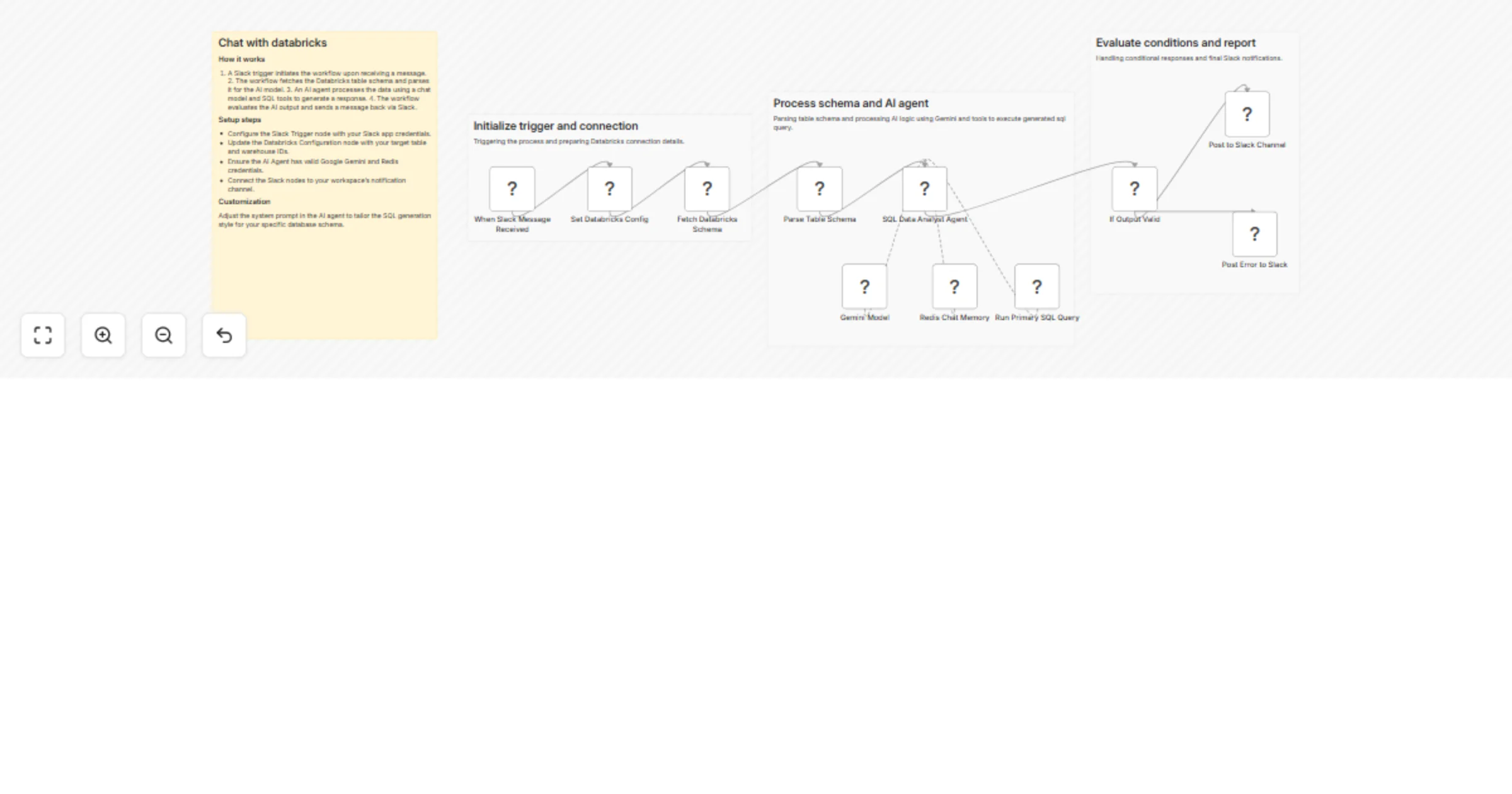
Original n8n.io sourceThis workflow is divided into three functional phases: Initialization, AI Processing, and Response Delivery.
| Node Name | Category | What it does |
|---|---|---|
| When Slack Message Received | Trigger | Monitors a Slack channel for @mentions. It captures the user's question and the thread ID to keep the conversation organized. |
| Set Databricks Config | Configuration | A "helper" node where you hardcode your Databricks warehouse_id and target_table. This makes it easy to update settings in one place. |
| Fetch Databricks Schema | Data Retrieval | Sends a DESCRIBE command to the Databricks API. It learns what columns exist (e.g., "price", "date", "store_id") so the AI knows what it can query. |
| Parse Table Schema | Data Transformation | Uses JavaScript to clean up the raw Databricks response. it converts complex technical data into a simple list that the AI can easily read. |
| SQL Data Analyst Agent | AI Brain | The "manager" of the workflow. It takes the user's question and the table schema, decides which SQL query to write, and interprets the results. |
| Gemini Model | LLM Engine | Provides the actual intelligence (using Google Gemini 3.1 Flash). This is what "thinks" and generates the SQL and conversational text. |
| Redis Chat Memory | Memory | Stores previous messages in the thread. This allows you to ask follow-up questions (e.g., "Now show me only the top 5") without repeating the whole context. |
| Run Primary SQL Query | AI Tool | An HTTP tool given to the Agent. The Agent "calls" this node to actually run the generated SQL on Databricks and get the real data back. |
| If Output Valid | Logic Gate | A safety check. It verifies if the Agent successfully produced a message for Slack or if something went wrong during the process. |
| Post to Slack Channel | Output (Success) | Sends the final answer (e.g., "The total revenue for Q3 was $4.2M") back to the user in Slack. |
| Post Error to Slack | Output (Failure) | If the SQL fails or the AI hits a wall, this node sends an error message to the user so they aren't left waiting. |
Unlike a standard linear workflow, the SQL Data Analyst Agent doesn't just move to the next step. It performs a "Reasoning" loop:
This catalog entry is organized from the workflow JSON. The node-level section below shows the executable blocks available for review before importing the template.
| Workflow | Query Databricks data and SQL insights via Slack with Gemini AI agent |
|---|---|
| Complexity | advanced |
| Nodes | 15 |
| Categories | Document Extraction, AI Chatbot |
| Author | iamvaar |
| Published | 23 Mar 2026 |
Use the JSON export at /data/workflows/14254/14254.json as the source template for this automation.
Open n8n, import the downloaded JSON, and review each node before activating the workflow.
Replace placeholder credentials, API keys, webhook URLs, account IDs, and environment-specific values with your own settings.
Run the workflow manually or in a staging workspace, inspect node output, and confirm downstream systems receive the expected data.
Enable the workflow only after testing, then monitor executions, errors, and rate limits during the first production runs.
Review imported nodes carefully before activation. This catalog entry is intended to help you inspect the workflow structure, understand required services, and find related templates faster.
Node names, credentials, schedules, webhook paths, and external service limits may need adjustment for your workspace.
Automated Databricks Data Querying & SQL Insights via Slack with AI Agent & Gemini Node by Node Explanation This workflow is divided into three functional phases: Initialization , AI Processing , a...
Review the workflow JSON, configure any required credentials in n8n, and test the automation in a safe workspace before using it in production.
Yes. Use the block-by-block analysis and the downloadable JSON to inspect each node, then adjust credentials, prompts, schedules, filters, or destinations for your Document Extraction, AI Chatbot use case.