Query and monitor Shopify orders via Telegram bot commands

Workflow preview

Workflow preview
100%
Query and monitor Shopify orders via Telegram bot commands preview
Open on n8n.io

Important notice

This workflow is provided as-is. Please review and test before using in production.

1. Workflow Overview

This n8n workflow integrates Shopify order management with Telegram, allowing you to query open orders and order details directly through Telegram chat commands. It provides an interactive way to m...

Best for

  • CRM automation workflows
  • intermediate n8n builders looking for reusable templates

Tools used

n8n-nodes-base.telegramtrigger, n8n-nodes-base.shopify, n8n-nodes-base.code, n8n-nodes-base.if, n8n-nodes-base.switch, n8n-nodes-base.httprequest, n8n-nodes-base.telegram

Source and attribution

This workflow is cataloged by N8N Workflows and links back to its original n8n.io source page by Roninimous.

Original n8n.io source

1.1 Workflow description

Title
Query and monitor Shopify orders via Telegram bot commands
Workflow name
Query and monitor Shopify orders via Telegram bot commands

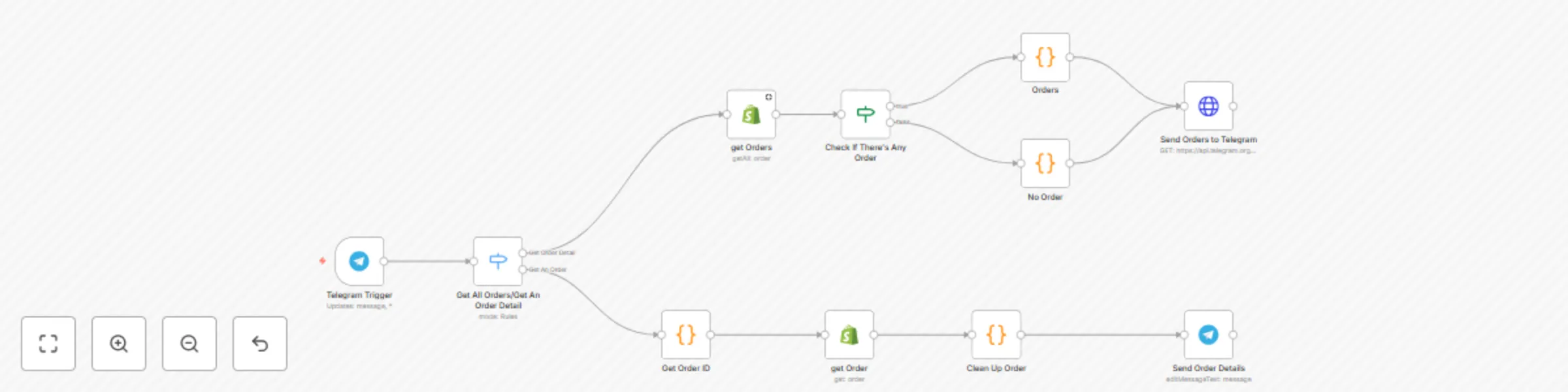
This n8n workflow integrates Shopify order management with Telegram, allowing you to query open orders and order details directly through Telegram chat commands. It provides an interactive way to monitor your Shopify store orders using Telegram as an interface.

Key Features

  1. Telegram Trigger: Listens for messages and callback queries from your Telegram bot.
  2. Switch Node: Routes incoming Telegram messages to different flows based on message content:
    • /orders command to fetch all open orders
    • Callback queries starting with /order_ to fetch details of a specific order
  3. Shopify Get Orders: Retrieves all open orders from your Shopify store using your Shopify API credentials.
  4. Conditional Check (If Node): Determines if there are any open orders; branches accordingly:
    • If orders exist, prepare an interactive Telegram message with a list of orders.1
    • If no orders exist, send a “No Order” message.
  5. Orders Code Node: Formats the list of open orders into a Telegram message with inline buttons. Each button corresponds to an order and sends a callback data containing the order ID.
  6. Get Order Details: When a user selects an order button, the workflow extracts the order ID from the callback data, fetches detailed order information from Shopify, and formats the order items into a readable message.
  7. Send Messages to Telegram: Sends formatted messages back to Telegram:
    • The list of open orders with clickable buttons.
    • Detailed information about a selected order.
    • “No Order” notification if there are no open orders.

How It Works

  • A Telegram user sends /orders to the bot.
  • The workflow fetches open orders from Shopify and sends a message with buttons listing each order.
  • When a user clicks an order button, the workflow fetches and displays detailed information about that specific order in Telegram.
  • If there are no open orders, the bot replies accordingly.

Setup Instructions

  1. Create a Telegram Bot:

    • Use @BotFather on Telegram to create a bot and get the bot token.
  2. Obtain Shopify API Credentials:

    • Create a private app in your Shopify admin dashboard with permission to read orders.
    • Obtain the API key and access token.
  3. Configure n8n Credentials:

    • Add your Telegram bot token as Telegram API credentials in n8n.
    • Add your Shopify API credentials in n8n Shopify credentials.
  4. Import the Workflow:

    • Import this workflow into your n8n instance.
    • Update the Telegram and Shopify credential nodes to use your credentials.
  5. Set Webhook URLs:

    • Ensure your Telegram bot webhook is set correctly to receive messages.
    • n8n webhook URLs should be publicly accessible.
  6. Test the Workflow:

    • Send /orders to your Telegram bot to verify it retrieves and lists open orders.

Customization Guidance

  • Modify Commands: Update the Switch node to add more Telegram commands or change existing ones.
  • Change Message Formats: Edit the Code nodes to customize how order lists and details appear.
  • Expand Shopify Integration: Add nodes to handle other Shopify operations like updating orders, managing products, etc.
  • Multi-User Support: Adapt the workflow to handle multiple Telegram chat IDs dynamically.

Security and Implementation Notes

  • The native Telegram node in n8n has limitations: it does not support sending dynamic inline keyboard arrays in JSON format, which is essential for displaying a variable number of buttons depending on how many orders are retrieved from Shopify.
  • To overcome this, this workflow uses the HTTP Request node to call Telegram’s API directly, allowing full flexibility to send dynamic inline keyboards as JSON objects. (I will make an update once Telegram Node support dynamic inline keyboards).
  • Security Considerations:
    • Always store your Telegram bot token securely in n8n credentials and never expose it in the HTTP Request node’s URL or body directly.
    • Use environment variables or n8n credentials to inject tokens safely.
    • Be mindful of Telegram API rate limits and add error handling in your workflow.
  • While using HTTP Request nodes increases flexibility, it also requires careful management of request payloads and authentication, as opposed to the built-in Telegram node which abstracts much of this complexity.

Benefits

  • Quickly access Shopify order data without leaving Telegram.
  • Interactive inline buttons improve user experience.
  • Automated, real-time integration between Shopify and Telegram.

1.2 Logical Blocks

This catalog entry is organized from the workflow JSON. The node-level section below shows the executable blocks available for review before importing the template.

2. Block-by-Block Analysis

Block 1 - Telegram Trigger

Type / Role
n8n-nodes-base.telegramTrigger - telegramTrigger
Config choices
Version 1.2

Block 2 - get Orders

Type / Role
n8n-nodes-base.shopify - shopify
Config choices
Version 1

Block 3 - Orders

Type / Role
n8n-nodes-base.code - code
Config choices
Version 2

Block 4 - No Order

Type / Role
n8n-nodes-base.code - code
Config choices
Version 2

Block 5 - get Order

Type / Role
n8n-nodes-base.shopify - shopify
Config choices
Version 1

Block 6 - Clean Up Order

Type / Role
n8n-nodes-base.code - code
Config choices
Version 2

Block 7 - Check If There's Any Order

Type / Role
n8n-nodes-base.if - if
Config choices
Version 2.2

Block 8 - Get All Orders/Get An Order Detail

Type / Role
n8n-nodes-base.switch - switch
Config choices
Version 3.2

Block 9 - Get Order ID

Type / Role
n8n-nodes-base.code - code
Config choices
Version 2

Block 10 - Send Orders to Telegram

Type / Role
n8n-nodes-base.httpRequest - httpRequest
Config choices
Version 4.2

Block 11 - Send Order Details

Type / Role
n8n-nodes-base.telegram - telegram
Config choices
Version 1.2

3. Summary Table

Workflow Query and monitor Shopify orders via Telegram bot commands
Complexity intermediate
Nodes 11
Categories CRM
Author Roninimous
Published 06 Jun 2025

4. Reproducing the Workflow from Scratch

  1. 1. Download the workflow JSON

    Use the JSON export at /data/workflows/4714/4714.json as the source template for this automation.

  2. 2. Import the template into n8n

    Open n8n, import the downloaded JSON, and review each node before activating the workflow.

  3. 3. Configure credentials and variables

    Replace placeholder credentials, API keys, webhook URLs, account IDs, and environment-specific values with your own settings.

  4. 4. Test with sample data

    Run the workflow manually or in a staging workspace, inspect node output, and confirm downstream systems receive the expected data.

  5. 5. Activate and monitor

    Enable the workflow only after testing, then monitor executions, errors, and rate limits during the first production runs.

5. General Notes & Resources

Review imported nodes carefully before activation. This catalog entry is intended to help you inspect the workflow structure, understand required services, and find related templates faster.

Node names, credentials, schedules, webhook paths, and external service limits may need adjustment for your workspace.

Frequently asked questions

What does Query and monitor Shopify orders via Telegram bot commands do?

This n8n workflow integrates Shopify order management with Telegram, allowing you to query open orders and order details directly through Telegram chat commands. It provides an interactive way to m...

What do I need before importing this workflow?

Review the workflow JSON, configure any required credentials in n8n, and test the automation in a safe workspace before using it in production.

Can I customize this workflow?

Yes. Use the block-by-block analysis and the downloadable JSON to inspect each node, then adjust credentials, prompts, schedules, filters, or destinations for your CRM use case.