R

Roninimous

3
Workflows

Workflows by Roninimous

Workflow preview: Location-based triggered reminder via Telegram Bot (iOS)
Free intermediate

Location-based triggered reminder via Telegram Bot (iOS)

This workflow integrates iOS Shortcuts with n8n to create a simple, automatic location-based reminder system. When the user arrives at a specified location, an automation in the Shortcuts app sends a webhook trigger to n8n. If the trigger matches predefined date and time conditions, n8n sends a Telegram message reminder to the user. This is perfect for repetitive weekly tasks like taking out the bins, customized with conditions for day and time. ## Key Features - Location-Based Trigger: Uses iOS Shortcuts automation to start the workflow upon arrival at a specific location. - Time and Day Validation: Logic in n8n checks current weekday and time to ensure reminders are sent only when appropriate. - Telegram Integration: Sends reminders directly to your Telegram account using your bot. - Minimal Setup: Uses native iOS and simple webhook setup in n8n. ## How It Works 1. iOS Shortcut Trigger: When the user arrives at a designated location, the iOS shortcut sends a GET request to the n8n webhook. 2. n8n Webhook Node: Receives the request and triggers the workflow. 3. Conditional Check: An IF node checks if the current time is after 4:00 PM and it's a Wednesday (or any other configured condition). 4. Telegram Node: If the condition passes, n8n sends a message like "Don't forget to take the bins out." to your Telegram bot. ## Setup Instructions 1. Create a Telegram Bot: - Use **@BotFather** to create a bot and obtain your bot token. - Add Telegram API credentials in n8n with your bot token. 2. Setup iOS Shortcut: - Open the Shortcuts app on your iPhone. - Go to the **Automation** tab → Tap **+** → Create Personal Automation. - Choose Arrive → Select a location. - Add action: **Get Contents of URL**. Method: **GET**, URL: your n8n Webhook URL (e.g. https://n8n.yourdomain.com/webhook/your-path). - Save the automation. (You can also test the automation by pressing the Play button) 3. Import Workflow into n8n: - Load the provided workflow JSON. - Set your webhook path and Telegram credentials. - Adjust the logic in the IF node to your usecase. In my case, I check if today is Wednesday and after 4 PM until Midnight. 4. Expose n8n Publicly: Ensure your n8n instance is publicly accessible via HTTPS so the shortcut can reach it. ## Customization Guidance - Change Reminder Message: Modify the text inside the Telegram node to suit different reminders. - Add More Conditions: Extend the logic to support more days, hours, or different trigger messages. - Add Multi-Channel Output: Send reminders via email, SMS, or Slack in addition to Telegram. - Use More Triggers: Expand to other types of shortcut triggers (e.g. NFC tag, leaving location, time of day). ## Security and Implementation - Webhook Protection: Avoid using easily guessable webhook URLs. - Secure Telegram Token: Store your bot token securely in n8n credentials, not in plain workflow text. - Limit Shortcut Scope: Only trigger the shortcut at trusted locations or with secure iCloud sync. - Automation Permissions: Ensure your iPhone allows shortcut automations to run without confirmation. ## Benefits - Automates repetitive location-based reminders without user interaction. - Provides a lightweight, native solution using iOS and n8n with no extra apps. - Keeps you on track for routine tasks like garbage days, medicine reminders, or arrival-based tasks. - Easily extendable for multiple locations or trigger conditions.

R
Roninimous
Personal Productivity
25 Jun 2025
572
0
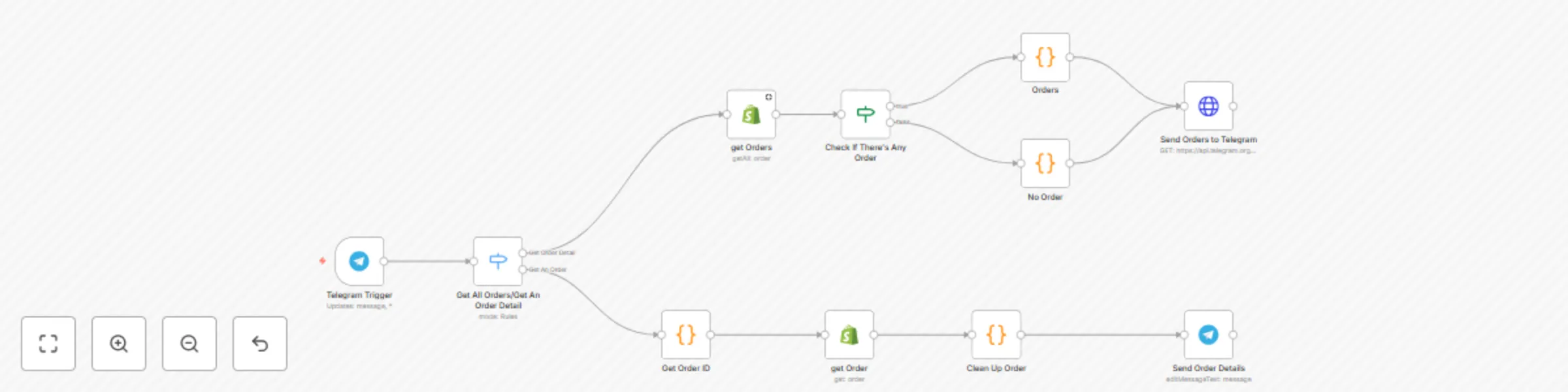
Workflow preview: Query and monitor Shopify orders via Telegram bot commands
Free intermediate

Query and monitor Shopify orders via Telegram bot commands

This n8n workflow integrates Shopify order management with Telegram, allowing you to query open orders and order details directly through Telegram chat commands. It provides an interactive way to monitor your Shopify store orders using Telegram as an interface. ## Key Features 1. **Telegram Trigger**: Listens for messages and callback queries from your Telegram bot. 2. **Switch Node**: Routes incoming Telegram messages to different flows based on message content: - **/orders** command to fetch all open orders - Callback queries starting with /order_ to fetch details of a specific order 1. Shopify Get Orders: Retrieves all open orders from your Shopify store using your Shopify API credentials. 2. Conditional Check (If Node): Determines if there are any open orders; branches accordingly: - If orders exist, prepare an interactive Telegram message with a list of orders.1 - If no orders exist, send a “No Order” message. 5. Orders Code Node: Formats the list of open orders into a Telegram message with inline buttons. Each button corresponds to an order and sends a callback data containing the order ID. 6. Get Order Details: When a user selects an order button, the workflow extracts the order ID from the callback data, fetches detailed order information from Shopify, and formats the order items into a readable message. 7. Send Messages to Telegram: Sends formatted messages back to Telegram: - The list of open orders with clickable buttons. - Detailed information about a selected order. - “No Order” notification if there are no open orders. ## How It Works - A Telegram user sends /orders to the bot. - The workflow fetches open orders from Shopify and sends a message with buttons listing each order. - When a user clicks an order button, the workflow fetches and displays detailed information about that specific order in Telegram. - If there are no open orders, the bot replies accordingly. ## Setup Instructions 1. Create a Telegram Bot: - Use @BotFather on Telegram to create a bot and get the bot token. 3. Obtain Shopify API Credentials: - Create a private app in your Shopify admin dashboard with permission to read orders. - Obtain the API key and access token. 6. Configure n8n Credentials: - Add your Telegram bot token as Telegram API credentials in n8n. - Add your Shopify API credentials in n8n Shopify credentials. 9. Import the Workflow: - Import this workflow into your n8n instance. - Update the Telegram and Shopify credential nodes to use your credentials. 12. Set Webhook URLs: - Ensure your Telegram bot webhook is set correctly to receive messages. - n8n webhook URLs should be publicly accessible. 1. Test the Workflow: - Send /orders to your Telegram bot to verify it retrieves and lists open orders. ## Customization Guidance - Modify Commands: Update the Switch node to add more Telegram commands or change existing ones. - Change Message Formats: Edit the Code nodes to customize how order lists and details appear. - Expand Shopify Integration: Add nodes to handle other Shopify operations like updating orders, managing products, etc. - Multi-User Support: Adapt the workflow to handle multiple Telegram chat IDs dynamically. ## Security and Implementation Notes - The native **Telegram node in n8n has limitations:** it does not support sending **dynamic inline keyboard arrays** in JSON format, which is essential for displaying a variable number of buttons depending on how many orders are retrieved from Shopify. - To overcome this, this workflow uses the **HTTP Request node** to call Telegram’s API directly, allowing full flexibility to send dynamic inline keyboards as JSON objects. (I will make an update once Telegram Node support dynamic inline keyboards). - **Security Considerations:** - Always store your Telegram bot token securely in n8n credentials and never expose it in the HTTP Request node’s URL or body directly. - Use environment variables or n8n credentials to inject tokens safely. - Be mindful of Telegram API rate limits and add error handling in your workflow. - While using HTTP Request nodes increases flexibility, it also **requires careful management of request payloads and authentication,** as opposed to the built-in Telegram node which abstracts much of this complexity. ## Benefits - Quickly access Shopify order data without leaving Telegram. - Interactive inline buttons improve user experience. - Automated, real-time integration between Shopify and Telegram.

R
Roninimous
CRM
6 Jun 2025
2007
0
Workflow preview: Conversational Telegram bot with GPT-5/GPT-4o for text and voice messages
Free intermediate

Conversational Telegram bot with GPT-5/GPT-4o for text and voice messages

This n8n workflow leverages a Telegram Message Trigger to activate an intelligent AI Agent capable of processing both text and voice messages. When a user sends a message in text or in voice format, the workflow captures and transcribes it (if necessary), then passes it to the AI Agent for understanding and response generation. To enhance user experience, the bot also displays a typing indicator while processing requests, simulating a natural, human-like interaction. ## Key Features - Multi-Modal Input: Supports both text messages and voice notes from users. - Real-Time Interaction: Shows a “typing…” action in Telegram while the AI processes the input. - AI Agent Integration: Provides intelligent, context-aware, and conversational responses. - Seamless Feedback Loop: Replies are sent directly back to the user within Telegram for smooth interaction. ## How It Works - The workflow triggers whenever a message or voice note is received on Telegram. - If the input is a voice note, the workflow transcribes it into text. - The text input is sent to the AI Agent for processing. - While processing, the bot sends a typing indicator to the user. - Once the AI generates a response, the workflow sends it back to the user in Telegram. ## Setup Instructions 1. Create a Telegram Bot: - Use **@BotFather** to create a bot and obtain your bot token. 2. Configure n8n Credentials: - Add Telegram API credentials in n8n with your bot token. - Add credentials for any speech-to-text service used for voice transcription (e.g., Open AI Transcribe A Recording). 3. Import the Workflow: - Import this workflow into your n8n instance. - Update all credential nodes to use your Telegram and transcription service credentials. 4. Set Webhook URLs: - Ensure Telegram webhook is set properly for your bot to receive messages. - Make sure your n8n instance is publicly accessible for Telegram callbacks. 5. Test the Workflow: - Send text messages and voice notes to your Telegram bot and observe the AI responses. ## Customization Guidance - Add new message handlers: Extend the workflow to handle additional message types (images, documents, etc.). - Improve transcription: Swap or add speech-to-text services for better accuracy or language support. - Enhance AI Agent: Customize prompts and context management to tailor the AI’s personality and responses. - AI Model Flexibility: Swap between different AI models (e.g., GPT-5, GPT-4, Claude, or custom LLMs) based on task type, cost, or performance preferences. By default, I use GPT-4o in this template. However, you can use the latest GPT-5 model by changing them in **OpenAI Chat Model** Node. It will show you a list of all the available models to choose. - Tool-Based Control: Add custom tools to the AI Agent such as calendar access, Notion, Google Sheets, web search, database queries, or custom APIs—allowing for dynamic, multi-functional agents ## Security and Implementation - Notes The Telegram node manages message reception and sending but does not directly handle AI processing. - Voice transcription requires integration with external APIs; secure those credentials in n8n and monitor usage. - To simulate typing, the workflow uses Telegram’s “sendChatAction” API method, providing users with feedback that the bot is processing. - Ensure your AI API keys and Telegram tokens are securely stored in n8n credentials and not exposed in workflows or logs. ## Benefits - Handles natural conversational inputs with text or voice. - Provides a smooth, engaging user experience via typing indicators. - Easy integration of advanced AI conversational agents with Telegram. - Flexible for personal assistants, helpdesks, or interactive chatbots.

R
Roninimous
Support Chatbot
5 Jun 2025
87399
0