Publishing videos across multiple platforms with Blotato (Instagram, YouTube)

Workflow preview

Workflow preview
100%
Publishing videos across multiple platforms with Blotato (Instagram, YouTube) preview
Open on n8n.io

Important notice

This workflow is provided as-is. Please review and test before using in production.

1. Workflow Overview

Description This workflow automates video distribution to 9 social platforms simultaneously using Blotato's API. It includes both a scheduled publisher (checks Google Sheets for videos marked "Read...

Best for

  • Social Media automation workflows
  • advanced n8n builders looking for reusable templates

Tools used

n8n-nodes-base.scheduletrigger, n8n-nodes-base.set, n8n-nodes-base.googlesheets, n8n-nodes-base.httprequest, n8n-nodes-base.stickynote, n8n-nodes-base.formtrigger, n8n-nodes-base.executeworkflow, n8n-nodes-base.noop

Source and attribution

This workflow is cataloged by N8N Workflows and links back to its original n8n.io source page by Anthony.

Original n8n.io source

1.1 Workflow description

Title
Publishing videos across multiple platforms with Blotato (Instagram, YouTube)
Workflow name
Publishing videos across multiple platforms with Blotato (Instagram, YouTube)

Description

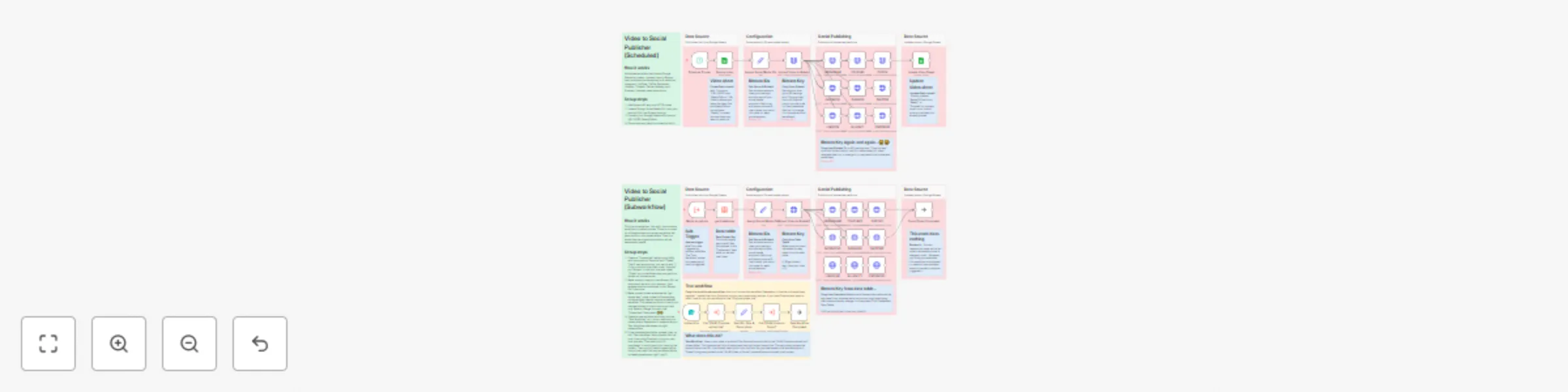
This workflow automates video distribution to 9 social platforms simultaneously using Blotato's API. It includes both a scheduled publisher (checks Google Sheets for videos marked "Ready") and a subworkflow (can be called from other workflows). Perfect for creators and marketers who want to eliminate manual posting across Instagram, YouTube, TikTok, Facebook, LinkedIn, Threads, Twitter, Bluesky, and Pinterest.


How It Works

Scheduled Publisher Workflow

  1. Schedule Trigger – Runs daily at 10 PM (configurable).
  2. Fetch Video – Pulls video URL and description from Google Sheets where "ReadyToPost" = "Ready".
  3. Upload to Blotato – Sends video to Blotato's media service.
  4. Broadcast to 9 Platforms – Publishes simultaneously to all connected social accounts.
  5. Update Sheet – Changes "ReadyToPost" to "Finished" so it won't repost.

Subworkflow: Video Publisher (Reusable)

  1. Receive Input – Gets URL, title, and description from parent workflow.
  2. Fetch Credentials – Pulls Blotato API key from n8n Data Table.
  3. Upload & Distribute – Uploads to Blotato, then posts to all platforms.
  4. Completion Signal – Returns to parent workflow when done.

> 💡 Tip: The subworkflow can be called from ANY workflow - great for posting videos generated by AI workflows, webhook triggers, or manual forms.


Test Workflow (Optional)

  1. Form Submission – Upload a video file with title and description.
  2. Upload to Dropbox – Generates shareable URL via "[SUB] Dropbox Upload Link" subworkflow.
  3. Trigger Publisher – Calls the subworkflow above to distribute the video.

Setup Instructions

Estimated Setup Time: 20-25 minutes

Step 1: Blotato Account Setup

  1. Create account at Blotato Dashboard
  2. Connect all your social media accounts (most time-consuming step)
  3. Go to Settings and copy your account IDs for each platform
  4. Go to API Settings and copy your API key

Step 2: Configure Workflow

  1. Update Social IDs:

    • Open "Assign Social Media IDs" node
    • Replace placeholder IDs with your actual Blotato account IDs:
      {
        "instagram_id": "YOUR_ID",
        "youtube_id": "YOUR_ID",
        "tiktok_id": "YOUR_ID",
        ...
      }
      
  2. Create Data Table:

    • Create n8n Data Table named "Credentials"
    • Add columns: service and token
    • Add row: service = blotato, token = YOUR_API_KEY
  3. Set Up Google Sheet:

    • Create sheet with columns: URL VIDEO, ReadyToPost, Description, Titre (Title)
    • Add video data
    • Set ReadyToPost to "Ready" for videos you want to post
  4. Connect Your Sheet:

    • Update "Get my video" node with your Google Sheet ID

> ⚙️ Pro Tip: If you don't need the scheduled version, just use the subworkflow and call it from other workflows.


Use Cases

  • AI Video Workflows: Automatically post videos generated by Veo, Sora, or other AI models to all platforms.
  • Content Schedulers: Queue videos in Google Sheets, let the scheduler post them automatically.
  • Batch Publishing: Generate 10 videos, mark them all "Ready", and let the workflow distribute them.
  • Marketing Campaigns: Coordinate multi-platform launches with a single click.
  • Agencies: Manage multiple client accounts by swapping Blotato credentials in the Data Table.

Customization Options

  • Remove Unused Platforms: Disconnect any social media nodes you don't use (speeds up execution).
  • Change Schedule: Modify the Schedule Trigger to run multiple times per day or on specific days.
  • Different File Hosts: Replace Dropbox with Google Drive, S3, or Cloudinary in the test workflow.
  • Platform-Specific Captions: Add IF nodes before each platform to customize descriptions or add hashtags.
  • Add Approval Step: Insert a WhatsApp or Telegram notification before posting for manual review.
  • Watermarks: Add a Code node to overlay branding before uploading to Blotato.

Important Notes

⚠️ Two Workflows in One File:

  • Lines 1-600: Scheduled publisher (checks Google Sheets)
  • Lines 600+: Subworkflow (called by other workflows)

⚠️ Data Table vs. Hardcoding:

  • Scheduled workflow: Hardcoded API keys in HTTP nodes
  • Subworkflow: Uses Data Table for API keys (recommended approach)

⚠️ Why Use the Subworkflow?

  • Can be called from ANY workflow
  • Easier to manage API keys (one place to update)
  • More flexible for complex automation systems

1.2 Logical Blocks

This catalog entry is organized from the workflow JSON. The node-level section below shows the executable blocks available for review before importing the template.

2. Block-by-Block Analysis

Block 1 - Schedule Trigger

Type / Role
n8n-nodes-base.scheduleTrigger - scheduleTrigger
Config choices
Version 1.2

Block 2 - Assign Social Media IDs

Type / Role
n8n-nodes-base.set - set
Config choices
Version 3.4

Block 3 - Get my video

Type / Role
n8n-nodes-base.googleSheets - googleSheets
Config choices
Version 4.5

Block 4 - Upload Video to Blotato

Type / Role
n8n-nodes-base.httpRequest - httpRequest
Config choices
Version 4.2

Block 5 - INSTAGRAM

Type / Role
n8n-nodes-base.httpRequest - httpRequest
Config choices
Version 4.2

Block 6 - YOUTUBE

Type / Role
n8n-nodes-base.httpRequest - httpRequest
Config choices
Version 4.2

Block 7 - TIKTOK

Type / Role
n8n-nodes-base.httpRequest - httpRequest
Config choices
Version 4.2

Block 8 - FACEBOOK

Type / Role
n8n-nodes-base.httpRequest - httpRequest
Config choices
Version 4.2

Block 9 - THREADS

Type / Role
n8n-nodes-base.httpRequest - httpRequest
Config choices
Version 4.2

Block 10 - LINKEDIN

Type / Role
n8n-nodes-base.httpRequest - httpRequest
Config choices
Version 4.2

Block 11 - BLUESKY

Type / Role
n8n-nodes-base.httpRequest - httpRequest
Config choices
Version 4.2

Block 12 - PINTEREST

Type / Role
n8n-nodes-base.httpRequest - httpRequest
Config choices
Version 4.2

Block 13 - Sticky Note3

Type / Role
n8n-nodes-base.stickyNote - stickyNote
Config choices
Version 1

Block 14 - TWITTER

Type / Role
n8n-nodes-base.httpRequest - httpRequest
Config choices
Version 4.2

Block 15 - Sticky Note - Data

Type / Role
n8n-nodes-base.stickyNote - stickyNote
Config choices
Version 1

Block 16 - Sticky Note - Config

Type / Role
n8n-nodes-base.stickyNote - stickyNote
Config choices
Version 1

Block 17 - Sticky Note - Social

Type / Role
n8n-nodes-base.stickyNote - stickyNote
Config choices
Version 1

Block 18 - Upload File

Type / Role
n8n-nodes-base.formTrigger - formTrigger
Config choices
Version 2.3

Block 19 - Call '[SUB] Video to Social'

Type / Role
n8n-nodes-base.executeWorkflow - executeWorkflow
Config choices
Version 1.3

Block 20 - Call '[SUB] Dropbox upload link'

Type / Role
n8n-nodes-base.executeWorkflow - executeWorkflow
Config choices
Version 1.3

Block 21 - Set URL, Title & Description

Type / Role
n8n-nodes-base.set - set
Config choices
Version 3.4

Block 22 - Test Workflow Completed

Type / Role
n8n-nodes-base.noOp - noOp
Config choices
Version 1

Block 23 - Sticky Note2

Type / Role
n8n-nodes-base.stickyNote - stickyNote
Config choices
Version 1

Block 24 - Sticky Note

Type / Role
n8n-nodes-base.stickyNote - stickyNote
Config choices
Version 1

Showing the first 24 of 64 workflow blocks. Download the JSON for the full node graph.

3. Summary Table

Workflow Publishing videos across multiple platforms with Blotato (Instagram, YouTube)
Complexity advanced
Nodes 64
Categories Social Media
Author Anthony
Published 29 Oct 2025

4. Reproducing the Workflow from Scratch

  1. 1. Download the workflow JSON

    Use the JSON export at /data/workflows/10298/10298.json as the source template for this automation.

  2. 2. Import the template into n8n

    Open n8n, import the downloaded JSON, and review each node before activating the workflow.

  3. 3. Configure credentials and variables

    Replace placeholder credentials, API keys, webhook URLs, account IDs, and environment-specific values with your own settings.

  4. 4. Test with sample data

    Run the workflow manually or in a staging workspace, inspect node output, and confirm downstream systems receive the expected data.

  5. 5. Activate and monitor

    Enable the workflow only after testing, then monitor executions, errors, and rate limits during the first production runs.

5. General Notes & Resources

Review imported nodes carefully before activation. This catalog entry is intended to help you inspect the workflow structure, understand required services, and find related templates faster.

Node names, credentials, schedules, webhook paths, and external service limits may need adjustment for your workspace.

Frequently asked questions

What does Publishing videos across multiple platforms with Blotato (Instagram, YouTube) do?

Description This workflow automates video distribution to 9 social platforms simultaneously using Blotato's API. It includes both a scheduled publisher (checks Google Sheets for videos marked "Read...

What do I need before importing this workflow?

Review the workflow JSON, configure any required credentials in n8n, and test the automation in a safe workspace before using it in production.

Can I customize this workflow?

Yes. Use the block-by-block analysis and the downloadable JSON to inspect each node, then adjust credentials, prompts, schedules, filters, or destinations for your Social Media use case.