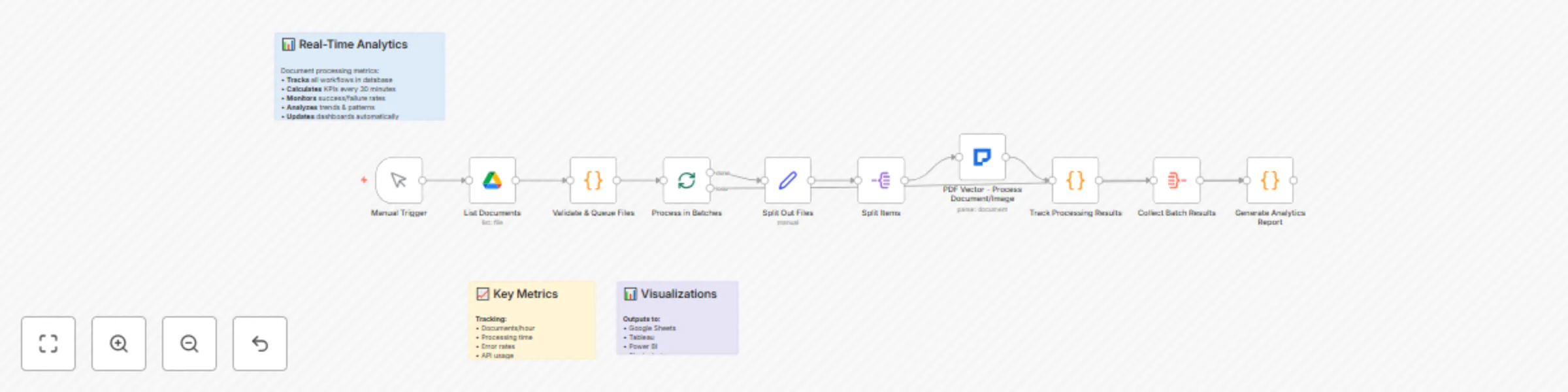
Block 1 - Analytics Overview
- Type / Role
- n8n-nodes-base.stickyNote - stickyNote
- Config choices
- Version 1


 Early Deal
This workflow is provided as-is. Please review and test before using in production.
Organizations dealing with high volume document processing face challenges in efficiently handling diverse document types while maintaining quality and tracking performance metrics. This enterprise...
n8n-nodes-base.stickynote, n8n-nodes-base.manualtrigger, n8n-nodes-base.googledrive, n8n-nodes-base.code, n8n-nodes-base.splitinbatches, n8n-nodes-base.set, n8n-nodes-base.splitout, n8n-nodes-pdfvector.pdfvector
This workflow is cataloged by N8N Workflows and links back to its original n8n.io source page by PDF Vector.
Original n8n.io sourceOrganizations dealing with high-volume document processing face challenges in efficiently handling diverse document types while maintaining quality and tracking performance metrics. This enterprise-grade workflow provides a scalable solution for batch processing documents including PDFs, scanned documents, and images (JPG, PNG) with comprehensive analytics, error handling, and quality assurance.
Large organizations, document processing centers, digital transformation teams, enterprise IT departments, and businesses that need to process thousands of documents reliably with detailed performance tracking and analytics.
High-volume document processing without proper monitoring leads to bottlenecks, quality issues, and inefficient resource usage. Organizations struggle to track processing success rates, identify problematic document types, and optimize their workflows. This template provides enterprise-grade batch processing with comprehensive analytics and automated quality assurance.
Setup Instructions:
Key Features:
Customization Options:
Implementation Details: The workflow uses intelligent batching to process documents efficiently while monitoring performance metrics in real-time. It automatically handles different document formats, applies OCR when needed, and provides detailed analytics to help organizations optimize their document processing operations. The system includes sophisticated error recovery and quality assurance mechanisms.
Note: This workflow uses the PDF Vector community node. Make sure to install it from the n8n community nodes collection before using this template.
This catalog entry is organized from the workflow JSON. The node-level section below shows the executable blocks available for review before importing the template.
| Workflow | Process documents with OCR, analytics & Google Drive using PDF Vector |
|---|---|
| Complexity | intermediate |
| Nodes | 13 |
| Categories | Document Extraction, AI RAG |
| Author | PDF Vector |
| Published | 12 Sept 2025 |
Use the JSON export at /data/workflows/8505/8505.json as the source template for this automation.
Open n8n, import the downloaded JSON, and review each node before activating the workflow.
Replace placeholder credentials, API keys, webhook URLs, account IDs, and environment-specific values with your own settings.
Run the workflow manually or in a staging workspace, inspect node output, and confirm downstream systems receive the expected data.
Enable the workflow only after testing, then monitor executions, errors, and rate limits during the first production runs.
Review imported nodes carefully before activation. This catalog entry is intended to help you inspect the workflow structure, understand required services, and find related templates faster.
Node names, credentials, schedules, webhook paths, and external service limits may need adjustment for your workspace.
Organizations dealing with high volume document processing face challenges in efficiently handling diverse document types while maintaining quality and tracking performance metrics. This enterprise...
Review the workflow JSON, configure any required credentials in n8n, and test the automation in a safe workspace before using it in production.
Yes. Use the block-by-block analysis and the downloadable JSON to inspect each node, then adjust credentials, prompts, schedules, filters, or destinations for your Document Extraction, AI RAG use case.