Predict construction delays with Claude, OpenWeather and Slack alerts

Workflow preview

Workflow preview
100%
Predict construction delays with Claude, OpenWeather and Slack alerts preview
Open on n8n.io

1. Workflow Overview

This workflow monitors active construction projects in real time, ingests weather forecasts, supplier delivery statuses, and crew/resource availability, then uses Claude AI to predict delay risk, e...

Best for

  • Project Management automation workflows
  • AI Summarization automation workflows
  • advanced n8n builders looking for reusable templates

Tools used

n8n-nodes-base.stickynote, n8n-nodes-base.webhook, n8n-nodes-base.scheduletrigger, n8n-nodes-base.airtable, n8n-nodes-base.code, n8n-nodes-base.httprequest, n8n-nodes-base.merge, @n8n/n8n-nodes-langchain.agent

Source and attribution

This workflow is cataloged by N8N Workflows and links back to its original n8n.io source page by Oneclick AI Squad.

Original n8n.io source

1.1 Workflow description

Title
Predict construction delays with Claude, OpenWeather and Slack alerts
Workflow name
Predict construction delays with Claude, OpenWeather and Slack alerts

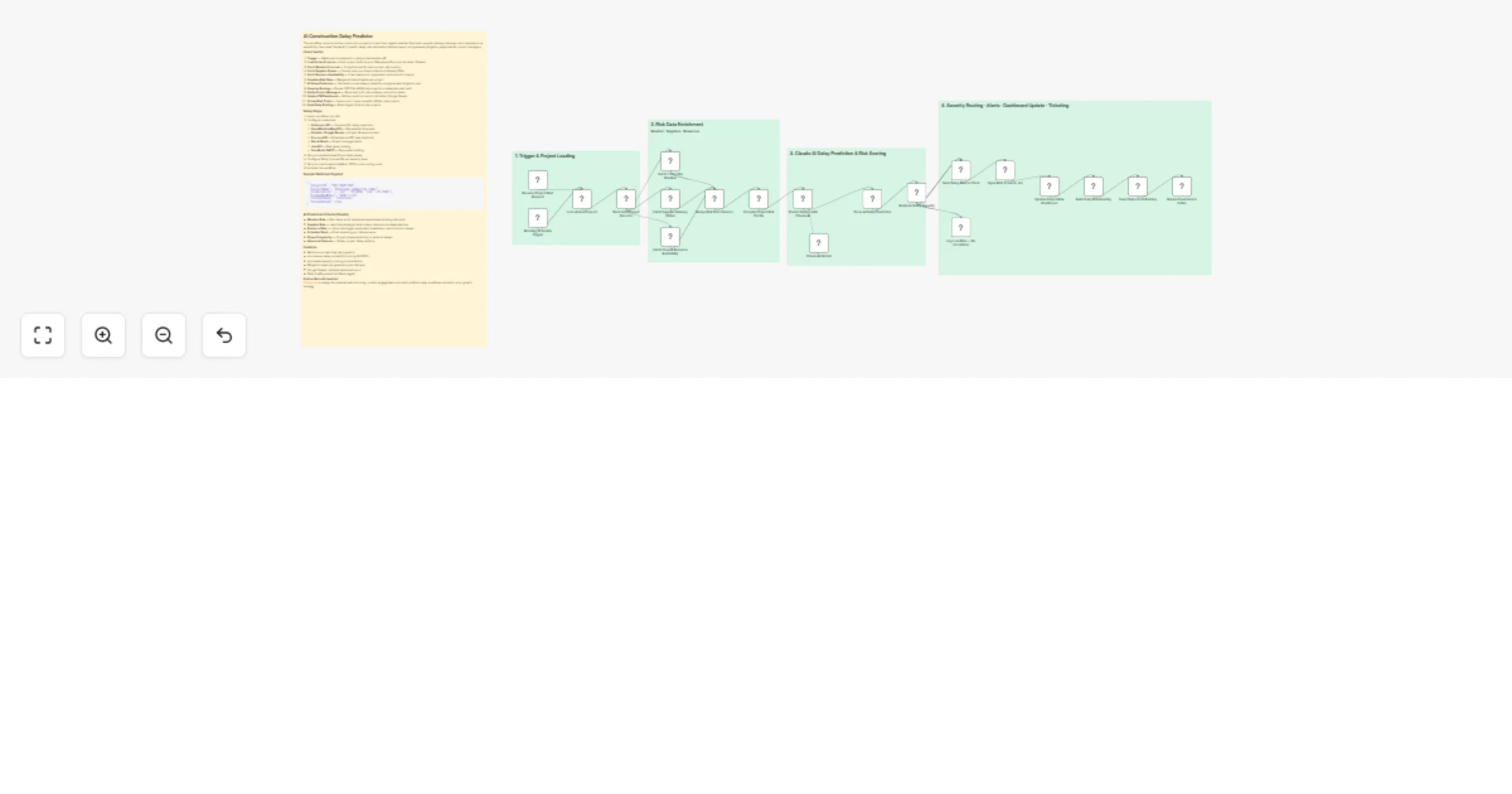
This workflow monitors active construction projects in real time, ingests weather forecasts, supplier delivery statuses, and crew/resource availability, then uses Claude AI to predict delay risk, estimate schedule impact, and generate mitigation playbooks for project managers.

How it works

  1. Trigger — Webhook (on-demand) or daily schedule kick-off
  2. Load Active Projects — Pulls project list from your PM system (Procore / Airtable / Sheets)
  3. Fetch Weather Forecast — 7-day forecast for each project site location
  4. Fetch Supplier Status — Checks open purchase orders and delivery ETAs
  5. Fetch Resource Availability — Crew headcount, equipment, subcontractor status
  6. Combine Risk Data — Merges all data streams per project
  7. AI Delay Prediction — Claude AI scores delay probability and generates mitigation plan
  8. Severity Routing — Routes CRITICAL/HIGH risk projects to immediate alert path
  9. Notify Project Managers — Slack alert with risk summary and action items
  10. Update PM Dashboard — Writes prediction back to Airtable / Google Sheets
  11. Create Risk Ticket — Opens Jira / Linear issue for HIGH+ risk projects
  12. Send Daily Briefing — Email digest of all at-risk projects

Setup Steps

  1. Import workflow into n8n
  2. Configure credentials:
  • Anthropic API — Claude AI for delay prediction
  • OpenWeatherMap API — Site weather forecasts
  • Airtable / Google Sheets — Project & resource data
  • Procore API — Schedule and RFI data (optional)
  • Slack OAuth — Project manager alerts
  • Jira API — Risk issue tracking
  • SendGrid / SMTP — Daily email briefing
  1. Set your Airtable base ID and table names
  2. Configure Slack channel IDs per severity level
  3. Set your risk threshold (default: 60%) in the routing node
  4. Activate the workflow

Sample Webhook Payload

{
 "projectId": "PROJ-2025-042",
 "projectName": "Riverside Commercial Tower",
 "siteLocation": { "lat": -33.8688, "lon": 151.2093 },
 "plannedEndDate": "2025-11-15",
 "currentPhase": "Structure",
 "forceRefresh": true
}

AI Prediction Criteria (Claude)

  • Weather Risk — Rain days, wind, temperature extremes blocking site work
  • Supplier Risk — Lead time slippage, back-orders, sole-source dependencies
  • Resource Risk — Labour shortages, equipment breakdown, subcontractor delays
  • Schedule Slack — Float remaining vs. risk exposure
  • Phase Complexity — Current phase sensitivity to external delays
  • Historical Patterns — Similar project delay patterns

Features

  • Multi-source real-time risk ingestion
  • AI-powered delay probability scoring (0–100%)
  • Automated severity routing and escalation
  • Mitigation playbook generation per risk type
  • Google Sheets / Airtable dashboard sync
  • Daily briefing email and Slack digest

Explore More Automation: Contact us to design AI-powered lead nurturing, content engagement, and multi-platform reply workflows tailored to your growth strategy.

1.2 Logical Blocks

This catalog entry is organized from the workflow JSON. The node-level section below shows the executable blocks available for review before importing the template.

2. Block-by-Block Analysis

Block 1 - Sticky Note

Type / Role
n8n-nodes-base.stickyNote - stickyNote
Config choices
Version 1

Block 2 - Sticky Note1

Type / Role
n8n-nodes-base.stickyNote - stickyNote
Config choices
Version 1

Block 3 - Sticky Note2

Type / Role
n8n-nodes-base.stickyNote - stickyNote
Config choices
Version 1

Block 4 - Sticky Note3

Type / Role
n8n-nodes-base.stickyNote - stickyNote
Config choices
Version 1

Block 5 - Sticky Note4

Type / Role
n8n-nodes-base.stickyNote - stickyNote
Config choices
Version 1

Block 6 - Receive Project Alert Request

Type / Role
n8n-nodes-base.webhook - webhook
Config choices
Version 2

Block 7 - Morning Schedule Trigger

Type / Role
n8n-nodes-base.scheduleTrigger - scheduleTrigger
Config choices
Version 1.2

Block 8 - Load Active Projects

Type / Role
n8n-nodes-base.airtable - airtable
Config choices
Version 2.1

Block 9 - Normalize Project Records

Type / Role
n8n-nodes-base.code - code
Config choices
Version 2

Block 10 - Fetch 7-Day Site Weather

Type / Role
n8n-nodes-base.httpRequest - httpRequest
Config choices
Version 4.2

Block 11 - Fetch Supplier Delivery Status

Type / Role
n8n-nodes-base.httpRequest - httpRequest
Config choices
Version 4.2

Block 12 - Fetch Crew & Resource Availability

Type / Role
n8n-nodes-base.airtable - airtable
Config choices
Version 2.1

Block 13 - Merge Risk Data Streams

Type / Role
n8n-nodes-base.merge - merge
Config choices
Version 3

Block 14 - Compile Project Risk Profile

Type / Role
n8n-nodes-base.code - code
Config choices
Version 2

Block 15 - Predict Delays with Claude AI

Type / Role
@n8n/n8n-nodes-langchain.agent - agent
Config choices
Version 1.6

Block 16 - Claude AI Model

Type / Role
@n8n/n8n-nodes-langchain.lmChatAnthropic - lmChatAnthropic
Config choices
Version 1

Block 17 - Parse AI Delay Prediction

Type / Role
n8n-nodes-base.code - code
Config choices
Version 2

Block 18 - Route by Delay Severity

Type / Role
n8n-nodes-base.switch - switch
Config choices
Version 3.1

Block 19 - Send Delay Alert to Slack

Type / Role
n8n-nodes-base.httpRequest - httpRequest
Config choices
Version 4.2

Block 20 - Open Risk Ticket in Jira

Type / Role
n8n-nodes-base.httpRequest - httpRequest
Config choices
Version 4.2

Block 21 - Update Project Risk Dashboard

Type / Role
n8n-nodes-base.googleSheets - googleSheets
Config choices
Version 4.5

Block 22 - Build Daily Risk Briefing

Type / Role
n8n-nodes-base.code - code
Config choices
Version 2

Block 23 - Send Daily Email Briefing

Type / Role
n8n-nodes-base.emailSend - emailSend
Config choices
Version 2.1

Block 24 - Return Prediction to Caller

Type / Role
n8n-nodes-base.respondToWebhook - respondToWebhook
Config choices
Version 1

Showing the first 24 of 25 workflow blocks. Download the JSON for the full node graph.

3. Summary Table

Workflow Predict construction delays with Claude, OpenWeather and Slack alerts
Complexity advanced
Nodes 25
Categories Project Management, AI Summarization
Author Oneclick AI Squad
Published 25 Feb 2026

4. Reproducing the Workflow from Scratch

  1. 1. Download the workflow JSON

    Use the JSON export at /data/workflows/13687/13687.json as the source template for this automation.

  2. 2. Import the template into n8n

    Open n8n, import the downloaded JSON, and review each node before activating the workflow.

  3. 3. Configure credentials and variables

    Replace placeholder credentials, API keys, webhook URLs, account IDs, and environment-specific values with your own settings.

  4. 4. Test with sample data

    Run the workflow manually or in a staging workspace, inspect node output, and confirm downstream systems receive the expected data.

  5. 5. Activate and monitor

    Enable the workflow only after testing, then monitor executions, errors, and rate limits during the first production runs.

5. General Notes & Resources

Review imported nodes carefully before activation. This catalog entry is intended to help you inspect the workflow structure, understand required services, and find related templates faster.

Node names, credentials, schedules, webhook paths, and external service limits may need adjustment for your workspace.

Frequently asked questions

What does Predict construction delays with Claude, OpenWeather and Slack alerts do?

This workflow monitors active construction projects in real time, ingests weather forecasts, supplier delivery statuses, and crew/resource availability, then uses Claude AI to predict delay risk, e...

What do I need before importing this workflow?

Review the workflow JSON, configure any required credentials in n8n, and test the automation in a safe workspace before using it in production.

Can I customize this workflow?

Yes. Use the block-by-block analysis and the downloadable JSON to inspect each node, then adjust credentials, prompts, schedules, filters, or destinations for your Project Management, AI Summarization use case.