PPC campaign intelligence & optimization with Google Ads, Sheets & Slack

Workflow preview

Workflow preview
100%
PPC campaign intelligence & optimization with Google Ads, Sheets & Slack preview
Open on n8n.io

Important notice

This workflow is provided as-is. Please review and test before using in production.

1. Workflow Overview

How it Works This workflow automatically monitors your Google Ads campaigns every day, analyzing performance with AI powered scoring to identify scaling opportunities and catch issues before they d...

Best for

  • Document Extraction automation workflows
  • AI Summarization automation workflows
  • advanced n8n builders looking for reusable templates

Tools used

n8n-nodes-base.scheduletrigger, n8n-nodes-base.googleads, n8n-nodes-base.code, n8n-nodes-base.if, n8n-nodes-base.googlesheets, n8n-nodes-base.slack, n8n-nodes-base.emailsend, n8n-nodes-base.set

Source and attribution

This workflow is cataloged by N8N Workflows and links back to its original n8n.io source page by Daniel Shashko.

Original n8n.io source

1.1 Workflow description

Title
PPC campaign intelligence & optimization with Google Ads, Sheets & Slack
Workflow name
PPC campaign intelligence & optimization with Google Ads, Sheets & Slack

How it Works

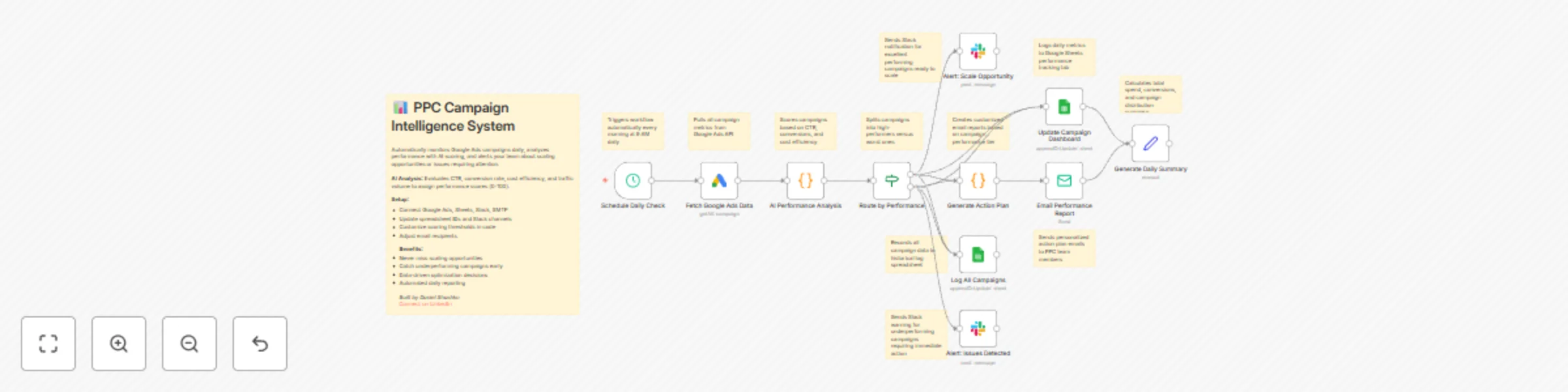
This workflow automatically monitors your Google Ads campaigns every day, analyzing performance with AI-powered scoring to identify scaling opportunities and catch issues before they drain your budget. Each morning at 9 AM, it fetches all active campaign data including clicks, impressions, conversions, costs, and conversion rates from your Google Ads account.

The AI analysis engine evaluates four critical dimensions: CTR (click-through rate) to measure ad relevance, conversion rate to assess landing page effectiveness, cost per conversion to evaluate profitability, and traffic volume to identify scale-readiness. Each campaign receives a performance score (0-100 points) and is automatically categorized as Excellent (75+), Good (55-74), Fair (35-54), or Underperforming (0-34).

High-performing campaigns trigger instant Slack alerts to your PPC team with detailed scaling recommendations and projected ROI improvements, while underperforming campaigns generate urgent alerts with specific optimization actions. Every campaign is logged to your Google Sheets dashboard with daily metrics, and the system generates personalized email reports—action-oriented scaling plans for top performers and troubleshooting guides for campaigns needing attention.

The entire analysis takes minutes, providing your team with daily intelligence reports that would otherwise require hours of manual spreadsheet work and data analysis.


Who is this for?

  • PPC managers and paid media specialists drowning in campaign data and manual reporting
  • Marketing agencies managing multiple client accounts needing automated performance monitoring
  • E-commerce brands running high-spend campaigns who can't afford budget waste
  • Growth teams looking to scale winners faster and pause losers immediately
  • Anyone spending $5K+ monthly on Google Ads who needs data-driven optimization decisions

Setup Steps

  • Setup time: Approx. 15-25 minutes (credential configuration, dashboard setup, alert customization)

  • Requirements:

    • Google Ads account with active campaigns
    • Google account with a tracking spreadsheet
    • Slack workspace
    • SMTP email provider (Gmail, SendGrid, etc.)
  • Create a Google Sheets dashboard with two tabs: "Daily Performance" and "Campaign Log" with appropriate column headers.

  • Set up these nodes:

    • Schedule Daily Check: Pre-configured to run at 9 AM daily (adjust timing if needed).
    • Fetch Google Ads Data: Connect your Google Ads account and authorize API access.
    • AI Performance Analysis: Review scoring thresholds (CTR, conversion rate, cost benchmarks).
    • Route by Performance: Automatically splits campaigns into high-performers vs. issues.
    • Update Campaign Dashboard: Connect Google Sheets and select your "Daily Performance" tab.
    • Log All Campaigns: Select your "Campaign Log" tab for historical tracking.
    • Slack Alerts: Connect workspace and configure separate channels for scaling opportunities and performance issues.
    • Generate Action Plan: Customize email templates with your brand voice and action items.
    • Email Performance Report: Configure SMTP and set recipient email addresses.
  • Credentials must be entered into their respective nodes for successful execution.


Customization Guidance

  • Scoring Weights: Adjust point values for CTR (30), conversion rate (35), cost efficiency (25), and volume (10) in the AI Performance Analysis node based on your business priorities.
  • Performance Thresholds: Modify the 75-point Excellent threshold and 55-point Good threshold to match your campaign quality distribution and industry benchmarks.
  • Benchmark Values: Update CTR benchmarks (5% excellent, 3% good, 1.5% average) and conversion rate targets (10%, 5%, 2%) for your industry.
  • Alert Channels: Create separate Slack channels for different alert types or route critical alerts to Microsoft Teams, Discord, or SMS via Twilio.
  • Email Recipients: Configure different recipient lists for scaling alerts (executives, growth team) vs. optimization alerts (campaign managers).
  • Schedule Frequency: Change from daily to hourly monitoring for high-spend campaigns, or weekly for smaller accounts.
  • Additional Platforms: Duplicate the workflow structure for Facebook Ads, Microsoft Ads, or LinkedIn Ads with platform-specific nodes.
  • Budget Controls: Add nodes to automatically pause campaigns exceeding cost thresholds or adjust bids based on performance scores.

Once configured, this workflow will continuously monitor your ad spend, identify opportunities worth thousands in additional revenue, and alert you to issues before they waste your budget—transforming manual reporting into automated intelligence.


Built by Daniel Shashko
Connect on LinkedIn

1.2 Logical Blocks

This catalog entry is organized from the workflow JSON. The node-level section below shows the executable blocks available for review before importing the template.

2. Block-by-Block Analysis

Block 1 - Schedule Daily Check

Type / Role
n8n-nodes-base.scheduleTrigger - scheduleTrigger
Config choices
Version 1.2

Block 2 - Fetch Google Ads Data

Type / Role
n8n-nodes-base.googleAds - googleAds
Config choices
Version 1

Block 3 - AI Performance Analysis

Type / Role
n8n-nodes-base.code - code
Config choices
Version 2

Block 4 - Route by Performance

Type / Role
n8n-nodes-base.if - if
Config choices
Version 2

Block 5 - Update Campaign Dashboard

Type / Role
n8n-nodes-base.googleSheets - googleSheets
Config choices
Version 4.4

Block 6 - Log All Campaigns

Type / Role
n8n-nodes-base.googleSheets - googleSheets
Config choices
Version 4.4

Block 7 - Alert: Scale Opportunity

Type / Role
n8n-nodes-base.slack - slack
Config choices
Version 2.1

Block 8 - Generate Action Plan

Type / Role
n8n-nodes-base.code - code
Config choices
Version 2

Block 9 - Email Performance Report

Type / Role
n8n-nodes-base.emailSend - emailSend
Config choices
Version 2.1

Block 10 - Alert: Issues Detected

Type / Role
n8n-nodes-base.slack - slack
Config choices
Version 2.1

Block 11 - Generate Daily Summary

Type / Role
n8n-nodes-base.set - set
Config choices
Version 3.3

Block 12 - Sticky Note

Type / Role
n8n-nodes-base.stickyNote - stickyNote
Config choices
Version 1

Block 13 - Sticky Note1

Type / Role
n8n-nodes-base.stickyNote - stickyNote
Config choices
Version 1

Block 14 - Sticky Note2

Type / Role
n8n-nodes-base.stickyNote - stickyNote
Config choices
Version 1

Block 15 - Sticky Note3

Type / Role
n8n-nodes-base.stickyNote - stickyNote
Config choices
Version 1

Block 16 - Sticky Note4

Type / Role
n8n-nodes-base.stickyNote - stickyNote
Config choices
Version 1

Block 17 - Sticky Note5

Type / Role
n8n-nodes-base.stickyNote - stickyNote
Config choices
Version 1

Block 18 - Sticky Note6

Type / Role
n8n-nodes-base.stickyNote - stickyNote
Config choices
Version 1

Block 19 - Sticky Note7

Type / Role
n8n-nodes-base.stickyNote - stickyNote
Config choices
Version 1

Block 20 - Sticky Note8

Type / Role
n8n-nodes-base.stickyNote - stickyNote
Config choices
Version 1

Block 21 - Sticky Note9

Type / Role
n8n-nodes-base.stickyNote - stickyNote
Config choices
Version 1

Block 22 - Sticky Note10

Type / Role
n8n-nodes-base.stickyNote - stickyNote
Config choices
Version 1

Block 23 - Sticky Note11

Type / Role
n8n-nodes-base.stickyNote - stickyNote
Config choices
Version 1

3. Summary Table

Workflow PPC campaign intelligence & optimization with Google Ads, Sheets & Slack
Complexity advanced
Nodes 23
Categories Document Extraction, AI Summarization
Author Daniel Shashko
Published 25 Oct 2025

4. Reproducing the Workflow from Scratch

  1. 1. Download the workflow JSON

    Use the JSON export at /data/workflows/10174/10174.json as the source template for this automation.

  2. 2. Import the template into n8n

    Open n8n, import the downloaded JSON, and review each node before activating the workflow.

  3. 3. Configure credentials and variables

    Replace placeholder credentials, API keys, webhook URLs, account IDs, and environment-specific values with your own settings.

  4. 4. Test with sample data

    Run the workflow manually or in a staging workspace, inspect node output, and confirm downstream systems receive the expected data.

  5. 5. Activate and monitor

    Enable the workflow only after testing, then monitor executions, errors, and rate limits during the first production runs.

5. General Notes & Resources

Review imported nodes carefully before activation. This catalog entry is intended to help you inspect the workflow structure, understand required services, and find related templates faster.

Node names, credentials, schedules, webhook paths, and external service limits may need adjustment for your workspace.

Frequently asked questions

What does PPC campaign intelligence & optimization with Google Ads, Sheets & Slack do?

How it Works This workflow automatically monitors your Google Ads campaigns every day, analyzing performance with AI powered scoring to identify scaling opportunities and catch issues before they d...

What do I need before importing this workflow?

Review the workflow JSON, configure any required credentials in n8n, and test the automation in a safe workspace before using it in production.

Can I customize this workflow?

Yes. Use the block-by-block analysis and the downloadable JSON to inspect each node, then adjust credentials, prompts, schedules, filters, or destinations for your Document Extraction, AI Summarization use case.