Personal Google Calendar & reminder bot on Telegram using Gemini & Whisper

Workflow preview

Workflow preview
100%
Personal Google Calendar & reminder bot on Telegram using Gemini & Whisper preview
Open on n8n.io

Important notice

This workflow is provided as-is. Please review and test before using in production.

1. Workflow Overview

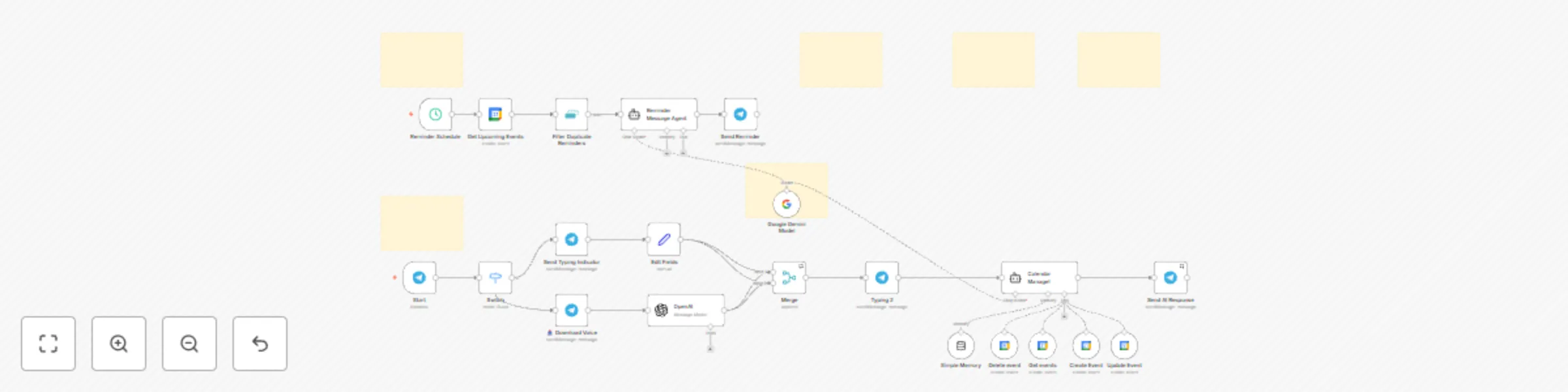
The CA Tele Assistant workflow is an intelligent Telegram bot designed to help you manage your Google Calendar effortlessly through natural language and voice commands. ![Screenshot 20250708 at 22....

Best for

  • Personal Productivity automation workflows
  • AI Chatbot automation workflows
  • advanced n8n builders looking for reusable templates

Tools used

n8n-nodes-base.telegram, @n8n/n8n-nodes-langchain.lmchatgooglegemini, n8n-nodes-base.scheduletrigger, n8n-nodes-base.googlecalendar, n8n-nodes-base.removeduplicates, @n8n/n8n-nodes-langchain.agent, n8n-nodes-base.googlecalendartool, @n8n/n8n-nodes-langchain.memorybufferwindow

Source and attribution

This workflow is cataloged by N8N Workflows and links back to its original n8n.io source page by Khaisa Studio.

Original n8n.io source

1.1 Workflow description

Title
Personal Google Calendar & reminder bot on Telegram using Gemini & Whisper
Workflow name
Personal Google Calendar & reminder bot on Telegram using Gemini & Whisper

The CA - Tele Assistant workflow is an intelligent Telegram bot designed to help you manage your Google Calendar effortlessly through natural language and voice commands.

💡 Why Use CA - Tele Assistant?

  • Hands-free calendar management: Manage your events via text or voice with zero manual calendar app usage
  • Smart reminders: Receive tailored, friendly reminders well in advance, helping you stay prepared
  • Multifunctional AI assistant: Create, view, update, or delete events simply by chatting naturally
  • Seamless integration: Combines Google Calendar, Telegram, OpenAI transcription, and Google Gemini model for powerful capabilities
  • Context-aware messaging: Personalized message tone, emoji use, and prep tips depending on event type and urgency

⚡ Who Is This For?

  • Busy professionals: Who want to manage their schedule quickly without opening multiple apps
  • Remote teams: Needing easy calendar coordination and friendly reminders via Telegram
  • People who prefer voice commands: Allows scheduling and querying via Indonesian voice messages
  • Anyone overwhelmed by calendar clutter: Automates reminders and event organization effortlessly

❓ What Problem Does It Solve?

Manually juggling your calendar events—creating entries, checking your schedule, or remembering appointments—is time-consuming and error-prone. Traditional calendar apps require multiple interactions and can flood you with generic notifications that lack context or personality. Voice commands or natural chat to manage calendars are rarely supported natively.

CA - Tele Assistant solves these issues by offering a chat-based, AI-powered interface that understands your natural language or voice, automates calendar operations, and sends smart reminders tailored to your event and preferences. This reduces the cognitive load, minimizes missed appointments, and makes calendar management seamless.

🔧 How This Workflow Works

⏱ Step 1: Incoming Telegram messages or voice messages trigger the workflow via Telegram Trigger node

📥 Step 2: Voice messages are automatically downloaded and transcribed into text using OpenAI

🔀 Step 3: A Switch node routes text and voice commands for unified processing

✍️ Step 4: The Google Gemini AI model processes natural language commands for calendar actions

🧠 Step 5: A Langchain AI agent ("Calendar Manage!") handles operations such as event creation, update, deletion, and fetching events using Google Calendar API tools. It uses session memory to keep contextual chat flow

🔔 Step 6: A scheduled trigger every 15 minutes retrieves upcoming calendar events (within 45-60 mins), filters duplicates, and an AI Reminder Message Agent crafts personalized reminder messages

💬 Step 7: Reminder messages are sent automatically to the user's Telegram chat, with typing indicators for a humanized feel

🛠 Step 8: All data flows and interactions are combined, ensuring seamless conversational experience with real-time calendar sync

🔐 Setup Instructions

  1. Import the provided JSON workflow into your n8n instance

  2. Set up credentials:

    • Telegram API Bot credentials via BotFather
    • Google Calendar OAuth2 credentials
    • OpenAI API key (for voice transcription)
    • Google Palm API credentials (for Gemini AI)
  3. Customize: Adjust chat IDs, timezone preferences, and reminder timing (default 45-60 minutes before events)

  4. Update: Replace placeholder chat IDs with your Telegram chat ID

  5. Test: Send test commands or voice messages through your Telegram bot to verify event creation, updates, and reminder delivery

🧩 Pre-Requirements

  1. Telegram Bot: Create bot via @BotFather
  2. Google Calendar: Setup OAuth2 credentials
  3. OpenAI API: For voice message transcription
  4. Google Gemini: For AI language model

📚 Useful Resources

🛠️ Customize It Further

  • Add support for additional languages in voice transcription or chat responses
  • Integrate weather or traffic APIs for more enhanced reminder tips
  • Enable multi-user support with dynamic chat ID handling for group chats
  • Enhance personality or tone configurations for more formal or casual responses

🧠 Nodes Used

  • Telegram Trigger
  • Telegram (Send Typing Indicator, Send Message, Download Voice)
  • OpenAI (Audio transcription)
  • Langchain Google Gemini Model
  • Langchain AI Agents (Reminder Message Agent, Calendar Manage! agent)
  • Google Calendar node (Get Upcoming Events)
  • Google Calendar Tools (Create, Update, Delete, Get events)
  • Remove Duplicates node
  • Merge node
  • Switch node
  • Set node
  • Schedule Trigger
  • Memory Buffer Window node

📞 Support

Made by: khaisa Studio
Tag: AI, Google Calendar, Telegram, Reminder, Schedule, Voice, OpenAI, Gemini, Category: Productivity Automation
Need a custom? contact khaisa for more tailored templates

1.2 Logical Blocks

This catalog entry is organized from the workflow JSON. The node-level section below shows the executable blocks available for review before importing the template.

2. Block-by-Block Analysis

Block 1 - Send Typing Indicator

Type / Role
n8n-nodes-base.telegram - telegram
Config choices
Version 1.2

Block 2 - Send AI Response

Type / Role
n8n-nodes-base.telegram - telegram
Config choices
Version 1.2

Block 3 - Google Gemini Model

Type / Role
@n8n/n8n-nodes-langchain.lmChatGoogleGemini - lmChatGoogleGemini
Config choices
Version 1

Block 4 - Reminder Schedule

Type / Role
n8n-nodes-base.scheduleTrigger - scheduleTrigger
Config choices
Version 1.2

Block 5 - Get Upcoming Events

Type / Role
n8n-nodes-base.googleCalendar - googleCalendar
Config choices
Version 1.3

Block 6 - Filter Duplicate Reminders

Type / Role
n8n-nodes-base.removeDuplicates - removeDuplicates
Config choices
Version 2

Block 7 - Reminder Message Agent

Type / Role
@n8n/n8n-nodes-langchain.agent - agent
Config choices
Version 2

Block 8 - Send Reminder

Type / Role
n8n-nodes-base.telegram - telegram
Config choices
Version 1.2

Block 9 - Calendar Manage!

Type / Role
@n8n/n8n-nodes-langchain.agent - agent
Config choices
Version 2

Block 10 - Delete event

Type / Role
n8n-nodes-base.googleCalendarTool - googleCalendarTool
Config choices
Version 1.2

Block 11 - Simple Memory

Type / Role
@n8n/n8n-nodes-langchain.memoryBufferWindow - memoryBufferWindow
Config choices
Version 1.3

Block 12 - Get events

Type / Role
n8n-nodes-base.googleCalendarTool - googleCalendarTool
Config choices
Version 1.2

Block 13 - Create Event

Type / Role
n8n-nodes-base.googleCalendarTool - googleCalendarTool
Config choices
Version 1.2

Block 14 - Update Event

Type / Role
n8n-nodes-base.googleCalendarTool - googleCalendarTool
Config choices
Version 1.2

Block 15 - OpenAI

Type / Role
@n8n/n8n-nodes-langchain.openAi - openAi
Config choices
Version 1.8

Block 16 - 📥 Download Voice

Type / Role
n8n-nodes-base.telegram - telegram
Config choices
Version 1.2

Block 17 - Start

Type / Role
n8n-nodes-base.telegramTrigger - telegramTrigger
Config choices
Version 1.2

Block 18 - Merge

Type / Role
n8n-nodes-base.merge - merge
Config choices
Version 3.2

Block 19 - Switch

Type / Role
n8n-nodes-base.switch - switch
Config choices
Version 3.2

Block 20 - Typing 2

Type / Role
n8n-nodes-base.telegram - telegram
Config choices
Version 1.2

Block 21 - Edit Fields

Type / Role
n8n-nodes-base.set - set
Config choices
Version 3.4

Block 22 - Sticky Note

Type / Role
n8n-nodes-base.stickyNote - stickyNote
Config choices
Version 1

Block 23 - Sticky Note1

Type / Role
n8n-nodes-base.stickyNote - stickyNote
Config choices
Version 1

Block 24 - Sticky Note2

Type / Role
n8n-nodes-base.stickyNote - stickyNote
Config choices
Version 1

Showing the first 24 of 27 workflow blocks. Download the JSON for the full node graph.

3. Summary Table

Workflow Personal Google Calendar & reminder bot on Telegram using Gemini & Whisper
Complexity advanced
Nodes 27
Categories Personal Productivity, AI Chatbot
Author Khaisa Studio
Published 08 Jul 2025

4. Reproducing the Workflow from Scratch

  1. 1. Download the workflow JSON

    Use the JSON export at /data/workflows/5784/5784.json as the source template for this automation.

  2. 2. Import the template into n8n

    Open n8n, import the downloaded JSON, and review each node before activating the workflow.

  3. 3. Configure credentials and variables

    Replace placeholder credentials, API keys, webhook URLs, account IDs, and environment-specific values with your own settings.

  4. 4. Test with sample data

    Run the workflow manually or in a staging workspace, inspect node output, and confirm downstream systems receive the expected data.

  5. 5. Activate and monitor

    Enable the workflow only after testing, then monitor executions, errors, and rate limits during the first production runs.

5. General Notes & Resources

Review imported nodes carefully before activation. This catalog entry is intended to help you inspect the workflow structure, understand required services, and find related templates faster.

Node names, credentials, schedules, webhook paths, and external service limits may need adjustment for your workspace.

Frequently asked questions

What does Personal Google Calendar & reminder bot on Telegram using Gemini & Whisper do?

The CA Tele Assistant workflow is an intelligent Telegram bot designed to help you manage your Google Calendar effortlessly through natural language and voice commands. ![Screenshot 20250708 at 22....

What do I need before importing this workflow?

Review the workflow JSON, configure any required credentials in n8n, and test the automation in a safe workspace before using it in production.

Can I customize this workflow?

Yes. Use the block-by-block analysis and the downloadable JSON to inspect each node, then adjust credentials, prompts, schedules, filters, or destinations for your Personal Productivity, AI Chatbot use case.